
-
FrmMain.cs[디자인]
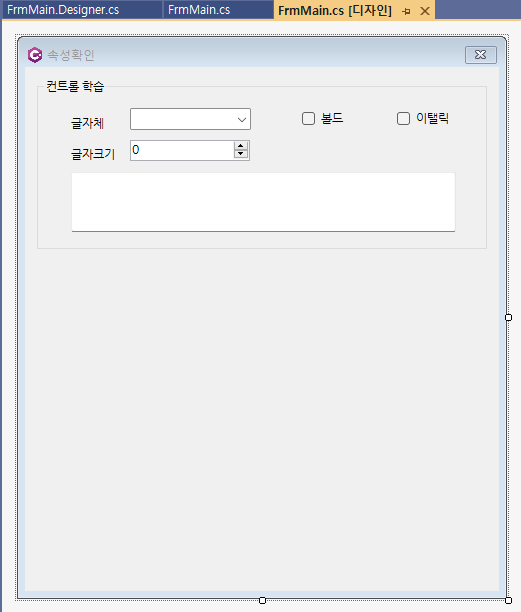
-
FrmMain.cs
- 컨트롤 더블클릭하면
private void CboFontFamily_SelectedIndexChanged(object sender, EventArgs e)이런식으로 함수가 생김
- 컨트롤 더블클릭하면
using System;
using System.Collections.Generic;
using System.ComponentModel;
using System.Data;
using System.Drawing;
using System.Linq;
using System.Text;
using System.Threading.Tasks;
using System.Windows.Forms;

namespace wf03_property
{
    public partial class FrmMain : Form
    {
        public FrmMain()
        {
            InitializeComponent();
            // 생성자는 되도록 설정부분을 넣지않을것
            // Form_Load() 이벤트 핸들러에 작성할 것
        }
        private void FrmMain_Load(object sender, EventArgs e)
        {
            GbxMain.Text = "컨트롤 학습";
            var fonts = FontFamily.Families.ToList();   //내 OS 폰트 이름 가져오기
            foreach (var font in fonts)
            {
                CboFontFamily.Items.Add(font.Name);
            }
            //글자크기 최솟값, 최댓값 지정
            NudFontSize.Minimum = 5;
            NudFontSize.Maximum = 40;
            //텍스트박스 초기화
            TxtResult.Text = "Hello WinForm!!";

            NudFontSize.Value = 9; // 글자체 크기를 9로 지정
        }

        private void ChangeFontStyle()
        {
            if (CboFontFamily.SelectedIndex < 0) return;

            FontStyle style = FontStyle.Regular; // 기본
            if (ChkBold.Checked == true)
            {
                style |= FontStyle.Bold;
            }
            if (ChkItalic.Checked == true)
            {
                style |= FontStyle.Italic;
            }
            decimal fontSize = NudFontSize.Value;
            TxtResult.Font = new Font((string)CboFontFamily.SelectedItem, (float)fontSize, style);
        }

        private void CboFontFamily_SelectedIndexChanged(object sender, EventArgs e)
        {
            ChangeFontStyle();
        }

        private void ChkBold_CheckedChanged(object sender, EventArgs e)
        {
            ChangeFontStyle();
        }

        private void ChkItalic_CheckedChanged(object sender, EventArgs e)
        {
            ChangeFontStyle();
        }

        private void NudFontSize_ValueChanged(object sender, EventArgs e)
        {
            ChangeFontStyle();
        }
    }
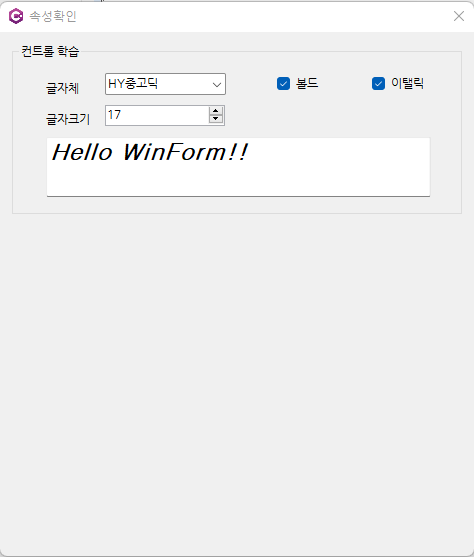
}
가랑비는 맞는다 하지만 폭풍은 내 것이야