Spring Boot Web에서 응답 만들기
4가지 방법이 있다.
- String: 일반 text type
- Object: 자동으로 json 변환됨. status: 200 OK
- ResponseEntity: Body의 내용을 Object로 설정. 상황에 따라 HttpStatus Code 설정
- ResponseBody: RestController가 아닌 곳에서 json 응답을 내릴 때.
package com.example.restapi.controller;

import com.example.restapi.model.UserRequest;
import lombok.extern.slf4j.Slf4j;
import org.springframework.http.HttpStatus;
import org.springframework.http.ResponseEntity;
import org.springframework.stereotype.Controller;
import org.springframework.web.bind.annotation.*;

@Slf4j
//@RestController // 응답을 json으로 내릴 경우
@Controller
@RequestMapping("/api/v1")
public class ResponseApiController {

    @GetMapping("") // 아래 방법보다 이 방법이 직관적임
//    @RequestMapping(path= "", method = RequestMethod.GET) // 이 주소의 GET 요청만 받겠다.
    @ResponseBody // Controller annotaion 일 때 응답이 json으로 내려가게 함. 없을 경우 404 발생
//    public ResponseEntity<UserRequest> user(){ //ResponseEntity 사용 시 반환 유형도 이렇게 수정해줘야 함
    public UserRequest user(){
        var user = new UserRequest();
        user.setUserName("김싸피");
        user.setUserAge(10);
        user.setEmail("ssafy1@ssafy.com");

        log.info("user : {}", user);

        var response = ResponseEntity
                .status(HttpStatus.BAD_REQUEST)
                .header("nae-mam", "Hi")
                .body(user);

        return user;
    }

}
Object Mapper
spring boot에서 json, DTO 사이의 역직렬화, 직렬화를 하는 역할을 함
다양한 라이브러리가 있는데 스프링부트에서는 Jackson에서 제공하는 object mapper로 request body에 들어오는 json을 DTO로 변환(역직렬화)해주고 반대로 response가 내려갈 때 직렬화한다.
직렬화를 할 때 변수가 아닌 get- 메소드에 매칭됨.
특정 필드를 못 찾는 경우에는 대부분 이런 클래스에 특정 get 메소드를 만들어 둔 경우.
이러한 경우 json으로 사용하지 않겠다는 어노테이션 사용(@JsonIgnore)
@JsonProperty 어노테이션으로 변수명 변경도 가능(@JsonProperty("user_email"))
ObjectMapper는 reflection을 기반으로 동작하기 때문에 생성자를 막아도 인스턴스 생성이 가능하다.
set method가 있으면 동작. get method가 있을 때에도 매칭된다.
다만 set을 사용할 땐 특정한 변수와 매핑하는 set method가 호출이 된다(이름이 다르면 x)
위와 같은 경우는 새로 setter를 설정해 줄 게 아니라 JsonProperty 이용.
getter setter 사용 안 할 경우 JsonPeroperty로 매칭 가능.
Spring boot에서의 예외 처리
Requset를 처리하는 과정
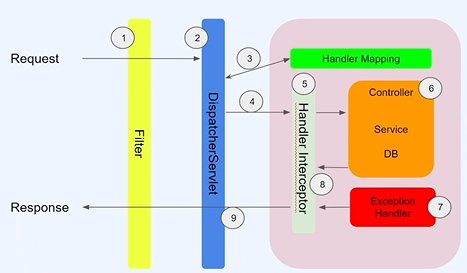
@ControllerAdvice : 여러 개의 컨트롤러 중에서도 모든 예외를 잡아주는 글로벌한 예외 핸들러.
부분적으로 특별한 컨트롤러에 대해서는 예외를 따로 처리할 수도 있다.
//RestApiExceptionHandler

package com.example.exception.exception;

import lombok.extern.slf4j.Slf4j;
import org.springframework.http.ResponseEntity;
import org.springframework.web.bind.annotation.ExceptionHandler;
import org.springframework.web.bind.annotation.RestControllerAdvice;

@Slf4j
@RestControllerAdvice // RestAPI를 사용하는 곳의 exception을 감지함
public class RestApiExceptionHandler {

    @ExceptionHandler(value= {Exception.class}) // value에 잡고자 하는 클래스 지정. 이 경우 모든 예외를 캐치함
    public ResponseEntity exception(Exception e){

        log.error("RestApiExceptionHandler", e);
        return ResponseEntity.status(200).build();
    }

    @ExceptionHandler(value = { IndexOutOfBoundsException.class})
    public ResponseEntity outOfBound(
            IndexOutOfBoundsException e
    ){
        log.error("IndexOutOfBoundsException", e);
        return ResponseEntity.status(200).build();
    }
}
//RestApiBController

package com.example.exception.controller;

import lombok.extern.slf4j.Slf4j;
import org.springframework.http.ResponseEntity;
import org.springframework.web.bind.annotation.ExceptionHandler;
import org.springframework.web.bind.annotation.GetMapping;
import org.springframework.web.bind.annotation.RequestMapping;
import org.springframework.web.bind.annotation.RestController;

@Slf4j
@RestController
@RequestMapping("/api/b")
public class RestApiBController {

    @GetMapping("/hello")
    public void hello(

    ){
        throw new NumberFormatException("number format exception");
    }

    @ExceptionHandler(NumberFormatException.class) // 글로벌로 가지 않고 해당 컨트롤러 내에서 에러 캐치(RestApiExceptionHandler의 exception을 거치지 않고 바로 여기서 에러 캐치)
    public ResponseEntity numberformatException(
            NumberFormatException e
    ){
      log.error("numberformatException", e);
      return ResponseEntity.ok().build();
    }
}
또는 특별한 베이스 패키지를 지정해 에러 캐치를 할 수도 있음
package com.example.exception.exception;

import lombok.extern.slf4j.Slf4j;
import org.springframework.http.ResponseEntity;
import org.springframework.web.bind.annotation.ExceptionHandler;
import org.springframework.web.bind.annotation.RestControllerAdvice;

@Slf4j
@RestControllerAdvice(basePackages = "com.example.exception.controller")
// 이 위치 하위에 있는 컨트롤러는 이 핸들러가 에러캐치를 하겠다.
public class RestApiExceptionHandler {

    @ExceptionHandler(value= {Exception.class}) // value에 잡고자 하는 클래스 지정
    public ResponseEntity exception(Exception e){

        log.error("RestApiExceptionHandler", e);
        return ResponseEntity.status(200).build();
    }

    @ExceptionHandler(value = { IndexOutOfBoundsException.class})
    public ResponseEntity outOfBound(
            IndexOutOfBoundsException e
    ){
        log.error("IndexOutOfBoundsException", e);
        return ResponseEntity.status(200).build();
    }
}
또는 basePackages가 아닌 basePackageClass를 이용해 특정 패키지에 대한 에러 처리를 할 수도 있다.
@RestControllerAdvice(basePackageClasses = {RestApiBController.class})어노테이션으로도 지정 가능하다.
어떤 클래스가 해당 어노테이션을 가지고 있다면 예외처리를 맡아서 하는 방법.
정리
- 글로벌 컨트롤러 어드바이스 설정
- 직접 컨트롤러에서 정리
- basePackage 이용
- basePackageClass 이용
- 어노테이션 필터링 이용(추후 정리)
package com.example.exception.controller;


import com.example.exception.model.Api;
import com.example.exception.model.UserResponse;
import org.springframework.http.HttpStatus;
import org.springframework.web.bind.annotation.GetMapping;
import org.springframework.web.bind.annotation.PathVariable;
import org.springframework.web.bind.annotation.RequestMapping;
import org.springframework.web.bind.annotation.RestController;

import java.util.List;

@RestController
@RequestMapping("/api/user")
public class UserApiController {

    private static List<UserResponse> userList = List.of(
            UserResponse.builder().id("1").age(10).name("bob").build(
            ),
            // Builder pattern : builder() 메소드로 체이닝하듯이 하나의 객체를 만드는 것
            UserResponse.builder().id("2").age(10).name("ssal").build()

    );

    @GetMapping("id/{userId}")
    public Api<UserResponse> getUser(
    @PathVariable String userId
    ){
        var user = userList.stream()
                .filter(
                        it -> it.getId().equals(userId)
                        // it : userList의 객체들.
                )
                .findFirst()
                .get(); // get 했을 때 존재하지 않는 id값을 줬을 때도 OK가 나옴(null). 없을 때는 따로 예외처리가 필요하다

        Api<UserResponse> response = Api.<UserResponse>builder()
                .resultCode(String.valueOf(HttpStatus.OK.value())) // 정상일 경우 내려주는 코드
                .resultMessage(HttpStatus.OK.name()) // 정상일 경우 내려주는 결과메시지
                .data(user)
                .build();

        return response;

    }
}
위의 경우 존재하지 않는(ex: id= 12)를 쿼리로 요청을 보내도 200 OK가 반환됨. 반환되는 내용은 no content.
이 경우 따로 예외처리가 필요하다.
 @ExceptionHandler(value = {NoSuchElementException.class})
    public Api noSuchElement(NoSuchElementException e){
        log.error("", e);

        return Api.builder()
                .resultCode(String.valueOf(HttpStatus.NOT_FOUND.value()))
                .resultMessage(HttpStatus.NOT_FOUND.getReasonPhrase())
                .build();
    }
이런식으로 exception handler를 작성해주면 반환내용을 원하는 형태로 반환해 줄 수 있다.
하지만 이 경우 error인데 error code가 200으로 내려간다.
    @ExceptionHandler(value = {NoSuchElementException.class})
    public ResponseEntity<Api> noSuchElement(NoSuchElementException e){
        // Api를 ResponseEntity로 한 번 감싸서 응답 내림
        log.error("", e);

        var response = Api.builder()
                .resultCode(String.valueOf(HttpStatus.NOT_FOUND.value()))
                .resultMessage(HttpStatus.NOT_FOUND.getReasonPhrase())
                .build();

        return ResponseEntity.status(HttpStatus.NOT_FOUND).body(response);
    }
이렇게 하면 원하는 에러 코드에, 원하는 형태를 내릴 수 있다.
= 에러가 있던 없던 같은 형태의 데이터를 내려 줄 수 있다.
에러가 없을 경우
{
  "result_code": "200",
  "result_message": "OK",
  "data": {
    "id": "1",
    "name": "bob",
    "age": 10
  }
}
에러 있을 경우
{
  "result_code": "404",
  "result_message": "Not Found",
  "data": null
}
클라이언트는 result_code를 판단하여 data parsing 여부를 결정하면 된다
ExceptionHandler가 여러 개일 때 순서를 정해줄 수 있다
모든 에러에 대해서 하나하나 예외처리를 해 줄 순 없다. 앞서 예외처리를 해 둔 hadler를 모두 거쳤음에도 일치하지 않는다면 global exception hadler로 처리되어야 하는데, 이 경우 @Order 어노테이션으로 우선순위를 정해줄 수 있다.
@Order.java
- default: low
- 우선순위를 낮게 주고 싶으면 max를 준다.@Order(value = Integer.MAX_VALUE)
어떠한 에러가 발생하더라도 같은 형태의 응답을 내려주기 위해서 global exception handler를 설정해 주는 것이 좋다.