
⚡ Map 함수
반복되는 컴포넌트를 렌더링하기 위하여 자바스크립트 배열의 내장 함수인 map()을 사용한다.
파라미터로 전달된 함수를 사용하여 배열 내 각 요소를 원하는 규칙에 따라 변환한 후 새로운 배열 생성 한다.
✍️ map 함수 사용방법
array.map((item,index)=>{
return (이 코드를 배열의 원소 갯수만큼 실행해줘)
})
위와 같은 형식으로 많이 작성이 된다.
- array 는 원본배열
- item 는 그 갯수만큼 코드가 반복실행
- index 는 0부터 1씩 증가하는 정수이며 생략 가능
✍️ map 함수 예제
Main 컴포넌트를 Map()를 사용하여 반복해보자.
const Main = (props) => {
  return(
    <div>
          <h3>이건 {props.name} 입니다.</h3>
    </div>
  );
}
<App.js 파일>
import React from 'react';
import Main from './Main';

const App = () => {
  const fritus = ["사과", "바나나", "포도"]
	const nameList = names.map((name) => (<Main name={name}/>))
	return (
		<div>
			{nameList}
		</div>
	);
}

export default App;
출력결과
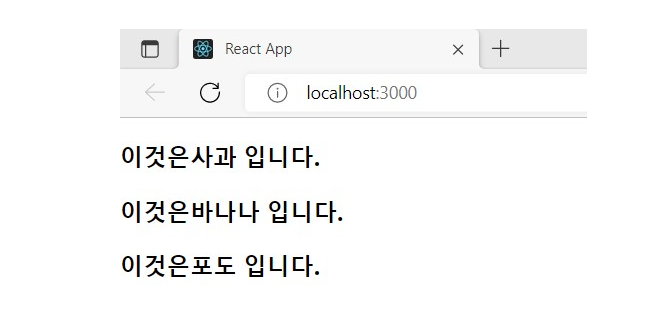
⚡ Find / FindIndex
배열 내에서 조건식을 만족하는 값(find)와 인덱스(findIndex)를 찾아올때 사용한다.
✍️ Find 함수 사용방법
find() 함수는
배열에서 특정 조건을 만족하는 요소를 찾아 첫 번째 요소를 반환하는 함수입니다.
배열의 각 요소에 대해 콜백 함수를 사용하여 원하는 조건의 요소를 찾습니다.
이 함수는 배열에서 특정 요소를 찾는 데 유용합니다.
이때 조건을 일치하는 경우가 없다면, undefined를 반환한다.
arr.find(callbackFn[, thisArg])
→ callbackFn(element [ , index [ , array ] ] ) --> 콜백 함수가 받는 인자
- element : 현재 처리중인 배열 요소
- index : 옵션. 현재 처리중인 배열 요소의 인덱스
- array: 옵션. finc()를 호출한 배열 그 자체
✍️ Find 함수 예제
배열의 요소에서 name 속성의 값이 'Apple'인 배열 요소의 값을 반환.
const fruits = [
  {name: 'Banana', number: 'A'},
  {name: 'Graps', number: 'B'},
  {name: 'Apple', number: 'C'},
  {name: 'FineApple', number: 'D'}
];

const result = fruits.find( function(item){ return item.name === "Apple"})

console.log(result);
주변에 일치 하는 배열 요소가 없는 경우 undefined를 반환.
동일한 값이 존재하는 경우. 2번째 인덱스에서 name 속성의 값이 'Apple'인 요소가 존재하므로 배열 요소의 값을 즉시 반환한다.
const fruits2 = [
  {name: 'Banana', number: 'A'},
  {name: 'Graps', number: 'B'},
  {name: 'Apple', number: 'C'},
  {name: 'FineApple', number: 'D'}
];

const result2 = fruits2.find(function(item, index){
    console.log(`${index}번째 index`);
    // 0번째 index
    // 1번째 index
    // 2번째 index

  return item.name === 'Apple'
});

console.log(result2);
→ 'Apple' 에 대한 동일한 값이 존재하는걸 발견하고, 배열 요소의 값을 즉시 반환 하는 모습을 볼수 있다.
✍️ FindIndex 함수 사용방법
findIndex 함수는 배열의 요소를 순차적으로 순회하면서 조건에 일치하는 요소의 인덱스를 반환한다. 조건을 일치하는 경우가 없다면, -1을 반환한다. ( 즉 , 반환 타입 number, 없다면 -1 )
✍️ FindIndex 함수 예제
배열의 요소에서 name 속성의 값이 'Apple'인 배열 요소의 인덱스를 반환하는 코드.
const arr = [5, 6, 9, 1, 6, 3, 2, 1, 2, 7, 9, 4, 3];

const find1 = arr.findIndex((element, index, array) => {
    return index < 7 && index > 5;
});
const find2 = arr.findIndex((element, index, arr) => element === 3);
const find3 = arr.findIndex((e) => e > 8);
const find4 = arr.findIndex((e) => e > 10);

console.log('findIndex1:', find1);
console.log('findIndex2:', find2);
console.log('findIndex3:', find3);
console.log('findIndex4:', find4);
결과
findIndex1: 6
findIndex2: 5
findIndex3: 2
findIndex4: -1
⚡ Filter
배열 데이터 중 조건을 통과하는 데이터만 새로운 배열로 반환한다.
조건은 true면 데이터를 유지하고, false면 버리기때문에 false에 해당되는 데이터를 삭제.
해석 그대로 걸러주는 역할을 하는 함수. 주로 특정 조건을 만족하는 새로운 배열을 필요로 할 때 사용하는 편이다.
✍️ Filter 함수 사용방법
Array.prototype.filter ( callbackfn,[thisArg] )
✍️ Filter 함수 예제
배열을 통해 주어진 값들을 filter를 통해 3 보다 큰 수
const numbers = [1, 2, 3, 4, 5];
const result = numbers.filter(number => number < 4);

console.log(numbers);
console.log(result);
출력 결과

콘솔 number 는 number 의 모든 숫자가 출력되는 모습을 볼수 있고,
콘솔 result 는 filter 의 조건식을 통해 4보다 작은 숫자만 걸러져 출력되는 모습을 볼수있다.
✍️ Filter 함수 예제2 (배열)
배열을 통해 주어진 값들의 filter 을 통해 조건에 맞는 'Banana' 찾기
const fruits  = ['Banana','Apple','Strowberry','Mango'];
const result = fruits.filter(fritus => fritus === 'Banana');

console.log(fruits);
console.log(result);
출력 결과
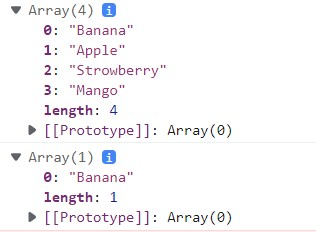
console.log(fruits) 창에 배열에 따라 모든 fruits안에 name이 출력되는 모습을 볼수 있다.
console.log(resultt) 에서 filter를 사용해 조건식에 맞는 'Banan'가 출력되는 모습을 볼수 있다.
참고
https://peter-codinglife.tistory.com/75
https://carrotdy.tistory.com/50
https://velog.io/@4775614/React-map-%EC%82%AC%EC%9A%A9%EB%B2%95