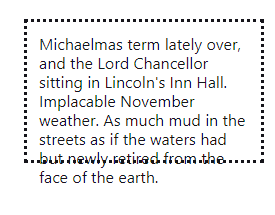
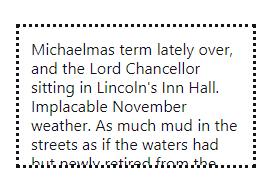
* 쉽게 말해서, 부모 크기를 넘어가는 자식을 (넘은 만큼) 가리는 것
1. overflow: visible(디폴트)
2. overflow: hidden
MDN - overflow
The overflow CSS shorthand property sets the desired behavior for an element's overflow — i.e. when an element's content is too big to fit in its block formatting context — in both directions.
=> overflow CSS 단축 속성은 요소의 콘텐츠가 너무 커서 요소의 블록 서식 맥락에 맞출 수 없을 때의 처리법을 지정합니다. overflow-x (en-US), overflow-y (en-US)의 값을 설정합니다.
MDN - overflow: hidden
Content is clipped if necessary to fit the padding box. No scrollbars are provided, and no support for allowing the user to scroll (such as by dragging or using a scroll wheel) is allowed. The content can be scrolled programmatically (for example, by setting the value of a property such as scrollLeft or the scrollTo() method), so the element is still a scroll container.
=> 콘텐츠를 안쪽 여백 상자에 맞추기 위해 잘라냅니다. 스크롤바를 제공하지 않고, 스크롤할 방법(드래그, 마우스 휠 등)도 지원하지 않습니다. 코드를 사용해 스크롤할 수는 있으므로 (offsetLeft (en-US) 속성 설정 등), 이 상태의 요소도 스크롤 컨테이너입니다.
