Crypto Security 101: Essential Tips to Keep Your Coins Safe
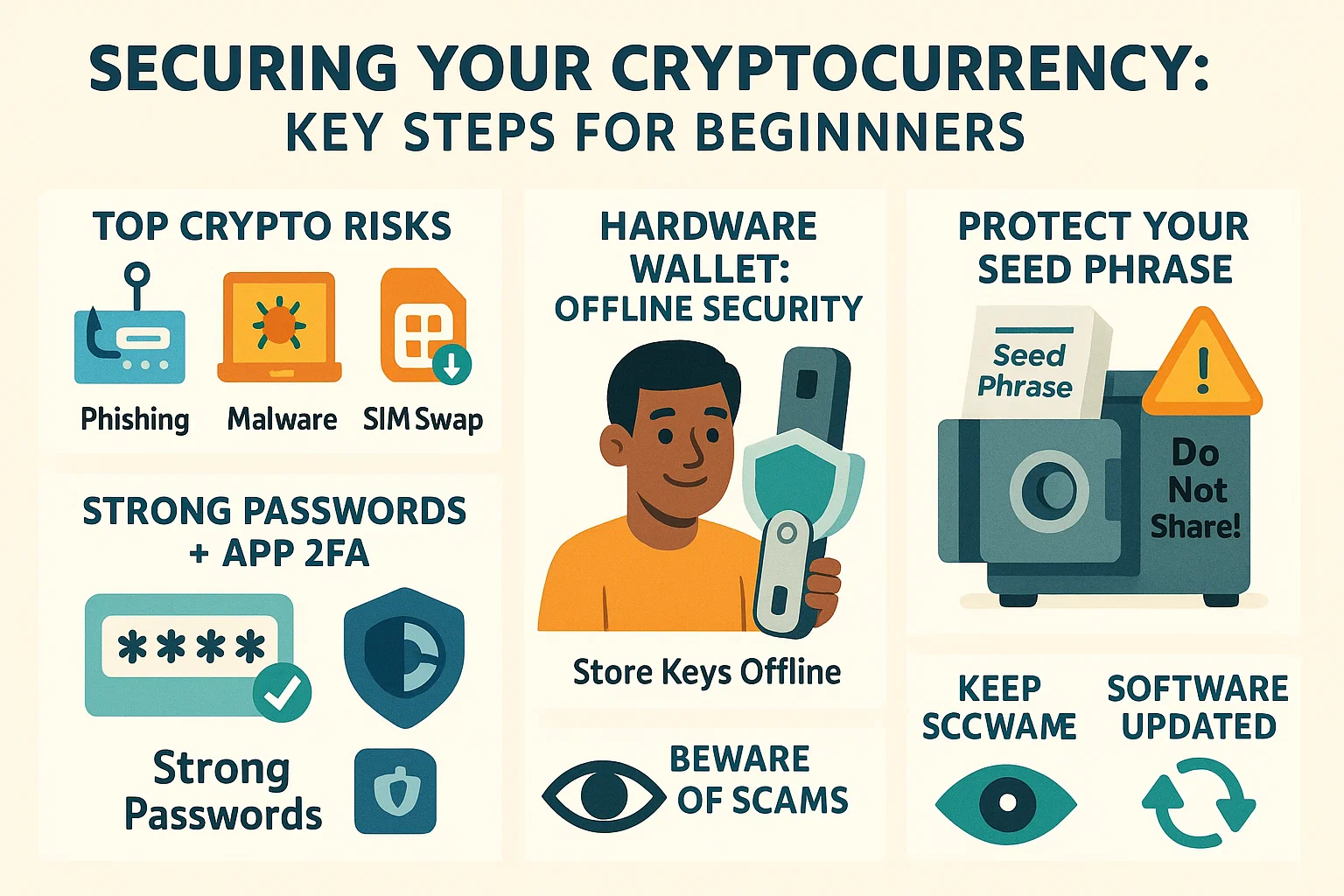
Welcome to the exciting world of cryptocurrency! As a beginner, you're likely thrilled by the potential of digital money. However, this new frontier also comes with unique security risks. Imagine waking up to find your hard-earned crypto vanished – a nightmare scenario that, unfortunately, is a reality for those who neglect security. But don't let that deter you! With the right knowledge and practices, you can confidently navigate the crypto space.
This guide is your Crypto Security 101, designed specifically for beginners. We'll walk you through the essential tips and best practices to safeguard your crypto investments from common threats like scams and hacking attempts, which have become increasingly rampant. Let's dive into how you can protect your digital assets from day one.
Why is Cryptocurrency Security So Crucial?
Cryptocurrency, by its nature, offers decentralization and user autonomy. Bitcoin, Ethereum, and other digital currencies are built on blockchain technology, which is incredibly secure. Hacking the blockchain itself is nearly impossible. So, where's the risk? The risk lies with you, the user, and how you manage your access to these assets.
Unlike traditional banking, where institutions often provide a safety net for fraud, in the crypto world, you are largely your own bank. If your private keys are compromised or you fall victim to a scam, retrieving lost funds can be incredibly difficult, if not impossible. This is why understanding and implementing robust security measures isn't just advisable—it's absolutely critical. Your security is your responsibility.
Understanding Common Cryptocurrency Threats
To protect yourself, you first need to know what you're up against. Scammers and hackers are constantly devising new ways to target crypto users. Here are some of the most prevalent threats:
Phishing Attacks: The Deceptive Lure
Phishing is a common tactic where attackers impersonate legitimate entities (like exchanges, wallet providers, or even individuals) to trick you into revealing sensitive information.
- How it works: You might receive an email, a direct message on social media, or see a fake ad that looks like it's from a trusted source. It might urge you to log in to your account via a provided link to "verify details" or claim a "prize."
- Example: An email appearing to be from "Binance" states there's a problem with your account and provides a link to resolve it. Clicking the link takes you to a fake login page that harvests your credentials.
- Red Flag: Always be suspicious of unsolicited messages asking for login details or private keys. Check website URLs meticulously for slight misspellings or different domain extensions.
Malware and Keyloggers: The Invisible Spies
Malware, including keyloggers, is malicious software that can secretly install itself on your device.
- How it works: You might download a compromised app (e.g., a fake crypto price tracker), click on a malicious link, or open an infected email attachment. Once installed, malware can steal your data, including passwords and private keys, by recording your keystrokes or accessing files.
- Example: You download a free "portfolio management tool" from an untrusted source. In the background, it's a keylogger recording every password you type.
- Red Flag: Only download software from official sources. Use reputable antivirus software and keep it updated.
SIM Swaps: Hijacking Your Identity
A SIM swap attack is more sophisticated. Hackers convince your mobile phone provider to transfer your phone number to a SIM card they control.
- How it works: Once they have control of your number, they can intercept SMS-based two-factor authentication (2FA) codes, allowing them to reset passwords and access your accounts.
- Example: You suddenly lose cell service. Later, you find your crypto exchange account has been emptied because the hacker reset your password using SMS 2FA.
- Red Flag: If you unexpectedly lose mobile service, contact your provider immediately. Prefer app-based 2FA over SMS.
Exchange Hacks & Vulnerabilities
While convenient for trading, leaving large amounts of cryptocurrency on an exchange can be risky. Exchanges are prime targets for hackers.
- How it works: Sophisticated hacking groups can find vulnerabilities in an exchange's security, leading to large-scale theft of user funds.
- Example: The infamous Mt. Gox collapse or the FTX downfall saw users lose billions. If you don't control your private keys, you don't truly control your crypto.
- Red Flag: Limit the amount of crypto you keep on exchanges. Transfer long-term holdings to a personal wallet where you control the keys.
Essential Security Layers for Beginners
Now that you're aware of the threats, let's focus on the core precautions every crypto beginner should take.
Secure Your Foundation: Strong Passwords & 2FA
This is a basic but often overlooked step.
- Strong Passwords:
- Use unique, complex passwords for every crypto-related account (and ideally, all online accounts). A password manager can help generate and store these.
- A strong password should be long (12+ characters) and include a mix of uppercase letters, lowercase letters, numbers, and symbols.
- Two-Factor Authentication (2FA):
- Enable 2FA on all accounts that support it, especially exchanges and email.
- Prefer app-based authenticators like Google Authenticator or Authy over SMS-based 2FA, as SMS can be vulnerable to SIM swaps.
- Store your 2FA backup codes securely offline, just like your recovery phrases.
The Golden Rule: Use a Hardware Wallet
This is arguably the single most important security measure for anyone serious about crypto.
- What it is: A hardware wallet is a physical device that stores your private keys offline, away from internet-connected computers and thus, away from hackers.
- Why it's crucial: Even if your computer is infected with malware, your private keys remain secure on the hardware wallet. Transactions are signed on the device itself.
- Leading Options: Trezor and Ledger are well-known, reputable brands.
- Investment: They typically cost between $50-$200, a worthwhile investment for anyone holding more than a few hundred dollars in crypto.
- Setup: When setting up a hardware wallet, you'll be given a recovery phrase (usually 12 or 24 words). This is paramount. Write it down on paper (never digitally!) and store it in multiple, extremely secure, offline locations. This phrase can restore your wallet if the device is lost or damaged.
Keep Your Digital Fortress Updated (Software)
Outdated software is a welcome mat for hackers.
- Wallet Apps: Ensure your crypto wallet software (if using a software wallet for small amounts or specific purposes) is always updated to the latest version.
- Operating System (OS): Keep your computer and mobile device OS updated with the latest security patches.
- Antivirus/Anti-malware: Use reputable antivirus software and keep its definitions current. Run regular scans.
- Enable Auto-Updates: Where possible, enable automatic updates to remove the hassle and ensure you're promptly protected against known exploits.
Spotting Traps: Avoiding Phishing & Scams
Develop a healthy sense of skepticism.
- Verify URLs: Always double-check website addresses before entering login details. Bookmark official sites.
- Don't Click Suspicious Links: Avoid clicking links in unsolicited emails, DMs, or pop-ups. Navigate to sites directly by typing the URL.
- Too Good To Be True: If an offer or giveaway sounds too good to be true (e.g., "Send 1 ETH, get 2 ETH back!"), it's almost certainly a scam. Fake celebrity endorsements are common.
- Never Share Private Keys/Recovery Phrases: No legitimate entity will ever ask you for your private keys or recovery phrase. Keep them secret, keep them safe.
Best Practices for Managing Your Crypto Assets
Beyond the foundational layers, incorporate these best practices into your crypto routine.
Private Key Management: The Keys to Your Kingdom
Repeat after us: "Not your keys, not your crypto."
- Understand Ownership: If your crypto is on an exchange, the exchange holds the private keys. While convenient, this means you're trusting them with your assets.
- Offline Storage for Recovery Phrases: As mentioned with hardware wallets, never store your recovery phrase digitally (no photos, no text files on your computer, no cloud storage). Use paper or even metal seed storage solutions.
- No Screenshots: Never take screenshots of your private keys or recovery phrases.
Safe Browsing & Network Habits
Your online environment matters.
- Public Wi-Fi Risks: Avoid accessing your crypto accounts or performing transactions on public Wi-Fi networks (like at cafes or airports). These networks are often unsecured and can expose you to Man-in-the-Middle attacks.
- Use a VPN: A Virtual Private Network (VPN) encrypts your internet traffic and masks your IP address, adding an extra layer of security and privacy, especially when accessing crypto accounts. Reputable options include NordVPN, ProtonVPN, or ExpressVPN.
Consider a Dedicated Device
If you handle significant amounts of crypto, consider using a dedicated device (a specific laptop or phone) solely for crypto transactions.
- Minimize Attack Surface: Don't use this device for general web browsing, downloading random apps, or checking personal email, as these activities increase the risk of malware infection.
The Perils of Keeping Crypto on Exchanges
While necessary for trading, exchanges should not be your primary storage solution for long-term holdings.
- Risk of Hacks: As mentioned, exchanges are targets.
- Lack of Control: You don't control the private keys.
- Withdraw to Personal Wallets: Regularly move crypto you don't plan to trade immediately to your hardware wallet or another secure personal wallet.
Educate Yourself: The Ongoing Journey
The crypto space is dynamic, and so are its threats.
- Stay Informed: Follow reputable crypto news sources, security researchers, and community forums.
- Learn About New Scams: Be aware of emerging scam tactics.
- Caution is Key: The more informed you are, the less likely you are to fall victim to avoidable mistakes. There are no shortcuts to security.
What If the Worst Happens? Responding to a Hack
Even with precautions, incidents can occur. If you suspect you've been hacked:
1. Move Remaining Funds (If Possible): If you still have access and believe only a specific wallet or account is compromised, immediately transfer any remaining funds to a known secure wallet (ideally a hardware wallet with a new, uncompromised seed phrase).
2. Change Passwords & 2FA: Immediately change passwords for all affected accounts (and any others that used similar passwords). Set up new, strong 2FA, preferably app-based.
3. Scan for Malware: Run a full system scan on all your devices using reputable antivirus/anti-malware software.
4. Report the Hack: If the hack occurred on an exchange, notify their support team. If it was a phishing scam, report the fake website or email.
5. Warn Others: If applicable, warn your community or contacts about the scam or method used to prevent others from falling victim.
Going Beyond the Basics: Advanced Security Measures
Once you've mastered these fundamentals, you can explore more advanced techniques:
- Multi-signature (Multisig) Wallets: Require multiple private keys to authorize a transaction, preventing a single point of failure.
- Hardware Wallet Passphrases (BIP39): Add an extra custom word/phrase to your standard recovery phrase for enhanced security. This creates a new, hidden wallet.
- Air-Gapped Machines: Computers kept completely offline, used for signing transactions imported via USB.
- Spreading Assets: Don't keep all your crypto in one wallet or on one exchange.
- Paper Wallets: Can create "deep cold" storage if done correctly (generating keys offline), but are less user-friendly and have their own risks if not handled properly.
Conclusion: Your Crypto, Your Responsibility
Cryptocurrency offers incredible opportunities, but it demands a proactive approach to security. By implementing the essential tips outlined in this guide—using hardware wallets, strong passwords and app-based 2FA, keeping software updated, being vigilant against phishing, and continuously educating yourself—you can significantly reduce your risk and protect your valuable digital assets.
Remember, in the world of crypto, security is your personal responsibility. Don't become another cautionary tale. Take security seriously from day one, and your journey into cryptocurrency can be both exciting and safe.
Ready to dive deeper into securing your digital assets, including understanding the nuances of different wallet types? Exploring options like those discussed at CryptoCrafted.org can further enhance your knowledge and help you make informed decisions for your crypto security strategy.

Stumbling upon https://beavercoin.net/en-gb was a game-changer. It highlights major brands like BC.Game, BetFury, and Winz.io, making it easy to find the best crypto casinos that accept bitcoin. The site ranks these platforms clearly, helping players choose based on bonuses, licenses, and payment options. I also checked their India-focused page, which provides region-specific recommendations. If you're based in the UK, this guide is especially useful for navigating trustworthy casinos. It’s rare to find such a well-organized hub for exploring top-tier crypto gaming platforms.