다음을 생각해보자
스펀지 케이크가 1개 있다고 가정해보자.
크림만 바르면 아무 모양이 없는 크림케이크가 되고,
여기에 딸기를 얹으면 딸기 케이크가 되고,
초콜릿을 장식하고 이름을 쓰고 초를 꽃으면 생일 케잌이 된다.
모두 처음에는 다 같은 스펀지 케이크지만 장식을 하면 목적에 맞는 케이크가 된다.
객체도 이런 식으로 장식의 기능을 하나씩 추가하면 좀 더 목적에 맞는 객체가 된다.
이러한 패턴을 데코레이터 디자인 패턴 이라고 한다.
1. 정의
Decorator Pattern은 이름에서 알 수 있듯 객체를 꾸며주는 역할을 담당하는 패턴이다.
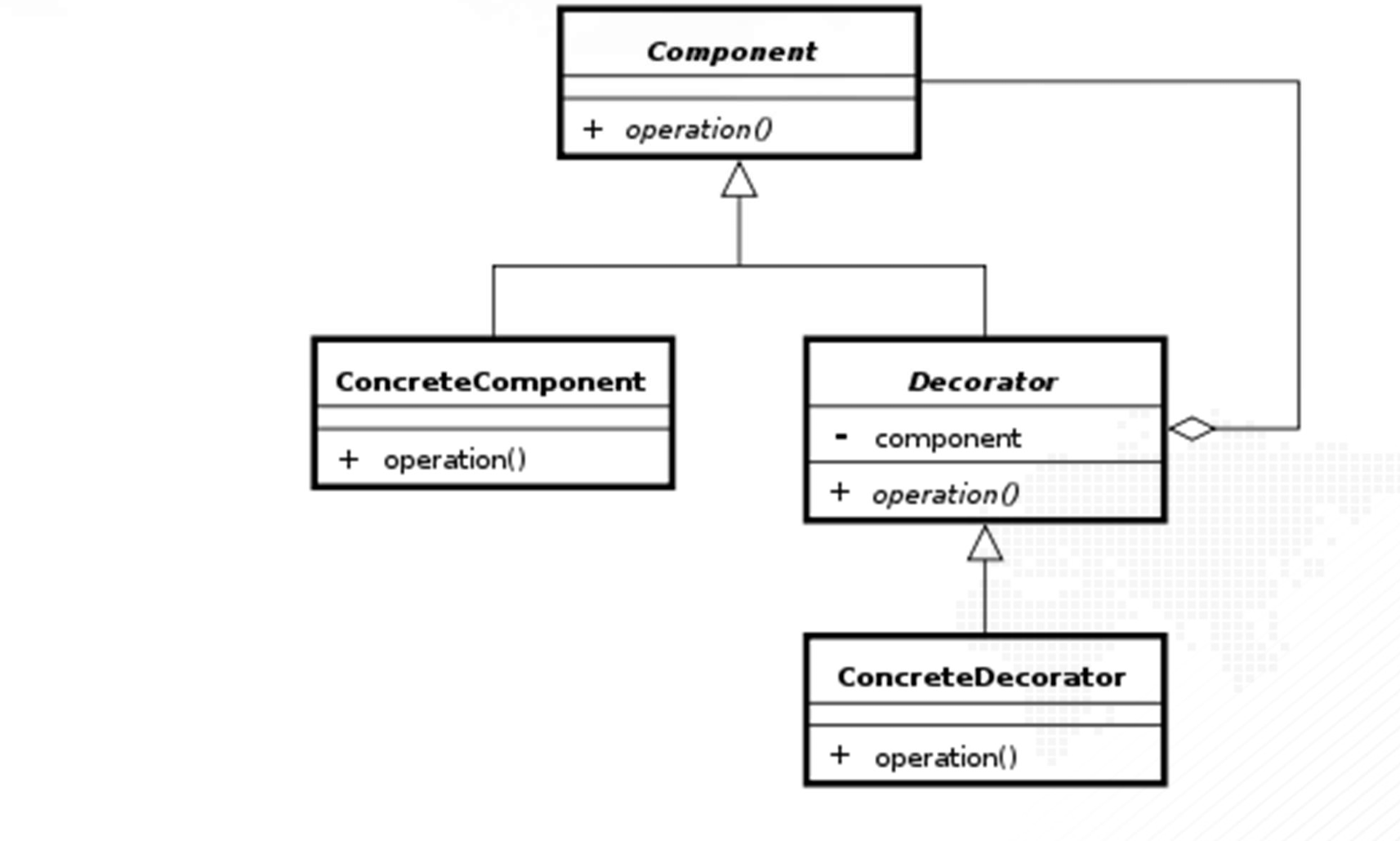
2. 예시
해당 패턴은 예시를 드는 것이 가장 빠르다고 생각한다. 따라서 예시를 들어서 설명한다.
글을 예쁘게 꾸며주는 패턴을 만들어보자.
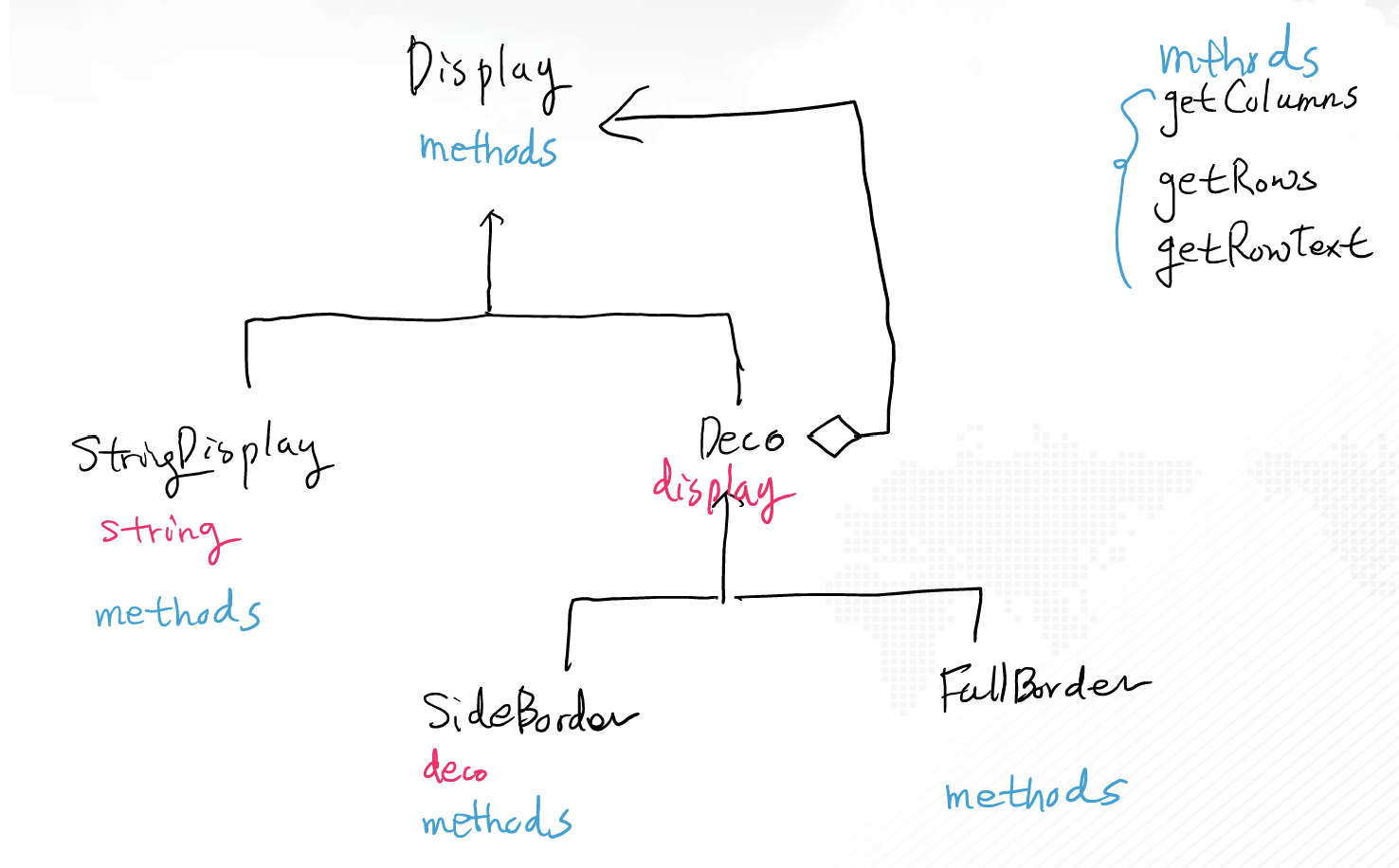
이를 코드로 나타내면 다음과 같다.
class Display:
    def getColumns(self):
        pass

    def getRows(self):
        pass

    def getRowText(self, row):
        pass

    def show(self):
        for i in range(self.getRows()):
            print(self.getRowText(i))


class StringDisplay(Display):
    def __init__(self, letters):
        self.letters = letters

    def getColumns(self):
        return len(self.letters)

    def getRows(self):
        return 1

    def getRowText(self, row):
        if row == 0:
            return self.letters
        else:
            return -1


class Deco(Display):
    def __init__(self, display: Display):
        self.display = display


class SideBorder(Deco):
    def __init__(self, display: Display, deco: str):
        super().__init__(display)
        self.borderDeco = deco

    def getColumns(self):
        return 1 + self.display.getColumns() + 1

    def getRows(self):
        return self.display.getRows()

    def getRowText(self, row):
        return self.borderDeco + self.display.getRowText(row) + self.borderDeco


class FullBorder(Deco):
    def __init__(self, display: Display):
        super().__init__(display)

    def getColumns(self):
        return 1 + self.display.getColumns() + 1

    def getRows(self):
        return 1 + self.display.getRows() + 1

    def makeLine(self, deco: str, count: int):
        buffer = ""
        for i in range(count):
            buffer += deco
        return buffer

    def getRowText(self, row: int):
        if row == 0:
            return "+" + self.makeLine("-", self.display.getColumns()) + "+"
        elif row == self.display.getRows() + 1:  # index -> count
            return "+" + self.makeLine("-", self.display.getColumns()) + "+"
        else:
            return "|" + self.display.getRowText(row - 1) + "|"


# 예시 실행 코드
b1 = StringDisplay("hello")
b2 = SideBorder(b1, "#")
b3 = FullBorder(b2)
b1.show()
b2.show()
b3.show()

b1 = StringDisplay("hello, world")
b1 = FullBorder(b1)
b1.show()

a = StringDisplay("hello")
a = FullBorder(a)
a = SideBorder(a, "*")
a = FullBorder(a)
a = FullBorder(a)
a = SideBorder(a, "/")
a.show()

b4 = SideBorder(
    FullBorder(
        FullBorder(
            SideBorder(
                FullBorder(
                    StringDisplay("hello")
                ),
                "*"
            )
        )
    ),
    "/"
)
b4.show()

마약같은 코딩, 마약같은 코딩러