2021.07.12 일지
1. 팀별 프로젝트 진행 상황 및 본인 업무
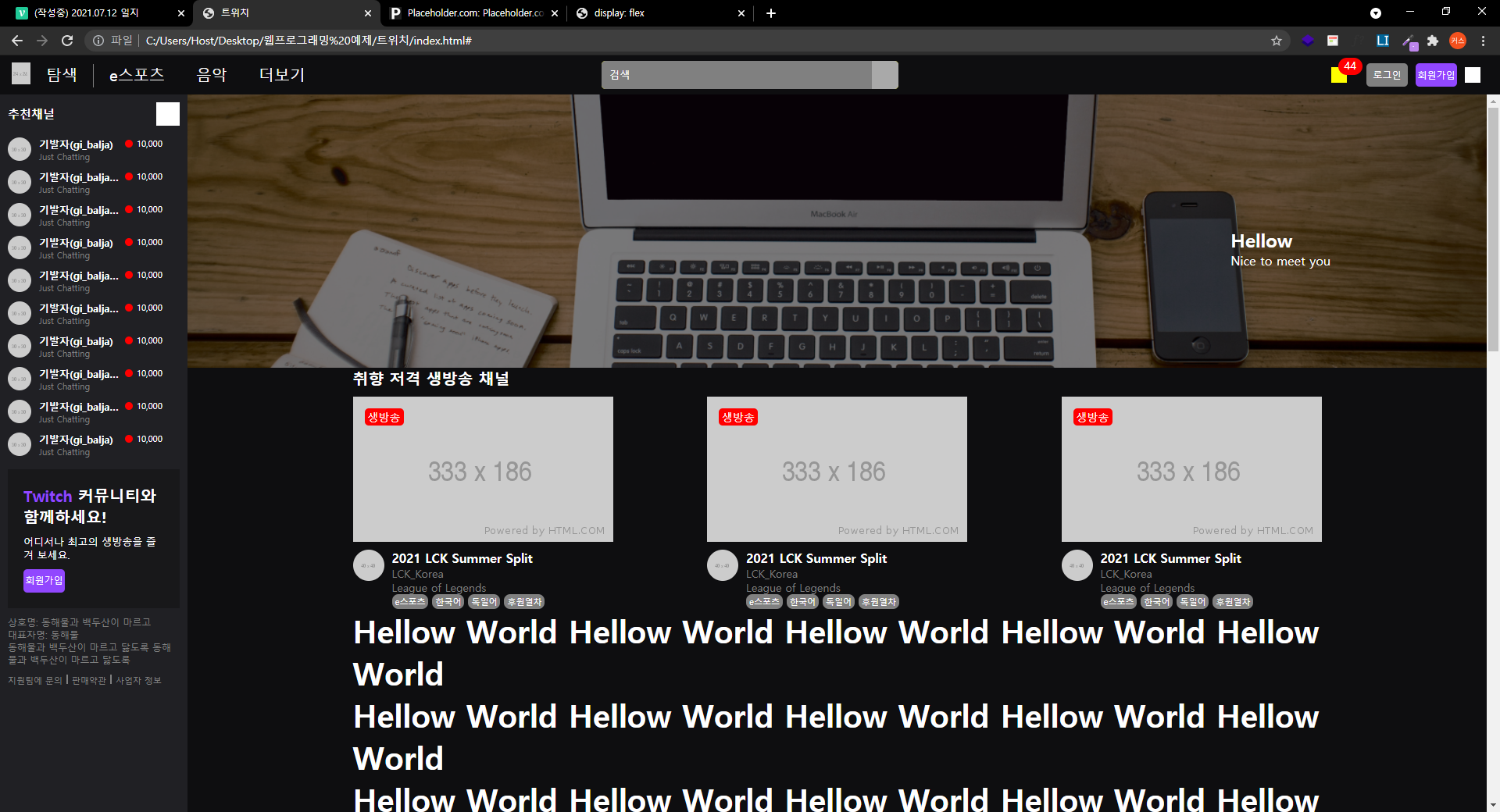
대략적인 메뉴구성 배치와 디자인 테스트 작업
페이지 첫 접속시 어떤 구성과 배치로 메인화면을 나타낼지 구상 작업
2. 오늘 강의를 통해 프로젝트에 적용한 부분
.main_container {
	position: relative;

	width: 100%;
	height: 100%;
	min-width: 1340px;
} <div class="content">
<div id="content_banner">
<div class="layer">
<div class="txt_wrap">
<h2>Hellow</h2>
<p>Nice to meet you</p>
</div>
</div>
</div>
<div class="content_container">
<div class="video_section">
<div class="title_wrap">
<h2>취향 저격 생방송 채널</h2>
</div>
<div class="video_wrap">
<ul>
<li>
<a href="#">
<div class="image_wrap">
<img src="https://via.placeholder.com/333x186">
<span class="mark">생방송</span>
</div>
<div class="video_bottom">
<img src="https://via.placeholder.com/40x40" class="thumbnail">
<div class="txt_wrap">
<h3>2021 LCK Summer Split</h3>
<p class="source">LCK_Korea</p>
<p class="game">League of Legends</p>
<div class="tag_wrap">
<span class="tag">e스포츠</span>
<span class="tag">한국어</span>
<span class="tag">독일어</span>
<span class="tag">후원열차</span>
</div>
</div>
</div>
</a>
</li>
<li>
<a href="#">
<div class="image_wrap">
<img src="https://via.placeholder.com/333x186">
<span class="mark">생방송</span>
</div>
<div class="video_bottom">
<img src="https://via.placeholder.com/40x40" class="thumbnail">
<div class="txt_wrap">
<h3>2021 LCK Summer Split</h3>
<p class="source">LCK_Korea</p>
<p class="game">League of Legends</p>
<div class="tag_wrap">
<span class="tag">e스포츠</span>
<span class="tag">한국어</span>
<span class="tag">독일어</span>
<span class="tag">후원열차</span>
</div>
</div>
</div>
</a>
</li>
<li>
<a href="#">
<div class="image_wrap">
<img src="https://via.placeholder.com/333x186">
<span class="mark">생방송</span>
</div>
<div class="video_bottom">
<img src="https://via.placeholder.com/40x40" class="thumbnail">
<div class="txt_wrap">
<h3>2021 LCK Summer Split</h3>
<p class="source">LCK_Korea</p>
<p class="game">League of Legends</p>
<div class="tag_wrap">
<span class="tag">e스포츠</span>
<span class="tag">한국어</span>
<span class="tag">독일어</span>
<span class="tag">후원열차</span>
</div>
</div>
</div>
</a>
</li>
</ul>
</div>
</div>
<h1>Hellow World Hellow World Hellow World Hellow World Hellow World</h1>
<h1>Hellow World Hellow World Hellow World Hellow World Hellow World</h1>
<h1>Hellow World Hellow World Hellow World Hellow World Hellow World</h1>
<h1>Hellow World Hellow World Hellow World Hellow World Hellow World</h1>
<h1>Hellow World Hellow World Hellow World Hellow World Hellow World</h1>
<h1>Hellow World Hellow World Hellow World Hellow World Hellow World</h1>
<h1>Hellow World Hellow World Hellow World Hellow World Hellow World</h1>
<h1>Hellow World Hellow World Hellow World Hellow World Hellow World</h1>
<h1>Hellow World Hellow World Hellow World Hellow World Hellow World</h1>
<h1>Hellow World Hellow World Hellow World Hellow World Hellow World</h1>
<h1>Hellow World Hellow World Hellow World Hellow World Hellow World</h1>
<h1>Hellow World Hellow World Hellow World Hellow World Hellow World</h1>
<h1>Hellow World Hellow World Hellow World Hellow World Hellow World</h1>
<h1>Hellow World Hellow World Hellow World Hellow World Hellow World</h1>
<h1>Hellow World Hellow World Hellow World Hellow World Hellow World</h1>
<h1>Hellow World Hellow World Hellow World Hellow World Hellow World</h1>
<h1>Hellow World Hellow World Hellow World Hellow World Hellow World</h1>
<h1>Hellow World Hellow World Hellow World Hellow World Hellow World</h1>
</div>
</div>.content {
position: absolute;
overflow-y: auto;
top: 50px;
left: 240px;
bottom: 0;
right: 0;
}
.content h1 {
font-size: 40px;
}
.content #content_banner {
position: relative;
width: 100%;
height: 350px;
background: url('../img/notebook.jpg') no-repeat center;
background-size: cover;
/* 많이 사용되는 배경이미지 넣는 기법 */
}
.content #content_banner .layer {
position: absolute;
width: 100%;
height: 100%;
background-color: rgba(0, 0, 0, .5);
top: 0;
left: 0;
}
.content #content_banner .layer .txt_wrap {
position: absolute;
top: 170px;
right: 200px;
}
.content .content_container {
width: 1240px;
margin: 0 auto;
}
/* 콘텐츠 공통 */
.content_container .tag_wrap {
display: flex;
flex-wrap: wrap;
align-items: center;
}
.content_container .tag_wrap .tag {
font-size: 11px;
color: #ffffff;
background-color: grey;
border-radius: 8px;
padding: 2px 4px 2px;
margin-right: 5px;
}
.content_container .tag_wrap .tag:last-child {
margin-right: 0;
}
.content_container .txt_wrap h3 {
font-size: 16px;
}
/* 비디오 섹션 */
.video_section .title_wrap {
padding-bottom: 10px;
}
.video_section .title_wrap h2 {
font-size: 20px;
}
.video_section .video_wrap ul {
display: flex;
flex-wrap: wrap;
justify-content: space-between;
align-items: flex-start;
}
.video_section .video_wrap li {
width: 333px;
}
.video_section .video_wrap a .image_wrap {
position: relative;
width: 333px;
height: 186px;
}
.video_section .video_wrap a .image_wrap img {
width: 100%;
height: 100%;
}
.video_section .video_wrap a .image_wrap .mark {
position: absolute;
top: 15px;
left: 15px;
font-size: 14px;
background-color: red;
border-radius: 5px;
padding: 2px 4px 2px;
}
.video_section .video_wrap a .video_bottom {
display: flex;
flex-wrap: wrap;
justify-content: space-between;
align-items: flex-start;
margin-top: 10px;
}
.video_section .video_wrap a .video_bottom .thumbnail {
width: 40px;
height: 40px;
border-radius: 50%;
}
.video_section .video_wrap a .video_bottom .txt_wrap {
width: calc(100% - 50px);
}
.video_section .video_wrap a .video_bottom .txt_wrap .source,
.video_section .video_wrap a .video_bottom .txt_wrap .game {
font-size: 14px;
color: grey;
}
3. 어려웠던 점과 해결방법
크게 어려운점은 없었지만 대략적인 메뉴 뎁스만 가지고 시작하다보니 페이지에 어울리는 기본메뉴 디자인이나 드롭다운 메뉴 디자인 그리고 배치를 하는데 어려움이 있었습니다.
다양한 디자인과 배치작업을 활용해서 구상 했습니다.
4. 아쉬웠던 점
아쉬웠던 점은 따로 없었습니다.

개발자를 꿈꾸는 이상화입니다.