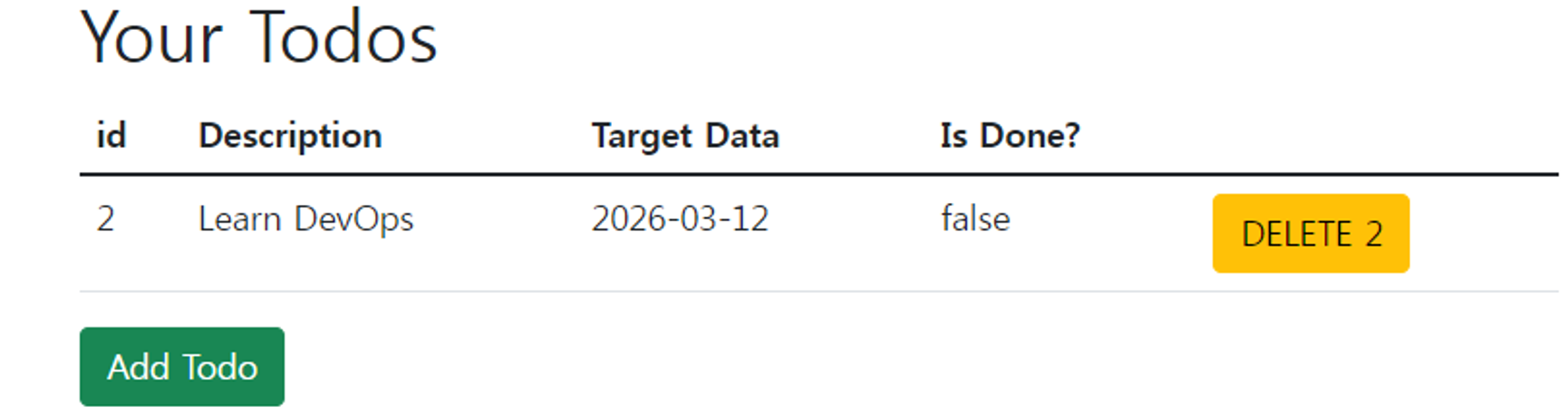
먼저 listTodos.jsp에 삭제 버튼을 추가합니다.
listTodos.jsp
id를 사용해서 게시물을 구분하고 쿼리스트링을 사용해서 id를 전달합니다.
<%@ taglib prefix="c" uri="http://java.sun.com/jsp/jstl/core" %>

<html>
<head>
    <link href="webjars\bootstrap\5.1.3\css\bootstrap.min.css" rel="stylesheet">
    <title>List Todos Page</title>
</head>
<body>
<div class="container">
    <h1>Your Todos</h1>
    <table class="table">
        <thead>
        <tr>
            <th>id</th>
            <th>Description</th>
            <th>Target Data</th>
            <th>Is Done?</th>
            <th></th>
        </tr>
        </thead>
        <tbody>
        <c:forEach items="${todos}" var="todo">
            <tr>
                <td>${todo.id}</td>
                <td>${todo.description}</td>
                <td>${todo.targetDate}</td>
                <td>${todo.done}</td>
                <td><a href="delete-todo?id=${todo.id}" class="btn btn-warning">DELETE ${todo.id}</a></td>
            </tr>
        </c:forEach>
        </tbody>
    </table>
    <a href="add-todo" class="btn btn-success">Add Todo</a>
</div>
<script src="webjars\bootstrap\5.1.3\js\bootstrap.bundle.min.js"></script>
<script src="webjars\jquery\3.6.0\jquery.min.js"></script>
</body>
</html>
TodoService에 삭제 관련 로직을 작성합니다.
import org.springframework.stereotype.Service;

import java.time.LocalDate;
import java.util.ArrayList;
import java.util.List;

@Service
public class TodoService {
    private static List<Todo> todos = new ArrayList<>();
    private static int todosCount = 0;

    static {
        todos.add(new Todo(++todosCount, "test1", "Learn AWS",
                LocalDate.now().plusYears(1), false));
        todos.add(new Todo(++todosCount, "test1", "Learn DevOps",
                LocalDate.now().plusYears(2), false));
        todos.add(new Todo(++todosCount, "test1", "Learn Full Stack Development",
                LocalDate.now().plusYears(3), false));
    }

    public List<Todo> findByUsername(String username) {
        return todos;
    }

    public void addTodo(String username, String description, LocalDate targetDate, boolean done) {
        Todo todo = new Todo(++todosCount, username, description, targetDate, done);
        todos.add(todo);
    }

    public void deleteById(int id) {
        todos.removeIf(todo -> todo.getId() == id);
    }
}
TodoController에 deleteById()를 추가합니다.
TodoController.class
import jakarta.validation.Valid;
import org.springframework.stereotype.Controller;
import org.springframework.ui.ModelMap;
import org.springframework.validation.BindingResult;
import org.springframework.web.bind.annotation.RequestMapping;
import org.springframework.web.bind.annotation.RequestMethod;
import org.springframework.web.bind.annotation.RequestParam;
import org.springframework.web.bind.annotation.SessionAttributes;

import java.time.LocalDate;
import java.util.List;

@Controller
@SessionAttributes("name")
public class TodoController {

    private TodoService todoService;

    public TodoController(TodoService todoService) {
        this.todoService = todoService;
    }

    //list-todos
    @RequestMapping("/list-todos")
    public String listAllTodos(ModelMap model) {
        List<Todo> todos = todoService.findByUsername("test1");
        model.addAttribute("todos", todos);

        return "listTodos";
    }

    @RequestMapping(value = "/add-todo", method = RequestMethod.GET)
    public String showNewTodoPage(ModelMap model) {
        String username = (String) model.get("name");
        Todo todo = new Todo(0, username, "", LocalDate.now().plusYears(1), false);
        model.put("todo", todo);
        return "todo";
    }

    @RequestMapping(value = "/add-todo", method = RequestMethod.POST)
    public String addNewTodo(ModelMap model, @Valid Todo todo, BindingResult result) {

        if (result.hasErrors()) {
            return "todo";
        }

        String username = (String) model.get("name");
        todoService.addTodo(username, todo.getDescription(), LocalDate.now().plusYears(1), false);
        return "redirect:list-todos";
    }

    @RequestMapping("/delete-todo")
    public String deleteTodo(@RequestParam int id) {
        //Delete todo
        todoService.deleteById(id);
        return "redirect:list-todos";
    }

}
실행결과
DELETE 2 버튼으로 id= 1, 3이 지워진 걸 확인할 수 있습니다.