
Excel 저장 - UI

<button class="btn btn-primary" id="btn_excel">엑셀로 저장</button>Excel 저장 - JS
  // 엑셀로 저장
  const btn_excel = document.querySelector("#btn_excel")

  btn_excel.addEventListener("click", () => {
    location.href = "member_to_excel.php"
  })
Excel 저장 - DB
  // 회원목록
  public function getAllData()
  {
    $sql = "SELECT * FROM member ORDER BY idx ASC";
    $stmt = $this->conn->prepare($sql);
    $stmt->setFetchMode(PDO::FETCH_ASSOC);
    $stmt->execute();

    return $stmt->fetchAll();
  }
Excel 저장 - member_to_excel.php
<?php

include "inc_common.php";
include "../inc/dbconfig.php";
include "../inc/member.php";

$mem = new Member($db);

$rs = $mem->getAllData();

header("Content-type: application/vnd.ms-excel; charset=UTF-8");
header("Content-Disposition: attachment; filename=member.xls");
header("Content-Description: PHP4 Generated Data");
출처:
https: //jongs-story.tistory.com/entry/HTMLPHP-php를-활용하여-데이터를-엑셀-파일로-저장하는-방법 [Jong's:티스토리]
?>

<style>
  .title {
    font-size: 30px;
    text-align: center;
    font-weight: bold;
  }
</style>

<table>
  <tr>
    <td colspan="6" class="title">회원목록</td>
  </tr>
</table>
<table border="1">
  <tr>
    <th>아이디</th>
    <th>이름</th>
    <th>이메일</th>
    <th>우편번호</th>
    <th>주소</th>
    <th>등록일시</th>
  </tr>
  <?php
  foreach ($rs as $row) {
    echo "
    <tr>
      <td>" . $row["id"] . "</td>
      <td>" . $row["name"] . "</td>
      <td>" . $row["email"] . "</td>
      <td>" . $row["zip_code"] . "</td>
      <td>" . $row["addr1"] . " " . $row["addr2"] . "</td>
      <td>" . $row["create_at"] . "</td>
    </tr>
    ";
  }
  ?>
</table>
결과
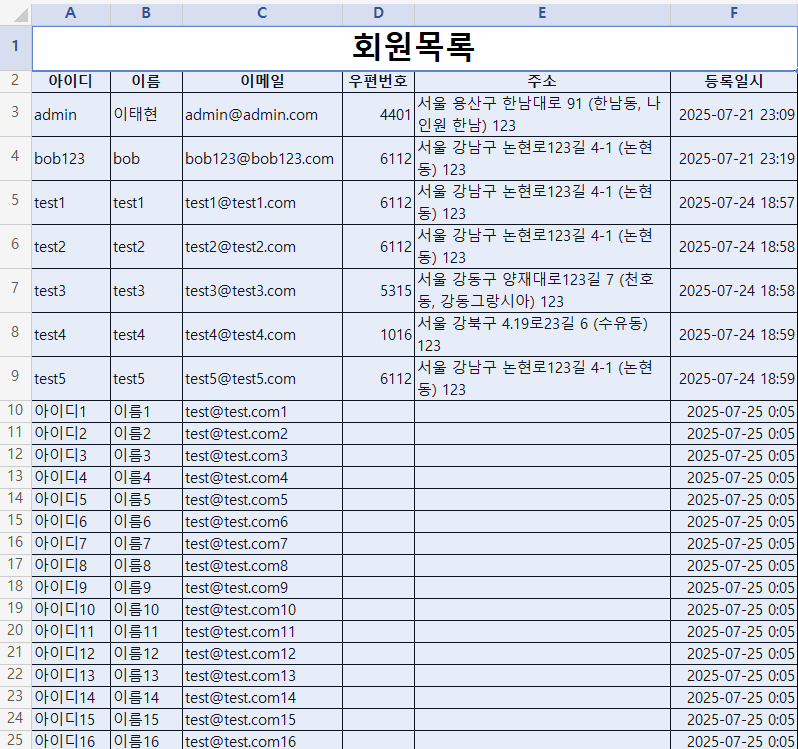
마무리
다음 시간에는 회원관리에서 회원 삭제 부분을 해보겠습니다.
감사합니다.

이해하고 분석하고 지배한다