AWS Secrets Manager, External Secrets Operator, Argo CD를 활용한 애플리케이션 시크릿 및 환경 변수 주입 상세 문서
OnTheTop - 프로젝트
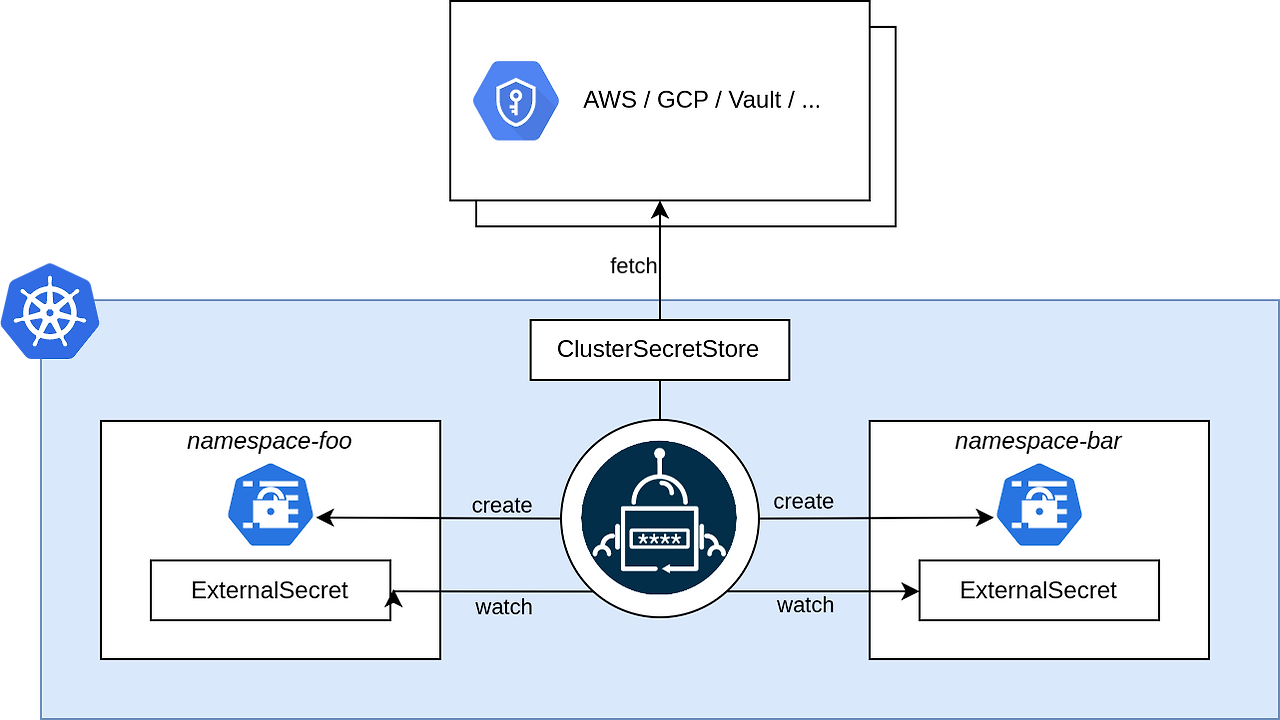
이 문서는 EKS (Amazon Elastic Kubernetes Service) 클러스터 환경에서 애플리케이션에 필요한 민감한 시크릿 값(예: 데이터베이스 비밀번호, API 키)과 비민감 환경 변수를 안전하고 자동화된 방식으로 주입하는 전체 과정을 상세히 설명합니다. GitOps 원칙에 따라 모든 설정이 Git에 코드로 관리되며, Argo CD가 이를 클러스터에 자동으로 동기화합니다.
GitHub Actions의 Secret은 CI/CD 파이프라인의 자격 증명으로는 탁월하지만, Kubernetes 클러스터 내에서 실행되는 애플리케이션의 런타임 Secret을 안전하고 동적으로 관리하는 데는 한계가 있습니다.
반면, AWS Secrets Manager + External Secrets Operator 방식은 Kubernetes와 GitOps의 철학에 완벽하게 부합하며, 런타임 Secret의 보안, 자동화, 동기화, 감사 및 운영 편의성 측면에서 훨씬 강력하고 안정적인 솔루션을 제공합니다. 이것이 우리가 이 방식을 선택한 주된 이유입니다.
1. 전체 아키텍처 및 데이터 흐름 개요
우리가 구축한 시스템은 다음과 같은 핵심 구성 요소들이 유기적으로 연결되어 작동합니다.
- AWS Secrets Manager (외부 금고): 민감한 시크릿 값들이 안전하게 저장되는 중앙 저장소입니다. Git 리포지토리에는 절대 시크릿 값이 직접 노출되지 않습니다.
- Git 리포지토리 (설계도): Kubernetes 클러스터의 모든 리소스(애플리케이션 배포, 서비스, 시크릿 참조 등)에 대한 정의(YAML 파일)가 코드로 저장되는 곳입니다. 이는 "단일 진실 공급원(Single Source of Truth)" 역할을 합니다.
- ExternalSecret 리소스 정의 파일 포함 (실제 시크릿 값은 없고, 어디에서 가져올지에 대한 참조만 있음).
- ConfigMap 리소스 정의 파일 포함 (비민감 환경 변수).
- Deployment, Service, Ingress 등 애플리케이션 배포 관련 파일 포함.
- Argo CD (자동 건설 로봇): Git 리포지토리를 지속적으로 모니터링하며, Git의 상태와 Kubernetes 클러스터의 실제 상태를 일치시키는 역할을 합니다. Git에 변경 사항이 감지되면 자동으로 클러스터에 적용합니다.
- External Secrets Operator (ESO) (비밀번호 전문 배달원): Kubernetes 클러스터 내에서 실행되는 컨트롤러입니다. Git을 통해 배포된
ExternalSecret리소스를 감지하고,ClusterSecretStore에 정의된 연결 정보를 사용하여 AWS Secrets Manager에서 실제 시크릿 값을 가져옵니다. - Kubernetes 클러스터 (우리 집): EKS 클러스터는 애플리케이션 Pod들이 실행되는 환경입니다.
- ClusterSecretStore: ESO가 AWS Secrets Manager와 통신하기 위한 "연결 통로" 설정입니다. (Terraform으로 미리 배포)
- Secret (Kubernetes Native): ESO에 의해 AWS Secrets Manager에서 가져온 실제 시크릿 값이 저장되는 Kubernetes의 기본 시크릿 리소스입니다.
- ConfigMap: 비민감 환경 변수들이 저장되는 Kubernetes의 기본 설정 리소스입니다.
- Deployment / Pod: 애플리케이션 컨테이너가 실행되는 단위입니다. Secret과 ConfigMap의 데이터를 파일 또는 환경 변수 형태로 주입받아 사용합니다.
2. 각 구성 요소의 상세 역할 및 데이터 흐름
2.1. AWS Secrets Manager: 안전한 외부 시크릿 저장소
- 역할: 데이터베이스 비밀번호, API 키, 인증서 등 민감한 정보를 안전하게 저장하고 관리합니다. Kubernetes 클러스터 외부에 존재하므로, Git 리포지토리에 시크릿 값이 직접 노출되는 위험을 방지합니다.
- 저장 방식:
secrets.properties파일의 전체 내용을 AWS Secrets Manager의 단일 시크릿(Secret) 값으로 저장합니다. 예를 들어,onthetop/backend/secrets-properties라는 이름으로 시크릿을 생성합니다. - 예시:
aws secretsmanager create-secret \
  --name onthetop/backend/secrets-properties \
  --secret-string file://./secrets.properties \
  --region ap-northeast-2
2.2. External Secrets Operator (ESO): 외부 시크릿과 Kubernetes의 다리
ESO는 AWS Secrets Manager와 Kubernetes 클러스터 간의 시크릿 동기화를 담당하는 핵심 도구입니다.
ClusterSecretStore (금고 연락처 설정)
- 역할: ESO에게 어떤 외부 시크릿 저장소(AWS Secrets Manager)를 사용할 것인지, 어떻게 인증할 것인지(IAM Role), 그리고 어느 리전에 있는지를 알려주는 설정입니다. 클러스터 전체에서 유효합니다.
- 배포 방식: 일반적으로 Terraform과 같은 인프라 관리 도구를 사용하여 EKS 클러스터에 미리 배포됩니다.
- 예시 (Terraform):
resource "kubernetes_manifest" "cluster_secret_store" { manifest = { apiVersion = "external-secrets.io/v1beta1" kind = "ClusterSecretStore" metadata = { name = "aws-secrets-manager-cluster-store" } spec = { provider = { aws = { service = "SecretsManager" region = "ap-northeast-2" auth = { jwt = { serviceAccountRef = { name = "external-secrets-sa" namespace = "external-secrets" # ESO SA가 위치한 네임스페이스 } } } } } } } } - 설명: 이 설정은 ESO가
external-secrets네임스페이스의external-secrets-sa서비스 어카운트의 권한을 사용하여ap-northeast-2리전의 AWS Secrets Manager에 접근할 수 있도록 합니다.
ExternalSecret (비밀번호 배달 주문서)
- 역할: 어떤 외부 시크릿(AWS Secrets Manager의 특정 시크릿)을 가져와서, 어떤 이름의 Kubernetes Secret으로 만들 것인지를 ESO에게 지시하는 Kubernetes 리소스입니다. Git 리포지토리에 이 ExternalSecret 정의가 저장됩니다.
- 배포 방식: GitOps 원칙에 따라 애플리케이션 Git 리포지토리에 YAML 파일로 정의하고, Argo CD가 이를 클러스터에 동기화합니다.
- 예시 (Git 리포지토리 파일):
# application-gitops-repo/kubernetes/onthetop-backend/external-secret.yaml apiVersion: external-secrets.io/v1beta1 kind: ExternalSecret metadata: name: onthetop-backend-secrets # ESO가 생성할 Kubernetes Secret의 이름 namespace: onthetop-backend # ExternalSecret 및 생성될 Secret이 위치할 네임스페이스 spec: refreshInterval: "1h" # 1시간마다 AWS Secrets Manager에서 값 동기화 secretStoreRef: name: aws-secrets-manager-cluster-store # 위에서 정의한 ClusterSecretStore 참조 kind: ClusterSecretStore target: name: onthetop-backend-secrets # Kubernetes Secret의 이름 (ExternalSecret의 이름과 동일) creationPolicy: Owner # ExternalSecret 삭제 시 Kubernetes Secret도 삭제 template: data: secrets.properties: "{{ .secrets_properties_file_content }}" # AWS Secrets Manager 값을 secrets.properties 키로 저장 data: - secretKey: secrets_properties_file_content # AWS Secrets Manager 값의 임시 키 remoteRef: key: onthetop/backend/secrets-properties # AWS Secrets Manager의 실제 시크릿 이름 - 설명: 이
ExternalSecret은 ESO에게aws-secrets-manager-cluster-store를 통해onthetop/backend/secrets-properties시크릿을 가져와onthetop-backend-secrets라는 Kubernetes Secret을onthetop-backend네임스페이스에 생성하라고 지시합니다.
2.3. Kubernetes: 시크릿 및 환경 변수 사용
ESO에 의해 생성된 Kubernetes Secret과 ConfigMap은 애플리케이션 Pod에 주입되어 사용됩니다.
Kubernetes Secret (클러스터 내 비밀 상자)
- 역할: ESO에 의해 AWS Secrets Manager에서 가져온 실제 시크릿 값(Base64 인코딩)이 저장되는 Kubernetes의 기본 리소스입니다.
- 주입 방식: Deployment의
volumes와volumeMounts를 사용하여 Pod의 컨테이너 내부에 파일 형태로 마운트됩니다. - 예시 (Deployment의 volumes 및 volumeMounts):
# Deployment YAML 내 spec: template: spec: containers: - name: onthetop-backend volumeMounts: - name: secrets-properties-volume mountPath: "/app/secrets.properties" # 컨테이너 내부 경로 subPath: "secrets.properties" # Secret 내의 키 이름 readOnly: true volumes: - name: secrets-properties-volume secret: secretName: onthetop-backend-secrets # ESO가 생성한 Secret 이름 - 설명:
onthetop-backend-secretsSecret의secrets.properties키에 해당하는 내용이 컨테이너 내부의/app/secrets.properties파일로 마운트됩니다.
Kubernetes ConfigMap (클러스터 내 설정 지도)
- 역할:
JUMP_HOST,BE_VERSION,PORT등 민감하지 않은 환경 변수나 설정 데이터가 저장되는 Kubernetes의 기본 리소스입니다. Git 리포지토리에 YAML 파일로 정의됩니다. - 주입 방식: Deployment의
env섹션에서valueFrom.configMapKeyRef를 사용하여 컨테이너 환경 변수로 주입됩니다. - 예시 (Git 리포지토리 파일):
# application-gitops-repo/kubernetes/onthetop-backend/configmap.yaml apiVersion: v1 kind: ConfigMap metadata: name: onthetop-backend-config namespace: onthetop-backend data: BE_VERSION: "v2.0.3" PORT: "8080" - 예시 (Deployment의 env):
# Deployment YAML 내 spec: template: spec: containers: - name: onthetop-backend env: - name: PORT valueFrom: configMapKeyRef: name: onthetop-backend-config # ConfigMap 이름 key: PORT # ConfigMap 내의 키 - name: BE_VERSION valueFrom: configMapKeyRef: name: onthetop-backend-config key: BE_VERSION - 설명:
onthetop-backend-configConfigMap의PORT와BE_VERSION값이 각각PORT와BE_VERSION이라는 환경 변수로 컨테이너에 주입됩니다.
Kubernetes Deployment / Pod (애플리케이션 실행)
- 역할: 애플리케이션 Docker 이미지를 기반으로 Pod들을 생성하고 관리하며, 위에서 설명한
Secret과ConfigMap의 데이터를 주입받아 애플리케이션을 실행합니다. - 예시 (Deployment의 args):
# Deployment YAML 내 spec: template: spec: containers: - name: onthetop-backend args: - "--logging.file.name=/logs/backend.log" - "--spring.config.additional-location=file:/app/secrets.properties" # 마운트된 secrets.properties 파일 사용 - 설명: 애플리케이션 시작 시
args를 통해/app/secrets.properties경로에 마운트된 파일을 추가 설정 파일로 읽도록 지시합니다.
2.4. Argo CD: GitOps 자동화
Argo CD는 Git 리포지토리에 정의된 모든 Kubernetes 리소스들을 EKS 클러스터에 자동으로 동기화하는 역할을 합니다.
Git as Single Source of Truth (설계도 저장소)
- 모든 Kubernetes YAML 파일(
Namespace,ExternalSecret,ConfigMap,Deployment,Service,Ingress)은 Git 리포지토리(application-gitops-repo)에 저장됩니다. ExternalSecret에는 실제 시크릿 값이 없으므로, Git에 민감 정보가 노출되지 않습니다.
Application 리소스 정의 (Argo CD의 배포 지시서)
- Argo CD 자체의 구성 Git 리포지토리(
argocd-config-repo)에Application리소스를 정의합니다. 이Application리소스는 Argo CD에게 "어떤 Git 리포지토리의 어떤 경로를 모니터링하여, 어떤 클러스터의 어떤 네임스페이스에 배포할지"를 알려줍니다. - 예시 (Argo CD Application YAML):
# argocd-config-repo/applications/onthetop-backend.yaml
apiVersion: argoproj.io/v1alpha1
kind: Application
metadata:
  name: onthetop-backend
  namespace: argocd
spec:
  project: default
  source:
    repoURL: https://github.com/your-org/application-gitops-repo.git
    targetRevision: HEAD
    path: kubernetes/onthetop-backend # YAML 파일들이 있는 경로
  destination:
    server: https://kubernetes.default.svc
    namespace: onthetop-backend # 배포될 네임스페이스
  syncPolicy:
    automated:
      prune: true
      selfHeal: true
    syncOptions:
      - CreateNamespace=true # 네임스페이스 자동 생성
자동 동기화 및 상태 일치
- Argo CD는
application-gitops-repo를 지속적으로 모니터링합니다. - Git에 새로운 파일이 푸시되거나 기존 파일이 변경되면, Argo CD는 이를 감지하여 EKS 클러스터에 자동으로 적용합니다. 이 과정에서
Namespace,ConfigMap,ExternalSecret,Deployment,Service,Ingress등이 순차적으로 생성/업데이트됩니다. ExternalSecret이 생성되면 ESO가 작동하여 KubernetesSecret을 만들고,Deployment는 이Secret과ConfigMap을 참조하여 Pod를 실행합니다.- Argo CD는 클러스터의 실제 상태가 Git의 정의된 상태와 항상 일치하도록 유지합니다.
3. 결론
이러한 통합된 접근 방식을 통해, onthetop-backend 애플리케이션은 AWS Secrets Manager에 저장된 민감한 시크릿 값과 ConfigMap에 정의된 비민감 환경 변수를 안전하고 효율적으로 주입받아 EKS 클러스터에 배포됩니다. 모든 설정은 Git에 코드로 관리되므로, 배포의 자동화, 일관성, 재현성 및 보안이 크게 향상됩니다.