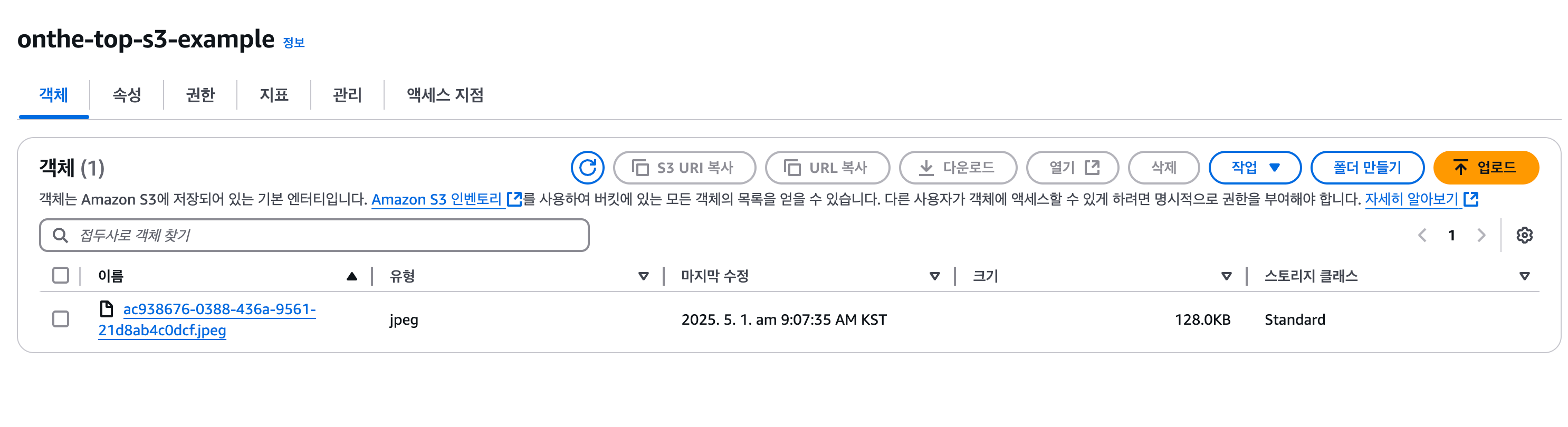
S3 연동 요청 및 제공 가이드
데이터베이스에 UUID로 저장된 S3 이미지 파일 조회 흐름.
기본 흐름
-
이미지를 업로드할 때:
- UUID를 생성 (예:
abc123-uuid.jpg) - S3에
abc123-uuid.jpg이름으로 업로드 - 이 UUID를 DB에 저장 (컬럼에 저장)
- UUID를 생성 (예:
-
이미지를 조회할 때:
- DB에서 UUID를 조회 (예: 게시글 id로 이미지 UUID를 가져옴)
- S3 URL에 UUID를 붙여 최종 이미지 URL 생성하고 조회 가능.
예시 코드 흐름 (Java 기준)
1. 업로드 시
UUID uuid = UUID.randomUUID();
String filename = uuid.toString() + ".jpg";
amazonS3.putObject(bucketName, filename, file);
saveToDatabase(uuid.toString()); // DB에 저장
2. 조회 시
String uuid = getImageUuidFromDB(postId); // DB에서 가져오기
String imageUrl = "https://" + onthe-top-s3-example + ".s3.amazonaws.com/" + uuid + ".jpg"; // onthe-top-s3exampe = 저희의 임시 bucket이름입니다.

> CloudFront를 쓴다면:
```java
String imageUrl = "https://dev.onthe-top.com/" + uuid + ".jpg";
정리
| 항목 | 설명 |
|---|---|
| 저장 | UUID를 S3 object key로 사용 |
| DB 저장 | UUID만 저장 (image_uuid 컬럼 등) |
| 조회 | UUID 기반으로 S3 URL 생성 |
🧩 React-Spring Boot 연동 예시(API 엔드포인트만 바꿔주시면 됩니다...!)
React(예시)
1. 업로드 예시
const formData = new FormData();
formData.append("file", fileInput.files[0]);

fetch("http://localhost:8080/s3/upload", {
  method: "POST",
  body: formData,
})
  .then((res) => res.text())
  .then((msg) => alert(msg));
Spring(예시)
1. dependency 의존성 추가
// AWS S3(gradle)
dependencies {
    implementation 'com.amazonaws:aws-java-sdk-s3:1.12.260'
    implementation 'org.springframework.boot:spring-boot-starter-web'
}
2. application.properties 설정
버킷이름과 잘 복사해온 액세스와 시크릿키, 그리고 지역을 넣어주세요.
참고로 지역은 서울로 설정하지 않았으면 만들어진 버킷에 적혀진 AWS 리전을 보고 바꿔서 넣어야합니다.
당연한 말이겠지만 시크릿키와 액세스키를 노출시키면 안됩니다.
#AWS S3 관련 설정
cloud.aws.s3.bucketName=BUCKET_NAME
cloud.aws.credentials.accessKey=ACCESS_KEY
cloud.aws.credentials.secretKey=SECRET_KEY
cloud.aws.region.static=ap-northeast-2
cloud.aws.stack.auto=false
3. S3Config.java
역할: AWS S3 클라이언트 설정을 위한 Bean 등록
package com.example.demo.config;

import com.amazonaws.auth.AWSStaticCredentialsProvider;
import com.amazonaws.auth.BasicAWSCredentials;
import com.amazonaws.services.s3.AmazonS3;
import com.amazonaws.services.s3.AmazonS3ClientBuilder;
import org.springframework.beans.factory.annotation.Value;
import org.springframework.context.annotation.Bean;
import org.springframework.context.annotation.Configuration;

@Configuration
public class S3Config {

    @Value("${aws.accessKeyId}")
    private String awsAccessKeyId;

    @Value("${aws.secretKey}")
    private String awsSecretKey;

    @Value("${aws.region}")
    private String awsRegion;

    @Bean
    public AmazonS3 amazonS3() {
        BasicAWSCredentials awsCredentials = new BasicAWSCredentials(awsAccessKeyId, awsSecretKey);
        return AmazonS3ClientBuilder.standard()
                .withRegion(awsRegion)
                .withCredentials(new AWSStaticCredentialsProvider(awsCredentials))
                .build();
    }
}
4. S3Service.java
비즈니스 로직(파일 업로드/다운로드) 처리
package com.example.demo.service;

import com.amazonaws.services.s3.AmazonS3;
import com.amazonaws.services.s3.model.PutObjectRequest;
import com.amazonaws.services.s3.model.S3Object;
import org.springframework.beans.factory.annotation.Value;
import org.springframework.stereotype.Service;

import java.io.File;
import java.io.IOException;
import com.amazonaws.HttpMethod;
import com.amazonaws.services.s3.model.GeneratePresignedUrlRequest;

import java.net.URL;
import java.util.Date;
import java.util.UUID;


@Service
public class S3Service {

    private final AmazonS3 amazonS3;

    @Value("${aws.s3.bucket}")
    private String bucketName;

    public S3Service(AmazonS3 amazonS3) {
        this.amazonS3 = amazonS3;
    }

    // Upload file to S3 bucket

    public String uploadFile(File file) {
        try {
            String originalName = file.getName();
            String extension = "";

            int dotIndex = originalName.lastIndexOf(".");
            if (dotIndex != -1) {
                extension = originalName.substring(dotIndex); // 확장자 포함 (.jpg 등)
            }

            String uniqueFileName = UUID.randomUUID().toString() + extension;

            amazonS3.putObject(new PutObjectRequest(bucketName, uniqueFileName, file));

            return "File uploaded successfully: " + uniqueFileName;
        } catch (Exception e) {
            e.printStackTrace();
            return "Error uploading file";
        }
    }
}
5. S3Controller.java
HTTP 요청 (REST API) 처리
package com.example.demo.controller;

import com.example.demo.service.S3Service;
import org.springframework.beans.factory.annotation.Autowired;
import org.springframework.web.bind.annotation.*;
import org.springframework.web.multipart.MultipartFile;

import java.io.File;
import java.io.IOException;

@RestController
@RequestMapping("/s3")
public class S3Controller {

    @Autowired
    private S3Service s3Service;

    // Upload a file to S3
    @PostMapping("/upload")
    public String uploadFile(@RequestParam("file") MultipartFile file) throws IOException {
        File convFile = new File(file.getOriginalFilename());
        file.transferTo(convFile); // Convert MultipartFile to File
        return s3Service.uploadFile(convFile);
    }
}
간이 테스트
curl -F "file=@ex.jpeg" http://localhost:8080/s3/upload- 업로드 완료.