GitLab 에서 토큰 발급
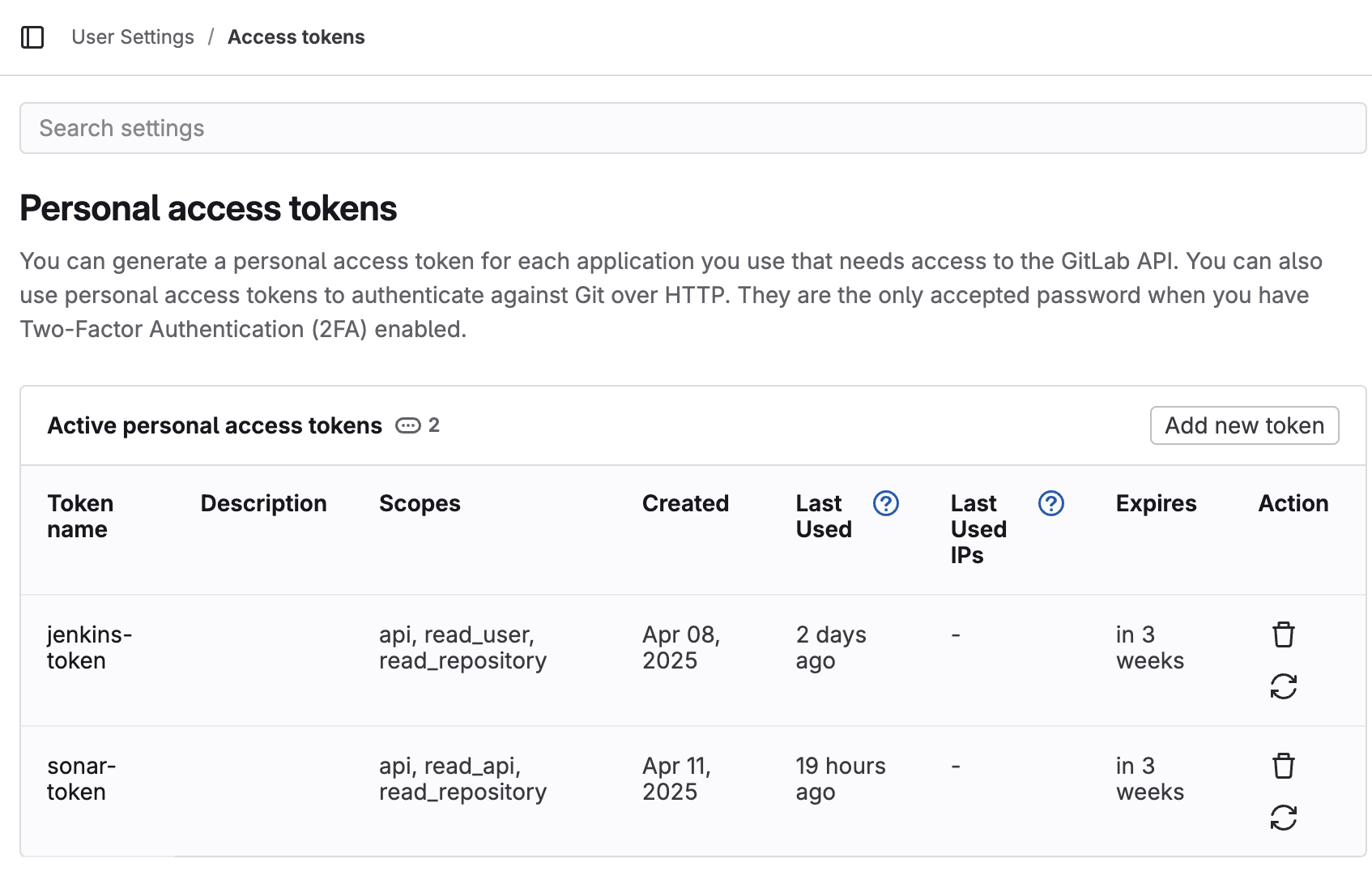
User Settings > Access tokens > Add new token 클릭
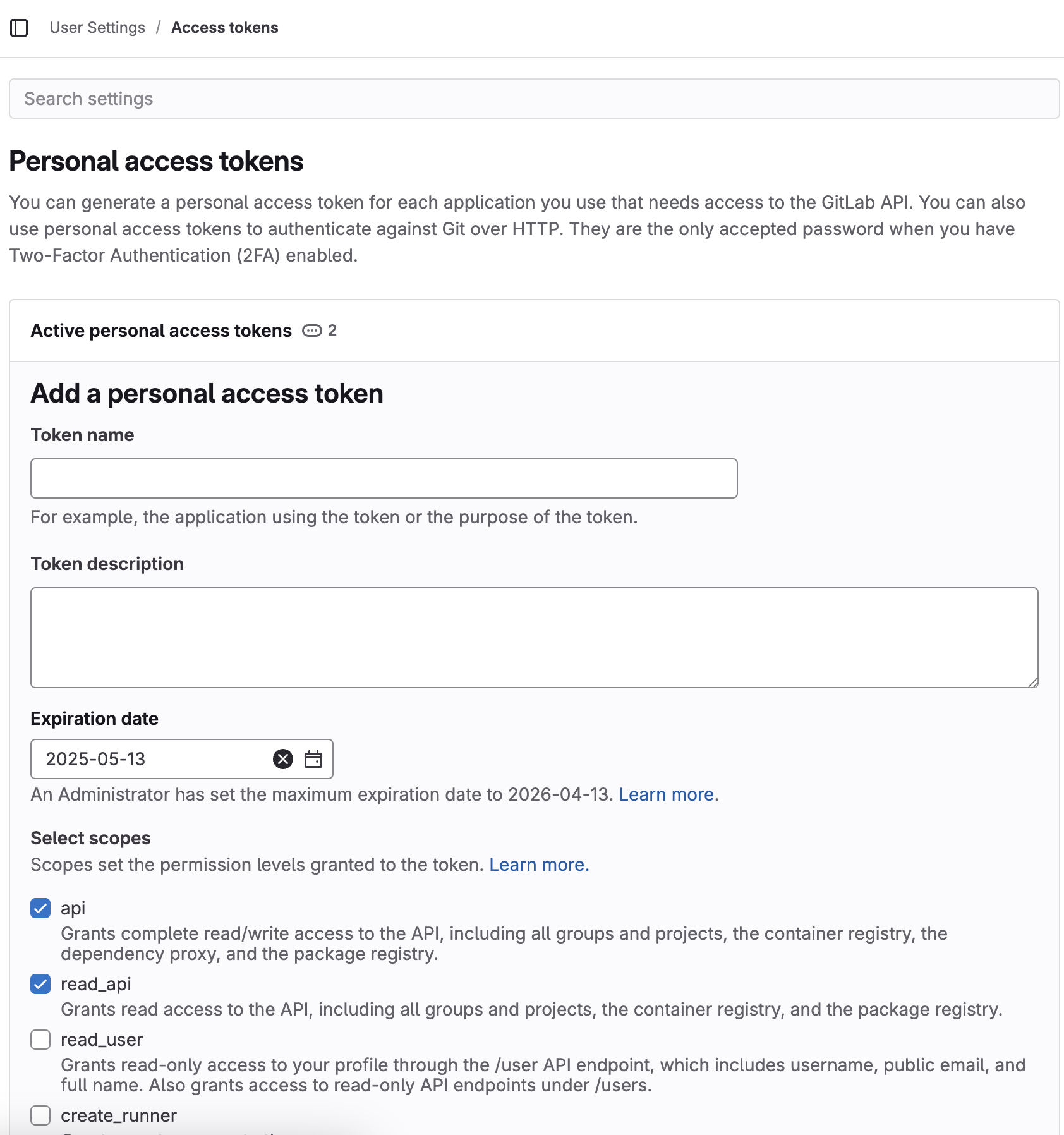
- Token name :: sonar-token
- Select scopes
- api :: check
- read_api :: check
- read_repository :: check
GitLab, SonarQube 연동
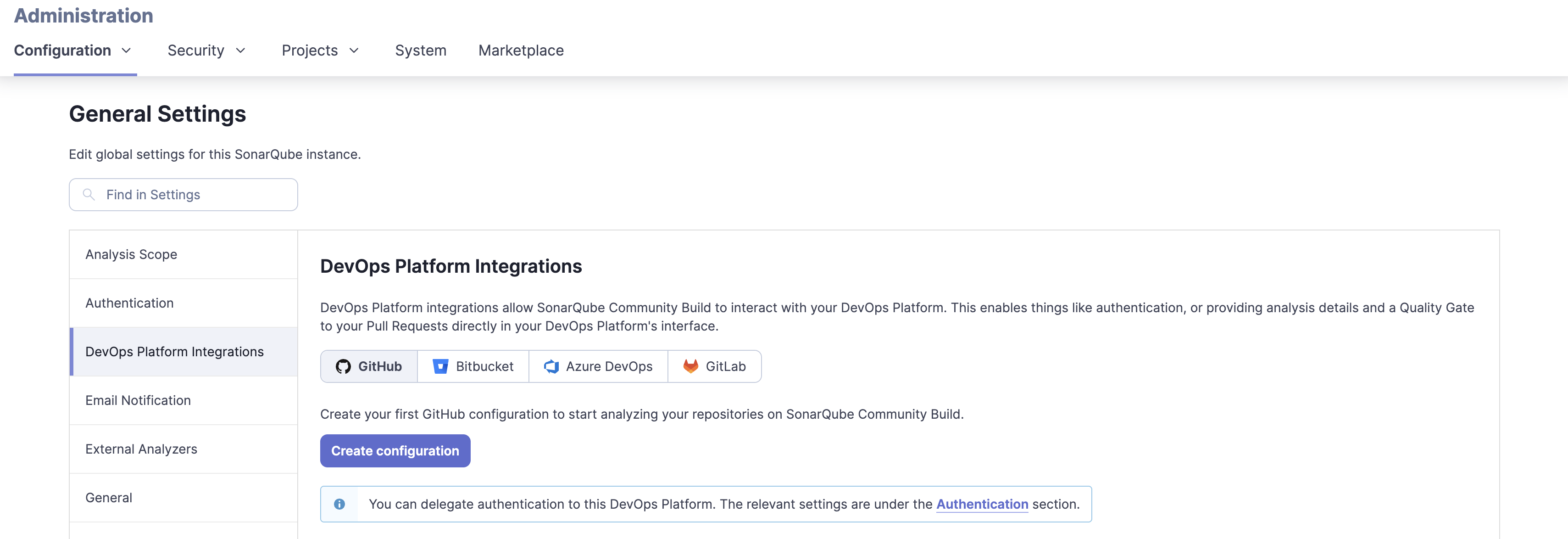
Administration > Configuration > DevOps Platform Integrations
GitLab>Create configuration
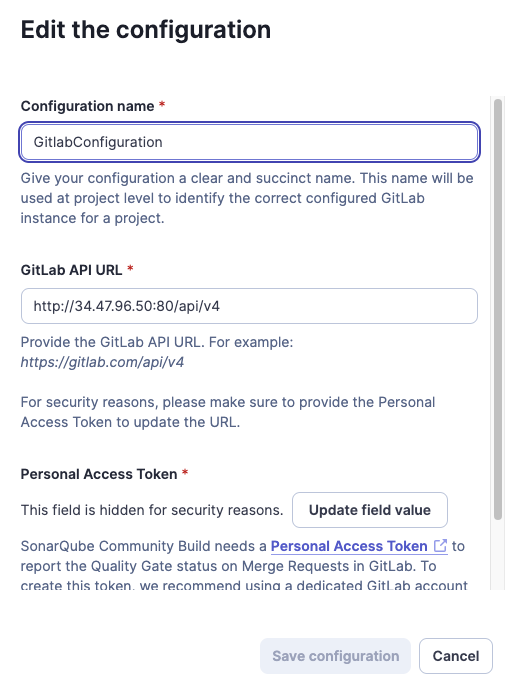
- Configuration name :: GitlabConfiguration
- GitLab API URL :: ${배포된_GitLab_URL}/api/v4
메인화면 > Create Proejct 클릭
- 연결할 GitLab 프로젝트 선택
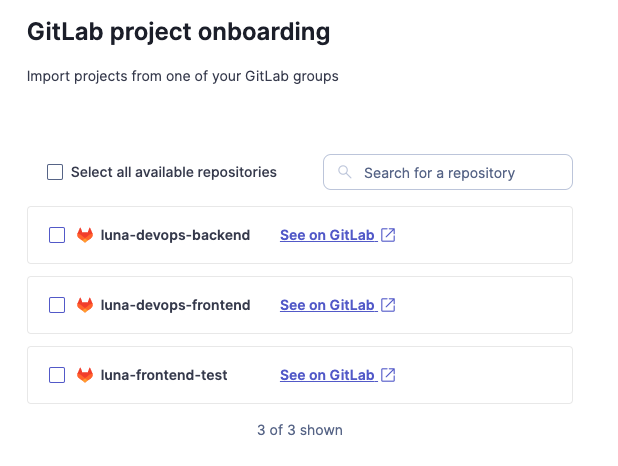
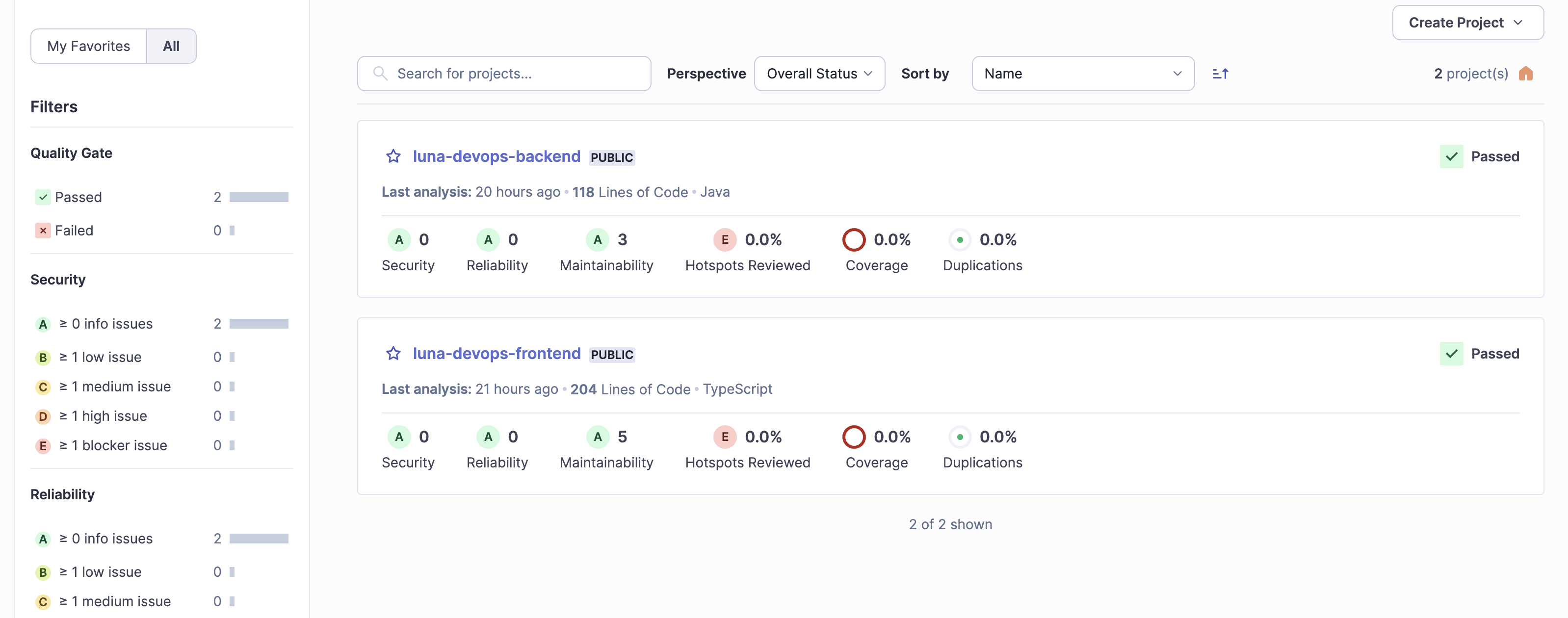
Import 후 메인화면
sonnar scanner 설치
# 1. 다운로드
wget https://binaries.sonarsource.com/Distribution/sonar-scanner-cli/sonar-scanner-cli-5.0.1.3006-linux.zip

# 2. 압축 해제
unzip sonar-scanner-cli-5.0.1.3006-linux.zip

# 3. 이동
sudo mv sonar-scanner-5.0.1.3006-linux /opt/sonar-scanner

# 4. 환경변수 설정
echo 'export PATH=$PATH:/opt/sonar-scanner/bin' >> ~/.bashrc
source ~/.bashrc

# (JAVA도 설치되어 있어야 함)
GitLab Runner 설치
# GitLab Runner 저장소 등록
curl -L https://packages.gitlab.com/install/repositories/runner/gitlab-runner/script.deb.sh | sudo bash

# GitLab Runner 설치
sudo apt-get install gitlab-runner -y
Project runner 발급
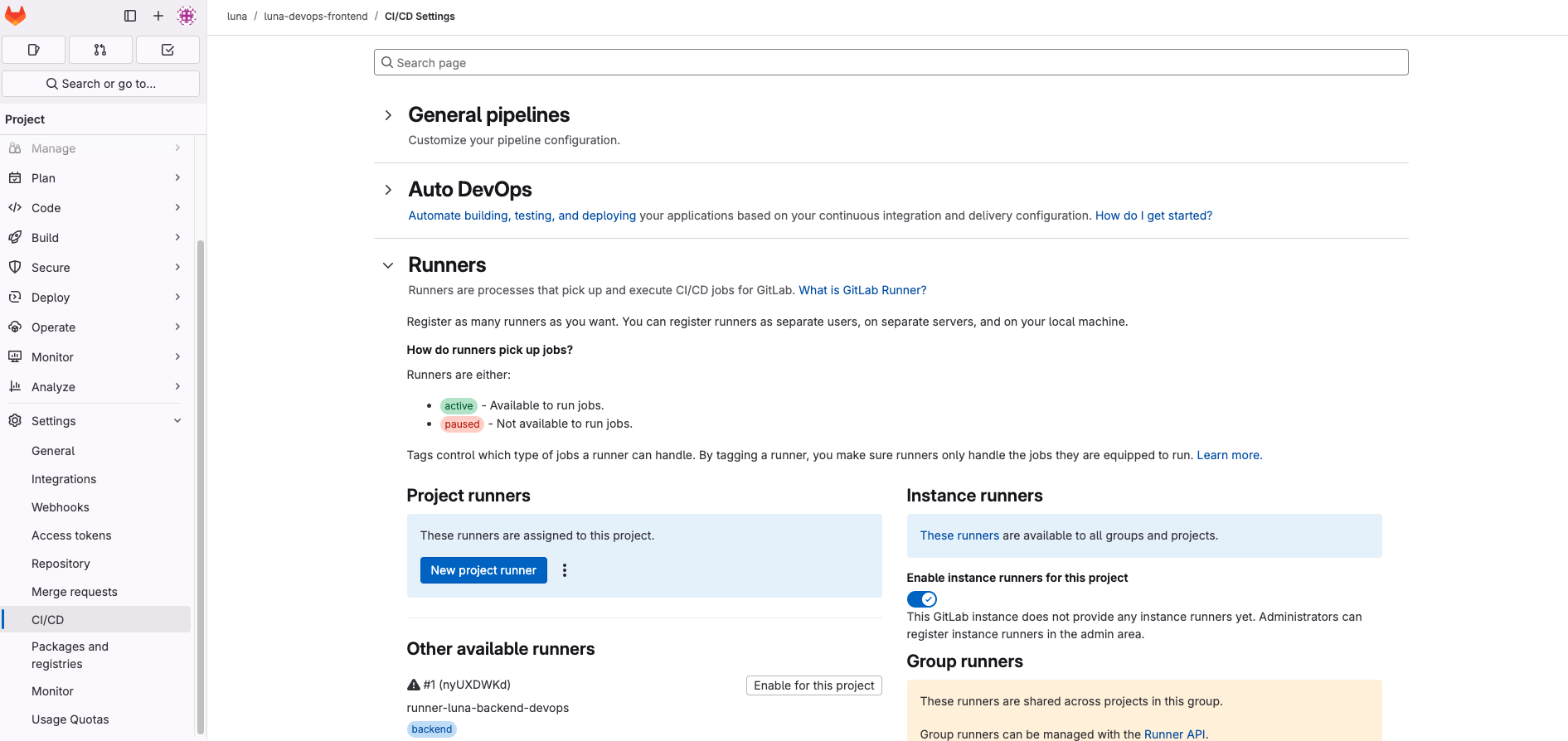
- GitLab 접속 후 ${계정} > ${프로젝트} > CI/CD Settings > Runners >
New Project runner클릭
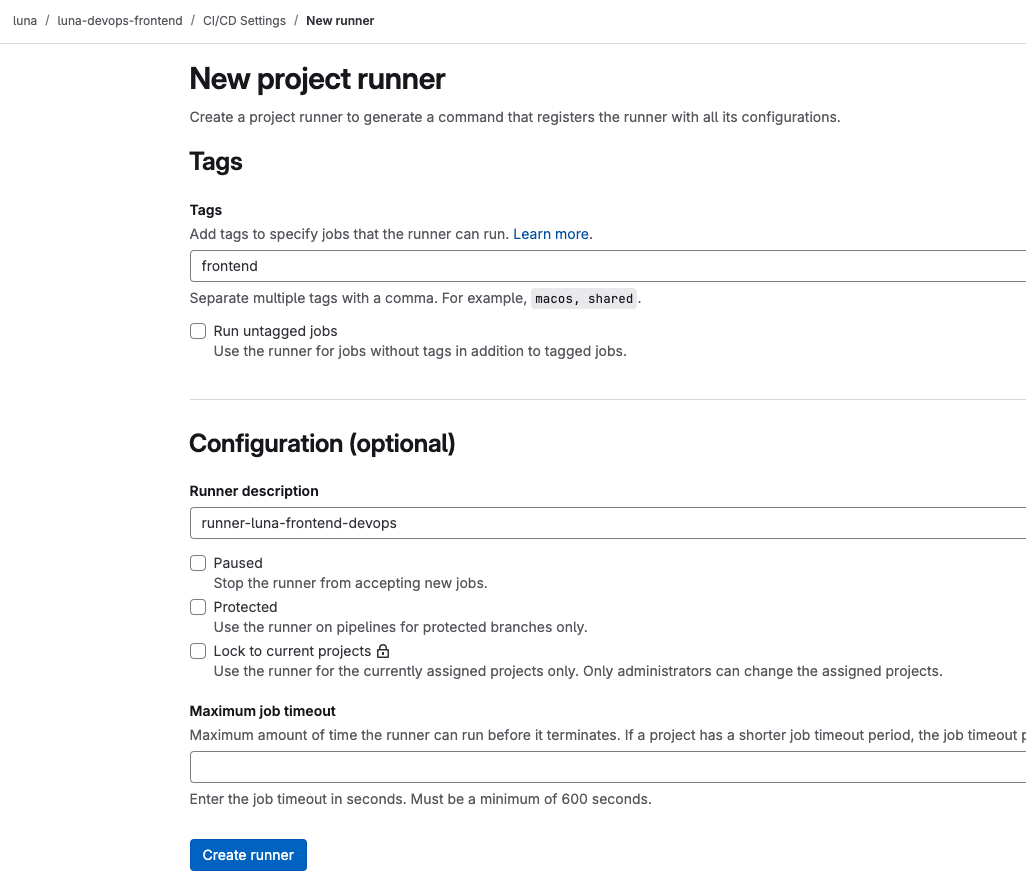
- tags ::
frontend - Runner description :: runner-luna-frontend-devops
Create runner클릭
vm에서 runner 등록
프로젝트 > CI/CD Settings > Register runner 화면으로 넘어감
- Platform :: Linux
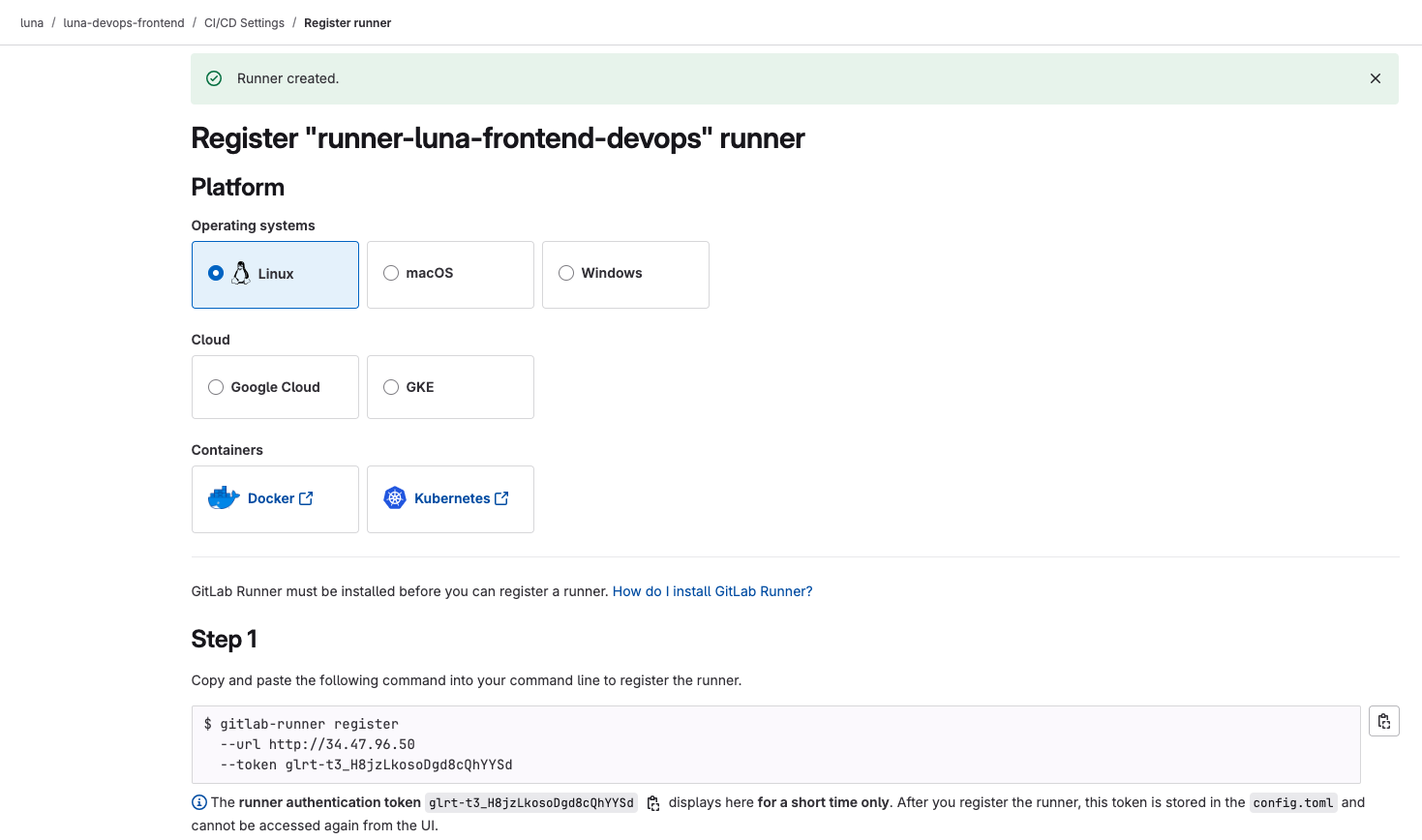
위의 명령어 복사해서 터미널에 붙여넣기
gitlab-runner register  --url http://34.47.96.50  --token glrt- ${token_value}
Runtime platform                                    arch=amd64 os=linux pid=142289 revision=ef334dcc version=17.10.1
WARNING: Running in user-mode.
WARNING: The user-mode requires you to manually start builds processing:
WARNING: $ gitlab-runner run
WARNING: Use sudo for system-mode:
WARNING: $ sudo gitlab-runner... - enter
- enter
- shell
Enter the GitLab instance URL (for example, https://gitlab.com/):
[http://34.47.96.50]: http://34.47.96.50/
Verifying runner... is valid                        runner=t3_H8jzLk
Enter a name for the runner. This is stored only in the local config.toml file:
[luna-dev-vm]: runner-luna-frontend-devops
Enter an executor: parallels, docker-windows, docker+machine, docker-autoscaler, kubernetes, instance, custom, shell, ssh, virtualbox, docker:
shell
Runner registered successfully. Feel free to start it, but if it's running already the config should be automatically reloaded!

Configuration (with the authentication token) was saved in "/home/ubuntu/.gitlab-runner/config.toml"
SonarQube token 발급 및 GitLab variables 적용
sonarqube token 발급
계정 > Security > Generate Tokens
- Name :: gitlab-token-backend
- Type :: Project Analysis Token
- Project :: ${프로젝트이름}

variables 세팅
luna > ${프로젝트} > CI/CD Settings
Varables
-
Developer :: check
-
Add variable클릭 -
Visible :: check
-
Expand variable reference :: check
-
key : SONAR_HOST_URL
-
value :: http://34.47.96.50:9002

- Masked :: check
- Expand variable reference :: check
- key : SONAR_HOST_URL
- value :: ${sonar-token-value}

runner 값 적용확인
cat .gitlab-runner/config.toml**concurrent = 1
check_interval = 0
connection_max_age = "15m0s"
shutdown_timeout = 0
[session_server]
session_timeout = 1800
[[runners]]
name = "luna-dev-vm"
url = "http://34.47.96.50"
id = 4
token = "${token_value}"
token_obtained_at = 2025-04-11T17:08:14Z
token_expires_at = 0001-01-01T00:00:00Z
executor = "shell"
[runners.cache]
MaxUploadedArchiveSize = 0
[runners.cache.s3]
[runners.cache.gcs]
[runners.cache.azure]
[[runners]]
name = "luna-dev-vm"
url = "http://34.47.96.50"
id = 5
token = "${token_value}"
token_obtained_at = 2025-04-12T06:22:26Z
token_expires_at = 0001-01-01T00:00:00Z
executor = "shell"
[runners.cache]
MaxUploadedArchiveSize = 0
[runners.cache.s3]
[runners.cache.gcs]
[runners.cache.azure]**아래 경로에 runner 값 재등록
sudo vim /etc/gitlab-runner/config.toml- ❓위의 경로에 runner 값을 재등록 하는 이유
왜 공식 가이드는
~/.gitlab-runner/config.toml같은 사용자 경로로 설정되는가?
공식 문서에서는 Runner를 서비스로 등록하지 않고,gitlab-runner를 "직접 실행"하는 경우gitlab-runner run을 터미널에서 직접 실행하는 개발 환경 기준 예제가 많음
이렇게 실행하면, Runner는 **현재 사용자의 홈 디렉토리 (gitlab-runner register gitlab-runner run~/.gitlab-runner/config.toml)를 사용해서 동작하지만 일반적으로는 서비스로 등록해서 자동 실행함
이렇게 하면 Runner는 시스템 서비스(GitLab Runner daemon로 동작하고, 이 서비스는 항상sudo gitlab-runner install sudo gitlab-runner start/etc/gitlab-runner/config.toml을 기본 경로로 삼음-
문서에서 로컬 개발/테스트용으로 보여줄 땐 직접 run →
~/.gitlab-runner/config.toml -
실무에서는 거의 대부분 서비스 설치 →
/etc/gitlab-runner/config.toml실행 방식 설정 파일 위치 비고 gitlab-runner run(직접 실행)~/.gitlab-runner/config.toml실험용/로컬 테스트 systemctl start gitlab-runner(서비스 실행)/etc/gitlab-runner/config.toml실무/자동화 환경 사용하는 설정파일 확인
-
ps aux | grep gitlab-runner실행해서 → 어떤 설정 파일 쓰는지 확인 가능 -
서비스 등록된 Runner를 쓰려면 →
sudo gitlab-runner register로 등록해야/etc/에 반영됨
-
runner 재시작
sudo systemctl restart gitlab-runnerCI Pipeline Code Example
frontend
sonar-project.properties
sonar.projectKey=luna_luna-devops-frontend_02c67b54-1c46-47db-8ad7-c7ec854e43a2
sonar.projectName=luna-devops-frontend
sonar.sources=src
#sonar.exclusions=**/node_modules/**,**/*.spec.ts,**/*.test.ts
sonar.javascript.lcov.reportPaths=coverage/lcov.info
sonar.qualitygate.wait=true
.gitlab-ci.yml
stages:
  - build-sonar

build-sonar:
  stage: build-sonar
  tags:
    - sonarqube
  cache:
    policy: pull-push
    key: "sonar-cache-$CI_COMMIT_REF_SLUG"
    paths:
      - "${SONAR_USER_HOME}/cache"
      - sonar-scanner/
  variables:
    JAVA_HOME: "/usr/lib/jvm/java-21-openjdk-amd64"
    PATH: "/opt/sonar-scanner/bin:/usr/lib/jvm/java-21-openjdk-amd64/bin:/usr/local/sbin:/usr/local/bin:/usr/sbin:/usr/bin:/sbin:/bin"
    SONAR_SCANNER_OPTS: "-Djava.home=/usr/lib/jvm/java-21-openjdk-amd64"

  script:
    - echo "✅ Java 확인"
    - java -version
    - echo "✅ SonarScanner 버전"
    - sonar-scanner -v
    - echo "✅ sonar-project.properties 내용 확인"
    - cat sonar-project.properties
    - echo "✅ sonar-scanner 실행"
    - sonar-scanner -Dsonar.host.url="$SONAR_HOST_URL" -Dsonar.login="$SONAR_TOKEN" -X

  allow_failure: true
  rules:
#    - if: $CI_PIPELINE_SOURCE == 'merge_request_event'
    - if: $CI_COMMIT_BRANCH == 'main'
backend
build.gradle.kts (luna-devops-backend)
plugins {
    id("org.springframework.boot") version "3.2.2"
    id("io.spring.dependency-management") version "1.1.4"
    id("java")
    id ("org.sonarqube") version "6.0.1.5171"
}

group = "org.example"
version = "1.0-SNAPSHOT"

repositories {
    mavenCentral()
}

dependencies {
    // **Spring Boot 기본 웹 기능 (REST API 개발)**
    implementation("org.springframework.boot:spring-boot-starter-web")

    // **JPA + Hibernate (데이터베이스 연동)**
    implementation("org.springframework.boot:spring-boot-starter-data-jpa")

    // **H2 데이터베이스 (In-Memory DB)**
    runtimeOnly("com.h2database:h2")

    // **Lombok (Getter, Setter, 생성자 자동 생성)**
    compileOnly("org.projectlombok:lombok")
    annotationProcessor("org.projectlombok:lombok")

    // **Spring Boot 테스트 (JUnit 포함)**
    testImplementation("org.springframework.boot:spring-boot-starter-test")
    testImplementation(platform("org.junit:junit-bom:5.10.0"))
    testImplementation("org.junit.jupiter:junit-jupiter")
}

tasks.test {
    useJUnitPlatform()
}

sonar {
    properties {
        property("sonar.projectKey", "luna_luna-devops-backend_b6a7eb17-6801-4fce-a381-7e55d34076df")
        property("sonar.projectName", "luna-devops-backend")
        property("sonar.qualitygate.wait", true)
    }
}

// ✅ SonarQube 실행 전에 테스트 자동 실행되게 설정 (선택)
tasks.named("sonarqube") {
    dependsOn("test")
}
.gitlab-ci.yml
stages:
  - build-sonar

build-sonar:
  stage: build-sonar
  tags:
    - sonarqube  # 해당 태그 가진 Runner가 있어야 함!
  cache:
    policy: pull-push
    key: "sonar-cache-$CI_COMMIT_REF_SLUG"
    paths:
      - "${SONAR_USER_HOME}/cache"
      - .gradle/
  variables:
    JAVA_HOME: "/usr/lib/jvm/java-21-openjdk-amd64"
    PATH: "/opt/sonar-scanner/bin:/usr/lib/jvm/java-21-openjdk-amd64/bin:/usr/local/sbin:/usr/local/bin:/usr/sbin:/usr/bin:/sbin:/bin"
    SONAR_SCANNER_OPTS: "-Djava.home=/usr/lib/jvm/java-21-openjdk-amd64"
    GRADLE_OPTS: "-Dorg.gradle.daemon=false"

  script:
    - echo "✅ Java 확인"
    - java -version
    - echo "✅ Gradle 테스트 실행"
    - ./gradlew test
    - echo "✅ SonarQube 분석 시작"
    - ./gradlew sonarqube -Dsonar.host.url="$SONAR_HOST_URL" -Dsonar.login="$SONAR_TOKEN"

  allow_failure: true
  rules:
    - if: $CI_COMMIT_BRANCH == 'main'
