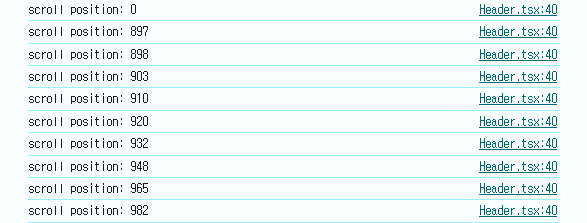
프로젝트의 Header 컴포넌트에 애니메이션 효과를 주기위해서 스크롤의 Y축 이동방향에 따라 감지할 수 있는 기능을 추가하기로 했다.
✅스크롤을 내릴땐 Header가 미노출되고 다시 올릴경우엔 Header가 노출
scroll 이벤트 최적화 전
const Header = ({ isLoading }: Props) => {

  const [visible, setVisible] = useState(true);
  const positionRef = useRef(window.scrollY);

  const throttleScroll = () => {
    const currentScrollY = window.scrollY;
    console.log(`scroll position: ${positionRef.current}`);
    if (currentScrollY > positionRef.current) {
      setVisible(false);
    } else {
      setVisible(true);
    }
    positionRef.current = currentScrollY;
  };

  ...
useRef를 통해 window.scrollY의 위치를 저장하고 이전 스크롤의 위치를 비교하여 state에 boolean값을 저장한뒤 다시 현재 스크롤의 위치를 저장한다.
    <header
      className={`Header ${themeContext?.darkMode ? "dark" : "light"} ${
        visible ? "visible" : "hidden"
      }`}
    >
&.visible {
transform: translateY(0);
transition: transform 0.1s ease-in-out;
}
&.hidden {
transform: translateY(-100%);
transition: transform 0.1s ease-in-out;
}state의 boolean값에 따라 Header의 className값을 변경하여 css효과를 적용해준다.
하지만
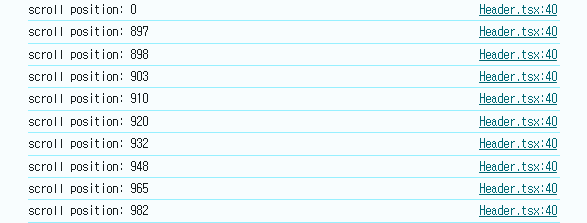
scroll 이벤트는 정상적으로 동작하여도 로그를 확인해보면 스크롤 시마다 엄청난 양의 이벤트가 발생하는 것을 확인할 수 있었다.
throttle을 사용한 최적화
throttle은 JavaScript에서 이벤트를 제어하는 방식으로 이벤트를 일정 주기마다 처리하여 이벤트를 제어하며 scroll 이벤트처리나 무한 스크롤 구현 등에 사용된다.
import { throttle } from "lodash";

...

const Header = ({ isLoading }: Props) => {

  const throttleScroll = useMemo(() => {
    return throttle(() => {
      const currentScrollY = window.scrollY;
      console.log(`scroll position: ${positionRef.current}`);
      if (currentScrollY > positionRef.current) {
        setVisible(false);
      } else {
        setVisible(true);
      }
      positionRef.current = currentScrollY;
    }, 200);
  }, [positionRef]);

  useEffect(() => {
    window.addEventListener("scroll", throttleScroll);
    return () => {
      window.removeEventListener("scroll", throttleScroll);
    };
  }, [throttleScroll]);

  ...
lodash라이브러리를 통해 throttle속성을 import하여 throttleScroll 함수의 호출 횟수를 제어해주고 useMemo()를 사용하여 throttleScroll 값을 메모이제이션 해준다.
➡️ useMemo()를 통해 scroll 시마다 throttleScroll이 호출되는 것을 방지
의존성배열로 포함시 useMemo() 혹은 useCallback()을 사용하지 않는다면 다음과 같은 eslint 경고문구를 확인하게 된다.
"throttleScroll 함수가 매 렌더링마다 새로 정의되기 때문에 useEffect 훅의 의존성이 변경됩니다. 이를 해결하기 위해 throttleScroll 함수를 useCallback 훅으로 감싸야 합니다"

⬇️⬇️⬇️
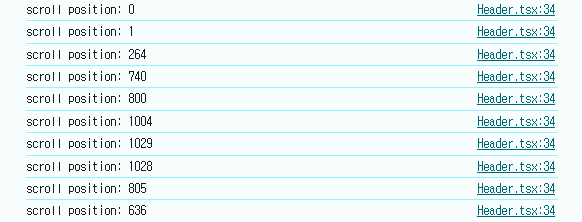
throttle을 사용한 뒤에는 사용전과 다르게 이벤트 발생이 제어한 시간에 따라 발생되는 것을 확인할 수가 있었다.