ES6에서 처음 등장한 Classes 속성에 대해 R아보기 전에 간단하게 확인할 것이 있다.
const maetamong = {
	name: 'Maetamong',
  	normal: function () {
    	console.log(this.name);
    },
  	arrow: () => {
    	console.log(this.name);
    }
}

maetamong.normal();
maetamong.arrow();
normal은 일반함수, arrow는 화살표 함수가 작성되어 있다.
객체데이터 내부에서 일반함수를 사용할 때, 콜론기호와 function 키워드를 생략해 줄 수 있다.
const maetamong = {
	name: 'Maetamong',
  	normal() {
    	console.log(this.name);
    },
  	arrow: () => {
    	console.log(this.name);
    }
}

maetamong.normal();
maetamong.arrow();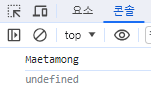
참고로 화살표 함수가 undefined가 뜨는 이유는 화살표 함수와 일반 함수의 this 동작 방식이 다르기 때문이다.
일반함수에서의 this는 호출된 메서드를 호출한 객체를 가리키고,
화살표 함수에서는 this가 정적으로 결정되어 주변 스코프(변수와 함수의 유효 범위)의 this값을 상속받기 때문이다.
현재 화살표 함수에서의 this.name은 상위 스코프인 전역 객체 window를 가리키기 때문에 name이 정의되지 않아 undefined가 뜨게 되는 것이다.
기존 Javascript 생성자함수
// User -> 생성자 함수
// (first, last) -> 밖에서 인수를 받아와 내부에서 사용하는 매개변수
function User(first, last){
  	// this.name에 first,last 매개변수를 할당
	this.firstName = first;
  	this.lastName = last;
}

User.prototype.getFullName = function() {
	return `${this.firstName} ${this.lastName}`
}

// 생성자 함수가 실행되면 변수의 인스턴스(하나의 객체 데이터)로 정보가 들어감
const maetamong = new User('Maetamong', 'Kim');
const leo = new User('Leo', 'Park');
const dabang = new User('Dabamg', 'Beak');

console.log(maetamong);
console.log(leo.getFullName());
console.log(dabang.getFullName());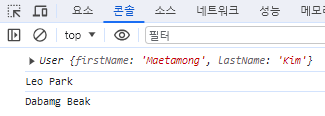
maetamong은 User의 객체데이터 출력
나머지 두 개는 getFullName의 메소드를 실행해 출력
class 사용
자바스크립트는 prototype기반의 프로그래밍 언어.
좀 더 안정적인 다른 객체지향 프로그래밍 언어들의 영향을 받아 Class라는 개념을 흉내내 새로운 문법을 ES6에서 제공하기 시작했다.
class User {
	//내부함수사용
  	constructor(first, last) {
    	this.firstName = first;
      	this.lastName = last;
    }
  	// prototype 안써도 됨^0^/
  	getFullName() {
    	return `${this.firstName} ${this.lastName}`
    }
}


const maetamong = new User('Maetamong', 'Kim');
const leo = new User('Leo', 'Park');
const dabang = new User('Dabamg', 'Beak');

console.log(maetamong);
console.log(leo.getFullName());
console.log(dabang.getFullName());
class키워드를 사용해 생성자 함수를 만들면 prototype를 따로 쓰지 않아도 되고, 코드도 간결해진다!

내가보려고만든벨로그