Three.js Raycasting
배경
네이버 랩스에서 3D 웹 개발을 하면서 여러 objects를 선택하고 수정하는 기능을 개발을 진행하였습니다. 3D 환경에서 objects를 단순히 시각화 뿐만 아니라, objects와 상호작용은 필수적입니다. 그러면서 Raycasting을 정말 많이 사용하게되었습니다. 이 글은 Raycasting을 정확히 이해하고 사용하기 위해서 작성하였습니다.
참고
https://threejs.org/docs/#api/en/core/Raycaster
https://github.com/gkjohnson/three-mesh-bvh
https://codesandbox.io/p/sandbox/r3f-mesh-bvh-sri15
https://threejs.org/examples/webgl_raycaster_bvh.html
Raycasting이란?
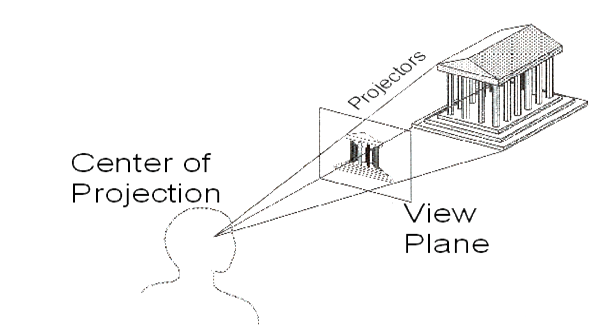
Ray를 특정 방향으로 Casting
특정 시작점(Origin)에서 특정 방향(Direction)으로 Ray를 생성하여
3D Scene에 배치된 객체와 Intersect 여부를 감지하는 기술
Raycasting 용도
- 객체 선택
- 충돌 감지
- 특정 지점의 data(normal vector, UV coordinate)
- 경로 탐색
- UI 버튼
Three.js에서 Raycasting 사용법
Raycasting을 여러 경우에 사용이 가능하다.
이번 예제에서는 Mouse 위치에서 Raycasting이 되는 것을 소개
- Raycaster 생성
import * as THREE from 'three';

// Raycaster 인스턴스 생성
const raycaster = new THREE.Raycaster();
- Mouse 이벤트 처리 및 NDC 변환 (Normalized Device Coordinates)
// 마우스 좌표를 저장할 Vector2 인스턴스 생성
const mouse = new THREE.Vector2();

function onMouseMove(event) {
    // 마우스의 클라이언트 좌표 (픽셀 단위)를 가져옵니다.
    // event.clientX: 뷰포트 기준 X 좌표
    // event.clientY: 뷰포트 기준 Y 좌표

    // 클라이언트 좌표를 NDC(-1.0 ~ +1.0)로 변환합니다.
    // X축: (마우스 X / 뷰포트 너비) * 2 - 1
    // Y축: -(마우스 Y / 뷰포트 높이) * 2 + 1  <-- Y축은 Three.js와 웹 표준이 반대이므로 -를 붙여줍니다.
    mouse.x = (event.clientX / window.innerWidth) * 2 - 1;
    mouse.y = -(event.clientY / window.innerHeight) * 2 + 1;
}

// 'mousemove' 이벤트를 리스닝하여 마우스 위치를 추적합니다.
window.addEventListener('mousemove', onMouseMove, false);
Y축에 -인 이유
웹 브라우저 화면 좌표계는 왼쪽 상단이 0,0이고 오른쪽 아래가 1,1이다.
즉, Y값이 아래로 갈수록 증가한다.
Three.js에서는 왼쪽 하단이 -1,-1이고 오른쪽 상단이 1,1이다.
따라서 Y축 좌표의 경우 웹 브루오저와 Three.j의 방향 차이가 있으므로 -1을 곱해준다.
- Raycaster 업데이트 및 교차 감지
교차 감지하는 과정은 requestAnimationFram 루프 내부에서 매 프레임 실행되거나, 특정 이벤트 발생 시 실행해준다.
function onMouseMove(event) {
  	mouse.x = (event.clientX / window.innerWidth) * 2 - 1;
    mouse.y = -(event.clientY / window.innerHeight) * 2 + 1;

  	 // 1. Raycaster 업데이트
    // mouse (NDC 좌표)와 camera를 사용하여 광선의 origin과 direction을 설정합니다.
    raycaster.setFromCamera(mouse, camera);

  	// 2. 3D 객체들과의 교차 감지
    // intersectObjects(objects, recursive):
    // - objects: 교차를 감지할 THREE.Object3D 객체들의 배열입니다.
    //            scene.children을 직접 사용하는 것보다, 인터랙션이 필요한 특정 객체들만 모아둔 배열을 전달하는 것이 성능에 좋습니다.
    // - recursive: (선택 사항, 기본값 false) true로 설정하면 objects 배열 내의 각 객체들의 자식 객체들까지 재귀적으로 검사합니다.
    const intersects = raycaster.intersectObjects(scene.children, true); // scene의 모든 자식 객체를 재귀적으로 검사
}
IntersectObjects()
IntersectObjects() 메서드는 교차되는 모든 객체에 대한 정보를 담은 배열을 반환한다.
거리가 가까운 순서대로 정렬된다.
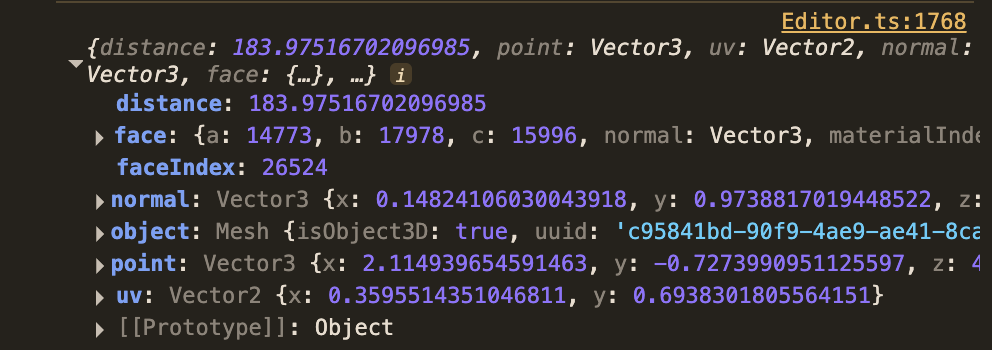
intersection 객체
intersection 객체는 여러 유용한 정보를 포함한다.
- distance
- point
- face
- faceIndex
- object
- uv
- instanceId
Three.js Raycaster 객체
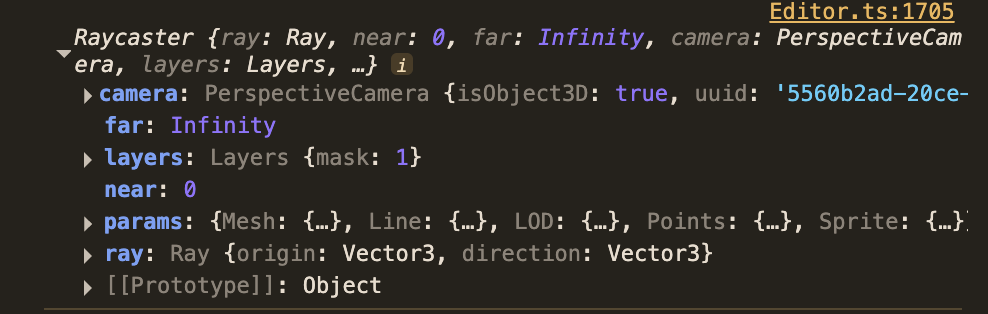
Raycaster 주요 속성
- ray
- Three.Ray 객체- orign과 Direction(normalized)으로 구성
- near
- intersection을 감지할 최소 거리- default value : 0
- far
- intersection을 감지할 최대 거리- default value : INFINITY
Raycaster 주요 메소드
- set(origin, direction)
- 카메라 orgin에서가 아닌 특정 위치에서 raycasting하기에 유용
const origin = new THREE.Vector3(0, 0, 0); // (0,0,0)에서 시작
const direction = new THREE.Vector3(0, 1, 0).normalize(); // Y축 방향으로
raycaster.set(origin, direction);- setFromCamera(coords, camera)
- coords: 화면 상의 2D 좌표 (THREE.Vector2). 이 좌표는 NDC(Normalized Device Coordinates)여야 합니다. 즉, X는 -1(화면 왼쪽)에서 1(화면 오른쪽)까지, Y는 -1(화면 아래쪽)에서 1(화면 위쪽)까지의 범위
- camera: 광선을 쏠 기준이 되는 THREE.Camera 객체 (예: PerspectiveCamera, OrthographicCamera).
// 마우스 이벤트로부터 클라이언트 좌표(event.clientX, event.clientY)를 얻은 후,
// 이를 NDC로 변환합니다.
const mouse = new THREE.Vector2();
function onMouseMove(event) {
    mouse.x = (event.clientX / window.innerWidth) * 2 - 1;
    mouse.y = -(event.clientY / window.innerHeight) * 2 + 1; // Y축은 화면 하단이 -1, 상단이 +1
}

// 애니메이션 루프 또는 마우스 이벤트 핸들러 내부에서
raycaster.setFromCamera(mouse, camera);
PerspectiveCamera와 OrthographicCamera의 ray 계산 방식
- PerspectiveCamera: origin은 카메라 위치,
- OrthographicCamera: origin은 coords에 해당하는 카메라 시야 평면 상의 3D 지점이 되며, direction은 카메라가 바라보는 방향과 동일합니다.
- intersectObject(object, recursive)
- object: intersection 검사할 단일 THREE.Object3D(Mesh, Group)
- recursive: default value는 false이며, true인 경우 Group 내부의 모든 Mesh에 대해 모두 검사 - intersectObjects(objects, recursive)
- objects: intersection 검사할 THREE.Object3D 배열
- recursive: default value는 false이며, true인 경우 그 객체의 children도 모두 검사
intersectObject, IntersectObjects 반환 값
intersection 검사 이후, intersection되는 객체에 대한 정보를 배열에 담아서 제공해준다.
- ray의 origin에서 거리가 가까운 순서대로 반환
- intersection 되는 객체가 없는 경우 빈 배열 반환
반환되는 객체의 속성
https://threejs.org/docs/#api/en/core/Raycaster.intersectObject
distance
distanceToRay
point
face
faceIndex
object
uv
uv1
normal
instanceId
Raycasting 최적화
- Intersection 검사 대상 최소화
- 가장 효율적인 최적화 방법
- scene.children이 아닌 Raycasting할 객체들만 따로 관리 필요 - recursive 옵션
- 그룹(Group)으로 묶인 복잡한 모델이나 계층 구조가 깊은 경우에 유용하지만, 그만큼 계산량이 증가 - Raycasting 빈도
- 매 frame마다 실행하면 효율적이지 못하다.
- mouse click, mouse move event 등에 적용하면 계산량이 줄어든다.
- Throttling, Debouncing을 적용해서 호출 빈도를 줄인다. - near, far 속성 활용
- 공간 분활 자료구조 활용
- BVH 활용 (관련 내용) - 객체 유형에 따른 최적화
- InstancedMesh의 경우, Raytracing을 한번만 계산한다. 결과로 반환되는 intersection.instanceId를 통해 어떤 인스턴스가 교차되었는지 알 수 있다.
- Line, Points의 경우, aycaster의 params.Line.threshold 및 params.Points.threshold 속성을 사용하여 교차 감지 '반경'을 조절 가능