1. issue
Dialogflow를 이용한 chatbot만들기를
https://blog.jscrambler.com/build-a-chatbot-with-dialogflow-and-react-native/ 블로그를 보며 따라하는 도중
Once in the service account, find the account named Dialogflow Integrations, and scroll to the right until you see the three dots. Click on this menu, and click Create Key.
이 부분이 달라서 당황했다.
2. issue
직접 CREATE SERVICE ACCOUNT을 생성해야한다. 권한 설정에서 Dialogflow Client API를 주면 된다.
Service Account Setup (GCP)에 자세한 과정이 나와있다.
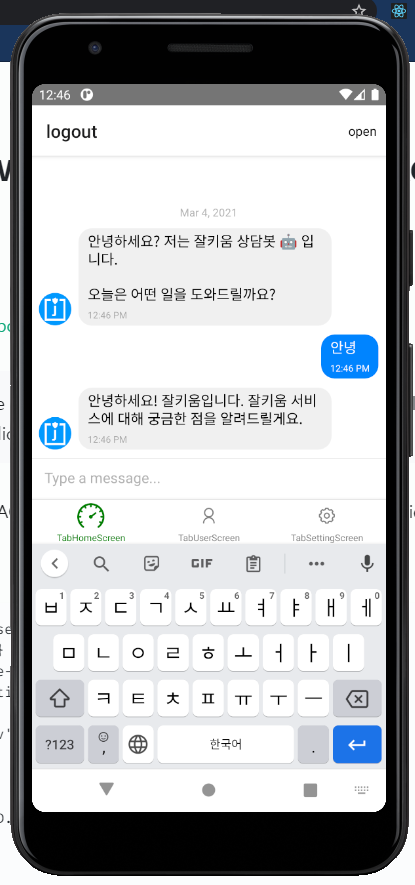
account를 생성하니 다음과 같이 chatbot이 나타났다.
import React, {useState, useEffect, useCallback} from 'react';
import {StyleSheet, Text, View, Image} from 'react-native';
import {GiftedChat} from 'react-native-gifted-chat';
import {Dialogflow_V2} from 'react-native-dialogflow';

import {dialogflowConfig} from '../env';
const BOT_USER = {
  _id: 2,
  name: 'FAQ Bot',
  avatar: 'https://i.imgur.com/7k12EPD.png',
};
let welcomeMessage = {
  _id: 1,
  text: `안녕하세요? 저는 잘키움 상담봇 🤖 입니다.\n\n오늘은 어떤 일을 도와드릴까요?`,
  createdAt: new Date(),
  user: BOT_USER,
};
const TabHomeScreen = ({navigation, route}) => {
  const [messages, setMessages] = useState([welcomeMessage]);
  console.log(messages);
  useEffect(() => {
    Dialogflow_V2.setConfiguration(
      dialogflowConfig.client_email,
      dialogflowConfig.private_key,
      Dialogflow_V2.LANG_KOREAN,
      dialogflowConfig.project_id,
    );
  }, []);

  const handleGoogleResponse = (result) => {
    let text =
      result.queryResult.fulfillmentText ||
      '제가 이해를 잘 못한 것 같아요. 다시 한번 말씀해주시겠어요?';
    // console.log('result:', result.queryResult.fulfillmentText);
    sendBotResponse(text);
  };

  const sendBotResponse = (text) => {
    let msg = {
      _id: messages.length + 2,
      text,
      createdAt: new Date(),
      user: BOT_USER,
    };

    setMessages((previousMessages) => GiftedChat.append(previousMessages, msg));
  };

  const onSend = useCallback(
    (newMessage = []) => {
      setMessages((previousMessages) =>
        GiftedChat.append(previousMessages, newMessage),
      );

      console.log('send:', newMessage[0].text);
      Dialogflow_V2.requestQuery(
        newMessage[0].text,
        (result) => handleGoogleResponse(result),
        (error) => console.dir(error),
      );
    },
    [messages],
  );

  return (
    <View style={{flex: 1, backgroundColor: '#fff'}}>
      <GiftedChat
        messages={messages}
        onSend={(messages) => onSend(messages)}
        user={{
          _id: 1,
        }}
      />
    </View>
  );
};
const styles = StyleSheet.create({});
export default TabHomeScreen;

2개의 댓글

Building a chatbot using Dialogflow and React Native provides a great user experience, but it’s important to account for the Cost to Build a Chatbot. Expenses typically vary based on features such as natural language understanding, multi-platform support, and backend integrations. Careful consideration of these elements will help you stay on budget while delivering a high-quality solution.
Building a chatbot using Dialogflow and React Native offers a powerful combination for creating interactive and user-friendly experiences. However, understanding the cost of building a chatbot is crucial for proper planning. Costs can vary based on features like natural language processing, integration complexity, and platform support. Careful consideration of these factors will help ensure a successful and cost-effective chatbot project.