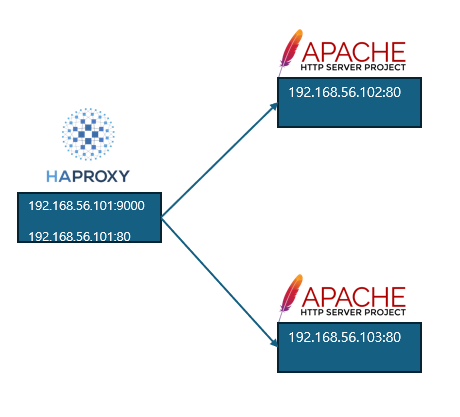
Slave 1 - Haproxy 설치
vagrant@slave1:~$ hostname -I
10.0.2.15 192.168.56.101 172.17.0.1 192.168.140.192
vagrant@slave1:~$ sudo apt-get install haproxy -y
vagrant@slave1:~$ haproxy -v
HA-Proxy version 2.0.33-0ubuntu0.1 2023/10/31 - https://haproxy.org/
vagrant@slave1:~$ sudo systemctl start haproxy
vagrant@slave1:~$ sudo systemctl enable haproxy
Haproxy 설정
sudo vi /etc/haproxy/haproxy.cfg
listen stats
    bind :9000
    stats enable
    stats realm Haproxy\ Statistics
    stats uri /stat
    stats auth admin:admin

frontend www
    bind *:80
    option forwardfor
    default_backend servers

backend servers
    balance roundrobin
    server server1      192.168.56.102:80 check
server server2 192.168.56.103:80 check// 상태 확인
vagrant@slave1:~$ systemctl status haproxy.service
● haproxy.service - HAProxy Load Balancer
     Loaded: loaded (/lib/systemd/system/haproxy.service; enabled; vendor preset: enabled)
     Active: active (running) since Sun 2024-12-22 09:49:04 UTC; 3min 29s ago
       Docs: man:haproxy(1)
             file:/usr/share/doc/haproxy/configuration.txt.gz
    Process: 113653 ExecStartPre=/usr/sbin/haproxy -Ws -f $CONFIG -c -q $EXTRAOPTS (code=exited, status=0/SUCCESS)
   Main PID: 113671 (haproxy)
      Tasks: 2 (limit: 1048)
     Memory: 34.6M
     CGroup: /system.slice/haproxy.service
             ├─113671 /usr/sbin/haproxy -Ws -f /etc/haproxy/haproxy.cfg -p /run/haproxy.pid -S /run/haproxy-master.sock
             └─113673 /usr/sbin/haproxy -Ws -f /etc/haproxy/haproxy.cfg -p /run/haproxy.pid -S /run/haproxy-master.sock

Dec 22 09:49:04 slave1 systemd[1]: Stopped HAProxy Load Balancer.
Dec 22 09:49:04 slave1 systemd[1]: Starting HAProxy Load Balancer...
Dec 22 09:49:04 slave1 haproxy[113671]: Proxy stats started.
Dec 22 09:49:04 slave1 haproxy[113671]: Proxy stats started.
Dec 22 09:49:04 slave1 systemd[1]: Started HAProxy Load Balancer.
Dec 22 09:49:04 slave1 haproxy[113671]: [NOTICE] 356/094904 (113671) : New worker #1 (113673) forked
Dec 22 09:49:04 slave1 haproxy[113671]: Proxy www started.
Dec 22 09:49:04 slave1 haproxy[113671]: Proxy www started.
Dec 22 09:49:04 slave1 haproxy[113671]: Proxy servers started.
Dec 22 09:49:04 slave1 haproxy[113671]: Proxy servers started.
Slave 2 - 아파치 설치, html 편집
vagrant@slave1:~$ sudo systemctl restart haproxy

vagrant@slave2:~$ hostname -I
10.0.2.15 192.168.56.102 172.17.0.1 192.168.140.64
vagrant@slave2:~$ sudo apt-get install apache2 -y

vagrant@slave2:~$ sudo vi /var/www/html/index.html
102
Slave 3 - 아파치 설치, html 편집
vagrant@slave3:~$ hostname -I
10.0.2.15 192.168.56.103 172.17.0.1 192.168.77.0
vagrant@slave3:~$ sudo apt-get install apache2 -y

vagrant@slave3:~$ sudo vi /var/www/html/index.html
103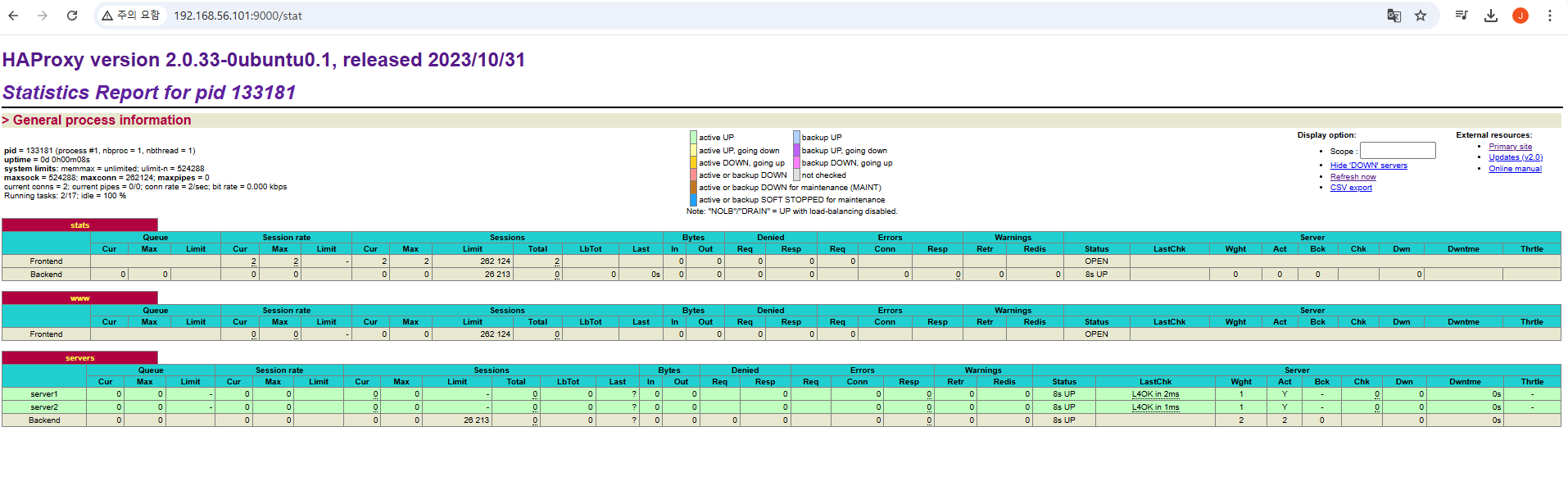
삭제
Haproxy 삭제
// stop
service haproxy stop

// list
vagrant@slave3:/var/www/html$ sudo apt list --installed | grep haproxy

WARNING: apt does not have a stable CLI interface. Use with caution in scripts.

haproxy/focal-updates,now 2.0.33-0ubuntu0.1 amd64 [installed]

// 삭제
sudo apt-get purge haproxy/focal-updates
아파치 웹서버 삭제
service apache2 stop
apt-get remove apache2*
apt-get --purge remove apache2*
apt-get autoremove

service apache-htcacheclean stop
apt-get remove apache*
apt-get --purge remove apache*
apt-get autoremove

apt update
apt upgrade
khagor