[1886px] vanilla JS+to do app
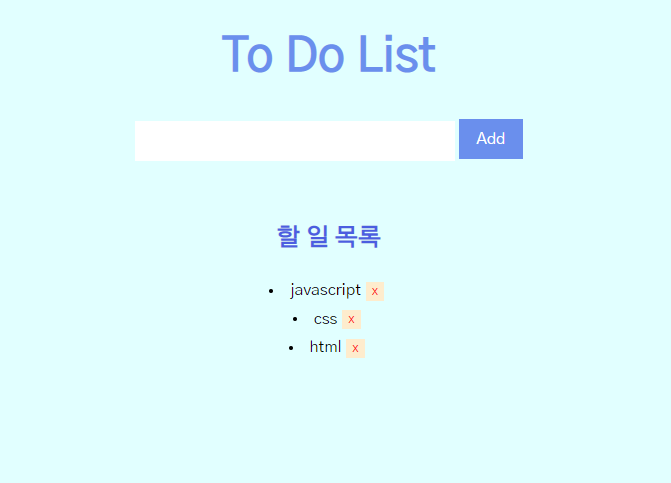
html
<!DOCTYPE html>
<html lang="en">
  <head>
    <meta charset="UTF-8" />
    <meta name="viewport" content="width=device-width, initial-scale=1.0" />
    <title><!--TO-DO APP--></title>
    <link rel="preconnect" href="https://fonts.googleapis.com">
    <link rel="preconnect" href="https://fonts.gstatic.com" crossorigin>
    <link href="https://fonts.googleapis.com/css2?family=Gothic+A1&display=swap" rel="stylesheet">
    <link rel="stylesheet" href="style.css" />
  </head>
  <body>
    <h1>To Do List</h1>
    <header>
        <input id="Input" type="text" placeholder="할 일을 입력하세요"/>
        <button type="submit" id="add-button" onClick="addToDo();">Add</button>
    </header>
    <section>
      <h2>할 일 목록</h2>
      <u1 id="list"></u1>
    </section>
  </body>
  <script src="script.js"></script>
</html>
javascript
const Input= document.getElementById("Input");
const addButton= document.getElementById("add-button");
const toDoList=document.getElementById("list");

function addToDo() {
    if(Input.value!=null){
        const li=document.createElement("li");
        const delBtn=document.createElement("button");
        const span =document.createElement("span");
        delBtn.className="del-btn";
        delBtn.textContent="x";
        span.textContent=Input.value;
        li.appendChild(span);
        li.appendChild(delBtn);
        toDoList.appendChild(li);
        delBtn.addEventListener("click", delToDo);
        span.addEventListener("click", toggle);
        Input.value=" ";
    }
}

function delToDo(event) {
    var remove = event.target.parentNode;
    var parentNode=remove.parentNode;
    parentNode.removeChild(remove);
}

function toggle(event){
    if (event.target.style.textDecoration !=="line-through"){
        event.target.style.textDecoration ="line-through";
    } else{
        event.target.style.textDecoration ="none";
    }
}
css
html,
body {
  background-color: #E0FFFF;
  margin: 0;
  text-align:center;
}
h1 {
  margin: 2rem;
  font-size: 3rem;
  color:	#6495ED;
}

header {
  width:100%;
  height:5rem;
}

#Input{
  width: 20rem;
  height: 2.5rem;
  border-width: 0.2rem;
  border-color:	#6495ED;
  border:2rem;
}

#add-button {
  font-size: 1rem;
  width: 4rem;
  height:2.5rem;
  color: #ffffff;
  border: 0;
  background-color:	#6495ED;
}

#list {
  font-size: 1rem;
  width: 1.5rem;
}

h2 {
  margin: 1.5rem;
  color: #4169E1;
}
.del-btn {
  margin:0.3rem;
  background-color:	#FFEBCD;
  color:red;
  border: 0.2rem;
}

* {
  box-sizing: border-box;
  margin: 0;
  font-family: 'Gothic A1', sans-serif;
}
어려웠던 점

원인) toDoList가 null이어서 생긴 오류
->엘리먼트를 찾는데 실패함
해결) html 코드를 다시 확인하고 list를 toDoList로 쓴 것을 수정
생각해볼 질문
-
DOM은 무엇이고, DOM 조작은 어떻게 하는 것일까요?
DOM(문서 객체 모델)은 HTML 문서에 접근하기 위한 일종의 인터페이스이다. DOM은 tree형식으로 문서 내의 모든 요소를 정의하고 각각의 요소에 접근하는 방법을 제공한다. -
변수명은 어떻게 짓는 것이 좋을까요?
1) 변수가 어디에 사용되는지 명확하게 설명할수록 좋다.
2) 기억하기 쉬워야 하므로 너무 길어선 안된다. -
git commit 단위를 기능별로 쪼개는 이유는 무엇일까요?
기능 단위로 저장해야 수정하기 더 쉽기 때문이다. -
코드 포매터를 사용하는 이유는 무엇일까요?
코드 포매터란 코딩 작성 규칙에 따라 코드를 알아서 정리해주는 프로그램이다. 코드 포매터를 사용하면 코드의 가독성이 높아져 다른 사람들과 협업할 때 유용하다. -
시맨틱 태그는 무엇이고 왜 사용하는 걸까요?
시맨틱 태그란 그 이름만으로도 의미를 전달할 수 있는 태그이다. 이름만으로 의미를 대강 전달할 수 있기 때문에 다른 사람들도 코드를 더 잘 이해할 수 있고 협업할 때도 편리하다.
