
option
사용자가 선택적으로 선택할 수 있는 부울 옵션을 제공하세요.

option(<variable> "<help_text>" [value])
message
메시지를 기록합니다.

    message([<mode>] "message text" ...)
    message(STATUS "Looking for someheader.h") if(checkSuccess) message(STATUS "Looking for someheader.h - found") else() message(STATUS "Looking for someheader.h - not found") endif()
    message(<checkState> "message" ...)
    message(CHECK_START "Finding my things") list(APPEND CMAKE_MESSAGE_INDENT " ") unset(missingComponents) message(CHECK_START "Finding partA") message(CHECK_PASS "found") message(CHECK_START "Finding partB") list(APPEND missingComponents B) message(CHECK_FAIL "not found") list(POP_BACK CMAKE_MESSAGE_INDENT) if(missingComponents) message(CHECK_FAIL "missing components: ${missingComponents}") else() message(CHECK_PASS "all components found") endif()
    message(CONFIGURE_LOG <text>...)
사용 예
cmake_minimum_required(VERSION 3.22)

project(CProject VERSION 1.0.0 LANGUAGES C CXX)

set(CMAKE_C_STANDARD 11)
set(CMAKE_CXX_STANDARD 17)
set(CMAKE_CXX_STANDARD_REQUIRED ON)
set(CMAKE_CXX_EXTENSIONS OFF)

set(EXECUTABLE_NAME Executable)
set(LIBRARY_NAME Library)

option(COMPILE_EXECUTABLE "Whether to compile the executable" OFF)

add_subdirectory(src)
if (COMPILE_EXECUTABLE)
    add_subdirectory(app)
else()
    message("W/o exe. compilation.")
endif()
- 기본적으로
app이 추가되지 않음

-DCOMPILE_EXECUTABLE="ON"으로app추가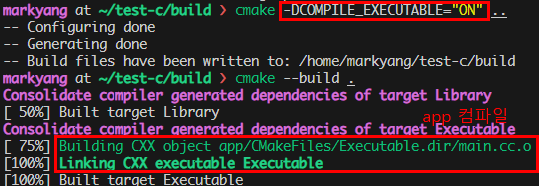
CMakeCache.txt
build에CMakeCache.txt가 있을 것인데, 여기에 설정이 저장되어 있다.
- 만약
COMPILE_EXECUTABLE=OFF로 하고 싶다면,cmake -DCOMPILE_EXECUTABLE=OFF ..또 할 필요없이,
CMakeCache.txt에서 수정후 바로cmake --build .를 하면 된다.
configure_file
- 파일을 다른 위치로 복사하고 그 내용을 수정한다.
- 주로
config.h파일 생성용
configure_file(<input> <output>
    [NO_SOURCE_PERMISSIONS | USE_SOURCE_PERMISSIONS | FILE_PERMISSIONS <permissions>...] [COPYONLY] [ESCAPE_QUOTES] [@ONLY] [NEWLINE_STYLE [UNIX|DOS|WIN32|LF|CRLF]])

``<input>`` 파일을 ``<output>`` 파일로 복사하고,
입력 파일 내용에 있는 ``@VAR@``, ``${VAR}``, ``$CACHE{VAR}``, ``$ENV{VAR}``와 같은 변수 값을 치환합니다.
각 변수 참조는 변수의 현재 값이나, 정의되지 않은 경우 빈 문자열로 대체됩니다.
또한, 다음과 같은 형식의 입력 라인

 #cmakedefine VAR ...

은 다음 중 하나로 대체됩니다.- 예
configure_file(
    "config.hpp.in"
    "${CMAKE_BINARY_DIR}/configured_files/include/config.hpp" ESCAPE_QUOTES
)config.hpp.in를${CMAKE_BINARY_DIR}/configured_files/include/config.hpp에 저장${CMAKE_BINARY_DIR}: CMake에서 빌드 디렉토리의 최상위 경로
ESCAPE_QUOTES는 큰 따옴표(")를 excape처리한다.
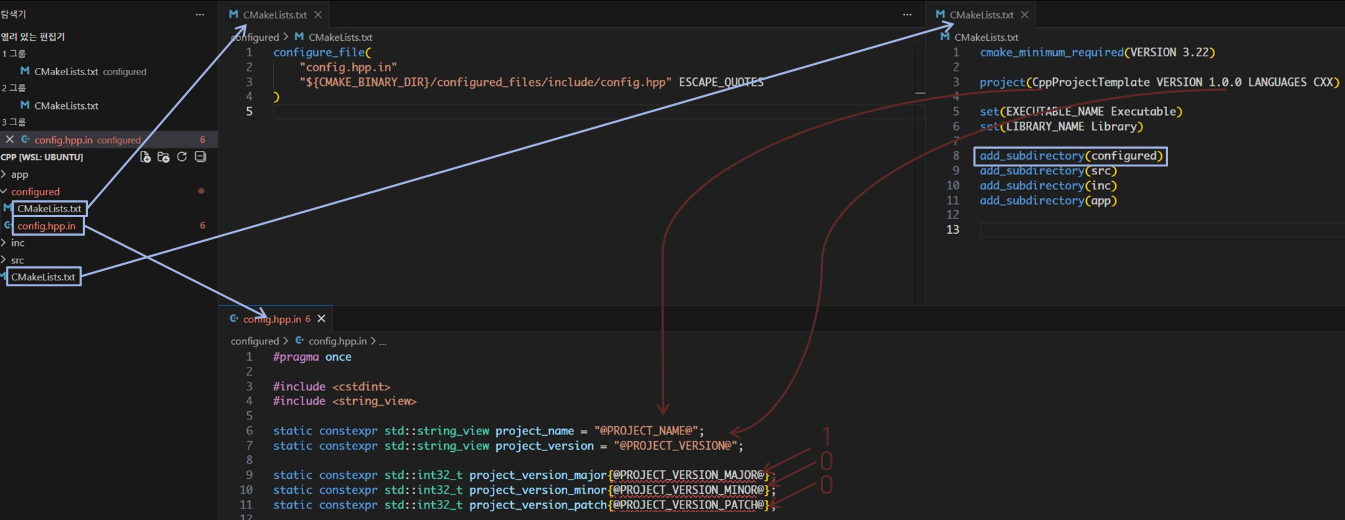
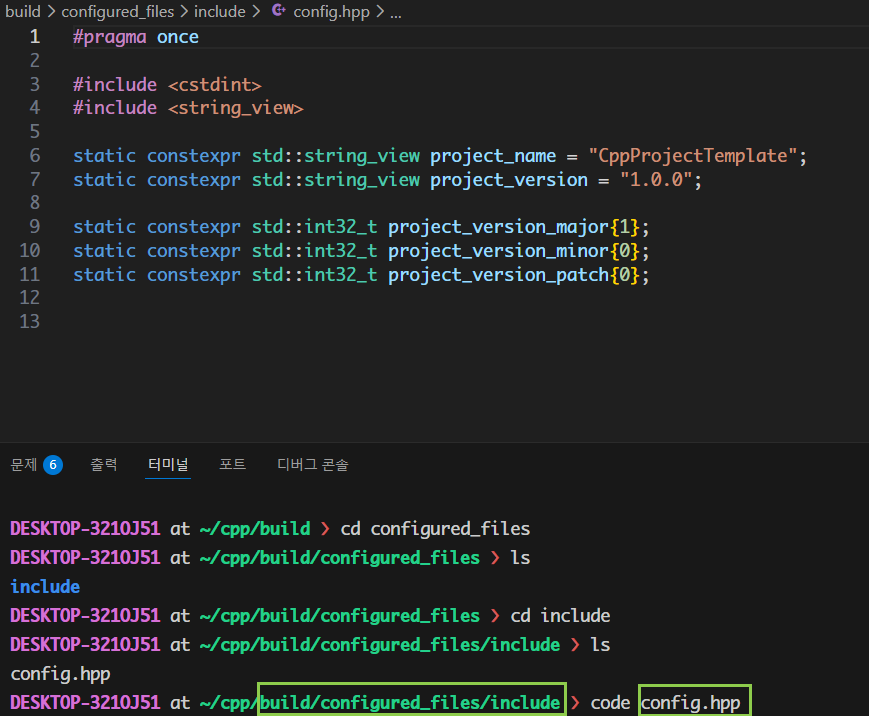
- cmake 빌드 이후 결과
config.hpp
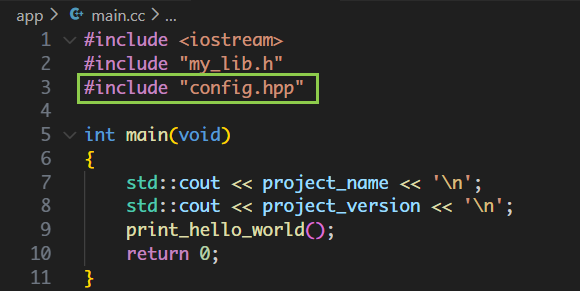
config.h를include해서 사용
main.cc
CMakeLists.txt구성
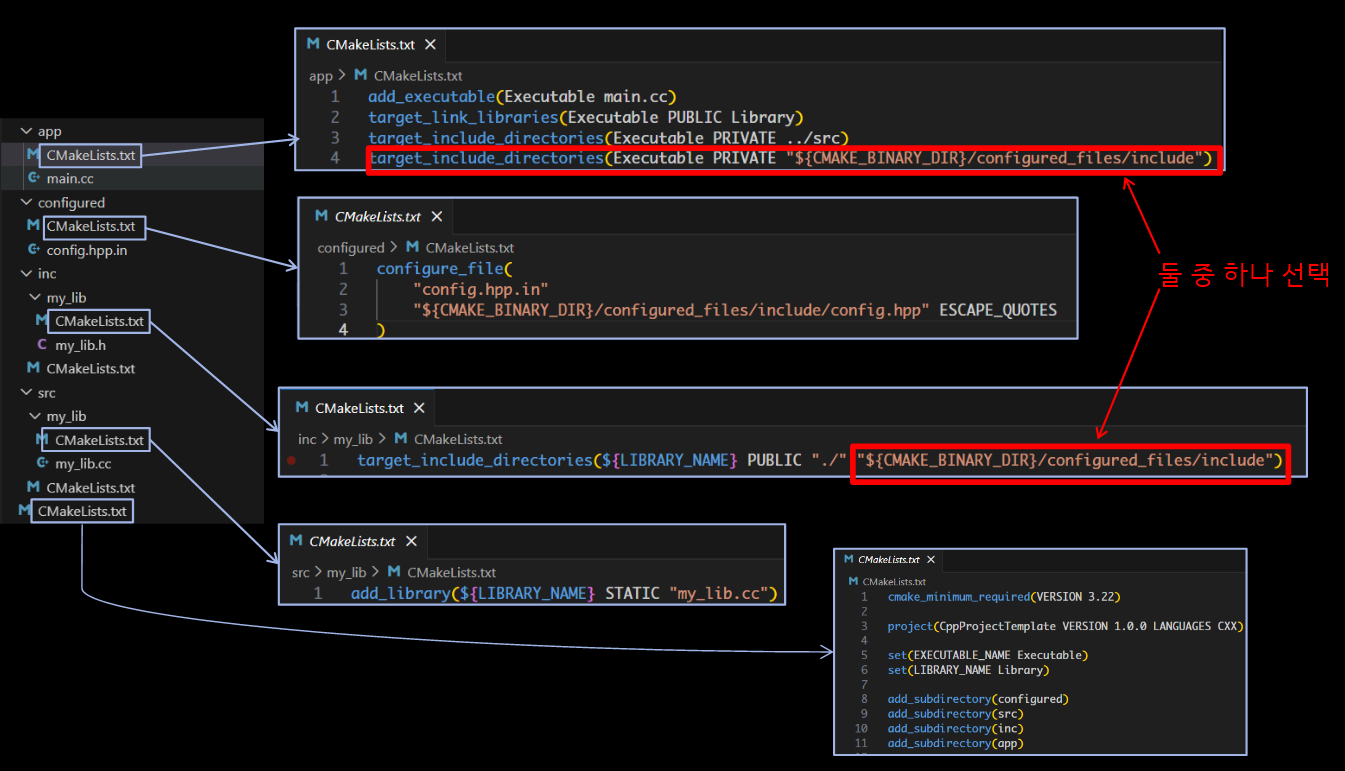
app/CMakeLists.txt에서target_include_directories(Executable PRIVATE"${CMAKE_BINARY_DIR}/configured_files/include")- 최소 권한
- 필요 없는 타겟에게 경로 노출하지 않음
inc/my_lib/CMakeLists.txt에서target_include_directories(${LIBRARY_NAME} PUBLIC "./""${CMAKE_BINARY_DIR}/configured_files/include")기존 "./"옆에 따로 추가할수 있다.- 라이브러리를 링크하는 모든 소비자(예:
Executable)이 자동으로 include 경로 받음

pllpokko@alumni.kaist.ac.kr