
📅 2025-12-04
➡️ Next.js Streaming, Suspense, Error Handling, Asset 최적화에 대해 새롭게 알게 된 것 또는 헷갈리는 부분 정리
🔎 학습 리마인드
📌 Streaming
💡 왜 Streaming이 필요한가?
- Next.js App Router에서는 서버에서 데이터를 가져온 뒤에야 렌더링이 시작됨
- 만약 API 응답이 5초, 10초 이상 지연되는 상황이라면? 예시로 json-server에 일부러 delay를 줌
→ 사용자에게 빈 화면만 보이게 되고, UX가 크게 떨어짐 이런 상황을 처리하는 대표적인 방법 3가지가 있음// package.json "scripts": { "server": "json-server --watch db.json --port 4000 --delay 5000" } // json-server는 0.17.4 버전 사용 필요
💡 1. 클라이언트 비동기 로딩
- 가장 익숙한 방식
- 페이지는 먼저 렌더링, 데이터는 client fetch로 처리하고 로딩 상태를 UI에서 관리
'use client';

import { useEffect, useState } from 'react';

export default function AsyncComponent() {
  const [data, setData] = useState(null);
  const [loading, setLoading] = useState(true);

  useEffect(() => {
    fetch('/api/data')
      .then((response) => response.json())
      .then((data) => {
        setData(data);
        setLoading(false);
      });
  }, []);

  if (loading) {
    return <div>Loading...</div>;
  }

  return (
    <div>
      <h1>Data Loaded</h1>
      <pre>{JSON.stringify(data, null, 2)}</pre>
    </div>
  );
}- 장점: 우리가 잘 아는 패턴
- 단점: SSR의 장점을 살릴 수 없음, SEO 취약, 첫 화면 늦어질 수 있음
💡 2. 캐싱(정적 생성) 활용
- 데이터가 자주 변하지 않는다면
fetch의 캐싱 옵션으로 빌드 or 요청 속도를 향상
import BookList from "@/components/BookList";
import { Book } from '@/types/book';

const BooksPage = async () => {
  const response = await fetch('http://localhost:4000/books',
  {
	  cache: "force-cache"
	}
  );
  const books: Book[] = await response.json();

  return (
    <div>
      <h1>Books</h1>
      <BookList books={books} />
    </div>
  );
};

export default BooksPage;- 장점: 즉시 응답 가능, 매우 빠름
- 단점: API 속도가 느리면 빌드/리빌드 시간이 증가
💡 3. Suspense + Streaming SSR
- Suspense란?
-
비동기 컴포넌트가 준비될 때까지 대체 UI(fallback)를 보여주는 기능
→ 사용자에게 점진적으로 화면이 완성되는 느낌 제공
-
데이터 패칭 / 코드 분할(lazy-loading) 등 비동기 UI 처리에 유용
-
여러 비동기 컴포넌트를 각각 독립적으로 로딩 가능
- Suspense 단위로 비동기 UI를 쪼갤 수 있음
- 준비된 컴포넌트부터 순차적으로 화면 렌더링
- 전체가 느려도 부분적으로 먼저 표시되어 체감 성능 향상import { Suspense } from 'react'; export default function Page() { return ( <Suspense fallback={<Loading />}> <BookList /> </Suspense> ); }
-
- loading.tsx
-
라우트 세그먼트 내 비동기 작업이 완료될 때까지 자동으로 Loading UI를 표시
// /book/loading.tsx
export default function Loading() {
  return <div>책 목록을 불러오는 중입니다...</div>;
}
Loading UI가 중요한 이유
-
사용자 경험 개선
- 로딩 중인 상태를 명확히 표시하여 사용자가 무슨 일이 일어나고 있는지 알 수 있게 함
- 이는 사용자의 불안감을 줄이고, 시스템이 응답하고 있음을 알리는데 도움을 줌
-
사용자의 불필요한 행동 문제 해결
- 사용자에게 현재 상태를 제공해서 불필요한 클릭이나, 페이지 이탈을 방지할 수 있어 사용자 유지율을 높이고, 사이트에 대한 신뢰성을 향상시킴
-
향상된 SEO 및 접근성
- 로딩 UI는 페이지의 일부분이 빠르게 렌더링되어 SEO 성능을 향상 시키고,사용자가 페이지를 더 빠르게 접근할 수 있도록 도와줌
-
- Streaming SSR
- 서버에서 렌더링한 UI를 조각 단위로 순차적으로 클라이언트에 전송
- 준비된 영역부터 우선 렌더링, 나머지는 백그라운드에서 계속 로드
- 느린 API가 있더라도 전체 화면을 기다릴 필요 없음 → 사용자에게 조금씩 채워지는 화면 경험 제공
📌 Error UI, Error Handling
💡 Error Handling
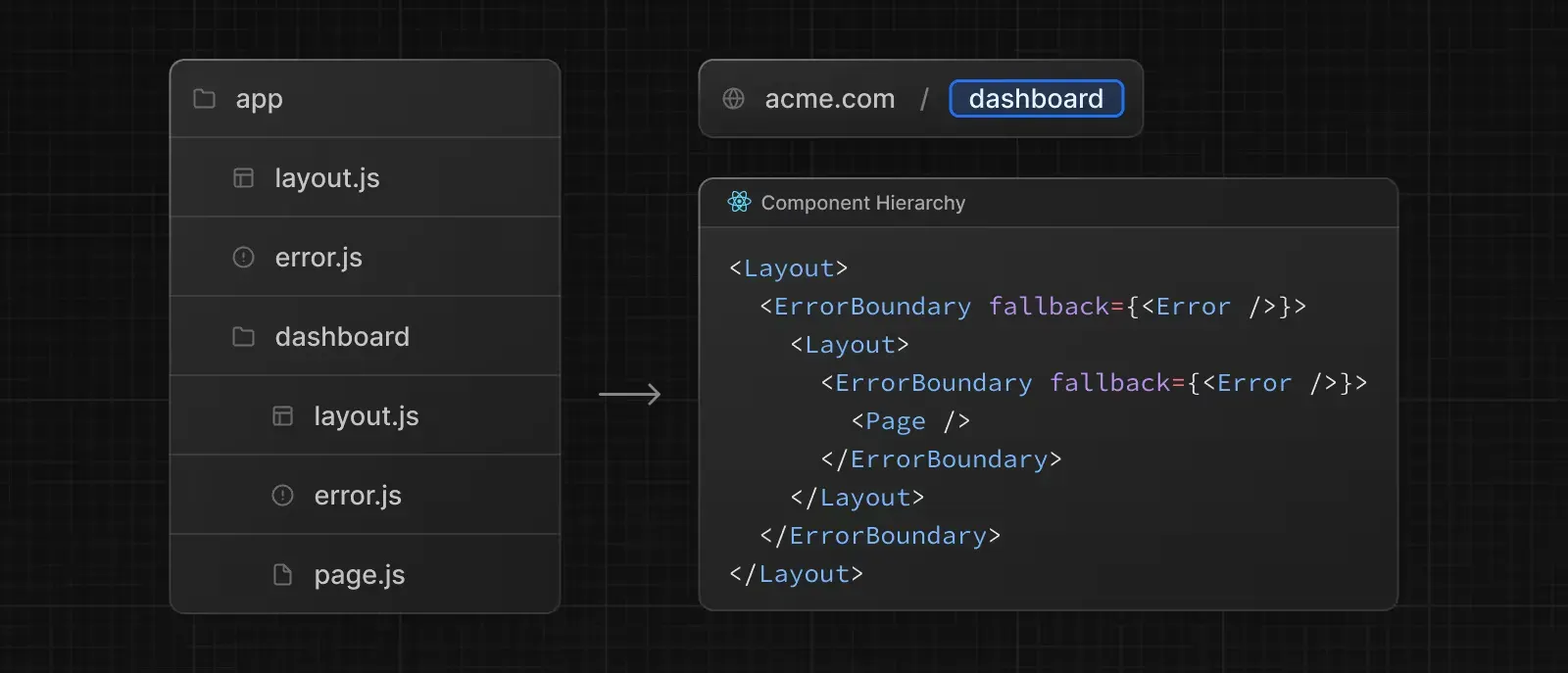
- Next.js에서는 라우트 세그먼트 별로
error.tsx파일을 생성하여 예기치 못한 런타임 오류를 처리할 수 있음 - 오류가 발생해도 문제가 있는 UI만 격리하고, 애플리케이션의 나머지 부분은 정상적으로 작동하도록 유지할 수 있음

- error.tsx
'use client' // Error boundaries must be Client Components import { useEffect } from 'react' export default function Error({ error, reset, }: { error: Error & { digest?: string } reset: () => void }) { useEffect(() => { // Log the error to an error reporting service console.error(error) }, [error]) return ( <div> <h2>Something went wrong!</h2> <button onClick={ // Attempt to recover by trying to re-render the segment () => reset() } > Try again </button> </div> ) }- 반드시
"use client"에서 동작해야 함
- 반드시
왜 클라이언트 컴포넌트여야 할까?
- React Error Boundary는 클라이언트에서만 동작
- 렌더링 중 발생하는 오류를 감지하여 fallback UI를 보여주는 기능
- 이는 React Client 환경에서만 작동
-
사용자 상호작용 기능 필요
reset()함수 사용 → 사용자 클릭을 통한 페이지 재시도- SSR 환경에서는 사용자 이벤트 처리 불가
-
에러 복구 로직은 클라이언트 상태 기반
- UI 복구 및 렌더링 재시도는 클라이언트에서 수행되어야 함
📌 Next.js Asset 최적화
💡 이미지 최적화 (next/image)
- Next.js는
Image컴포넌트를 통해 이미지 최적화를 자동으로 수행함
특징
-
크기 최적화
- 각 기기에 맞는 크기의 이미지를 자동으로 제공하고, 최신 이미지 형식을 사용
-
포맷 변환
- WebP, AVIF 등 최신 포맷으로 자동 변환하여 용량 축소
- WebP, AVIF 확장자는 압축 효율이 뛰어나 많은 관심을 받고있는 이미지 포맷
- AVIF가 WebP 보다 조금 더 나은 압축 성능을 낸다고 알려져있으나, WebP를 지원하는 브라우저의 범위가 조금 넓음
- WebP, AVIF 등 최신 포맷으로 자동 변환하여 용량 축소
-
시각적 안정성
- 아미지가 로딩될 때 레이아웃 이동을 자동으로 방지
-
Lazy Loading 기본 적용
- 스크린 내(뷰포트)에 노출되는 이미지만 로드하여 페이지 로드 속도 개선
-
자산 유연성
- 원격 서버에 저장된 이미지도 포함하여 필요에 따라 이미지 크기 조정
import Image from "next/image";
import profilePic from "/public/profile.png";

export default function Page() {
  return (
    <Image
      src={profilePic}
      alt="Picture of the author"
      // width={500} 자동 제공
      // height={500} 자동 제공
      // blurDataURL="data:..." 자동 제공
      // placeholder="blur" // 로딩 중 블러업 옵션
    />
  )
}-
너비, 높이 등등의 이런 세부적인 기능들은 Next.js에서 자동으로 제공
-
원격, 네트워크 이미지
import Image from 'next/image' export default function Page() { return ( <Image src="<https://picsum.photos/seed/refactoring/400/600>" alt="Picture of the author" width={500} height={500} /> ) }- 원격 이미지 허용을 위한 설정
// next.config.js
module.exports = {
  images: {
    remotePatterns: [
      {
        protocol: 'https',
        hostname: 's3.amazonaws.com',
        port: '',
        pathname: '/my-bucket/**',
      },
    ],
  },
}
- 원격 이미지 허용을 위한 설정
- 포맷 최적화 옵션
module.exports = {
  images: {
	  // ...
    formats: ['image/avif', 'image/webp'],
  },
}
💡 폰트 최적화 (next/font)
-
폰트를 자동으로 최적화하고 외부 네트워크 요청을 제거하여 개인정보 보호와 성능을 향상시킬 수 있음
-
모든 폰트 파일에 대해 자동으로 셀프 호스팅을 제공
-
레이아웃 시프팅(Layout Shifting) 없이 최적의 방식으로 웹 폰트를 로드할 수 있도록 도와줌
-
Google Fonts
-
google fonts는 내장되어 있어서 따로 설치 필요 없이 바로 가져다 쓸 수 있음
//ver 15 import { Geist } from 'next/font/google' const geist = Geist({ subsets: ['latin'], }) export default function RootLayout({ children, }: { children: React.ReactNode }) { return ( <html lang="en" className={geist.className}> <body>{children}</body> </html> ) } -
특정 font weight를 사용하고 싶으면 font weight를 지정해야 합니다.
import { Roboto } from 'next/font/google'

const roboto = Roboto({
  weight: '400',
  subsets: ['latin'],
})

export default function RootLayout({
  children,
}: {
  children: React.ReactNode
}) {
  return (
    <html lang="en" className={roboto.className}>
      <body>{children}</body>
    </html>
  )
}
-
- Multiple Fonts 사용
-
여러 폰트를 사용해야 할 때는 폰트를 내보내고 필요한 곳에서 가져와 사용
// app/fonts.ts
import { Geist, Geist_Mono } from 'next/font/google'

export const geist = Geist({
  subsets: ['latin'],
})

export const geistMono = Geist_Mono({
  subsets: ['latin'],
})

// app/layout.tsx
import { geist } from './fonts'
import './globals.css'

export default function RootLayout({
  children,
}: {
  children: React.ReactNode
}) {
  return (
    <html lang="en" className={geist.className}>
      <body>{children}</body>
    </html>
  )
}
-
- Local Font
// app/fonts.ts
import localFont from 'next/font/local'

export const myFont = localFont({
  src: './my-font.woff2',
})

// app/layout.tsx
import { myFont } from './fonts'
import './globals.css'

export default function RootLayout({
  children,
}: {
  children: React.ReactNode
}) {
  return (
    <html lang="en" className={myFont.className}>
      <body>{children}</body>
    </html>
  )
}
💡 스크립트 최적화 (next/script)
import Script from 'next/script'

export default function Dashboard() {
  return (
    <>
      <Script src="https://example.com/script.js" />
    </>
  )
}- 스크립트 로딩 전략을 세부적으로 조정할 수 있음
beforeInteractive: Next.js 코드 및 페이지 하이드레이션 전에 스크립트 로드afterInteractive: (기본값) 페이지 하이드레이션 후 스크립트 로드lazyOnload: 브라우저 유휴 시간에 스크립트 로드worker: (실험적) 웹 워커에서 스크립트 로드