
📅 2025-11-13
➡️ Supabase에 대해 새롭게 알게 된 것 또는 헷갈리는 부분 정리
🔎 학습 리마인드
📌 Supabase
💡 이미지 업로드 기능 구현하기
-
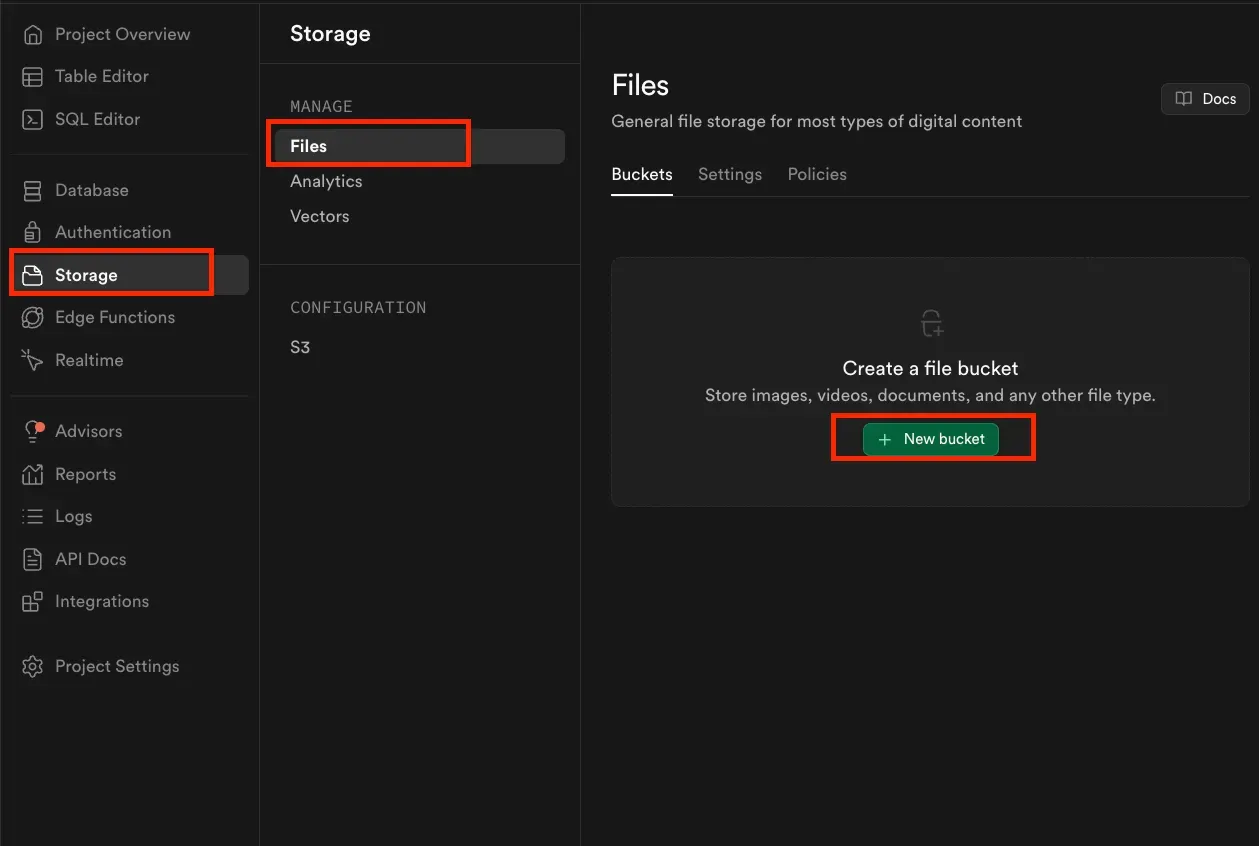
Bucket 생성
- Supabase Dashboard 접속 → Storage > Files > New bucket
- Bucket 이름 입력 → Public 옵션 꼭 체크!!
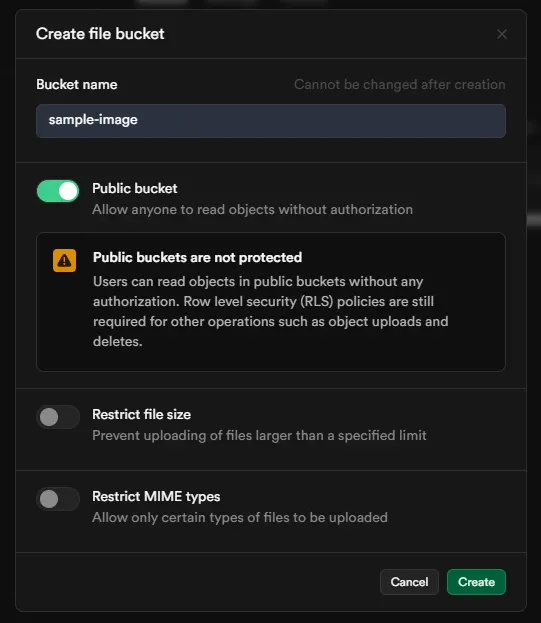
- 비공개 버킷이면
getPublicUrl()로 접근 불가
- 비공개 버킷이면
- Supabase Dashboard 접속 → Storage > Files > New bucket
-
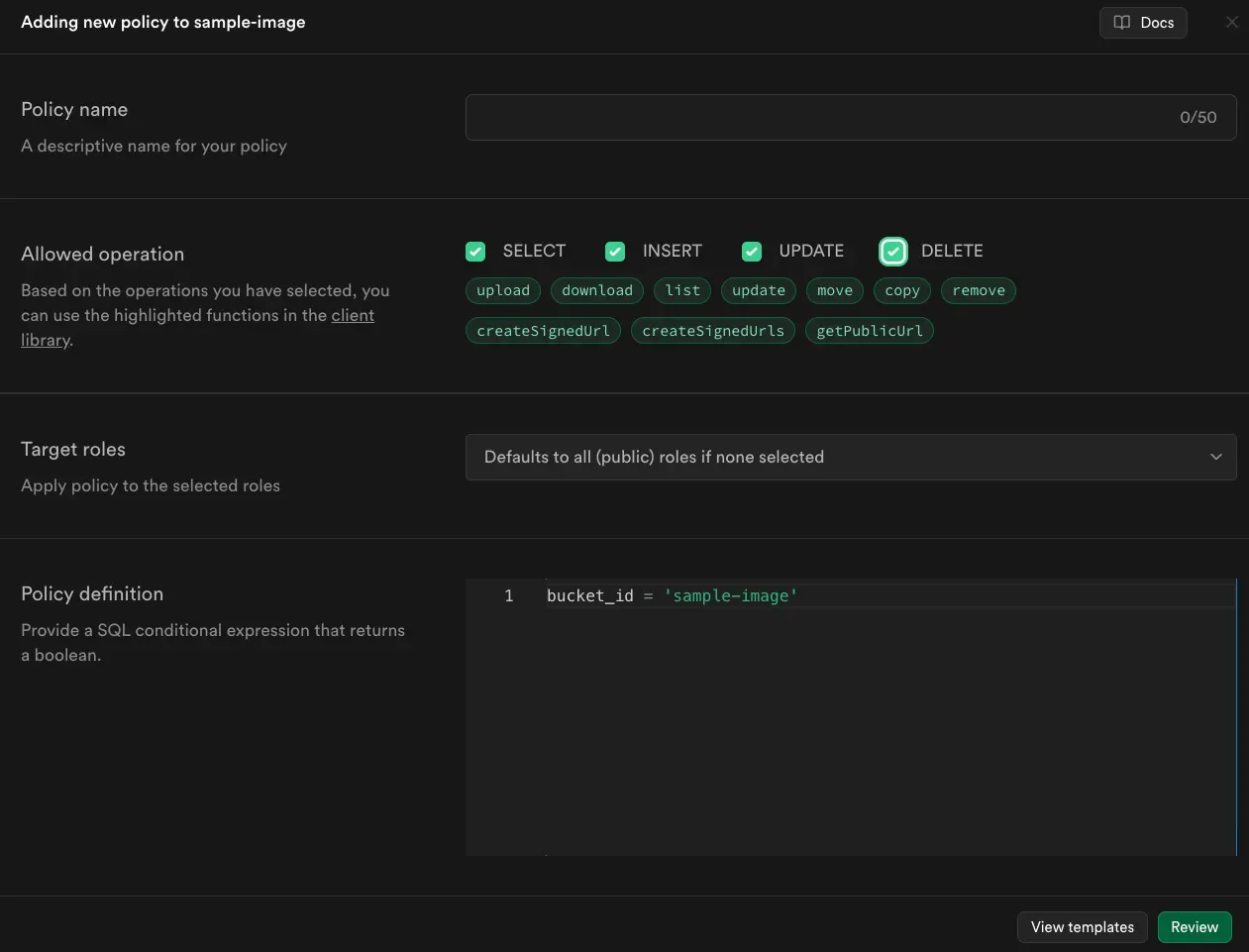
Policies 설정
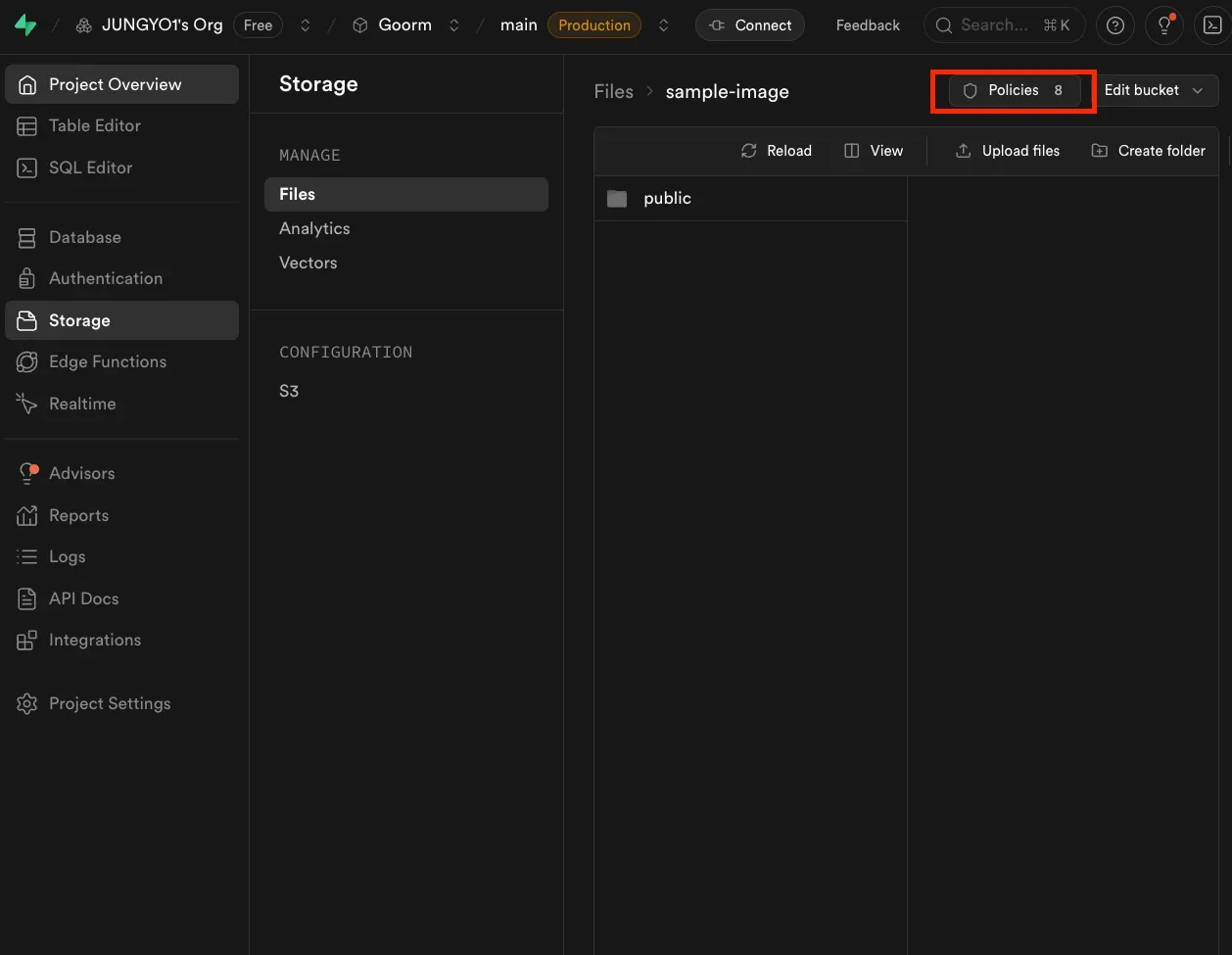
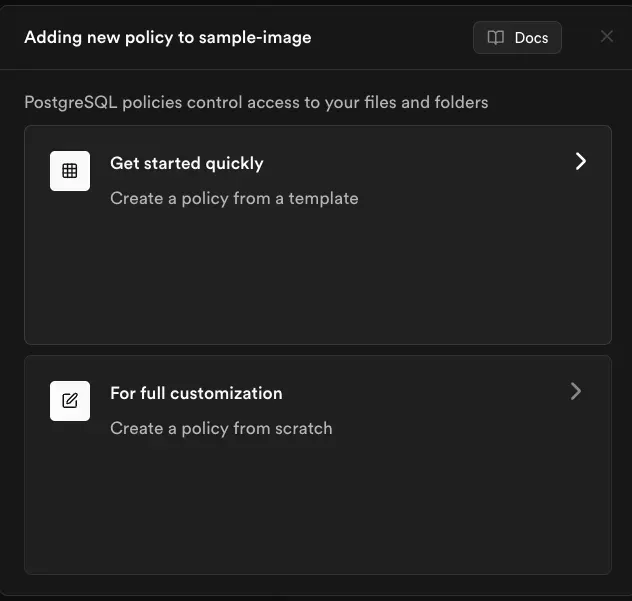
-
ImageSamplePage생성import { useEffect, useState } from 'react'; import supabase from '../supabase/supabaseClient'; const ImageSamplePage = () => { const [image, setImage] = useState(null); const [imageList, setImageList] = useState([]); // 사용자가 파일을 선택하면 호출되는 함수 const handleImageChange = (e) => { // 파일 입력에서 첫 번째 파일을 가져와서 image 상태에 저장 console.log(e.target.files); setImage(e.target.files[0]); }; // 이미지 업로드 함수 const handleImageUpload = async () => { // 만약 이미지가 선택되지 않았다면 함수 종료 if (!image) return; // supabase의 스토리지에 이미지 업로드 const { data, error } = await supabase.storage .from('sample-image') // 'sample-image'라는 이름의 버킷에 업로드 .upload(`public/${image.name}`, image); // 'public' 폴더에 이미지 이름으로 저장 // 콘솔에 오류 메시지 출력 if (error) { console.error('이미지 업로드 실패:', error.message); alert('이미지 업로드 실패'); } else { // 업로드가 성공하면 성공 메시지와 데이터를 콘솔에 출력 console.log('이미지 업로드 성공:', data); setImageList((prevList) => [...prevList, { name: image.name }]); alert('이미지 업로드 성공'); } }; // 페이지 로드 시 Supabase에서 이미지 목록 가져옴 useEffect(() => { const fetchImages = async () => { // 'sample-image' 버킷의 'public' 폴더 안에 있는 파일 리스트를 가져옴 const { data, error } = await supabase.storage.from('sample-image').list('public'); if (error) { console.error('이미지 리스트 가져오기 실패:', error.message); } else { setImageList(data); console.log('list 결과:', { data, error }); } }; fetchImages(); }, []); // Supabase의 파일 이름을 이용해 실제 접근 가능한 이미지 URL을 반환 const getImageUrl = (imageName) => { // 'public/{파일이름}' 경로의 공개 URL 생성 const { data } = supabase.storage.from('sample-image').getPublicUrl(`public/${imageName}`); return data.publicUrl; // 생성된 URL을 반환 }; return ( <div> <h4>이미지 업로드 기능을 확인합니다.</h4> {/* 파일을 선택할 수 있는 입력 필드 */} <input style={{ display: 'block', border: '1px solid #ccc', padding: '10px' }} type="file" onChange={handleImageChange} // 파일이 선택되면 handleImageChange 함수가 호출됩니다. /> <button onClick={handleImageUpload}>업로드</button> {/* 저장된 이미지 리스트 렌더링 */} <div> <h5>저장된 이미지 리스트:</h5> <ul> {imageList.map((img, index) => ( <li key={index}> <img src={getImageUrl(img.name)} style={{ width: '200px', border: '1px solid #ddd' }} alt={img.name} /> </li> ))} </ul> </div> </div> ); }; export default ImageSamplePage;
💡 댓글 기능 구현하기
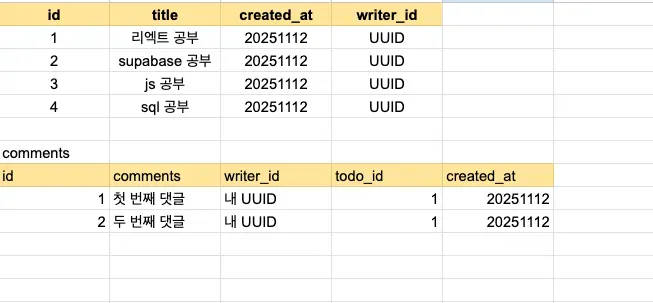
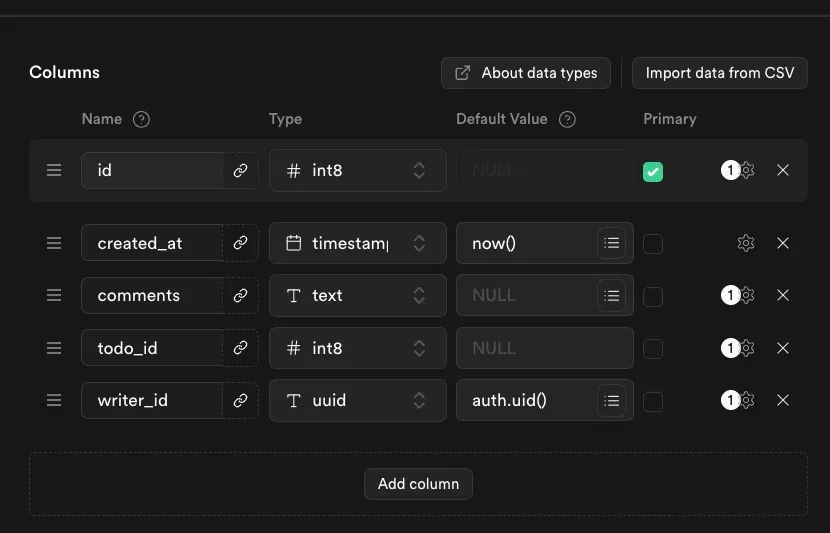
- 테이블 설계
- 연결 관계:
comments.todo_id→todos.id(Foreign Key)
- 연결 관계:
- PK (Primary Key)
- 각 테이블에서 데이터를 유일하게 식별하는 컬럼
- FK (Foreign Key)
- 다른 테이블의 PK를 참조하는 컬럼으로, 테이블 간 관계를 연결
최종 코드 - Todos.jsx
import React, { useContext, useEffect, useState } from "react";
import supabase from "../supabase/supabaseClient";
import { AuthContext } from "../context/AuthProvider";
import Todo from "../components/Todo";

const Todos = () => {
  const [todos, setTodos] = useState([]);
  const [newTodo, setNewTodo] = useState("");
  const { isLogin, user } = useContext(AuthContext);
  // 컴포넌트가 마운트될 때 할 일 목록을 불러옴
  useEffect(() => {
    const fetchTodos = async () => {
      const { data, error } = await supabase.from("todos").select(`
          *,
          comments (
            id,
            comments,
            created_at
          )
        `);
      console.log(data);
      if (error) {
        console.log("Todo 불러오기 실패:", error);
        return;
      }
      setTodos(data);
    };
    fetchTodos();
  }, []);

  // todo 추가 함수
  const handleCreate = async () => {
    const { data, error } = await supabase
      .from("todos")
      .insert({ title: newTodo, completed: false })
      .select();
    console.log("Todo 생성 Data:", data);
    if (error) {
      console.log("Todo 추가 실패:", error);
      return;
    }
    setTodos([...todos, ...data]);
    setNewTodo("");
  };

  //todo삭제
  const handleDelete = async (id) => {
    const isConfirm = window.confirm("정말 삭제하시겠습니까?");
    if (!isConfirm) return;

    const { error } = await supabase.from("todos").delete().eq("id", id);
    if (error) {
      console.log("Todo 삭제 실패:", error);
      return;
    }
    setTodos(todos.filter((todo) => todo.id !== id));
  };

  //todo 완료 토글
  const handleToggle = async (id) => {
    const todo = todos.find((todo) => todo.id === id);
    const { data, error } = await supabase
      .from("todos")
      .update({ completed: !todo.completed })
      .eq("id", id)
      .select();
    if (error) {
      console.log("Todo 업데이트 실패:", error);
      return;
    }
    setTodos(
      todos.map((todo) =>
        todo.id === id ? { ...todo, completed: data[0].completed } : todo
      )
    );
  };

  // todo수정
  const handleUpdate = async (id) => {
    const newTitle = prompt("새로운 제목을 입력하세요:");
    if (!newTitle) return;

    const { data, error } = await supabase
      .from("todos")
      .update({ title: newTitle })
      .eq("id", id)
      .select();

    console.log("update data: ", data);
    if (error) {
      console.log("Todo 수정 실패:", error);
      return;
    }
    setTodos(
      todos.map((todo) =>
        todo.id === id ? { ...todo, title: data[0].title } : todo
      )
    );
  };

  return (
    <div>
      <h1>Todo</h1>
      <input
        type="text"
        placeholder="할 일을 입력하세요"
        value={newTodo}
        onChange={(e) => setNewTodo(e.target.value)}
      />
      <button onClick={handleCreate}>추가</button>
      <ul>
        {todos.map((todo) => (
          <Todo
            key={todo.id}
            todo={todo}
            handleToggle={handleToggle}
            handleDelete={handleDelete}
            handleUpdate={handleUpdate}
            user={user}
          />
        ))}
      </ul>
    </div>
  );
};

export default Todos;
import React, { useState } from "react";
import supabase from "../supabase/supabaseClient";

const Todo = ({ todo, handleToggle, handleDelete, handleUpdate, user }) => {
  const [commentText, setCommentText] = useState("");
  const [comments, setComments] = useState(todo.comments || []);
  // 댓글 추가 렌더링
  const handleAddComments = async (e, todoId, commentText) => {
    e.preventDefault();

    const { data, error } = await supabase
      .from("comments")
      .insert({ todo_id: todoId, comments: commentText })
      .select();
    console.log("Comment 추가 Data:", data);
    if (error) {
      console.log("Comment 추가 실패:", error);
      return;
    }
    setComments([...comments, ...data]);
    setCommentText(""); // 초기화 해주고
  };
  const onSubmit = (e) => {
    e.preventDefault();
    handleAddComments(e, todo.id, commentText);
    setCommentText("");
  };

  return (
    <>
      <li key={todo.id} onClick={() => handleToggle(todo.id)}>
        {todo.title} - {todo.completed ? "완료" : "미완료"}
        {user.id === todo.writer_id && (
          <>
            <button onClick={() => handleDelete(todo.id)}>삭제</button>
            <button onClick={() => handleUpdate(todo.id)}>수정</button>
          </>
        )}
      </li>
      <form onSubmit={onSubmit}>
        <input
          type="text"
          placeholder="댓글을 입력하세요"
          value={commentText}
          onChange={(e) => setCommentText(e.target.value)}
        />
        <button type="submit">댓글 추가</button>
      </form>
      <div>
        {comments.map((comment) => (
          <p key={comment.id}>{comment.comments}</p>
        ))}
      </div>
    </>
  );
};

export default Todo;