1. 요약
Anthropic 공식문서 참고하여 예제 작성.
2. git source
서버 예제 : https://github.com/ReadEin/mcp-server-ex
예제) 기상청 정보 fetch 하는 도구 생성 및 서버에 등록
import { McpServer } from "@modelcontextprotocol/sdk/server/mcp.js";
import { z } from "zod";

// Helper function for making NWS API requests
const NWS_API_BASE = "https://api.weather.gov";
const USER_AGENT = "weather-app/1.0";

// NWS 알림 도구 등록
export function registerNwsTool(mcp: McpServer) {
  // NWS 알림 도구 등록
  mcp.tool(
    "get-alerts",
    "Get weather alerts for a state",
    {
      state: z.string()
        .length(2)
        .describe("Two-letter state code (e.g. CA, NY)")
        .transform(val => val.toUpperCase()),
    },
    async ({ state }) => {
      const alertsUrl = `${NWS_API_BASE}/alerts?area=${state}`;
      const alertsData = await makeNWSRequest<AlertsResponse>(alertsUrl);

      if (!alertsData) {
        return {
          content: [{
            type: "text",
            text: "Failed to retrieve alerts data",
          }],
        };
      }

      const features = alertsData.features || [];
      if (features.length === 0) {
        return {
          content: [{
            type: "text",
            text: `No active alerts for ${state}`,
          }],
        };
      }

      const formattedAlerts = features.map(formatAlert);
      const alertsText = `Active alerts for ${state}:\n\n${formattedAlerts.join("\n")}`;

      return {
        content: [{
          type: "text",
          text: alertsText,
        }],
      };
    }
  );
}

// Helper function for making NWS API requests
async function makeNWSRequest<T>(url: string): Promise<T | null> {
  const headers = {
    "User-Agent": USER_AGENT,
    Accept: "application/geo+json",
  };

  try {
    await new Promise(resolve => setTimeout(resolve, 100)); // 실제 API 호출처럼 비동기 동작 모사
    const mockResponse = {
      features: [
        {
          properties: {
            event: "호우주의보",
            areaDesc: "캘리포니아",
            severity: "보통",
            status: "활성",
            headline: "호우주의보 발효"
          }
        }
      ] as AlertFeature[]
    };
    return mockResponse as T;
  } catch (error) {
    console.error("Error making NWS request:", error);
    return null;
  }
}

interface AlertFeature {
  properties: {
    event?: string;
    areaDesc?: string;
    severity?: string;
    status?: string;
    headline?: string;
  };
}

interface AlertsResponse {
  features: AlertFeature[];
}

// Format alert data
function formatAlert(feature: AlertFeature): string {
  const props = feature.properties;
  return [
    `Event: ${props.event || "Unknown"}`,
    `Area: ${props.areaDesc || "Unknown"}`,
    `Severity: ${props.severity || "Unknown"}`,
    `Status: ${props.status || "Unknown"}`,
    `Headline: ${props.headline || "No headline"}`,
    "---",
  ].join("\n");
}

interface ForecastPeriod {
  name?: string;
  temperature?: number;
  temperatureUnit?: string;
  windSpeed?: string;
  windDirection?: string;
  shortForecast?: string;
}

interface PointsResponse {
  properties: {
    forecast?: string;
  };
}

interface ForecastResponse {
  properties: {
    periods: ForecastPeriod[];
  };
}
import { McpServer } from "@modelcontextprotocol/sdk/server/mcp.js";
import { StdioServerTransport } from "@modelcontextprotocol/sdk/server/stdio.js";
import process from "node:process";
import { z } from "zod";
import { registerNwsTool } from "./tool/nws.js";
// Create server instance
const server: McpServer = new McpServer({
name: "mcp-server",
version: "1.0.0",
capabilities: {
resources: {
list: true,
read: true,
},
tools: {
list: true,
call: true,
},
prompts: {
list: true,
get: true,
},
},
});
const global: any = globalThis;
global.mcp = server;
// 기본 프롬프트 등록
server.prompt(
"default",
"Default prompt",
{},
async () => {
return {
messages: [{
role: "assistant",
content: {
type: "text",
text: "This is a default prompt",
},
}],
};
}
);
// NWS 툴 등록
registerNwsTool(server);
async function main() {
const transport = new StdioServerTransport();
await server.connect(transport);
}
main().catch((error) => {
console.error("Error:", error);
process.exit(1);
});클라이언트 예제 :
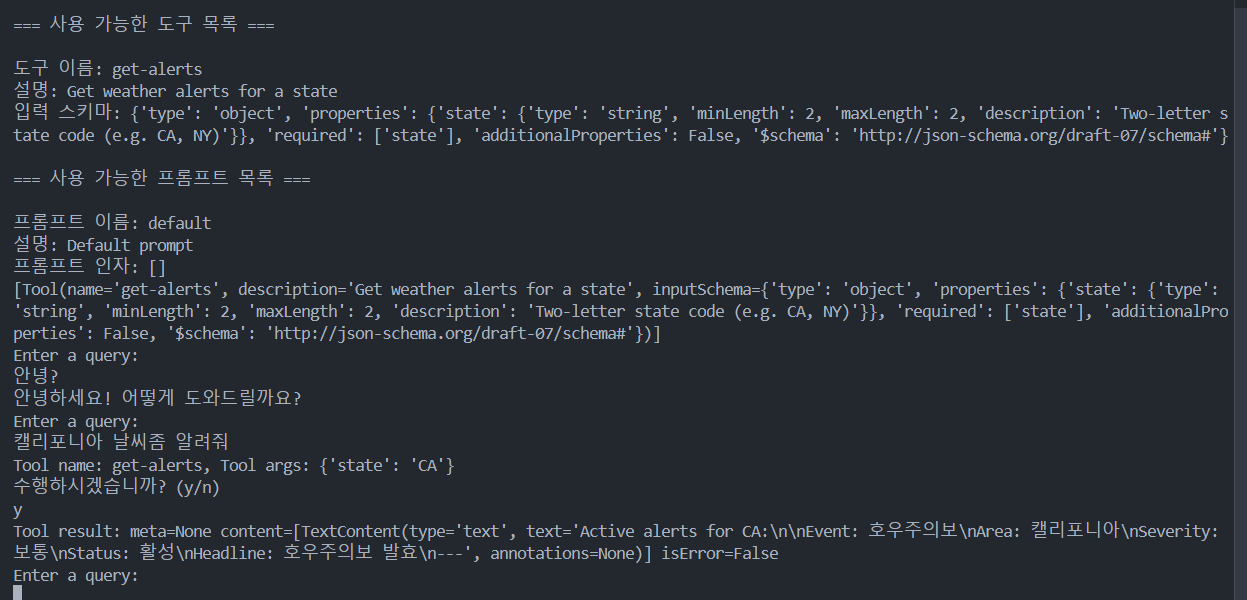
예제) mcp 클라이언트 인터페이스 작성
https://github.com/ReadEin/mcp-client-ex
openai completions api를 통해 클라이언트 구현은 git 저장소 참고.
import asyncio
import json
import sys
from typing import List, Optional, Dict, Any
from contextlib import AsyncExitStack

from mcp import ClientSession, StdioServerParameters, Tool
from mcp.client.stdio import stdio_client
from mcp.types import Prompt

class MCPClient:
    session: Optional[ClientSession] = None
    exit_stack = AsyncExitStack()
    config: Optional[Dict[str, Any]] = None
    tools : List[Tool] = []
    prompts : List[Prompt] = []

    def __init__(self, config_path="mcp-config.json"):
        # Initialize session and client objects
        self.session: Optional[ClientSession] = None
        self.exit_stack = AsyncExitStack()
        self.config_path = config_path
        self.config = self._load_config()
        if not self._check_config():
            print("유효한 mcp 서버 설정이 없습니다.")
            sys.exit(1)

    async def connect_to_server(self, server_name: str):
        server_params = self._build_server_params(server_name)
        stdio_transport = await self.exit_stack.enter_async_context(stdio_client(server_params))
        self.stdio, self.write = stdio_transport
        self.session = await self.exit_stack.enter_async_context(ClientSession(self.stdio, self.write))
        await self.session.initialize()
        await self._check_tools()
        await self._check_prompts()
        return True

    async def process_query(self, query: str) -> str:
        """Process a query using Claude and available tools"""
        return "mock response"

    def _load_config(self) -> Dict[str, Any]:
        try:
            with open(self.config_path, 'r') as f:
                return json.load(f)
        except Exception as e:
            print(f"설정 파일 로드 중 오류 발생: {e}")
            return {"mcpServers": {}}

    def _check_config(self) -> bool:
        if not self.config or "mcpServers" not in self.config:
            print("유효한 mcp 서버 설정이 없습니다.")
            return False
        if not self.config["mcpServers"]:
            print("설정에 mcp 서버가 지정되지 않았습니다.")
            return False
        return True

    def _build_server_params(self, server_name: str) -> StdioServerParameters:
        server_config = self.config["mcpServers"][server_name]
        command = server_config.get("command")
        args = server_config.get("args", [])
        cwd = server_config.get("cwd")

        if not command:
            print("실행 명령어가 지정되지 않았습니다.")
            return False

        if isinstance(command, list):
            cmd = command[0]
            args = command[1:] + args
        else:
            cmd = command

        print(f"실행할 명령어: {cmd} {' '.join(args)}")
        print(f"작업 디렉토리: {cwd}")

        server_params = StdioServerParameters(
            command=cmd,  # 문자열로 전달
            args=args,    # 리스트로 전달
            env=None,
            cwd=cwd
        )
        return server_params

    async def _check_prompts(self) -> bool:
        response = await self.session.list_prompts()
        self.prompts = response.prompts
        print("\n=== 사용 가능한 프롬프트 목록 ===")
        for prompt in self.prompts:
            print(f"\n프롬프트 이름: {prompt.name}")
            print(f"설명: {prompt.description}")
            print(f"프롬프트 인자: {prompt.arguments}")
        return True

    async def _check_tools(self) -> bool:
        # List available tools
        response = await self.session.list_tools()
        self.tools = response.tools
        print("\n=== 사용 가능한 도구 목록 ===")
        for tool in self.tools:
            print(f"\n도구 이름: {tool.name}")
            print(f"설명: {tool.description}")
            print(f"입력 스키마: {tool.inputSchema}")
        return True

    async def cleanup(self):
        """Clean up resources"""
        await self.exit_stack.aclose()

async def main():
    client = MCPClient()
    server_name = "mcp-server"  # 기본값 (또는 명령줄 인수에서 가져올 수 있음)

    try:
        success = await client.connect_to_server(server_name)
        if success:
            print("서버 연결 성공")
    finally:
        await client.cleanup()

if __name__ == "__main__":
    asyncio.run(main())
3. 확인 가능한 부분 :
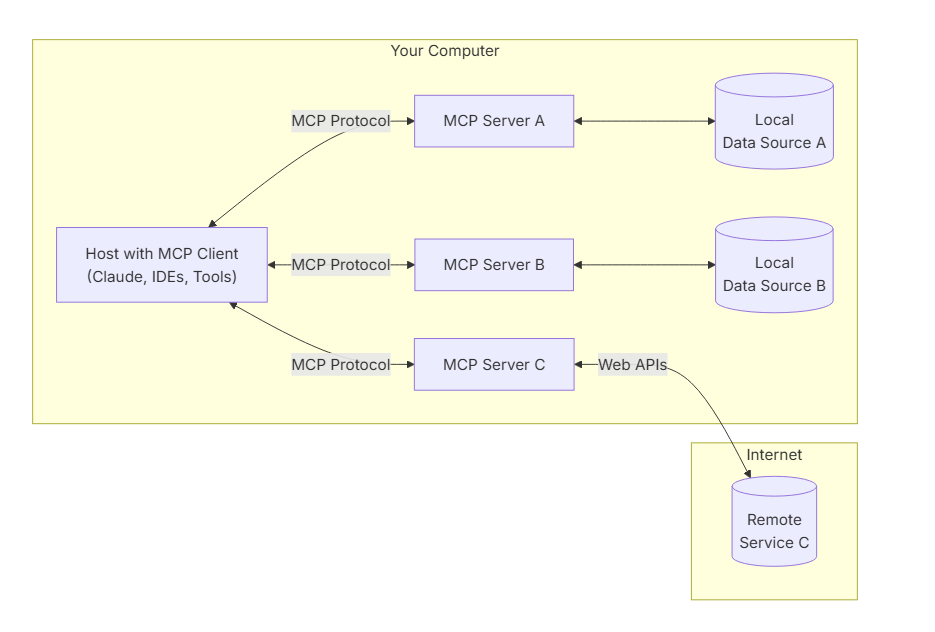
1. client 단과 서버 간의 stdio 통신을 mcp 라이브러리가 지원
2. mcp 프로토콜을 통해 클라이언트가 mcp 서버 정보를 가져오는 방식(mcp session 활용)
3. mcp 프로토콜을 파싱하여 Anthropic사 llm이 아닌 다른 llm api에 적용하는 법
4. 프로토콜 상세 - 공식 문서 : https://modelcontextprotocol.io/llms-full.txt

개발 일지 작성 중