2026.01.14 (수)
과제_ToDo App 완료
금일 구현 작업 TIL
오늘의 공부 이미지 💫
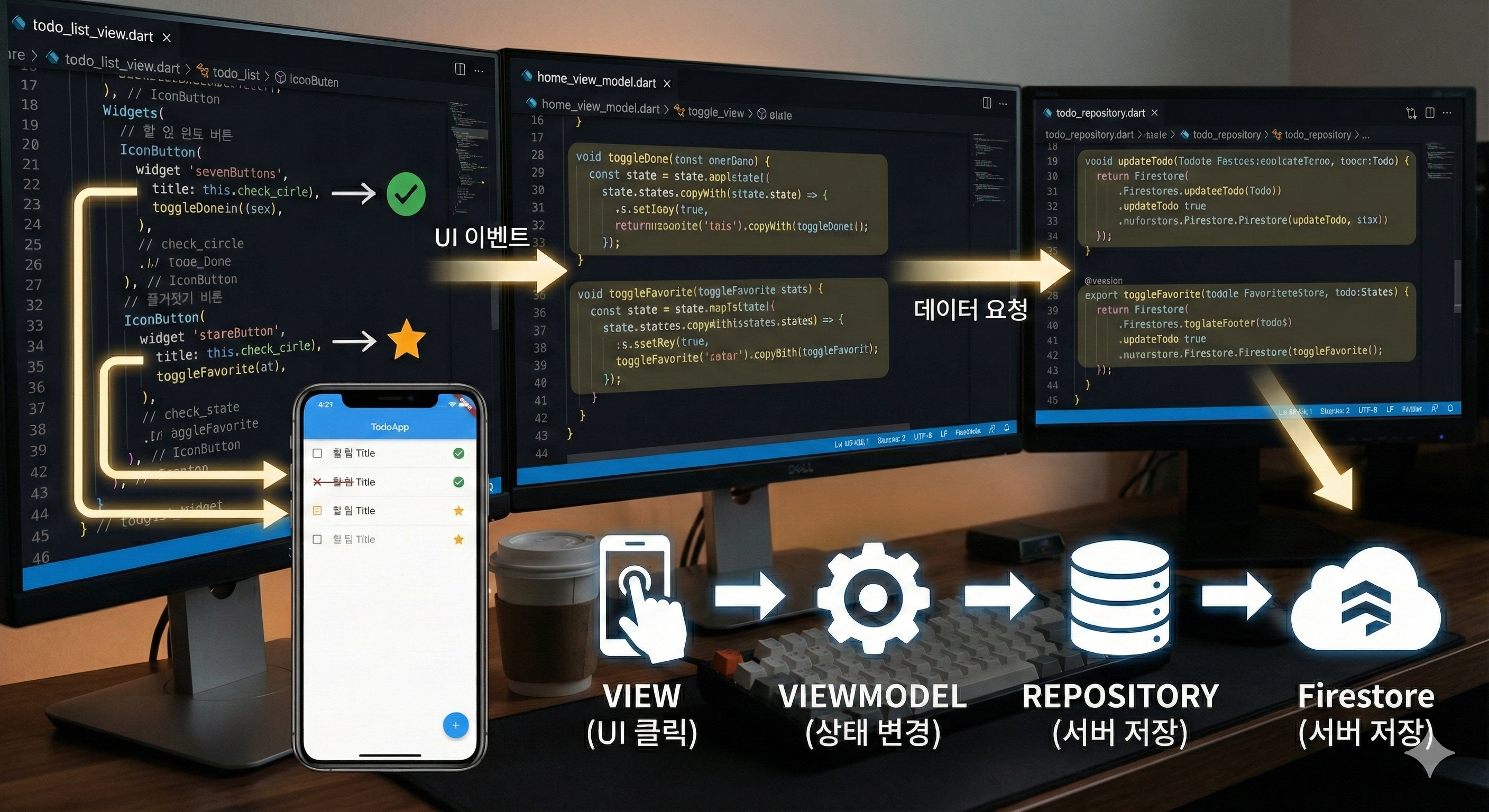
내가 설명을 제대로 안 해서 그런가.. 요즘 좀 대충 그려주는 듯 Gemini.....
🗓 할 일 완료, ⭐️ 즐겨찾기 구현 완료
ToDo App의 할 일 완료, 즐겨찾기가 실제 데이터 베이스에 반영되는 것을 마지막으로 과제가 마무리가 되었다.!!
오늘 작업한 내용을 TIL로 작성해보려고 한다 🌞
🎢 UI - ViewModel - Repository 흐름 분석하기
📎 전체적인 흐름과 분석
사용자가 클릭 시에 실제 데이터 베이스에 반영될 때의 경로는?
View (UI) -> ViewModel (State) -> Repository -> Firestore
개발자 입장에서의 코드를 짤 때 경로는?
Repository 구현 -> ViewModel 구현 -> View (UI) 작업
📎 기능별 상세 진행 순서
나는 코드를 짰으니, 내가 짠 코드대로 정리해본당
1. Repository
[할 일 완료 기능]
Future<void> updateToDo({required ToDoEntity todo}) async {
    FirebaseFirestore firestore = FirebaseFirestore.instance;
    final collectionRef = firestore.collection('todos');
    final docRef = collectionRef.doc(todo.id);
    await docRef.update(todo.toJson());
  }
[즐겨찾기 기능]
Future<void> toggleFavorite({required ToDoEntity todo}) async {
    FirebaseFirestore firestore = FirebaseFirestore.instance;
    final collectionRef = firestore.collection('todos');
    final docRef = collectionRef.doc(todo.id);
    await docRef.update({'isFavorite': todo.isFavorite});
}- 할 일 완료 이벤트 발생 시에 업데이트 되게 할 Insert 구현해주기
2. ViewModel
[할 일 완료 기능]
Future<void> toggleDone({required bool isDone, required String id}) async {
    final newTodo = state.firstWhere((todo) => todo.id == id);
    final updateTodo = newTodo.copyWith(isDone: isDone);
    await todoRepo.updateToDo(todo: updateTodo);
    state = state.map((todo) => todo.id == id ? updateTodo : todo).toList();
  }
[즐겨찾기 기능]
Future<void> toggleFavorite({required bool isFavorite, required String id}) async {
    final newTodo = state.firstWhere((todo) => todo.id == id);
    final leFavoriteTodo = newTodo.copyWith(isFavorite: isFavorite);
    await todoRepo.toggleFavorite(todo: leFavoriteTodo);
    state = state.map((todo) => todo.id == id? leFavoriteTodo : todo).toList();
}state.firstWhere을 사용해서 해당 ID를 가진 객체를 찾을 수 있게 한다.- copyWith
를 사용해서 받아온 ID만newTodo`로 바꿔서 기존 객체는 그대로, 상태를 복사한다. - Repository의
updateTodo를 비동기로 호출
3. UI (ListView)
[할 일 완료 기능]
class TodoListView extends ConsumerWidget {
  @override
  Widget build(BuildContext context, WidgetRef ref) {
  final vm = ref.read(homeViewModelProvider.notifier);
    final todos = ref.watch(homeViewModelProvider);

 (... 생략 ...)

// [할 일 완료]
IconButton(
 onPressed: () {
  vm.toggleDone(isDone: !item.isDone, id: item.id,);
  },
   icon: Icon(
    item.isDone
    ? Icons.check_circle
    : Icons.radio_button_unchecked,
     color: item.isDone
     ? Colors.green
     : Colors.grey,
 ),
),

// [즐겨찾기]
IconButton(
 onPressed: () {
  vm.toggleFavorite(isFavorite: !item.isFavorite, id: item.id);
  },
   icon: Icon(
    item.isFavorite
    ? Icons.star
    : Icons.star_border,
     color: item.isFavorite
     ? Colors.amber
     : Colors.grey,
    ),
),ConsumerWidget확인vm함수 만들기IconButton의onPressed발생 시에 현재item.isDone/item.isFavorite상태를!item.isDone/!item.isFavorite으로 반전시켜서vm.toggleDone함수로 전달하기
🏗 작업 내용
1단계: Data Model (Entity) 설계
가장 먼저 할 일은 내가 다룰 데이터는 어떻게 생겼는가 정의하기
TodoEntity 클래스를 생성한다.
- 데이터 구조가 결정되어야 Repository에서 저장할 형식을 알 수 있고, ViewModel에서 어떤 값을 관리할 지 결정할 수 있다.
- 핵심은
id,title,isDone,isFavorite등의 필드를 정의하고, Firestore와 통신ㄴ하기 위한fromJson/toJson메서드를 만든다 ⭐️
2단계: Repositoty 구현
데이터 (FireStore)와 통신하는 통로를 만든다
TodoRepository를 만들고 각insertupdate등등 구현할 함수를 만든다- 실제 데이터가 잘 들어가고 나가는지 확인 필요, UI가 없어도
print해보기!
3단계: ViewModel 구현
데이터를 UI가 쓰기 좋은 형태로 가공하고 상태를 관리하기
- Riverpod의
Notifier등을 사용ㅎ해서HomeViewModel을 작성한다 - Repository에서 가져온 리스트 형태나 필터링하는 로직을 미리 준비한다
4단계: View 결합 (UI)
마지막으로 사용자에게 보여줄 화면을 그리고, ViewModel에 연결하기
TodoLisiView,IconButton등을 만들고,ref.watch를 통해 ViewModel의 상태를 구독한다
📲 구현 완료~!
+ 🌞 추가 모닝스터디 정리
과제 하면서 추가적으로 모닝스터디때 도움이 되었던 내용을 정리해보려고오오 한닷
.map() 이란?
.map()은 리스트 안에 있는 모든 데이터를 하나하나 꺼내서, 내가 정한 규칙에 따라 새로운 형태로 바꾸어 주는 역할을 한다!
⭐️ 중요한 점은!
원본 리스트는 건드리지 않고! 변형된 데이터들로 이루어진 새로운 묶음으로 만들어준다
예를 들어서 Repository에서 객체로 바꿔줘야 할 때, .map()을 사용해서 코드를 간단하게 만들 수 있다!
리스트 안에 있는 내용을 하나씩 돌면서 확인 후 원하는 데이터만 바꿔야 한다면?
원래라면 for문을 사용했을거다..!
[for문]
List<Matzip> matzipList = [];
    for (var i = 0; i < box.length; i++) {
      Map<String, dynamic> e = box[i];
      Matzip m = convertMatzip(e);
      matzipList.add(m);
    }
하지만 간결하게 만들고 싶다면?
[.map() 메서드]
List<Matzip> matzipList2 = box.map((e) {
      return Matzip.fromJson(e);
    },).toList ();
=> 요렇게 바꿔줄 수 있다.
⛔️ 주의 사항은?
.map() 의 결과값은 리스트가 아니라, Iterable 이라는 형태이다. 그래서 꼭!! .toList()를 붙여서 다시 리스트로 만들어줘야한다!!