application 기본 객체
특정 웹 어플리케이션에 포함된 모든 JSP 페이지는 하나의 application 기본 개체를 공유하게 된다.
초기 설정 정보를 읽어올 수 있으며 / 서버 정보를 읽어올 수 있고 / 제공파는 자원(파일)을 읽어올 수 도 있다.
	<context-param>
		<param-name>파라미터 이름</param-name>
		<param-value>파라미터 값</param-value>
	</context-param>
초기화 파라미터를 web.xml 파일에 추가하기
<?xml version="1.0" encoding="UTF-8"?>
<web-app xmlns:xsi="http://www.w3.org/2001/XMLSchema-instance" xmlns="http://java.sun.com/xml/ns/javaee" xsi:schemaLocation="http://java.sun.com/xml/ns/javaee http://java.sun.com/xml/ns/javaee/web-app_2_5.xsd" id="WebApp_ID" version="2.5">
  <display-name>07_21</display-name>
  <welcome-file-list>
    <welcome-file>index.html</welcome-file>
    <welcome-file>index.htm</welcome-file>
    <welcome-file>index.jsp</welcome-file>
    <welcome-file>default.html</welcome-file>
    <welcome-file>default.htm</welcome-file>
    <welcome-file>default.jsp</welcome-file>
  </welcome-file-list>

  <context-param>
  	<description>로깅 여부</description>
  	<param-name>logEnabled</param-name>
  	<param-value>true</param-value>
  </context-param>

  <context-param>
  	<description>디버깅 레벨</description>
  	<param-name>debugLevel</param-name>
  	<param-value>5</param-value>
  </context-param>
</web-app>- 이름이 logEnabled이고 값이 "true"인 초기화 파라미터를 설정한다.
- 이름이 debugLevel이고 값이 "5"인 최고하 파라미터를 설정한다.
- 모든 값을 공유하게 되서 JSP에서 값을 꺼내올 수가 있다.
<%@page import="java.util.Enumeration"%>
<%@ page language="java" contentType="text/html; charset=UTF-8"
    pageEncoding="UTF-8"%>
<!DOCTYPE html PUBLIC "-//W3C//DTD HTML 4.01 Transitional//EN" "http://www.w3.org/TR/html4/loose.dtd">
<html>
<head>
<meta http-equiv="Content-Type" content="text/html; charset=UTF-8">
<title>초기화 파라미터 읽어오기</title>
</head>
<body>
	초기화 파라미터 목록:
	<ul>
		<%
			Enumeration<String> initParamEnum = application.getInitParameterNames();
			while(initParamEnum.hasMoreElements()) {
				String initParamName = initParamEnum.nextElement();
		%>
		<li><%= initParamName %> =
			<%= application.getInitParameter(initParamName) %>
		<%
			}
		%>
	</ul>
</body>
</html>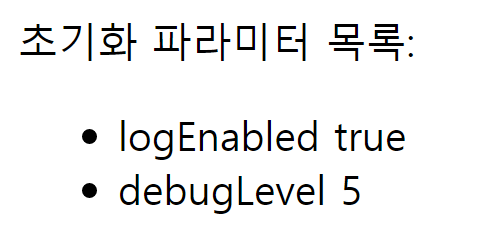
출력 결과
웹 어플리케이션 초기화 파라미터는 언제 사용할까?
웹 어플리케이션 초기화 파라미터는 이름처럼 웹 어플리케이션을 초기화하는 데 필요한 설정 정보를 지정하기 위해 사용된다. 예를 들어, 데이터베이스 연결과 관련된 설정 파일의 경로나, 로깅 설정 파일, 또는 웹 어플리케이션의 주요 속성 정보를 담고 있는 파일의 경로 등을 지정할 때 초기화 파라미터를 사용한다. → 여러 JSP에서 사용되는 값들을 넣어서 사용한다.
서버 정보 읽어오기
메이저 버전은 소수점 위에 숫자
마이너 버전은 소수점 아래 숫자
로그 메시지 기록하기
웹 컨테이너가 사용하는 로그 파일에 로그 메세지를 기록할 수 있도록 메서드를 제공한다.
- 개발 중에는 이클립스 콘솔 창에는 로그 기록이 남고 배포 할때는 로그 기록이 톰캣 폴더에 logs폴더에 .log 파일로 남는다.(localhost_log.2021-07-21.log)
- 중요 행위나 시스템에 기록을 남겨야한다면 log를 남겨서 기록해야한다.
웹 어플리케이션 자원 구하기
- 예외처리 하지 않아도 서블릿으로 변환할때 service()에 들어가는데 service() 메서드가 throws를 하고 있기 때문에 가능하다.
- 개발에 사용했던 파일 경로를 다른 컴퓨터에 실행 될때 같은 파일 경로를 알 수 없게 된다. 외부 경로와 일치하지 않는 경우가 발생할 수 있다. 그래서 파일의 자원을 어플리케이션 내부에 위치해둔다.
- \ 는 어플리케이션 내부의 루트 경로를 나타낸다. 웹 어플리케이션에서만 사용하고 디스크상의 경로를 나타내지 않는다.
- 문제는 디스크상의 경로가 아니라서 읽기 / 쓰기가 되지 않는다.
- application : 어플리케이션 내부 경로를 디스크상의 경로로 바꿔서 읽기 쓰기가 가능하게 해준다.
<%@ page language="java" contentType="text/html; charset=UTF-8"
    pageEncoding="UTF-8"%>
<%@ page import="java.io.*"%>
<!DOCTYPE html PUBLIC "-//W3C//DTD HTML 4.01 Transitional//EN" "http://www.w3.org/TR/html4/loose.dtd">
<html>
<head>
<meta http-equiv="Content-Type" content="text/html; charset=UTF-8">
<title>application 기본 객체 사용하여 자원 읽기</title>
</head>
<body>
	<%
		String resourcePath = "/message/notice.txt";
	%>
	자원의 실제 경로:<br>
	<%= application.getRealPath(resourcePath) %>
	<br>
	--------------<br>
	<%= resourcePath %>의 내용<br>
	--------------<br>
	<%
		char[] buff = new char[128];
		int len = -1;

		InputStreamReader isr = null;
		InputStream is = application.getResourceAsStream(resourcePath);

		try {
			isr = new InputStreamReader(is);
			while( (len = isr.read(buff)) != -1) {
				out.print(new String(buff, 0, len));
			}
		} catch(IOException e) {
			e.printStackTrace();
		} finally {
			try {
				isr.close();
			} catch(Exception e) {}
			try {
				is.close();
			} catch(Exception e) {}
		}

		/*
		try(InputStreamReader br = new InputStreamReader(application.getResourceAsStream(resourcePath))) {
			while( (len = br.read(buff)) != -1) {
				out.print(new String(buff, 0, len));
			}
		} catch(IOException e) {
			out.println("익셉션 발생 :" + e.getMessage());
		}
		*/
	%>
</body>
</html>- 이클립스 상의 경로지만 실제로는 톰캣 폴더에 message 폴더 안에 있다고 생각하면 된다.
- application.getRealPath(어플리케이션 경로) : 어플리케이션 내부 경로를 → 디스크 경로로 바꿔준다. 경로를 문자열로 구해준다.
- InputStream is = application.getResourceAsStream(resourcePath) :어플리케이션 내부 자원 경로를 읽을 수 있는 InputStream을 구한다. 읽기 밖에 안되는 단점이 있다.
- FIleInputStream is = new FileInputStream(application.getResourceAsStream(resourcePath)) 을 통해 읽기 외에 작업을 할 수 있다.

실행결과
이클립스에서 생성되는 .dat 파일 생성 위치
C:\Users\GG\Desktop\Java\source code.metadata.plugins\org.eclipse.wst.server.core\tmp0\wtpwebapps\07_21\data
web.xml에 파일 경로 설정하기
-
web.xml에 파일에 추가하기
path /data/docList.dat -
각 JSP 파일들마다 파일경로로 설정한다. 저장할 경로가 바뀌면 web.xml에서 경로만 바꿔주면 된다.
String path = application.getInitParameter("path");
application 파트에서 중요한 외워야 되는 것.
- 초기화 파라미터 관련 메서드 기억하기
- 로그
- 자원 접근(읽기)
- getRealPath(어플리케이션 내부경로);
- getResourceAsStream(어플리케이션 내부경로); → return값은 InputStream
- getResource(어플리케이션 내부경로); → return값은 opneStream()
JSP 기본 객체의 속성(Attribute) 사용하기
속성은 <속성이름, 값>의 형태를 갖는다.
Map 형식으로 key는 String, value는 object를 갖는다.


개발자를 위해 기록하는 습관