useRef란 무엇일까...

시작하며
오늘은 전부터 헷갈리고 잘 사용해보지 못했던 useRef에 대해 알아보도록 하겠습니다.
useRef 그래서 넌 뭐냐
useState는 값이 변경되면 즉시 컴포넌트를 다시 렌더링하기 위한 용도이고,
useRef는 렌더링과 무관하게 유지해야 하는 값을 저장하는 데 사용됩니다.
- useRef는 반환된 객체의 current 프로퍼티로 값에 접근하고 수정할 수 있습니다.
- useRef는 값이 바뀌어도 컴포넌트가 다시 렌더링되지 않습니다.
여기까지만 들었을때 저는 왜 굳이 쓸까? 어디에 쓸까? useState쓰면 되는거 아닌가 라는 고민이 되었습니다.
사용법 부터 알아보자~
기본 사용법
-
먼저 import로 useRef를 불러옵니다:
import { useRef } from 'react'; -
초기값을 넣어 변수에 할당합니다:
const inputRef = useRef(null); -
필요할 경우 JSX에서 ref 속성으로 연결:
<input ref={inputRef} type="text" /> -
JavaScript에서
.current속성으로 참조하거나 값을 변경할 수 있습니다:
inputRef.current.focus();와 같이 사용하면 함수에서 해당 input에 포커스를 줄 수 있습니다.
렌더링 없이 값 저장하기
import { useRef } from 'react';

export default function Counter() {
  const countRef = useRef<number>(0);

  const increase = () => {
    countRef.current += 1;
    console.log(countRef.current); // UI는 안 바뀌지만 값은 증가
  };

  return <button onClick={increase}>카운트 증가</button>;
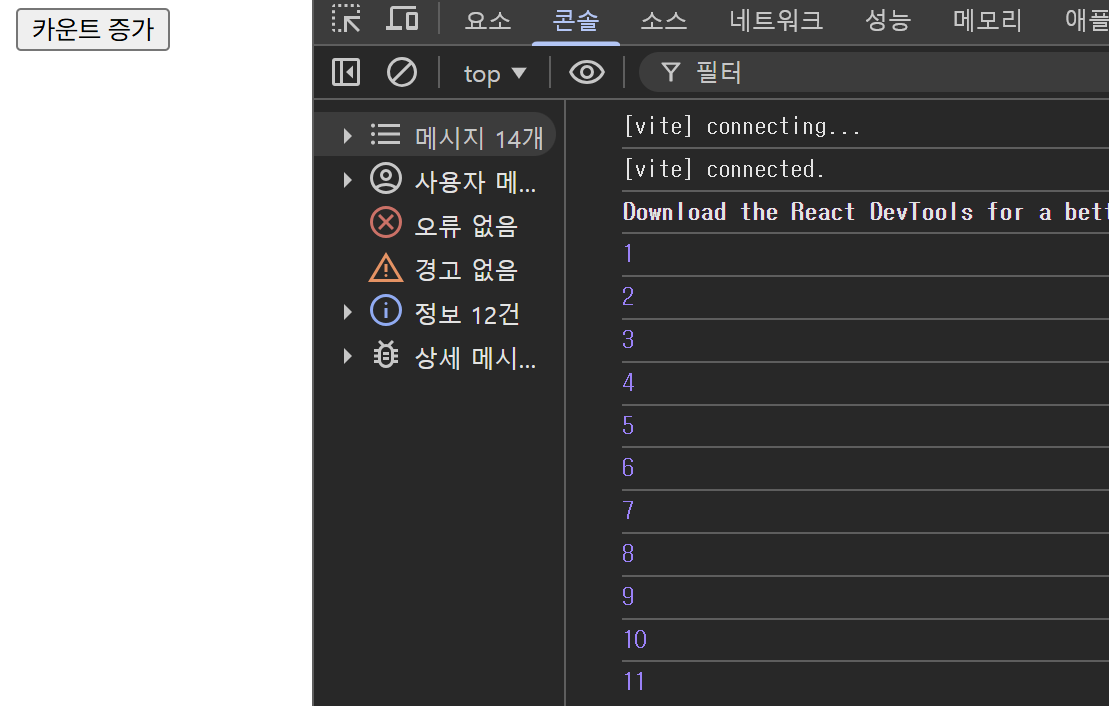
}
-
useRef(0)
useRef를 호출하면{ current: 초기값 }객체를 반환한다. 여기서는countRef.current가 0으로 시작합니다
이때 countRef 자체는 컴포넌트가 재렌더링되어도 동일한 객체를 가리킵니다 -
countRef.current += 1
.current값만 변경되므로React가 리렌더링을 트리거하지 않는다.
콘솔에서 값은 바뀌지만 화면에는 반영되지 않습니다
돔 직접 접근
import { useRef } from 'react';

export default function InputFocus() {
  const inputRef = useRef<HTMLInputElement>(null);

  const handleFocus = () => {
    inputRef.current?.focus();
  };

  return (
    <>
      <input ref={inputRef} />
      <button onClick={handleFocus}>포커스 이동</button>
    </>
  );
}
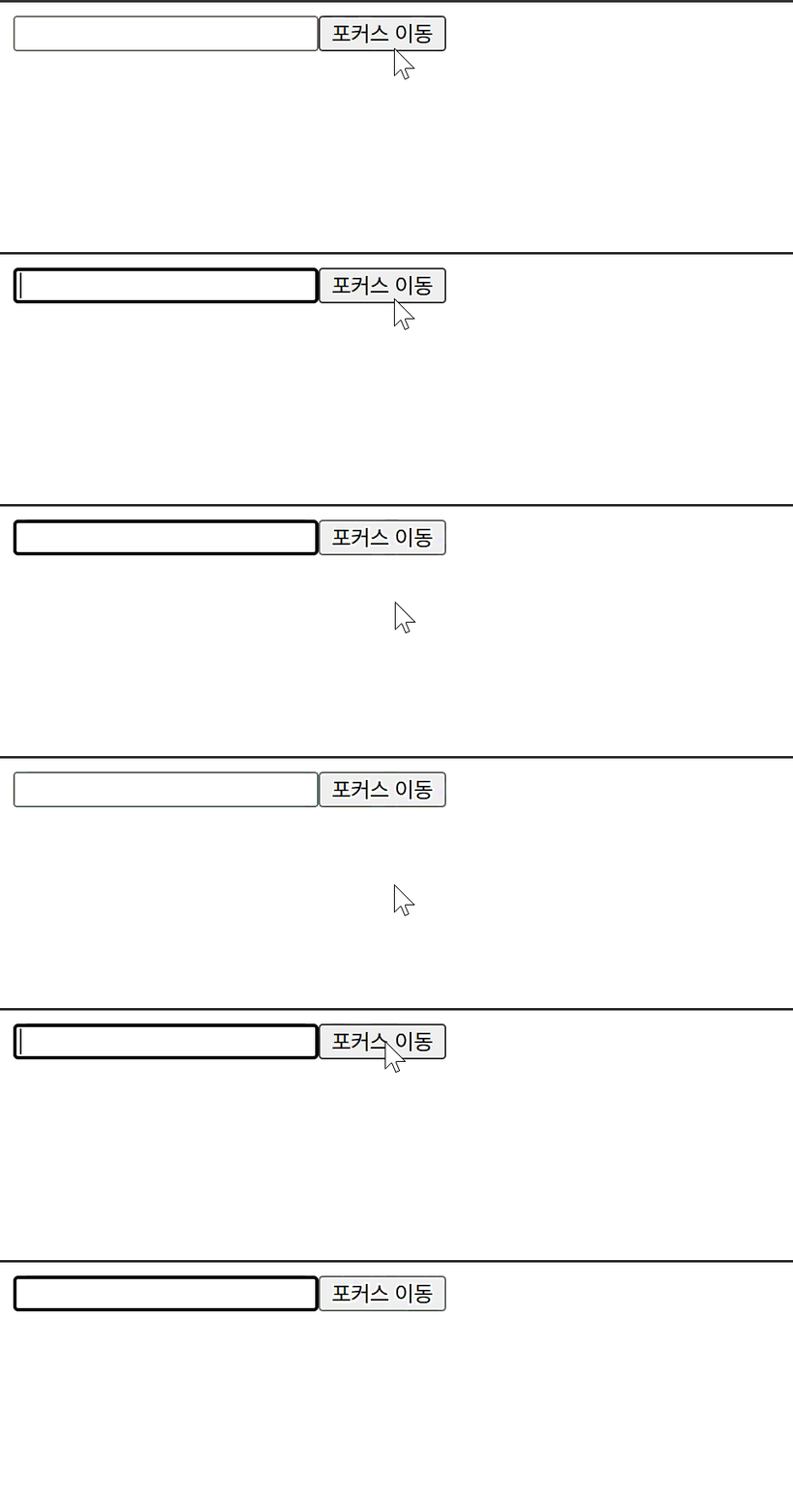
-
const inputRef = useRef(null);
useRef에 초기값을 null로 전달하면 처음 렌더링 시inputRef.current는 null 상태입니다. 이후 React가<input ref={inputRef} />를 렌더링하면서 해당 DOM 요소를inputRef.current에 자동으로 넣어줍니다. 즉, 아직 참조할 대상이 없다 → 렌더링 후 DOM을 가지게 됩니다 -
<input ref={inputRef} />
ref 속성에 useRef로 만든 ref 객체를 전달하면, React가 렌더링 후 해당 DOM 노드를inputRef.current에 할당하게 됩니다.
개발자는 DOM을 직접 찾을 필요 없이ref.current를 통해 바로 접근할 수 있습니다. -
inputRef.current?.focus()
ref를 통해 얻은 실제 DOM 노드에 접근해, 브라우저의 기본 DOM API인.focus()를 호출하게 됩니다.
이를 통해 버튼 클릭 시 input 요소로 포커스가 곧바로 이동하게 됩니다.
어디에 쓸까?
메시지 도착 시 스크롤을 맨 아래로 내려야 할때
채팅 앱을 사용해본 사람이라면 누구나 익숙한 기능이 있습니다.
새로운 메시지가 생기면 자동으로 스크롤이 아래로 내려가는 것
이걸 구현하려면 마지막 메시지 엘리먼트를 직접 선택해서 스크롤을 이동시켜야 합니다.
그래서 이렇게 ref를 만들었습니다.
const messagesEndRef = useRef(null);그리고 메시지가 업데이트될 때 실행해줍니다.
messagesEndRef.current?.scrollIntoView({ behavior: 'smooth' });- state로 DOM을 직접 선택할 수 없다
- state는 값의 변경 → 렌더링이 목적
- 그러나 스크롤처럼 DOM 조작은 렌더링과 무관한 영역
따라서 이러한 경우에는 useRef를 사용해야합니다.
스크롤을 움직임을 감지 할때
채팅에 자동 스크롤이 있다고 해서 항상 스크롤을 내려가면 안 됩니다.
사용자가 과거 메시지를 읽으려고 위로 올렸는데
아래 메시지가 올 때마다 자동으로 내려가 버리면 안됩니다.
그래서 실시간으로 사용자가 스크롤을 올렸는지를 감지해야 했는데,
또 DOM 요소에 직접 이벤트를 달아야 했습니다.
먼저 채팅 메시지 전체를 감싸는 DOM 요소를 ref로 가져옵니다.
const messagesContainerRef = useRef(null);이제 이 DOM 요소에 직접 scroll 이벤트를 붙입니다.
useEffect(() => {
  const handleScroll = () => {
    if (!messagesContainerRef.current) return;

    const { scrollTop, scrollHeight, clientHeight } = messagesContainerRef.current;

    // 사용자가 맨 아래에 있는지 여부
    const isAtBottom = scrollHeight - scrollTop - clientHeight < 50;

    setIsUserScrolling(!isAtBottom);
  };

  const container = messagesContainerRef.current;
  if (container) {
    container.addEventListener('scroll', handleScroll);
    return () => {
      container.removeEventListener('scroll', handleScroll);
    };
  }
}, []);| 속성 | 의미 |
|---|---|
scrollTop | 현재 얼마나 내려왔는지 (위로 갈수록 0) |
scrollHeight | 전체 스크롤 가능한 높이 |
clientHeight | 현재 보이는 영역의 높이 |
사용자가 맨 아래에 있는지 확인하는 공식
scrollHeight - scrollTop - clientHeight < 50scrollHeight - clientHeight → 스크롤 가능한 가장 아래 위치
거기서 현재 scrollTop을 빼서
얼마나 아래에 가까운지를 측정
50px 정도 여유를 둔 이유는
미세한 스크롤 변화에도 갑자기 자동 스크롤이 꺼지거나 켜지는 걸 방지하기 위함입니다.
최종 결정
useEffect(() => {
  if (messages.length > previousMessagesLengthRef.current && !isUserScrolling) {
    messagesEndRef.current?.scrollIntoView({ behavior: 'smooth' });
  }

  previousMessagesLengthRef.current = messages.length;
}, [messages, isUserScrolling]);
새 메시지가 추가됐는지 체크
messages.length > previousMessagesLengthRef.current- 이전 렌더 때 저장해둔 메시지 개수(previousMessagesLengthRef.current)보다
지금 메시지 개수가 많으면 → 새 메시지가 도착한 상황이라고 판단.
사용자가 스크롤을 위로 올려서 읽고 있는 중인지 체크
!isUserScrolling- 사용자가 과거 메시지 읽으려고 스크롤을 위쪽에 두고 있는 중이면 자동 스크롤하면 안 됨.
- 따라서 사용자가 아래쪽(최신 위치)에 있을 때만 자동 스크롤 가능.
조건 충족 시 자동 스크롤 실행
messagesEndRef.current?.scrollIntoView({ behavior: 'smooth' });- 새 메시지가 추가되었고
사용자가 현재 스크롤 맨 아래에 있다면
→ 부드럽게(smooth) 맨 아래로 자동 이동.
현재 메시지 개수를 ref에 저장
previousMessagesLengthRef.current = messages.length;- 다음 렌더 때 “이전 메시지 개수”로 사용하기 위해 업데이트해 둠.
- ref는 값이 바뀌어도 리렌더링이 일어나지 않음 → 이 용도에 최적.
마치며
오늘은 리액트 훅중 하나인 useRef에 대해 알아보았습니다. useRef에대해 개념정도는 알고 있었지만 왜 쓰는지 또 어디에 쓰는지 잘 알지 못하였지만 이 블로그를 쓰면서, 프로젝트에도 적용을 해보면서 잘 알게 된 것 같습니다.
글 읽어 주셔서 감사합니다.