ApiPass Playground Review — Testing AI Models Without Writing a Single Line of Code
Introduction
Choosing an AI model isn't really a tech problem. The tough part is deciding before anyone writes integration code. Product managers want to know if a model can actually deliver what their feature calls for. Designers want to try out visual styles without bothering engineering. Even developers like to settle on prompts and parameters before locking into a provider.
The usual route is rough. You read the docs. Sign up. Get a key. Throw together a test script. Parse the response. Find a way to render the output. Then repeat for the next model. Two days gone, and all you've built is plumbing.
The ApiPass Playground was built to skip that whole step. It's a browser tool where you can try AI models on your real use case, no code needed.
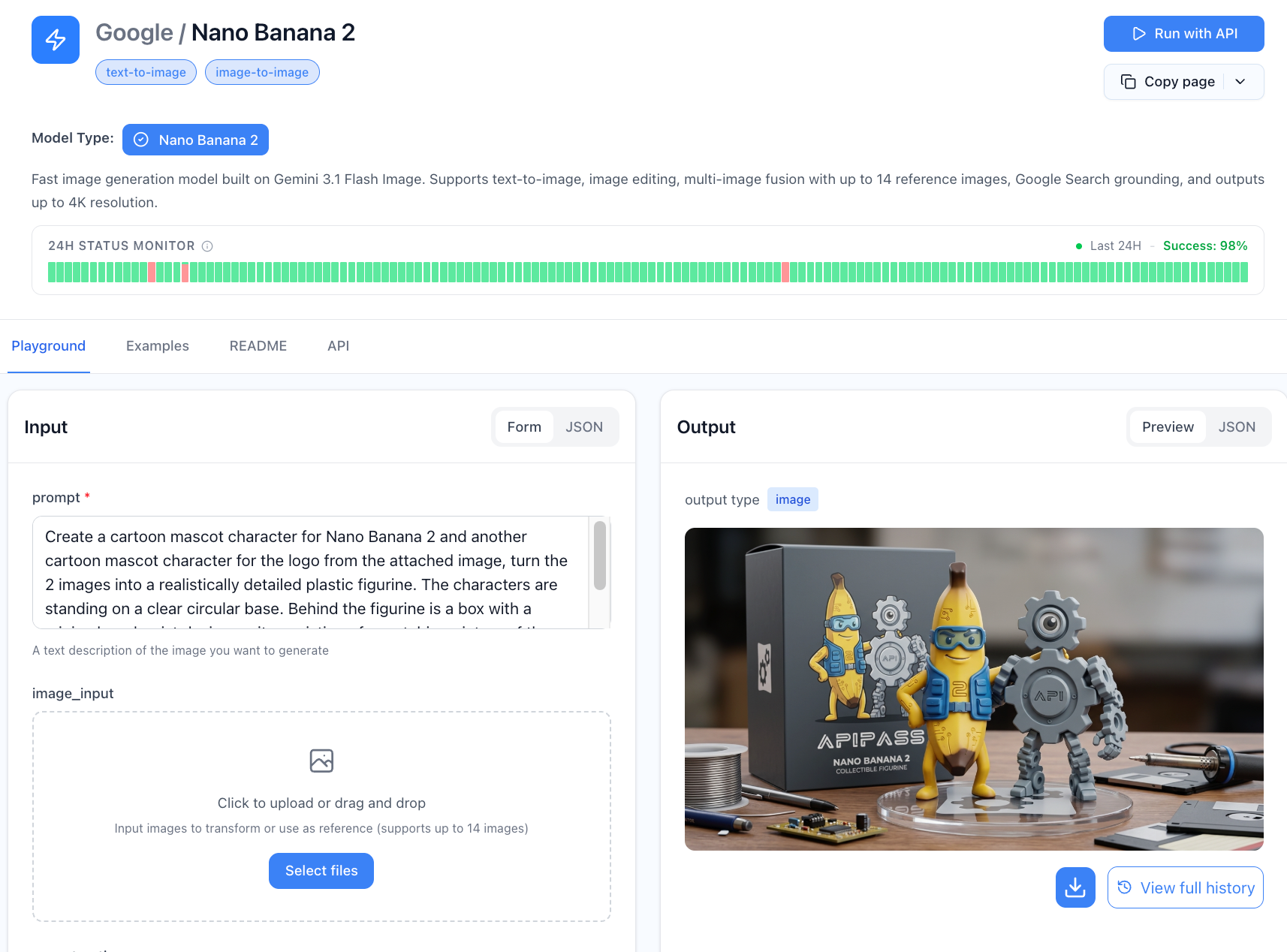
What Is the ApiPass Playground?
The Playground sits inside the ApiPass dashboard. It calls the same models the production API does — Nano Banana 2 for images, a few different LLMs, plus other multimodal options — but puts a visual layer on top so you can test things instead of integrating them.
The layout is simple by design. Model picker on the left. Prompt box in the middle. Parameter controls on the right. Output panel below, showing results inline. Nothing to install. No auth code. No JSON to read. Log in, pick a model, type a prompt, see what happens.
Anyone who's ever fired up a Jupyter notebook just to test one API call will notice the difference right away.
Walkthrough: Testing Nano Banana 2 in Under 5 Minutes
Here's what the flow really looks like for a non-developer trying the Nano Banana 2 API from scratch:
- Sign up and grab the free credits. Takes under a minute. Your account comes with enough balance for dozens of real test runs.
- Open the Playground. It's the first screen after login. No wizard, no checklist.
- Pick Nano Banana 2 from the model list. The page updates to show only the parameters that apply.
- Type your prompt. Use the one your users would actually write. Generic demo prompts won't tell you much.
- Hit generate. The image shows up in the panel, usually in a few seconds.
That's the whole thing. Someone who's never seen ApiPass before can go from the homepage to a real Nano Banana 2 image — rendered from their own prompt — in under five minutes. No code at any point.
Side-by-Side Model Comparison
When you're picking between models, the most useful thing about the Playground is running the same prompt through a few of them at once and seeing the results side by side.
For image work especially, this beats reading benchmarks. Two models can look similar on paper and produce totally different results. One might be great at photorealistic portraits. Another might shine on illustration. A model card won't tell you which fits your product. But seeing both outputs next to each other — from the prompt your users would actually type — answers the question fast.
The Playground handles this natively. Run the same prompt against several models, view the outputs together, and pick the one that matches your product's voice or visual style. The same idea works for LLMs if you're comparing tone, how well they follow instructions, or how they reason. No more flipping between five different provider tabs.
For a PM running model selection, this one feature alone can shrink a week's work into an afternoon.
Parameter Tweaking Without Code
Most AI models have parameters that shift the output in real ways. Resolution and aspect ratio for image models. Temperature and top-p for LLMs. Seeds for repeatability. System prompts for behavior. In a code workflow, tuning these means editing variables, rerunning scripts, and trying to remember which version produced what.
The Playground turns this into clicks and sliders. Every parameter has its own control, and changing anything updates the cost estimate and gets the next run ready. A few examples:
- Change resolution on Nano Banana 2 between 1K, 2K, and 4K to see the quality-cost tradeoff for yourself.
- Move temperature on an LLM to watch the output shift from steady to creative.
- Lock a seed to keep one result fixed while varying the rest.
- Edit the system prompt and see how a different persona changes the response.
For designers and PMs, this is the difference between "I need engineering to test that" and "I already know the answer."
Cost Estimation Before You Commit
Here's a smaller feature that ends up mattering a lot: per-request cost estimation. Before you hit generate, the Playground shows how many credits the call will use and what that comes to in dollars.
Sounds small. It isn't, especially if you've ever been blindsided by an AI bill. A team that prototypes on 1K images and ships on 4K can watch the per-image cost jump without catching why. The Playground puts the numbers right in front of you:
| Resolution | Credits per Run | Price per Image |
|---|---|---|
| 1K Image | 3 credits | $0.0136 |
| 2K Image | 5 credits | $0.0227 |
| 4K Image | 7 credits | $0.0318 |
For comparison, hitting Google's official Nano Banana 2 endpoint directly runs about $0.134 per 1K image and $0.24 per 4K image. Knowing the ApiPass cost upfront — somewhere between 83% and 90% lower — gives teams real numbers to plug into their unit economics before they write any integration code.
Use Cases the Playground Solves Well
Three workflows where the Playground really pays off:
PMs checking feature feasibility. Before writing a PRD or scoping engineering work, a PM can confirm whether a model produces what the feature needs. No "can you spike a prototype" tickets. The answer's in a browser tab.
Engineers tuning prompts before integration. Prompt engineering is iterative, and doing it in code is slow for no good reason. Engineers can settle on the right prompt and parameter combo in the Playground, then copy it straight into their integration code.
Designers testing styles without engineering in the loop. For visual products, designers often have the strongest opinions about output and the least access to test it. The Playground gives them direct access to image models with no engineering bottleneck, which tightens the design-to-validation loop a lot.
The common thread: the right person makes the right call without waiting on anyone else's schedule.
Limitations of the Playground
The Playground is for evaluation, not production. Worth being upfront about what it isn't:
- Not a batch tool. Generating thousands of images or running automated test suites belongs in the API.
- Not a deployment surface. You can't expose Playground outputs to end users. It's a workspace, not a backend.
- Not a full workflow tool. Prompt version control, output history, and team collaboration exist to varying degrees, but the Playground is built for one person evaluating models, not for multi-user production work.
None of this counts as a flaw. It's just scoping. The Playground does one job well — taking friction out of model evaluation. For production, you move to the API, which calls the same backend anyway.
Final Take
In an AI tooling procurement process, the Playground fills a specific role. It collapses evaluation from days into minutes, and it opens that evaluation up to people who don't write code. For a small team, that means PMs and designers can actually weigh in on model selection. For a bigger company, it means decisions get made on real output quality against real prompts — not on whatever a vendor pitch deck claims.
Free credits on registration mean the evaluation itself costs nothing, which removes the last bit of friction. By the time you're ready to integrate, you already know which model fits, which parameters work, and what each call will cost. A week of engineering time, saved.
For any team currently choosing between AI models, the ApiPass Playground isn't a nice-to-have. It's the fastest path from "we're thinking about this" to "we know it works."