1. What is Github
repo를 위한 hosting platform
git - local
github - website
2. Git Clone
2.1) git clone url
모든 파일, 커밋, 파일 전체의 히스토리를 가지고 올 수 있다.
2.2) 실행할 때 git repo에 있지 않도록 주의하고 따로 repo를 만들지 않아도 clone하면 따라온다.
3.SSH Keys
명령줄(command lines)에서 github와 상호 작용할 때마다 사용자 이름, 비밀번호를 사용하지 않아도 인증을 받을 수 있게 해준다.
4.local에 먼저 repo 있을 때 vs Github에 먼저 repo 있을 때
local 먼저
1. Github에 가서 빈 저장소를 새로 만들기
2. local repo에 Github repo의 정보를 입력하기
3. local repo를 new Github repo에 push하기
github 먼저
1. Gihub에 repo 만들고
2. Gihub repo을 clone 하기
3. local -> push // 따로 연결할 필요가 없다.
5. Git remote
5.1) 개념
git에 알려주는 url. remote가 원격 url하고 local 이름을 연결해서 사용한다고 생각하면 된다. Origin은 원격 url 이름 중 하나이며 특별하지 않다.
5.2) 명령어
git remote -v
name 원격 url
git remote add name url // 원격에 remote 만들기
6. Git push
6.1) 핵심
local branch github branch가 다를 때 vs 같을 때
다를 때
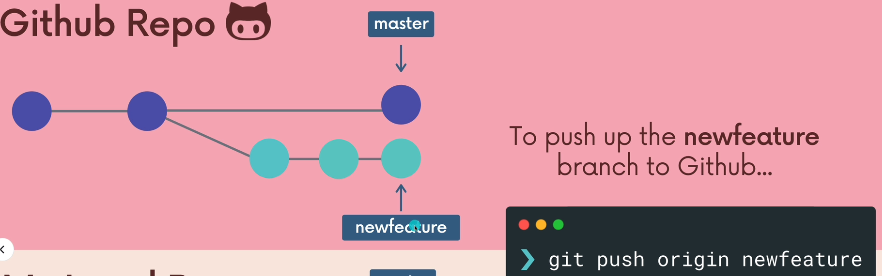
git push remote local-branch : remote-branch
같을 때 / 일반적
git push origin master // master branch:master branch
feature branch push 할 때 (일반적 같은 경우)
6.2) 명령어
1. git push remote branch // 특정 분기를 호출
remote = where we are pushing to
2.git push origin master // master branch:master branch (일반적으로 같을 때)
ex. dogs -> dogs // local -> github branch
3. git push -u origin master // upstream, 상하관계를 형성
한 번 형성하고 연결관계가 형성되면 git push로 push 가능하다.
4.The current branch doesn't have upstream branch
upstream, 상하관계가 형성되지 않았다는 문구
5.github에서 clone해서 local repo에 가져오면 자동 상하관계가 연결된다. 바로 git push 가능하다.
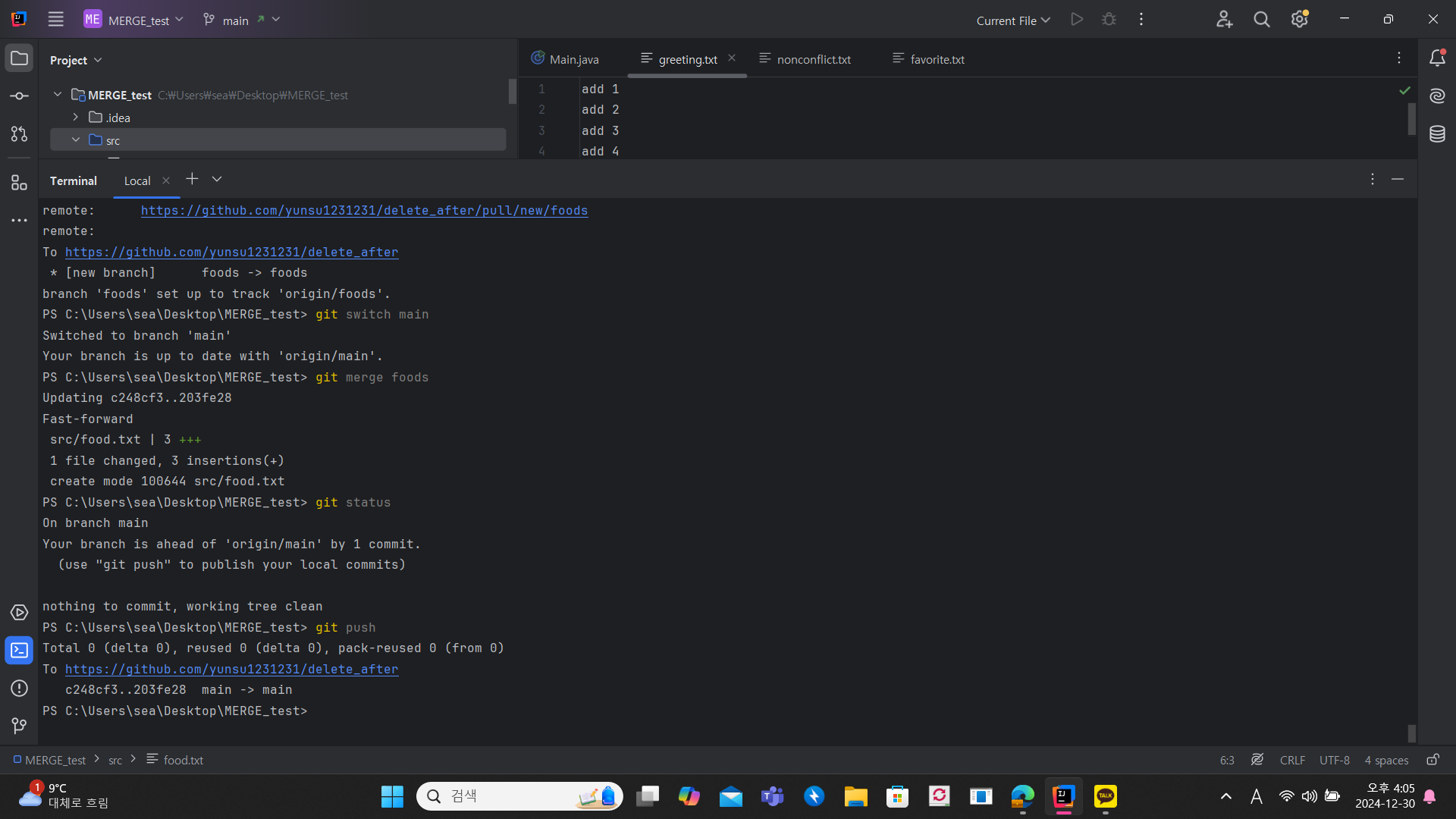
6.This branch is 1 commit ahead, 1 commit behind master
해석 = master가 가지고 있지 않은 1 commit을 가지고, master가 가지는 1 commit을 가지고 있지 않다.
7. main vs master
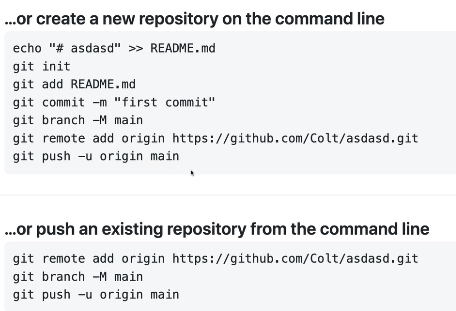
7.1) github에서 repo을 만들고 local에 clone 할 때는 local에 repo가 없어야 됨을 주의하기
github에서 repo를 만들었으면 local에서는 git clone을 해야 됨! 여기서 git init + git remote add를 하는 순간 다른 history를 가지고 있어서 오류가 뜸!
7.2) github에서 기본 branch은 main이고 local에서 기본 branch 이름은 master이다.
git branch -M main // local 기본 branch 이름을 바꿔 주기!
8. Github Exercise
9. 로컬, 원격 repo에서 commit 차이
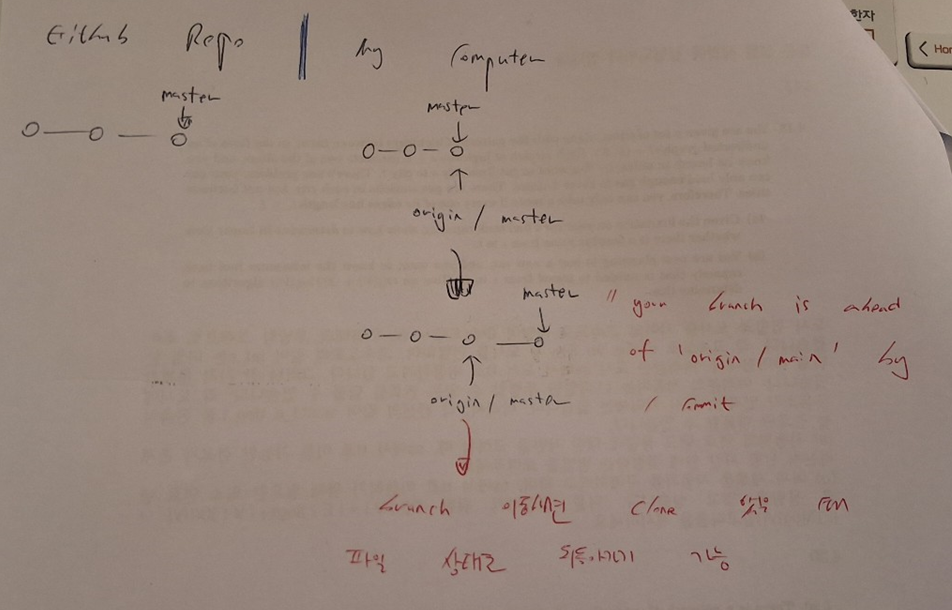
git clone을 했을 때
git branch
git branch -r 로 표시되는 branch 다르다. git branch하면 main만 표시가 되고 나머지 branch들은 switch 해줬을 때 자동으로 생성하고 연결시켜준다. ex. git switch puuy
-> 관계를 형성해주는거지 merge 해주지는 않는다.
Worksspace Remote
master -> origin / master
puppy -> origin / puppy
두 개는 같은 이름
10. Workflow
10.0) 전체 workflow
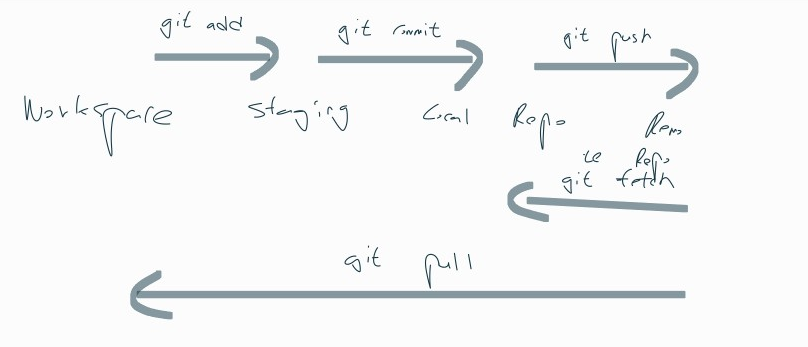
10.1) git fetch origin master
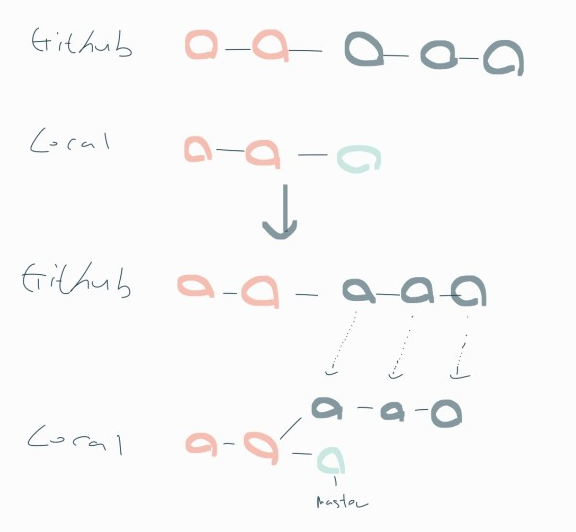
11. git fetch
git fetch remote // 따로 언급하지 않으면 git fetch origin이 default이다.
git fetch remote branch
주의 = fetch하면 정보를 가지고 오는 것이지 통합하지 않는다.
local repo가 원격 repo의 정보를 가지고 오는 작업이라고 생각하면 된다.
12. git pull
git pull origin master
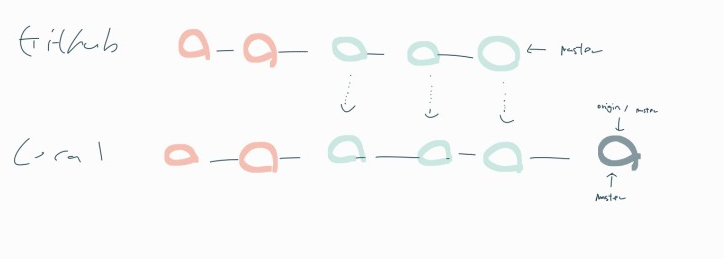
12.1) 실제 작업 디렉토리를 update 한다. 어디에서 pull 하는지가 제일 중요하다. 현재 branch에 pull하면 merge한다. pull을 먼저해서 github의 정보를 가지고 오고 push한다. git pull = git fetch + git merge. pull -> add -> commit -> push 과정이 보편적이다.
12.2) 명령어
git pull remote branch
짧은 명령어
git pull
READ.ME
Markdown
velog도 그렇고 마크다운은 알아두면 좋으니깐 시간이 있으면 되돌아가서 보고 차후에는 좀 더 가독성이 좋은 velog을 작성해보자!
생략
public, private
Adding gibhub collaborators
README.md
Markdown
Adding Read.me to project
Gists
Git pages
출처
https://www.udemy.com/course/git-and-github-bootcamp/?couponCode=ST12MT122624
https://git-scm.com/video/what-is-git
