완성 본 (20240826 Updated)
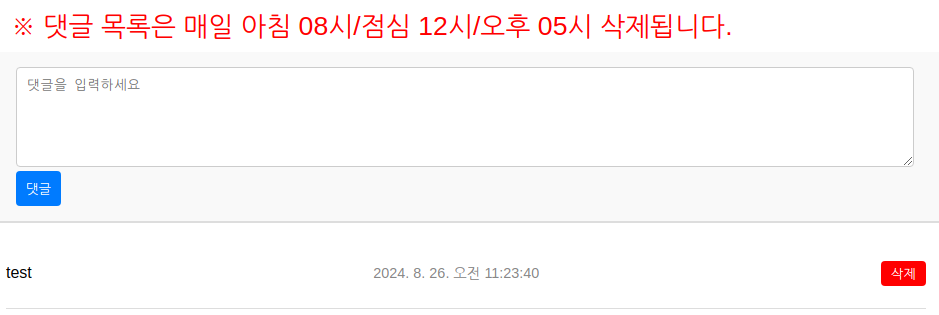
DB
database, table create
create database txt;
use txt;
CREATE TABLE records ( idx INT AUTO_INCREMENT PRIMARY KEY, text TEXT NOT NULL, created_at TIMESTAMP DEFAULT CURRENT_TIMESTAMP );

# 구조 확인
MariaDB [(none)]> desc txt.records;
+------------+-----------+------+-----+---------------------+----------------+
| Field      | Type      | Null | Key | Default             | Extra          |
+------------+-----------+------+-----+---------------------+----------------+
| idx        | int(11)   | NO   | PRI | NULL                | auto_increment |
| text       | text      | NO   |     | NULL                |                |
| created_at | timestamp | NO   |     | current_timestamp() |                |
+------------+-----------+------+-----+---------------------+----------------+
3 rows in set (0.001 sec)
user, permission create
create user txt@localhost identified by 'PASSWORD';
grant all privileges on txt.* to txt@localhost;
flush privileges;
WEB
db_connect.php
<?php
$servername = "localhost"; // 또는 DB 서버 주소
$username = "txt"; // MySQL 사용자 이름
$password = "PASSWORD"; // MySQL 비밀번호
$dbname = "txt"; // 연결하려는 데이터베이스 이름

// MySQLi 연결 생성
$conn = new mysqli($servername, $username, $password, $dbname);

// 연결 확인
if ($conn->connect_error) {
    die("Connection failed: " . $conn->connect_error);
}

// 연결 성공 메시지 (디버깅용, 실제로는 생략 가능)
// echo "Connected successfully";
?>
index.html
<!DOCTYPE html>
<html lang="en">
<head>
    <meta charset="UTF-8">
    <meta name="viewport" content="width=device-width, initial-scale=1.0">
    <title>댓글 목록</title>
    <style>
        /* 기본 스타일 */
        body {
            font-family: Arial, sans-serif;
            margin: 0;
            padding: 0;
            box-sizing: border-box;
        }

        /* 댓글 입력 폼 스타일 */
        .comment-form {
            padding: 15px;
            border-bottom: 2px solid #ddd;
            background-color: #f9f9f9;
        }

        .comment-form textarea {
            width: 100%;
            height: 100px;
            margin-bottom: 10px;
            padding: 10px;
            border: 1px solid #ccc;
            border-radius: 4px;
        }

        .comment-form button {
            padding: 10px 15px;
            border: none;
            background-color: #007bff;
            color: white;
            border-radius: 4px;
            cursor: pointer;
        }

        .comment-form button:hover {
            background-color: #0056b3;
        }

        /* 댓글 목록 스타일 */
        .comments-list {
            padding: 15px;
        }

        .comment {
            border-bottom: 1px solid #ddd;
            padding: 10px 0;
            display: flex;
            justify-content: space-between;
            align-items: center;
        }
                }

        .comment-time {
            color: #888;
            font-size: 0.9em;
        }

        .delete-button {
            background-color: red;
            color: white;
            border: none;
            padding: 5px 10px;
            border-radius: 4px;
            cursor: pointer;
        }

        .delete-button:hover {
            background-color: darkred;
        }
    </style>
</head>
<body>

        <p style="color: red; font-size: 20pt; padding: 10px; margin: 0 10px;"> ※ 댓글 목록은 매일 아침 08시/점심 12시/오후 05시 삭제됩니다.</p>

    <!-- 댓글 입력 폼 -->
    <div class="comment-form">
            <form action="reply_ok.php?board_id=<?php echo $board_id; ?>&idx=<?php echo $bno; ?>" method="post">
                    <input type="hidden" name="dat_user" id="dat_user" class="dat_user" size="15" placeholder="아이디" value="<?php echo $_SESSION['userid']; ?>">
                    <div>
                            <textarea name="content" class="reply_content" id="re_content" placeholder="댓글을 입력하>세요" style="padding: 10px; margin: 0 10px; width: calc(100% - 22px); box-sizing: border-box;"></textarea> </div>
        <button type="submit" id="rep_bt" class="re_bt" style="padding: 10px; margin: 0 10px;">댓글</button>
            </form>
    </div>

        <!-- 댓글 목록 -->
    <div class="comments-list" id="comments-list">
        <!-- 댓글이 여기에 동적으로 추가됩니다 -->
    </div>

    <script>
        // 페이지 로드 시 댓글 목록을 가져와서 표시
        document.addEventListener('DOMContentLoaded', function() {
            fetch('comments.php')
                .then(response => response.json())
                .then(data => {
                    const commentsList = document.getElementById('comments-list');
                    commentsList.innerHTML = ''; // 기존 댓글 삭제

                    data.forEach(comment => {
                        const commentDiv = document.createElement('div');
                        commentDiv.className = 'comment';
                        commentDiv.innerHTML = `
                            <p>${comment.text}</p>
                            <p class="comment-time">${new Date(comment.created_at).toLocaleString()}</p>
                            <button class="delete-button" data-id="${comment.id}">삭제</button>
                        `;
                        commentsList.appendChild(commentDiv);
                    });
        });
    </script>
</body>
</html>
reply_ok.php
<?php
include 'db_connect.php';

// 데이터 삽입
if ($_SERVER["REQUEST_METHOD"] == "POST") {
    // 입력값 가져오기
    $content = $_POST['content'];
    $dat_user = $_POST['dat_user'];

    // SQL 쿼리 작성
    $sql = "INSERT INTO records (text, created_at) VALUES (?, NOW())";

    // 준비된 문장 생성
    if ($stmt = $conn->prepare($sql)) {
        // 파라미터 바인딩
        $stmt->bind_param("s", $content);

        // 쿼리 실행
        if ($stmt->execute()) {
                            // 성공적으로 삽입된 경우 알림 팝업과 리다이렉트
            echo "<!DOCTYPE html>
            <html>
            <head>
                <title>댓글 입력 완료</title>
                <script type='text/javascript'>
                    function showAlertAndRedirect() {
                        alert('댓글이 성공적으로 입력되었습니다.');
                        window.location.href = 'index.html';
                    }
                    window.onload = showAlertAndRedirect;
                </script>
            </head>
            <body>
            </body>
            </html>";

        } else {
            echo "Error: " . $stmt->error;
        }

        // 문장 닫기
        $stmt->close();
    } else {
        echo "Error preparing statement: " . $conn->error;
    }
}

// 연결 종료
$conn->close();
?>
comments.php
<?php
// 데이터베이스 연결 설정
include 'db_connect.php';

// 연결 확인
if ($conn->connect_error) {
    die("Connection failed: " . $conn->connect_error);
}

// SQL 쿼리 작성
$sql = "SELECT * FROM records ORDER BY created_at DESC";
$result = $conn->query($sql);

// 댓글 배열 초기화
$comments = array();

if ($result->num_rows > 0) {
    // 각 행을 배열로 추가
    while($row = $result->fetch_assoc()) {
        $comments[] = $row;
    }
}

// JSON 형식으로 결과 반환
header('Content-Type: application/json');
echo json_encode($comments);

// 연결 종료
$conn->close();
?>
댓글 삭제
현재 개별 선택 후 삭제하는 기능 테스트 중으로 임시로 db 자체에서 table 데이터를 drop하는 bash 스크립트로 대체합니다.
txt_rm.sh
#!/bin/bash

# MariaDB 접속 정보 설정
DB_HOST="localhost"      # 데이터베이스 호스트
DB_USER="txt"           # 데이터베이스 사용자
DB_PASS="PASSWORD"       # 데이터베이스 비밀번호
DB_NAME="txt"            # 데이터베이스 이름
TABLE_NAME="records"      # 삭제할 테이블 이름

# MariaDB 명령어 실행
mysql --host=$DB_HOST --user=$DB_USER --password=$DB_PASS $DB_NAME <<EOF
DELETE FROM $TABLE_NAME;
EOF

# 성공 메시지
logger "모든 레코드가 '$TABLE_NAME' 테이블에서 삭제되었습니다."
crontab 등록 시
00 08,12,17 * * * /home/smileserv/txt_rm.sh
Raiju Hantu Goryo Obake