1. fillRect
<title>캔버스</title>
<style type="text/css">
	#canvas{
		border:1px solid #999999
	}
</style>
<script type="text/javascript">
window.onload=function(){
	let canvas = document.getElementById('canvas');
	if(canvas.getContext){
		let context = canvas.getContext('2d');
		context.fillStyle = 'rgb(200,0,0)'; //색상 지정
		context.fillRect(0,0,100,100); //사각형 x,y,width,height

		context.fillRect(150,150,100,100); //사각형 x,y,width,height

		//색상 및 알파값 지정(0.0 완전 투명 ~ 1.0 완전 불투명)
		context.fillStyle = 'rgba(0,0,200,0.5)';
		context.fillRect(150,200,100,100); //사각형 x,y,width,height

	}else{
		alert('브라우저가 캔버스를 지원하지 않습니다.');
	}
};
</script>
</head>
<body>
	<canvas id="canvas" width="500" height="300"></canvas>
</body>
</html>
2. strokeRect
<title>캔버스</title>
<script type="text/javascript">
window.onload=function(){
	let canvas = document.getElementById('canvas');
	if(canvas.getContext){
		let context = canvas.getContext('2d');

		context.fillStyle = 'rgb(200,0,0)';
		context.fillRect(10,10,100,100); //x,y,width,height

		context.strokeStyle = 'rgb(200,0,250)'; //선 색상 지정
		context.strokeRect(200,50,70,150); //테두리만 있는 사각형

	}else{
		alert('브라우저가 캔버스를 지원하지 않습니다.');
	}
};
</script>
</head>
<body>
	<canvas id="canvas" width="500" height="300"></canvas>
</body>
</html>
3. moveTo
1)
<title>캔버스</title>
<script type="text/javascript">
window.onload=function(){
	let canvas = document.getElementById('canvas');
	if(canvas.getContext){
		let context = canvas.getContext('2d');

		/*
		선 그리기
		1. 패스(path) 시작
		2. 선 그리기
		3. 패스(path) 닫기
		*/
		context.beginPath(); //path 시작
		context.moveTo(50,50); //시작점을 옮기는 역할
		context.lineTo(80,80); //왼쪽 작은 직선

		context.moveTo(140,80);
		context.lineTo(170,50); //오른쪽 작은 직선

		context.moveTo(60,150);
		context.lineTo(170,150); //아래 직선

		context.closePath(); //path 끝

		context.stroke(); //경로에 테두리 표시, 명시하지 않으면 선이 그려지지 않음.


	}else{
		alert('브라우저가 캔버스를 지원하지 않습니다.');
	}
};
</script>
</head>
<body>
	<canvas id="canvas" width="500" height="300"></canvas>
</body>
</html>
2)
<title>캔버스</title>
<script type="text/javascript">
window.onload=function(){
	let canvas = document.getElementById('canvas');
	if(canvas.getContext){
		let context = canvas.getContext('2d');

		//색칠된 삼각형
		context.beginPath();
		context.moveTo(50,50);
		context.lineTo(150,50);
		context.lineTo(50,150);
		context.closePath();

		context.fill(); //색칠

		//빨간색 테두리의 삼각형
		context.beginPath();
		context.moveTo(80,80);
		context.lineTo(200,100);
		context.lineTo(100,200);
		context.closePath(); //열려있는 부분 닫아줌

		context.strokeStyle = 'rgb(200,0,0)';
		context.stroke();

	}else{
		alert('브라우저가 캔버스를 지원하지 않습니다.');
	}
};
</script>
</head>
<body>
	<canvas id="canvas" width="500" height="300"></canvas>
</body>
</html>
4. arc
		arc메서드에서의 각도는 도(degree)로 표시하지 않고 라디안 값으로 표기함
		표시 1라디안 180/Math.PI, 60도 (Math.PI/180)*60, 360도 Math.PI*2

						1.5파이(270도)
							 |
							 |
		   1파이(180도) ---- 중심점 ---- 0파이,2파이 (0도,360도)
							 |
							 |
						0.5파이(90도)


		x,y 위치에서 시작해서 반시계방향(anticlockwise)으로 반지름(r) 만큼의 원을 그림.
startAngle과 endAngle 매개변수는 호의 시작점과 끝점을 의미<title>캔버스</title>
<script type="text/javascript">
window.onload=function(){
let canvas = document.getElementById('canvas');
if(canvas.getContext){
let context = canvas.getContext('2d');
//70,70에서 반시계 방향으로 반지름 20픽셀인 원을 그리는데, 60도까지만 그리고 테두리만 표시
context.beginPath();
//x,y,r(반지름),startAngle,endAngle,anticlockwise(반시계방향)
context.arc(70,70,20,0,(Math.PI/180)*60,true); //기본이 반시계 방향이므로 true를 해줌
context.stroke();
//130,110에서 반시계 방향으로 반지름 50인 원을 그리고 색을 채움.
//끝 각도를 360도, 즉 2파이 라디안으로 하면 전체 원이 그려짐
context.beginPath();
context.arc(130,110,50,0,Math.PI*2,true);
context.closePath(); //360도 이기 때문에 생략 가능
context.fillStyle = 'rgb(0,200,200)';
context.fill();
context.stroke();
//190,70에서 반시계 방향으로 반지름 20인 원을 그리고 110도에서 170까지만 그리고 테두리만 표시
context.beginPath();
context.arc(190,70,20,(Math.PI/180)*110,(Math.PI/180)*170,true);
context.stroke();
}else{
alert('브라우저가 캔버스를 지원하지 않습니다.');
}
};
</script>
</head>
<body>
<canvas id="canvas" width="500" height="300"></canvas>
</body>
</html>[실행결과]
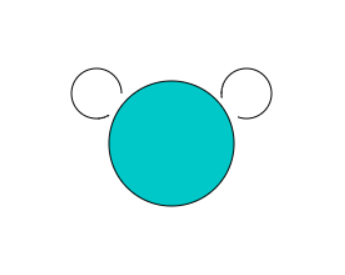
5. quadraticCurveTo
<title>캔버스</title>
<script type="text/javascript">
window.onload=function(){
	let canvas = document.getElementById('canvas');
	if(canvas.getContext){
		let context = canvas.getContext('2d');

		context.beginPath();
		context.moveTo(50,200); //시작점
		//(200,50)을 조절점으로 하여 현재 위치(50,200)에서 (350,200)까지 곡선을 그림
		context.quadraticCurveTo(200,50,350,200);

		context.stroke();

	}else{
		alert('브라우저가 캔버스를 지원하지 않습니다.');
	}
};
</script>
</head>
<body>
	<canvas id="canvas" width="500" height="220"></canvas>
	<br><br>
	<img src="../files/exp_01.gif">
</body>
</html>
[실행결과]
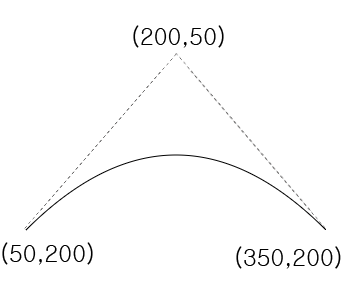
6. bezierCurveTo
<title>캔버스</title>
<script type="text/javascript">
window.onload=function(){
	let canvas = document.getElementById('canvas');
	if(canvas.getContext){
		let context = canvas.getContext('2d');

		context.beginPath();
		context.moveTo(50,200); //시작점
		//(90,50),(310,50)을 조절점으로 하여 현재 위치(50,200)에서 (350,200)까지 곡선을 그림
		context.bezierCurveTo(90,50,310,50,350,200);

		context.stroke();

	}else{
		alert('브라우저가 캔버스를 지원하지 않습니다.');
	}
};
</script>
</head>
<body>
	<canvas id="canvas" width="500" height="220"></canvas>
	<br><br>
	<img src="../files/exp_02.gif">
</body>
</html>
[실행결과]
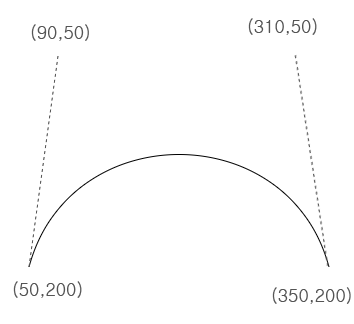
7. image
1)
<title>Canvas</title>
<script type="text/javascript">
window.onload=function(){
	let canvas = document.getElementById('canvas');
	if(canvas.getContext){
		let context = canvas.getContext('2d');
		let img = new Image();
		img.src = '../files/landscape.jpg';
		img.onload=function(){
			context.drawImage(img,10,10); //(이미지 객체, x좌표, y좌표)

			context.fillStyle = 'rgb(200,0,0)'; //색상 지정
			context.fillRect(20,20,100,100); //사각형:(x,y,width,height)
		};

	}else{
		alert('브라우저가 캔버스를 지원하지 않습니다.');
	}
};
</script>
</head>
<body>
	<canvas id="canvas" width="800" height="400"></canvas>
</body>
</html>
2)
<title>Canvas</title>
<script type="text/javascript">
window.onload=function(){
	let canvas = document.getElementById('canvas');
	if(canvas.getContext){
		let context = canvas.getContext('2d');

		let img = new Image();
		img.src = '../files/landscape.jpg';
		img.onload=function(){
			context.drawImage(img,10,10) //이미지 객체,x,y

			context.drawImage(img,10,500,200,100); //이미지 객체,x,y,width,height
		};

	}else{
		alert('브라우저가 캔버스를 지원하지 않습니다.');
	}
};
</script>
</head>
<body>
	<canvas id="canvas" width="800" height="700"></canvas>
</body>
</html>
8. pattern
<title>Canvas</title>
<script type="text/javascript">
window.onload=function(){
	let canvas = document.getElementById('canvas');
	if(canvas.getContext){
		let context = canvas.getContext('2d');

		let img = new Image();
		img.src = '../files/pattern.png';
		img.onload=function(){
			//이미지 반복 지정(repeat,repeat-x,repeat-y,no-repeat)
			let pttn = context.createPattern(img,'repeat');
			context.fillStyle = pttn; //생성한 패턴을 색상으로 지정
			context.fillRect(0,0,300,500);
		};

	}else{
		alert('브라우저가 캔버스를 지원하지 않습니다.');
	}
};
</script>
</head>
<body>
	<canvas id="canvas" width="500" height="500"></canvas>
</body>
</html>