2026.1.15.목
프로젝트 발표
기억할 것들
Dependencies, 배포 관련
- peerDependencies
- 사용자가 받아서 써야 할 것 (이미 설치되어있다고 가정)
- devDependencies
- 개발 환경에서 쓴 dependencies
- pack
- 배포 전에 개발 환경에서 테스트 해 볼 수 있다.
- github action
- NPM_TOKEN 으로 넣어주어야 한다.
- npm props
- 사용자가 이용해야 하는 prop을 제공한다.
- npm library
- css 적용 안 됨
- 사용자가 import하거나, 자동으로 config 파일에 불러오도록 한다.
응용 프로그램
- storybook
- 개발한 UI 컴포넌트를 하나하나 실행시켜보기 전에 플레이 그라운드처럼 사용한다.
금융
- 상품 설명 블럭 누름 → 바로 가입 페이지로 이동하면 ‘가입유도’가 되어 법적 문제가 발생할 수 있다.
기획
- 공개된 문서 기반으로 현실과 비슷하게 코드 작성하면 좋다.
- ex) 계좌 인식 하려고 할 때 금융 감독원 문서의 은행 별 코드 번호 / 계좌번호 규칙 문서 이용.
Context API
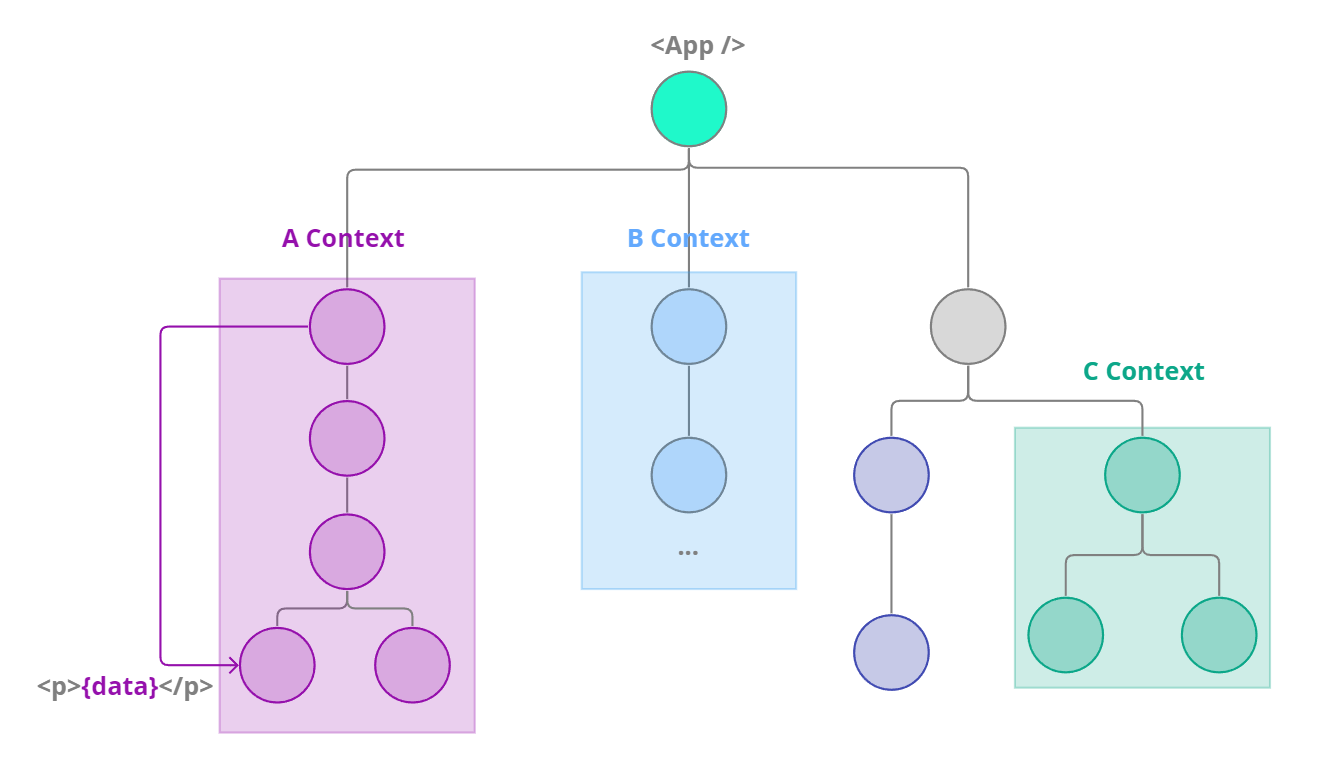
같은 맥락에 속한 데이터를 바로 받아서 사용할 수 있다.
전역 상태 관리가 아니라, context관리라고 생각하기 !
사용 예시
: 여러 개의 인자(함수 포함)를 넘겨줄 때에는 배열([])로 묶는다.
createContext(), .Provider
const { useState, createContext, useContext } = React;

        // #2. Context 생성
        const MyContext = createContext();
        // console.log(MyContext); // object

        const App = () => {

            const [data, setData] = useState('Hello from Parent');

            return (
                <div>
                    {/* #3. Context 객체가 제공하는 컴포넌트인 Provider를 통해
                        Context로 적용될 영역을 그룹핑,
                        해당 컨텍스트에 속한 하위 컴포넌트들에게 전달할 데이터 지정
                        -> value={전달할 데이터}
                        */}
                    <MyContext.Provider value={[data, setData]}>
                        <A />
                    </MyContext.Provider>
.useContext
: 여러 개의 context를 받아와 사용할 때도 마찬가지로 배열로 풀어준다.
const D = () => {
            // #4-1. useContext 훅을 통해 특정 컨텍스트 이름 지정
            // 하나의 앱에 2개 이상의 다른 컨텍스트가 있을 수 있기 때문에
            // useContext(사용할 컨텍스트명 지정)

            // Provider를 통해 전달받은 데이터
            const [data, setData] = useContext(MyContext);

            const clickHandler = () => setData('Data changed');

            return (
                <div>
                    <h5>{data}</h5>
                    <button onClick={clickHandler}>Change Data</button>
                </div>
            );
};- redux context API
- redux: context API 를 이용하여 구현되어 있다.
Hooks
useReducer
https://react.dev/reference/react/useReducer
시그니처
const [state, dispatch] = useReducer(reducer, initialArg, init?)
예시 코드
<!DOCTYPE html>
<html lang="en">
<head>
    <meta charset="UTF-8">
    <meta name="viewport" content="width=device-width, initial-scale=1.0">
    <title>Document</title>
    <script crossorigin src="https://unpkg.com/react@18/umd/react.development.js"></script>
    <script crossorigin src="https://unpkg.com/react-dom@18/umd/react-dom.development.js"></script>

    <script src="https://unpkg.com/@babel/standalone/babel.min.js"></script>
    <script src="https://cdn.tailwindcss.com"></script>
</head>
<body>
    <div id="root"></div>

    <script type="text/babel">

        const { useState, useReducer } = React;

        // reducer 함수, 이벤트(action)를 받아서 카운트 상태값(state) 로직 처리 담당
        const reducer = (state, action) => {
            switch(action.type) {
                case 'INCREASE':
                    return state + action.data // 증가 로직
                case 'DECREASE':
                    return state + action.data
                case 'RESET':
                    return action.data
            }
        }

        const App = () => {
            // const [상태변수, 디스패치함수] = useReducer(로직처리함수, 초기값);
            const [count, dispatch] = useReducer(reducer, 0);

            // dispatch를 통해 useReducer의 첫 번째 인수로 전달된
            // reducer()가 호출됨

            // dispatch({type: '이벤트명', data: '로직 처리에 사용할 값'})
            const increase = () => dispatch({type: 'INCREASE', data: 1});
            const decrease = () => dispatch({type: 'DECREASE', data: -1});
            const reset = () => dispatch({type: 'RESET', data: 0});

            return (
                <div>
                    <p>카운트: {count}</p>
                    <button onClick={increase}>증가</button>
                    <button onClick={decrease}>감소</button>
                    <button onClick={reset}>초기화</button>
                </div>
            )
        }

        const rootElement = document.getElementById('root');
        const rootDiv = ReactDOM.createRoot(rootElement);

        rootDiv.render(<App />);
    </script>
</body>
</html>