Yocto를 쓰다가 소스코드 형태로 빌드를 다시 설정하는 이유
- 컴파일 속도면에서의 유의미한 차이 (Yocto는 환경체크와 레시피 처리에 많은 시간이 소요됌)
- 세밀한 제어와 커스터마이징 (소스빌드는 즉시 수정후 결과를 덤프하기에 편리함)
- 초기 하드웨어 브링업 테스트 단계에서 오프셋을 직접 제어 하는 것이 부트 스트랩 과정을 검증하는 절차이기 때문.
Background
- MA35D1 Boot loader 특성상 U-Boot.bin 파일만 넣어서 실행이 되지 않음.
- header → BL2 → BL31 (FIP.bin) 구조이다.
- 따라서 U-Boot 소스코드를 TF-A에 넣고 FIP.bin 파일로 만들고 같이생성된 BL2.bin 파일과 BL2.dtb 또한 각각 정확한 offset에 로드 해야 한다.
소스코드 빌드 하기전 관련 파일 설치
$ sudo apt-get update

# bison parser 생성기 설치
$ sudo apt-get install bison flex
$ sudo apt-get install build-essential bc libssl-dev

# 텍스트 기반의 그래픽 메뉴화면 보여주는 도구 설치
$ sudo apt-get install libncurses-dev pkg-config
U-Boot 이미지 생성
- git clone (U-Boot 소스코드 다운로드)
$ git clone https://github.com/OpenNuvoton/MA35D1_u-boot-v2020.07
$ cd MA35D1_u-boot-v2020.07- U-Boot Configuration
# 설정할 configuration 셋팅.
# ~/MA35D1_u-boot-v2020.07/configs 안에 다양한 옵션이 있음
# nand flash로 부팅할 예정이라 ma35d1_nand_defconfig로 설정
$ make ma35d1_defconfig

# config 설정 (H/W setting, U-Boot command set 추가 등을 여기서 함)
$ make menuconfig-
menuconfig 화면
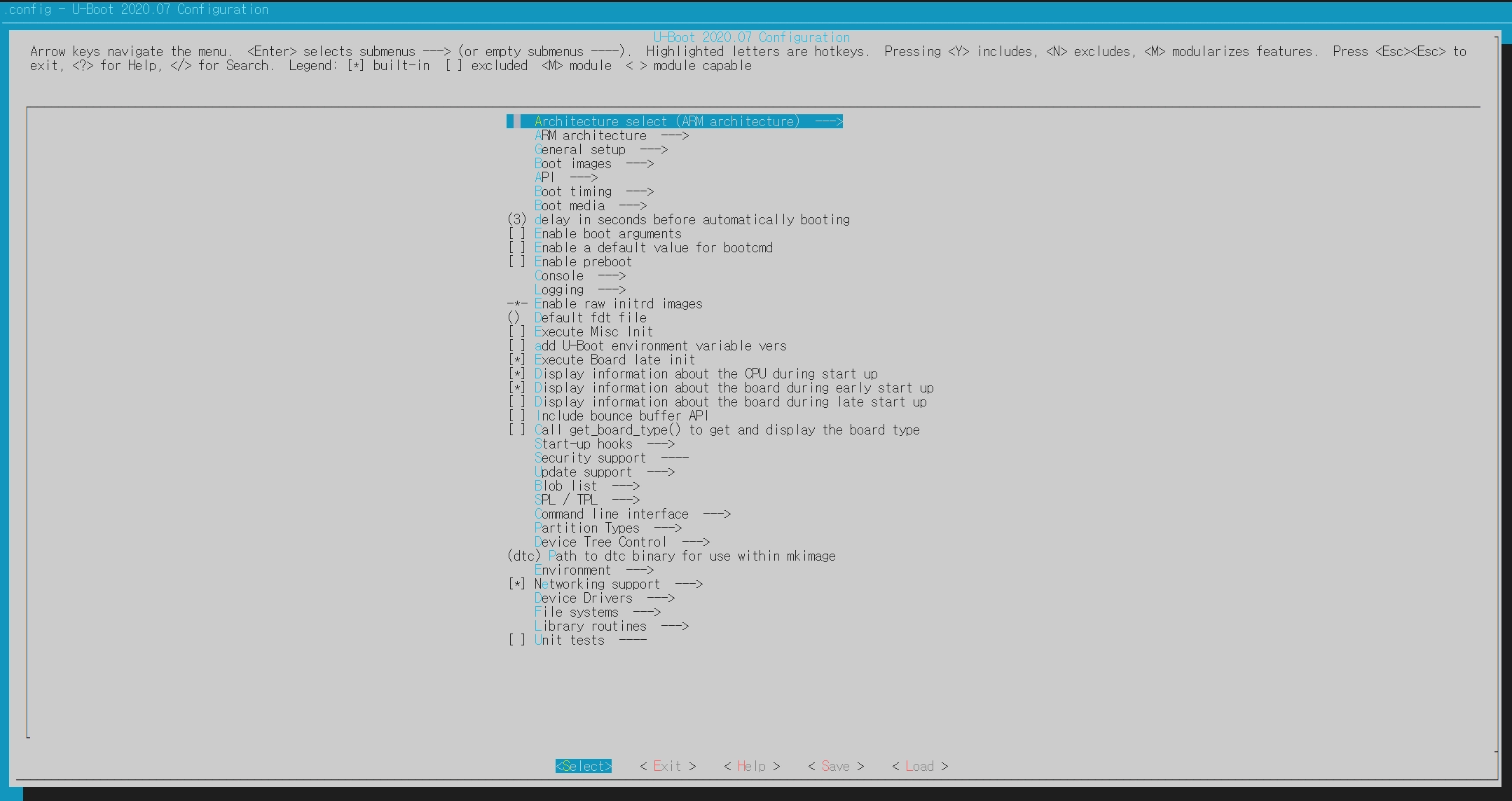
- select
- Device Driver
- Enable Driver Model for MDIO Device
- Enable Driver Model for Ethernet Generic Phy Driver
- Enable Driver Model for Keyboard Support
- USB Support
- USB Keyboard Support
- I2C Support
- GPIO Support
- Command line interface
- Network Command
- mii, mdio, nfs
- Device Access
- dm, gpio, clk, nand, i2c
- Memory Command
- md, mtest, mw
- Shell Scripting Command
- itest
- Network Command
- Device Driver
- select
-
device tree source 수정 및 생성
$ cd ~/MA35D1_u-boot-v2020.07/arch/arm/dts

~/MA35D1_u-boot-v2020.07/arch/arm/dts$ cp MA35D1.dts MA35D1-custom.dts

# 새로 생성한 dts 파일 수정
$ vi MA35D1-custom.dts #수정

# Makefile에 dts 파일 추가해서 dtb 파일로 생성될 수 있게 경로 추가- ma35d1-custom.dts 파일 수정
//written by smjeon
&gmac0 {
status = "okay";
};
&gmac1 {
phy-mode = "rmii";
pinctrl-names = "default";
pinctrl-0 = <&pinctrl_emac1>;
phy-handle = <ð_phy1>;
status = "okay";
mdio {
compatible = "snps,dwmac-mdio";
#address-cells = <1>;
#size-cells = <0>;
/delete-node/ ethernet-phy@1;
eth_phy1: ethernet-phy@0 {
reg = <0>;
};
};
};
///////////////- Makefile에 ma35d1-custom.dts 파일 경로 추가
dtb-$(CONFIG_MA35D1) += \
         ma35d1.dtb \
         ma35d1-sdcard0.dtb \
         ma35d1-spinor.dtb \
ma35d1-custom.dtb #줄 추가- Build Command
# 기본 빌드 (ma35d1.dts 사용)
$ CROSS_COMPILE=aarch64-linux-gnu- make

# 내가 만든 dts 파일로 빌드 (TARGET_DEVICE_TREE == ma35d1-custom)
$ CROSS_COMPILE=aarch64-linux-gnu- DEVICE_TREE=TARGET_DEVICE_TREE make- Generate Files 확인
u-boot.bin #u-boot image with dtbTF-A FIP Packaging
- TF-A FIP 패키징은 BL2 단계에서 고유 UUID로 식별되는 다수의 펌웨어 컴포넌트(BL31, BL32, BL33 등)를 계층적으로 파싱 및 로드하기 위한 표준 하드웨어 부팅 규격이기 때문에 필수적.
- git clone (TF-A 소스코드 다운로드)
$ git clone https://github.com/OpenNuvoton/MA35D1_arm-trusted-firmware-v2.3
$ cd MA35D1_arm-trusted-firmware-v2.3- 생성한 u-boot.bin 파일 가져오기
$ mkdir fiptool_images

# fiptool_images 디렉토리에 생성한 u-boot.bin 파일 복사
$ cp ../MA35D1_u-boot-v2020.07/u-boot.bin fiptool_images/- FIP.bin 파일 생성
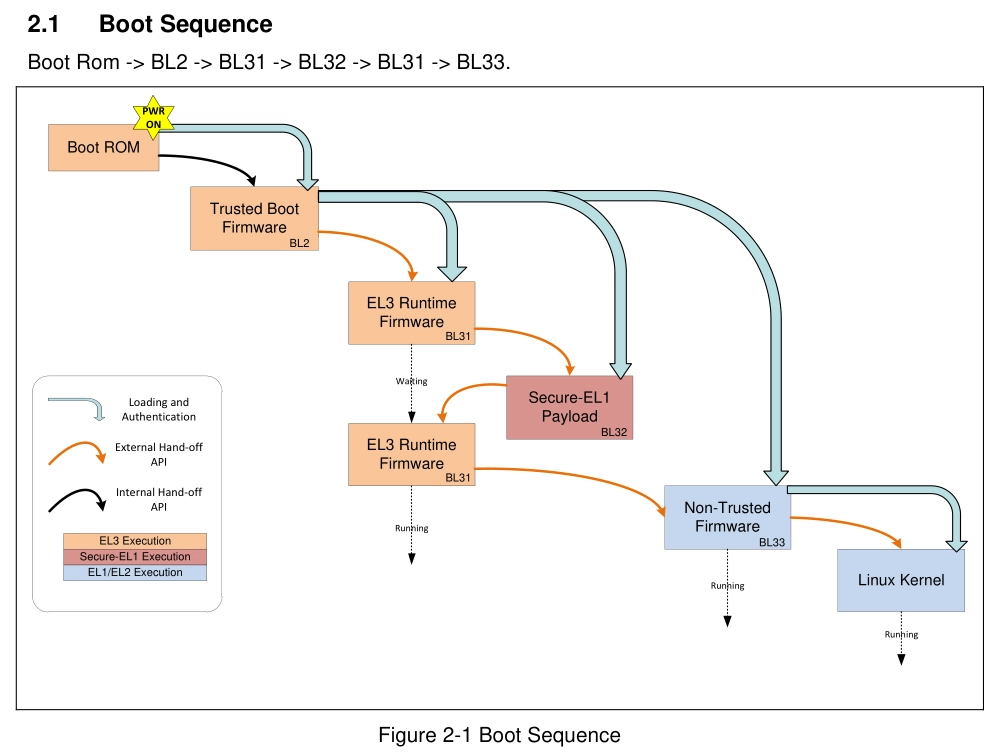
- header → BL2 → (BL31 BL32 BL33[u-boot] Packaging → FIP.bin) → Linux Kernel
- Build
# 생성된 파일 지우는 작업
$ make realclean

# Build (no need BL32[OP-TEE])
# 보안 펌웨어인 BL32의 경우 사용하지 않으므로 없이 Packaging
$ CROSS_COMPILE=aarch64-linux-gnu- make PLAT=ma35d1 \
NEED_BL31=yes bl31 BL33=fiptool_images/u-boot.bin all fip- 생성된 file 확인
$ cd build/ma35d1/release

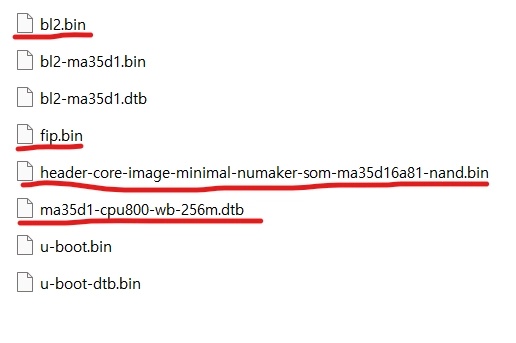
# 사용 해야 할 것은 bl2.bin 파일과 fip.bin 파일
    smj@smj-VirtualBox:~/MA35D1_arm-trusted-firmware-v2.3/build/ma35d1/release$ ls
    bl2  **bl2.bin**  bl31  bl31.bin  fdts  **fip.bin**  lib  libc  libfdt  libwrapper  romlib

# bl2.dtb 파일의 경우는 build/ma35d1/release/fdts에서 확인
# 맞는 bl2 dtb 파일을 사용해주면 되는데 cpu-ddr ram 용량에 맞는 파일 사용
# ma35d1-cpu800-wb-256m.dtb (cpu 800Mhz  + winbond DDR 256MB)
smj@smj-VirtualBox:~/MA35D1_arm-trusted-firmware-v2.3/build/ma35d1/release/fdts$ ls
ma35d1-cpu1g-custom-ddr.d        ma35d1-cpu1g-mc-1g.o.d        ma35d1-cpu1g-wb-512m.d        ma35d1-cpu800-custom-ddr.o.d   ma35d1-cpu800-wb-128m.d        ma35d1-cpu800-wb-256m.o.d
ma35d1-cpu1g-custom-ddr.dtb      ma35d1-cpu1g-mc-1g.pre.dts    ma35d1-cpu1g-wb-512m.dtb      ma35d1-cpu800-custom-ddr.pre.dts  ma35d1-cpu800-wb-128m.dtb      ma35d1-cpu800-wb-256m.pre.dts
ma35d1-cpu1g-custom-ddr.o.d      ma35d1-cpu1g-wb-256m.d        ma35d1-cpu1g-wb-512m.o.d      ma35d1-cpu800-mc-1g.d         ma35d1-cpu800-wb-128m.o.d      ma35d1-cpu800-wb-512m.d
ma35d1-cpu1g-custom-ddr.pre.dts  ma35d1-cpu1g-wb-256m.dtb      ma35d1-cpu1g-wb-512m.pre.dts  ma35d1-cpu800-mc-1g.dtb       ma35d1-cpu800-wb-128m.pre.dts  ma35d1-cpu800-wb-512m.dtb
ma35d1-cpu1g-mc-1g.d             ma35d1-cpu1g-wb-256m.o.d      ma35d1-cpu800-custom-ddr.d    ma35d1-cpu800-mc-1g.o.d           ma35d1-cpu800-wb-256m.d        ma35d1-cpu800-wb-512m.o.d
ma35d1-cpu1g-mc-1g.dtb           ma35d1-cpu1g-wb-256m.pre.dts  ma35d1-cpu800-custom-ddr.dtb  ma35d1-cpu800-mc-1g.pre.dts       ma35d1-cpu800-wb-256m.dtb      ma35d1-cpu800-wb-512m.pre.dts
NuWriter 이용해서 offset에 맞게 이미지 넣기
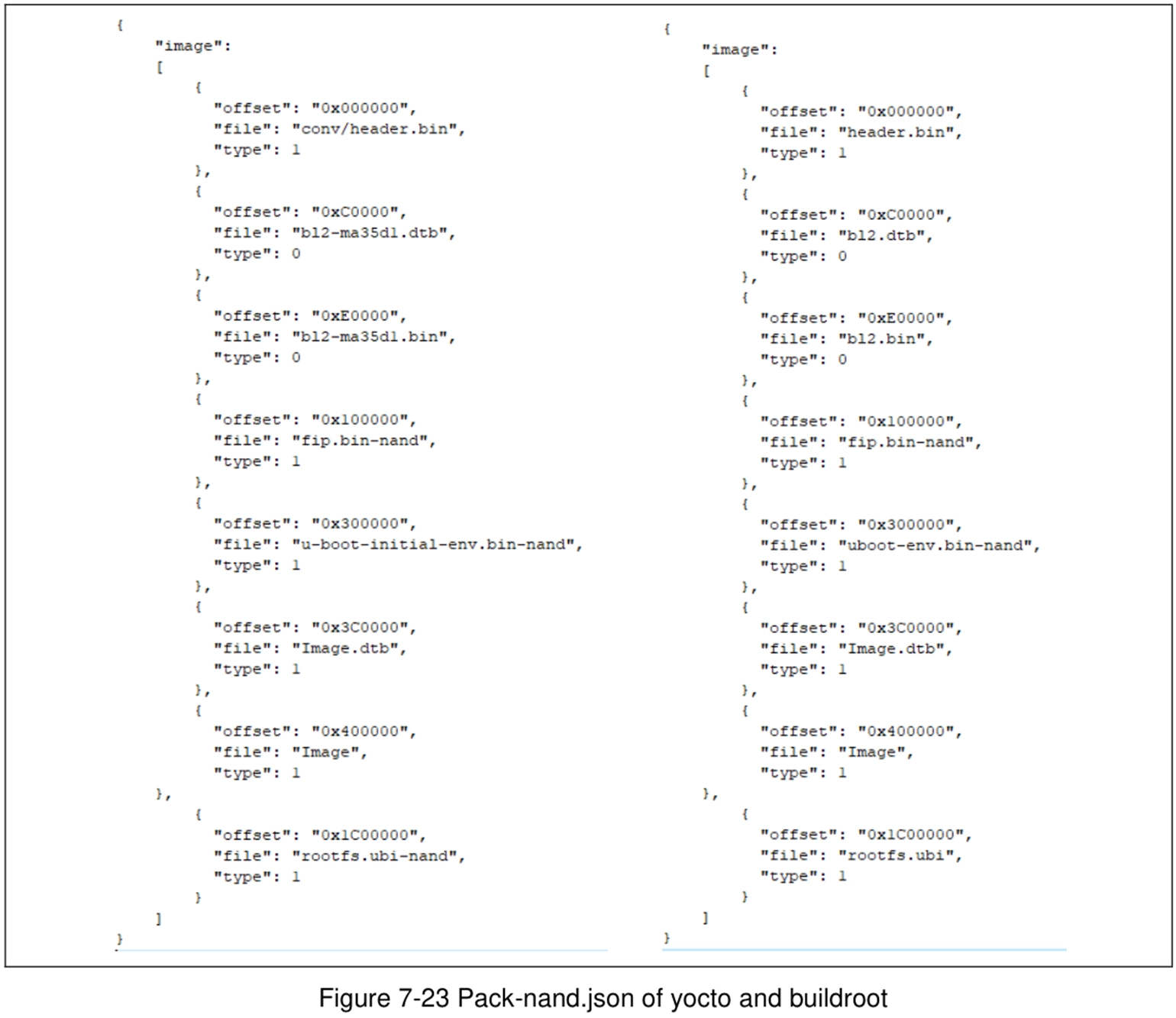
- NAND offset에 맞게 넣어주면 된다.
- 기본적으로 U-Boot 정도만 필요하다고 하면 필요한 부분은 header, bl2.dtb, bl2.bin, fip.bin 파일 필요
bl2.dtb,bl2.bin,fip.bin파일은 TF-A 디렉토리에서,header는 yocto에서 가져왔다.

Embedded Junior Developer