JavaFX로 Hello!를 표현하는 GUI 만들어보기
플랫폼기반프로그래밍이라는 과목을 수강하고 있는데, Java를 다루는 강의입니다. 첫 과제로 JavaFX를 사용하여 간단한 GUI를 만들어 보았습니다.
JavaFX?
JavaFX는 Java에서 GUI(Graphic User Interface)를 만들 수 있는 라이브러리입니다. 웹에서 HTML을 렌더링하듯이 JavaFX는 FXML이라는 XML을 사용합니다.
GUI Outcome
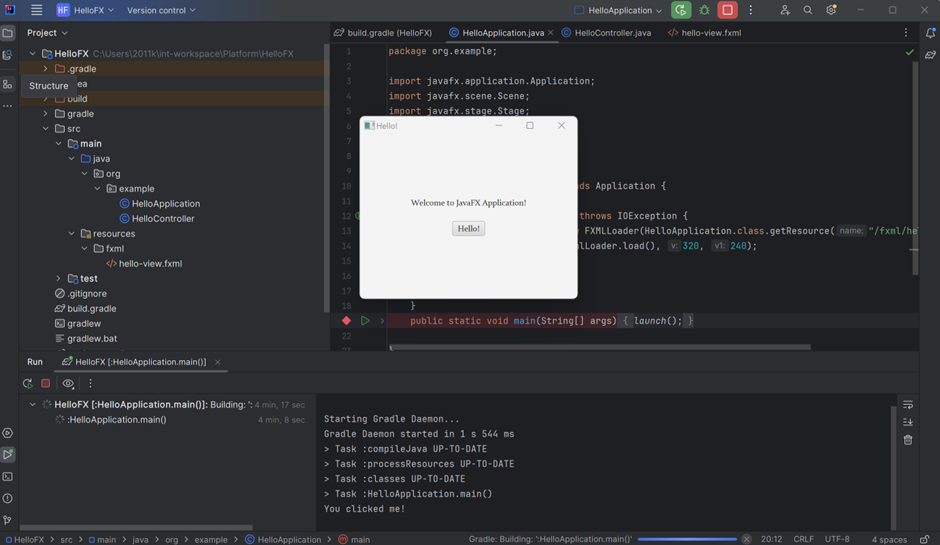
다음과 같은 GUI를 구성하는 것이 과제였습니다. Hello버튼 클릭 시 콘솔에 You clicked me!" 메시지를 출력합니다.
Short Explanation
- Install JavaFX SDK by link below and unzip the files into proper location JavaFX 설치 링크
- Based on IntelliJ IDEA, make a gradle project. (I used Java 17 jdk)
- Add some code line in “build.gralde” file.
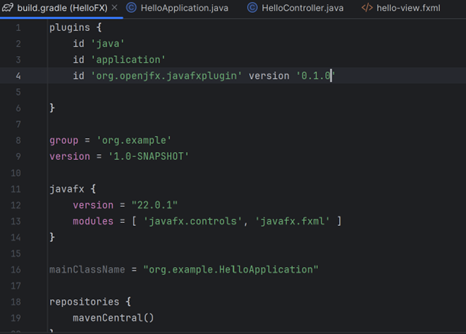
- Add VM options (Edit Configuration -> Modify options Add VM options)
Then, paste under command line into the option.
--module-path C:\Users\2011k\javafx-sdk-22.0.2/lib --add-modules javafx.controls,javafx.fxml- Complete a souce code(HelloApplication, HelloController, hello-view.html)
package org.example;

import javafx.application.Application;
import javafx.scene.Scene;
import javafx.stage.Stage;
import javafx.fxml.FXMLLoader;

import java.io.IOException;

public class HelloApplication extends Application {
    @Override
    public void start(Stage stage) throws IOException {
        FXMLLoader fxmlLoader = new FXMLLoader(HelloApplication.class.getResource("/fxml/hello-view.fxml"));
        Scene scene = new Scene(fxmlLoader.load(), 320, 240);
        stage.setTitle("Hello!");
        stage.setScene(scene);
        stage.show();
    }
    public static void main(String[] args) {
        launch();
    }

}
package org.example;
import javafx.event.ActionEvent;
import javafx.fxml.FXML;
import javafx.fxml.Initializable;
import javafx.scene.control.Button;
import javafx.scene.control.Label;
import javafx.scene.control.TextArea;
import javafx.scene.control.TextField;
import java.net.URL;
import java.util.ResourceBundle;
public class HelloController {
@FXML
private Label welcomeLabel;
@FXML
private Button helloButton;
@FXML
private void handleButtonAction(ActionEvent event) {
System.out.println("You clicked me!");
}
}<?xml version="1.0" encoding="UTF-8"?>
<?import java.lang.*?>
<?import java.util.*?>
<?import javafx.scene.*?>
<?import javafx.scene.control.*?>
<?import javafx.scene.layout.*?>
<AnchorPane xmlns="http://javafx.com/javafx"
xmlns:fx="http://javafx.com/fxml"
fx:controller="org.example.HelloController"
prefHeight="400.0" prefWidth="600.0" >
<children>
<VBox alignment="CENTER" spacing="20.0" AnchorPane.leftAnchor="0.0" AnchorPane.rightAnchor="0.0" AnchorPane.topAnchor="0.0" AnchorPane.bottomAnchor="0.0">
<Label text="Welcome to JavaFX Application!" />
<Button fx:id="helloButton" text="Hello!" onAction="#handleButtonAction" />
</VBox>
</children>
</AnchorPane>Reference

백문이 불여일타