지금까지 배운 내용으로 만들었던 회원가입 페이지에 css를 적용시켜보기
목표
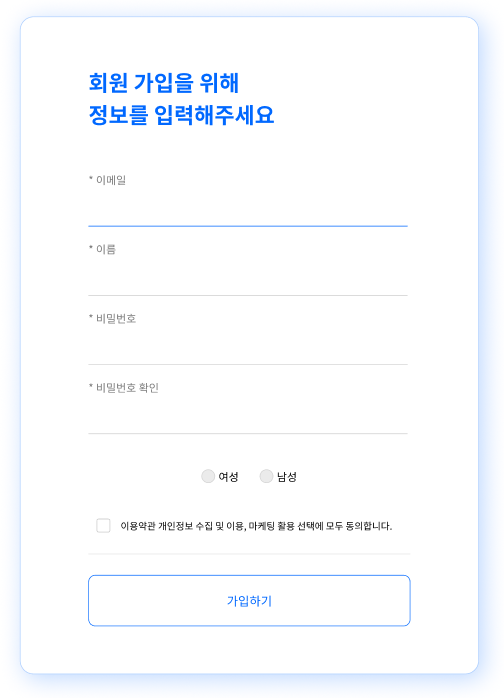
완성품
html 파일
<!DOCTYPE html>
<html lang="ko">
<head>
    <title>회원가입</title>
    <link href="./06-signup_test.css" rel="stylesheet">
</head>
<body>
    <div id ="pr">
        <h2 id="title">
            회원 가입을 위해 <br>
            정보를 입력해주세요
        </h2>
        <br>
        <div class="infortitle">* 이메일</div><br>
        <input class="inforinput" type="text"><br>
        <div class="infortitle">* 이름</div><br>
        <input class="inforinput" type="text"><br>
        <div class="infortitle">* 비밀번호</div><br>
        <input class="inforinput" type="text"><br>
        <div class="infortitle">* 비밀번호 확인</div><br>
        <input class="inforinput" type="text"><br>
        <div>
            <br><br>
            <input class="gendercheck" type="radio" name="gender"> 여성
            <input class="gendercheck" type="radio" name="gender"> <span>남성</span>
            <br><br>
        </div>
        <div>
            <input id="procheck" type="checkbox"> 이용약관 개인 정보 수집 및 이용, 마케팅 활용 선택에 모두 동의합니다.
        </div>
        <br>
        <hr>
        <br>
        <button>가입하기</button>
    </div>
</body>
</html>
css 파일
#pr{
    width: 670px;
    height: 960px;
    top: 60px;
    left: 625px;
    border-radius: 20px;
    border: 1px solid #AACDEF;
    box-shadow: 7px 7px 39px 0px #0068FF40;
                /* x축, y축, Blur, Spread */
    display: flex;
    flex-direction: column;
    justify-content: center;
    align-items: center;
}

#title{
    width: 466px;
    height: 94px;
    top: 132px;
    left: 725px;
    color: #0068FF;
    box-sizing: border-box;

    font-family: Noto Sans CJK KR;
    font-size: 32px;
    font-weight: 700;
    line-height: 47.36px;
    text-align: left;

}

.infortitle{
    width: 466px;
    height: 23.65px;
    top: 286px;
    left: 725px;
    gap: 0px;
    opacity: 0px;

}
/* 기본 스타일 설정 */
input.inforinput {
    border: none;              /* 기본 테두리 제거 */
    border-bottom: 2px solid #e6e6e6; /* 밑줄 스타일 설정 */
    outline: none;             /* 포커스 시 기본 테두리 제거 */
    padding: 5px;             /* 패딩 설정 (옵션) */
    font-size: 16px;          /* 폰트 크기 (옵션) */

    width: 466px;
}

  /* 포커스 시 밑줄 색상 변경 (선택사항) */
input.inforinput:focus {
    border-bottom-color: #007bff; /* 포커스 시 밑줄 색상 변경 */
}

.gendercheck{
    appearance: none;          /* 기본 radio 버튼 스타일 제거 */
    -webkit-appearance: none;  /* 웹킷 기반 브라우저에서 기본 스타일 제거 */
    background-color: #f0f0f0; /* 회색 배경색 */
    border-radius: 50%;        /* 둥근 모양 */
    width: 20px;               /* 버튼의 너비 */
    height: 20px;              /* 버튼의 높이 */
    border: 2px solid #ccc;    /* 회색 테두리 */
    cursor: pointer;           /* 포인터 커서 설정 */
    position: relative;        /* 절대 위치 설정을 위한 준비 */
}

/* 선택된 radio 버튼 스타일 */
.gendercheck:checked::before {
    content: '';               /* 내용 없음 */
    position: absolute;        /* 절대 위치 설정 */
    top: 50%;                  /* 중앙 정렬 */
    left: 50%;                 /* 중앙 정렬 */
    transform: translate(-50%, -50%); /* 중앙 정렬 */
    width: 12px;               /* 선택된 부분의 크기 */
    height: 12px;              /* 선택된 부분의 크기 */
    background-color: #666;    /* 선택된 상태의 색상 */
    border-radius: 50%;        /* 둥근 모양 */
  }

#procheck{
    transform: scale(1.5); /* 크기를 1.5배로 키움 */
    -webkit-transform: scale(1.5); /* 웹킷 브라우저 호환성 */
    margin: 10px; /* 여백 조정 (옵션) */
}

button{
    width: 470px;
    height: 75px;
    top: 875px;
    left: 725px;
    gap: 0px;
    border-radius: 10px 10px 10px 10px;
    border: 1px 0px 0px 0px;
    opacity: 0px;

    border: 1px solid #0068FF;
    background-color:white;
    color:#0068FF;

    font-size: 18px;

}
hr{
    width: 470px;
    border: none; /* 기본 테두리 제거 */
    height: 1px; /* 두께 설정 */
    background-color: #e6e6e6; /* 선 색상 */

}