이벤트 변경 감지
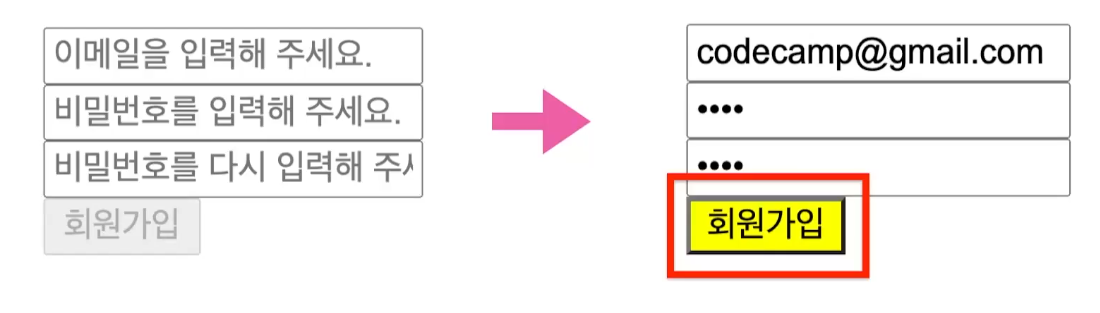
특정 내용을 입력해야 버튼이 활성화 되는 등의 이벤트를 감지하는 코드
<!DOCTYPE html>
<html lang="ko">
<head>
    <title>Document</title>
    <script src="./14-signup.js"></script>
</head>
<body>
    <input type="text" id="email" oninput="checkValidation()">
    <input type="text" id="pw1" oninput="checkValidation()">
    <input type="text" id="pw2" oninput="checkValidation()">
    <button id="submit" disabled="true">회원가입</button>
</body>
</html>
const checkValidation = function() { let email = document.getElementById("email").value let pw1 = document.getElementById("pw1").value let pw2 = document.getElementById("pw2").value if(email && pw1 && pw2){ document.getElementById("submit").disabled = false } else { document.getElementById("submit").disabled = true } }
모든칸이 채워져 있을 때만 버튼 활성화





핸드폰 번호 등을 입력할 때 자동으로 다음 칸으로 커서가 이동되는 기능
<!DOCTYPE html>
<html lang="ko">
<head>
    <title>Document</title>
    <script src="./14-signup.js"></script>
</head>
<body>
    <input type="text" id="p1" oninput="changeFocus1()" maxlength="3"> -
    <input type="text" id="p2" oninput="changeFocus2()" maxlength="4"> -
    <input type="text" id="p3" maxlength="4">
</body>
</html>
const changeFocus1 = () => { let phone1 = document.getElementById("p1").value if(phone1.length === 3){ document.getElementById("p2").focus() } } const changeFocus2 = () => { let phone2 = document.getElementById("p2").value if(phone2.length === 4){ document.getElementById("p3").focus() }
}