CSS 간단 실습 1
나만의 일기장 페이지 만들어보기
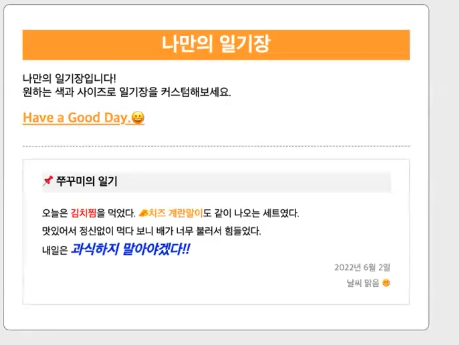
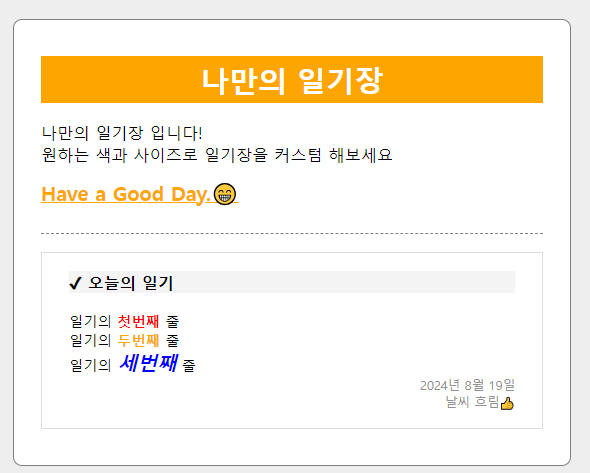
이런형식으로 만들 예정
<body> <div class="container"> <div class="wrapper"> <div class="wrapper__head"> <h1 class="wrapper__head__title"> 나만의 일기장 </h1> <p class="wrapper__head__sub-title"> 나만의 일기장 입니다!<br> 원하는 색과 사이즈로 일기장을 커스텀 해보세요<br> <span id="point"> Have a Good Day.😁 </span> </p> </div> <div class="wrapper__body"> <div class="wrapper__body__content"> <p class="diary-title">✔ 오늘의 일기</p> <p> 일기의 <span class="first">첫번째</span> 줄<br> 일기의 <span class="second">두번째</span> 줄<br> 일기의 <span class="third">세번째</span> 줄<br> </p> <p class="diary-date"> 2024년 8월 19일<br> 날씨 흐림👍 </p> </div> </div> </div> </div> </body>*{ box-sizing: border-box; margin: 0px; padding: 0px; } .container{ background-color: #eeeeee; display: flex; flex-direction: row; justify-content: center; align-items: center; padding: 50px 0; } .wrapper{ width: 620px; background-color: white; border: 1px solid gray; border-radius: 10px; padding: 40px 30px; } .wrapper__head{ border-bottom: 1px dashed gray; padding-bottom: 20px; margin-bottom: 20px; } .wrapper__head__title{ font-size: 32px; text-align: center; background-color: orange; color: white; padding: 5px; margin-bottom: 10px; } .wrapper__head__sub-title{ font-size: 18px; padding: 10px 0px; } #point{ font-size: 22px; color: orange; text-decoration: underline; font-weight: bold; margin-top: 15px; display: block; } .wrapper__body{ border: 1px solid #dddddd; padding: 20px 30px; } .diary-title{ background-color: #f4f4f4; font-size: 18px; font-weight: 600; margin-bottom: 20px; } .first{ color: red; font-weight: 600; } .second{ font-weight: 600; color: orange; } .third{ font-size: 22px; color: blue; font-weight: 700; font-style: italic; } .diary-date{ color: #919191; font-size: 14px; text-align: end; }