Float
기본적으로 div 블럭은 옆이 비어있어도 다음 줄로넘어감
위 사진처럼 기본 태그들의 속성 그대로 나열되어있는 기본적인 요소들의 흐름을 normal flow 라고함.
float는 요소가 이런 normal flow 로부터 벗어나서 특정한 컨테이너의 좌측, 우측을 감싸는 형태로 강제 배치할 수 있도록 도와주는 속성
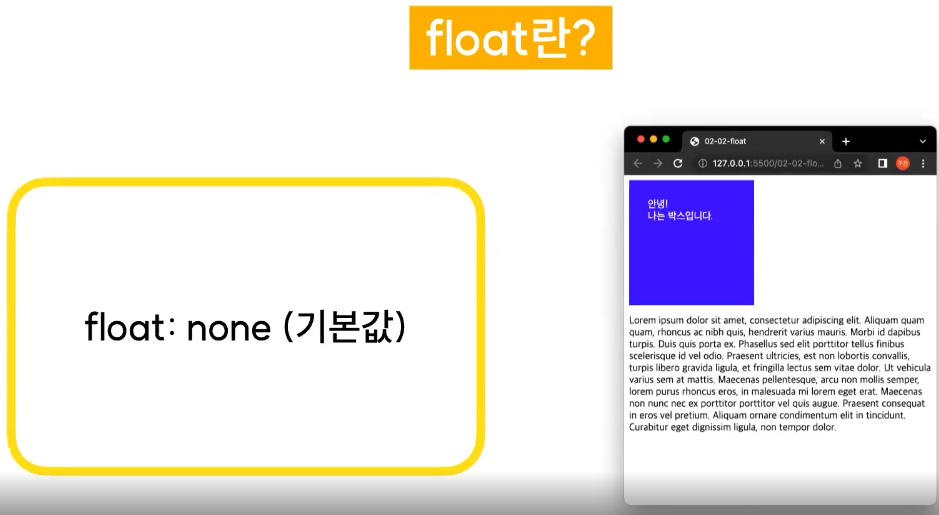
float: left
상단에있는 div 태그에 float: left를 적용한 예시
원래는 div도 p도 블럭요소이기에 옆으로 붙을수 없지만 float속성으로 div박스를 왼쪽으로 땡겨와서 위처럼 출력이 가능하다

float: right
위와 반대로 div 박스를 오른쪽으로 땡겨온 모습
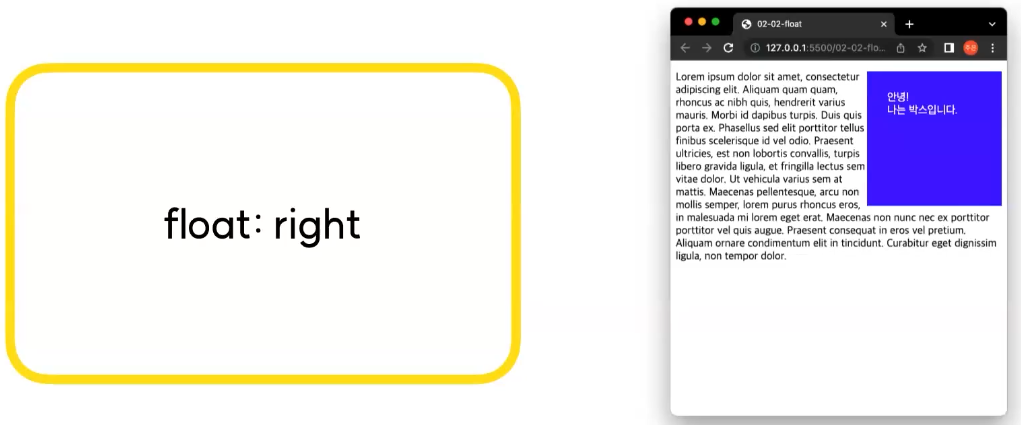
clear: none
기본값
clear는 float가 적용된 요소나 해당 요소에게 영향을 받고 있는 요소들에게 추가로 줄 수 있는 속성
float가 적용된 요소에게 영향을 받는 요소란 위 사진처럼 빨간박스와 보라색 박스를 float을 사용해서 왼쪽, 오른쪽으로 붙였을때 p태그의 글들은 별도의 float을 주지 않았지만 div 박스들에 의해서 위로 끌려올려가게 되었기에 p태그가 영향을 받는 요소라고 볼 수 있다.
clear: right
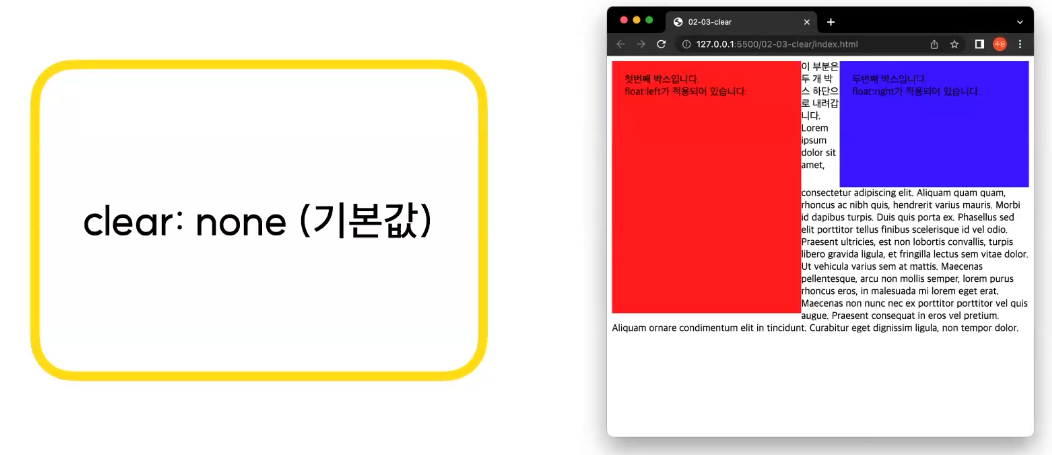
클리어가 p태그에 적용된 모습
clear: right는 float: right가 적용된 요소와 관련이 생기
clear: left는 float: left가 적용된 요소와 관련이 생기게된다위 사진은 clear: right 이기에 float: right 가 적용된 보라박스 아래로 p 태그를 땡겨주게 됨.

clar: left

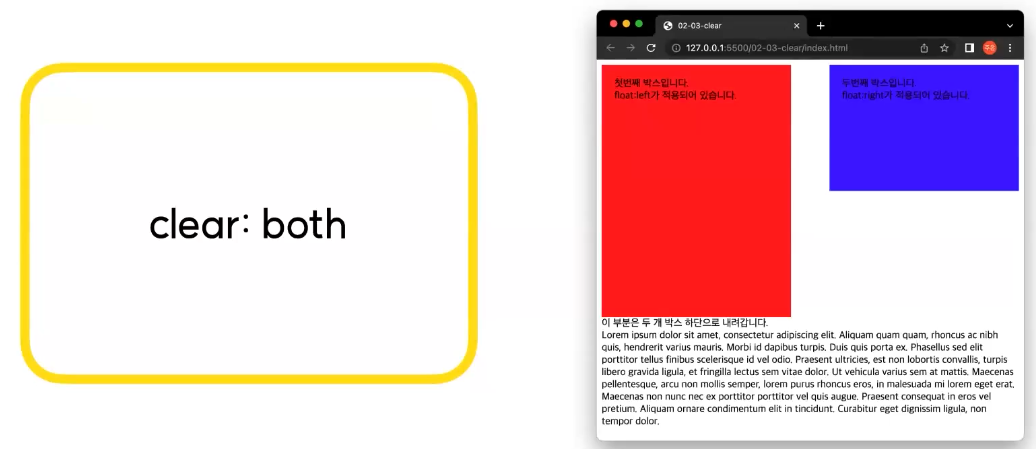
clar: both
이름 그대로 양쪽의 영향력을 모두 해제하는 것으로 둘중 더 아래쪽으로 이동하게됨.
float을 사용해서 나만의 일기장 상단 네비게이션 바 만들기
<body> <header class="header"> <div class="header-inner"> <div class="logo"> <h1><a href="#none">HAGD</a></h1> <!--a태그 = 메인으로 가는 링크 태그--> </div> <div class="menu"> <ul class="menu__ul"> <!-- 리스트 태그 ul --> <li> <a href="#none">어제의 일기</a> </li> <li> <a href="#none">오늘의 일기</a> </li> <li> <a href="#none">내일의 일기</a> </li> <div class="clearfix"></div> </ul> </div> <div class="user"> <img src="../img/portrait.png" alt="유저정보" width="32" height="32"> <!-- alt 는 대체 정보 --> </div> <div class="clearfix"></div> </div> </header> <div class="container"> <div class="wrapper"> <div class="wrapper__head"> <h1 class="wrapper__head__title"> 나만의 일기장 </h1> <p class="wrapper__head__sub-title"> 나만의 일기장 입니다!<br> 원하는 색과 사이즈로 일기장을 커스텀 해보세요<br> <span id="point"> Have a Good Day.😁 </span> </p> </div> <div class="line"></div> <div class="wrapper__body"> <div class="wrapper__body__content"> <p class="diary-title">✔ 오늘의 일기</p> <p> 일기의 <span class="first">첫번째</span> 줄<br> 일기의 <span class="second">두번째</span> 줄<br> 일기의 <span class="third">세번째</span> 줄<br> </p> <p class="diary-date"> 2024년 8월 19일<br> 날씨 흐림👍 </p> </div> </div> </div> </div> </body>*{ box-sizing: border-box; margin: 0px; padding: 0px; } .container{ background-color: #eeeeee; display: flex; flex-direction: row; justify-content: center; align-items: center; padding: 50px 0; } .wrapper{ width: 620px; background-color: white; border: 1px solid gray; border-radius: 10px; padding: 40px 30px; } .wrapper__head{ border-bottom: 1px dashed gray; padding-bottom: 20px; margin-bottom: 20px; } .wrapper__head__title{ font-size: 32px; text-align: center; background-color: orange; color: white; padding: 5px; margin-bottom: 10px; } .wrapper__head__sub-title{ font-size: 18px; padding: 10px 0px; } #point{ font-size: 22px; color: orange; text-decoration: underline; font-weight: bold; margin-top: 15px; display: block; } .wrapper__body{ border: 1px solid #dddddd; padding: 20px 30px; } .diary-title{ background-color: #f4f4f4; font-size: 18px; font-weight: 600; margin-bottom: 20px; } .first{ color: red; font-weight: 600; } .second{ font-weight: 600; color: orange; } .third{ font-size: 22px; color: blue; font-weight: 700; font-style: italic; } .diary-date{ color: #919191; font-size: 14px; text-align: end; } .header{ /* width: 100%; 블럭형은 기본값이 100%임*/ border-bottom: 1px solid gray; } .header-inner{ width: 900px; height: 100%; margin: 0 auto; } .logo{ float: left; width: 100px; height: 80px; padding-top: 18px; } .logo h1 a { text-decoration: none; color: orange; } .menu{ float: left; width: calc(100% - 200px); height: 80px; text-align: center; } .menu__ul { display: inline-block; } .menu__ul li{ float: left; list-style: none; } .menu__ul li a{ color: black; text-decoration: none; padding: 30px 20px; display: block; } .menu__ul li a:hover{ color: orange; } .user{ float: left; width: 100px; height: 80px; padding-top: 15px; } .clearfix{ clear: both; }