DOM(Document Object Model)
문서객체모델
html문서의 각 요소들을 트리 형식으로 표현,트리형식의 자료구조
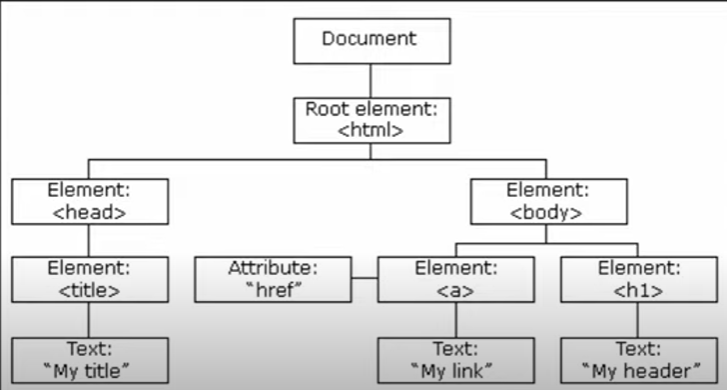
자바스크립트를 이용해 이를 생성,수정,삭제 가능
위 그림에서 하나의 객체가 노드
노드에 접근하기
document.documentElement //html 접근
document.body //body태그 접근
document.head
document.body.style
모든 html태그는 객체임.
자바스크립트로 접근할 수 있다.
자바스크립트로 html제어가 가능함
- css도 제어가능
document.body.style.opacity ='0.5';//투명도
document.body.style.padding = '100px';
getElement로 접근
- id로 접근하기(id가 first인 태그 출력)
document.getElementById('first');- 모든 p태그를 출력
document.getElementsByTagName('p');태그명으로도 접근 가능함
- 모든 p태그 접근(for of로 순회 가능)
let pList = document.getElementsByTagName('p');
for(p of pList){
	p.style.fontSize = '30px';
   }
+)id는 한페이지에 1번만 사용가능하기에 getElement가 단수형
p태그는 여러개니까 복수형
- 클래스네임이나 네임으로 노드 접근가능
document.getElementByClassName()
document.getElementByName()
querySelector로 접근
- querySelectorAll + css문법으로 접근
document.querySelectorAll('.link');//클래스접근
document.querySelectorAll('#first');//id접근
document.querySelector('#first');//id는 어차피 하나니깐
querySelector는 제일 처음의 노드만 가져옴
document.querySelector('h3:nth-of-type(2)');//두번째 h3찾기
document.querySelector('h3:nth-of-type(2)').style.color='red';//찾아서 빨간색으로 변경
let pList = document.querySelectorAll('p:nth-of-type(2n)');//짝수번째 p태그
for(p of pList){
p.style.backgroundColor ='#000';
p.style.color='#fff';
}//p태그 번갈아가며 흑백바꾸기- 위 메소드로 가져온 결과들은 배열처럼 보이지만 배열은 아님

NodeList는 배열 아니고 iterable한 컬렉션임
for of 사용, index로 각 노드에 접근 가능함, length도 가능함.
하지만 배열이 아니기에 push, pop, filter, join같은 메소드 사용 불가
부모, 자식, 형제 노드
querySelectorAll, getElementBy는 반환값이 조금 다름

querySelectorAll는 NodeList를 반환
getElementBy는 HTMLCollection을 반환
공통점 ; 둘다 유사배열객체, 이터러블, for of순회가능
차이점
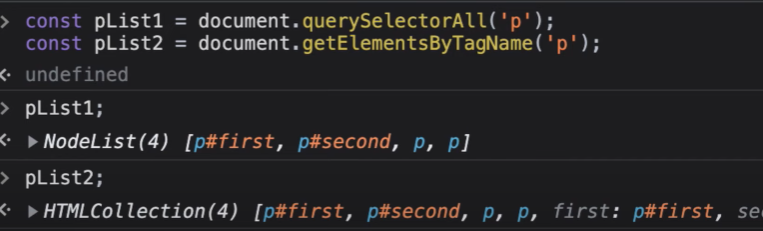
p태그 추가하고 다시 찍어보면
pList2만 값이 변함
html컬랙션은 노드의 변경사항이 실시간으로 반영
- 부모노드 접근
const red = document.getElementById('red');
red.parentNode;//부모노드접근
red.parentElement;//부모노드접근- parentNode,parentElement 차이
document.documentElement; //html
document.documentElement.parentNode;//#document
document.documentElement.parentElement;//null
parentNode는 부모노드를 반환, html의 부모노드는 도큐먼트
parentElement는 부모노드중 요소노드만 반환
- 요소노드 ? html태그로 이루어진 요소
- 자식노드 접근(2가지)
const ul = document.getElementById('color');
ul.childNodes;
ul.children; //요소노드만 반환
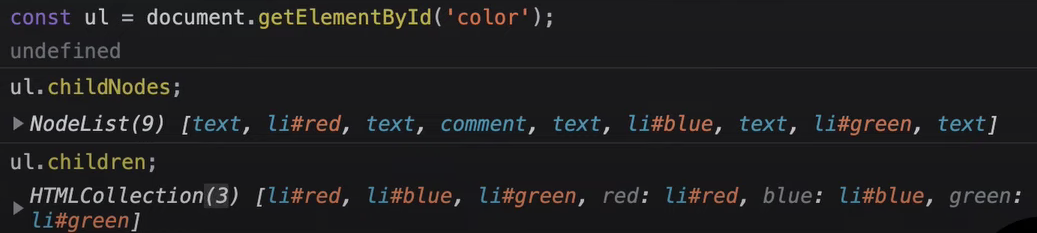
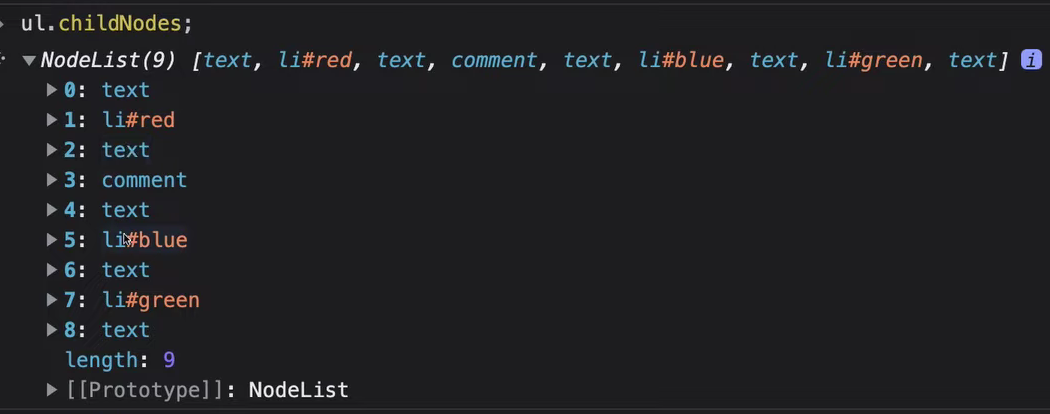
childNodes는 li요소 외에도 text, 주석 등 모든 타입의 노드를 반환함.
text는 공백도포함
children는 요소타입의 노드들만 반환
childNodes는 NodeList를 반환하지만, 예외적으로 html컬랙션처럼 실시간 반영됨.
- 처음과 마지막 노드
ul.firstChild;
ul.lastChild;- 처음과 마지막 요소노드
ul.firstElementChild;
ul.lastElementChild;-
형제노드 접근
이전형제, 다음형제로 나뉨 -
형제노드중 모든 타입가져옴
const blue = document.getElementById('blue');
blue.previousSibling;
blue.nextSibling;- 형제노드중 요소노드만 가져옴
blue.previousElementSibling;
blue.nextElementSibling;- 정리
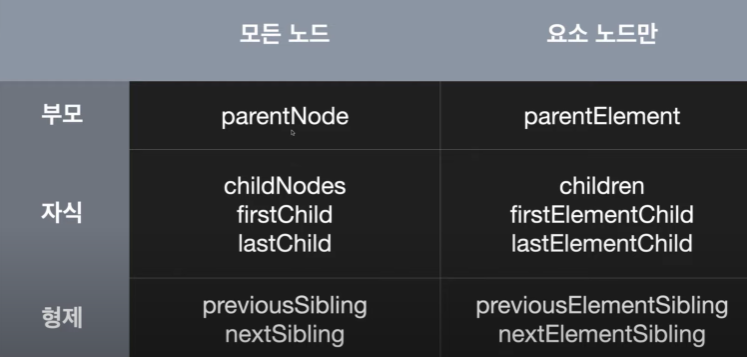

Back-end
이런 유용한 정보를 나눠주셔서 감사합니다.