1.
Hello World
2.
Hello World
CatPhotoApp
3.
Hello World
CatPhotoApp
Hello Paragraph.
- lorem ipsum text (로마 철학자 키케로의 글귀를 따온걸, 개발자들이 텍스트 채우고 싶을 때 쓴다.)
Hello World
CatPhotoApp
Kitty ipsum dolor sit amet, shed everywhere shed everywhere stretching attack your ankles chase the red dot, hairball run catnip eat the grass sniff.
5.주석달기

CatPhotoApp
CatPhotoApp
Kitty ipsum dolor sit amet, shed everywhere shed everywhere stretching attack your ankles chase the red dot, hairball run catnip eat the grass sniff.
8.의미론적 태그 main, header, footer, nav, video, article, section
9.
CatPhotoApp
Kitty ipsum dolor sit amet, shed everywhere shed everywhere stretching attack your ankles chase the red dot, hairball run catnip eat the grass sniff.
Purr jump eat the grass rip the couch scratched sunbathe, shed everywhere rip the couch sleep in the sink fluffy fur catnip scratched.
10.이미지 추가.

모든 이미지에는 ALT 속성이 있어야 한다.
alt 속성 내부의 텍스트는 접근성을 향상시키기 위해 화면 판독기에 사용되며 이미지가로드되지 않으면 표시됩니다.
CatPhotoApp
Kitty ipsum dolor sit amet, shed everywhere shed everywhere stretching attack your ankles chase the red dot, hairball run catnip eat the grass sniff.
Purr jump eat the grass rip the couch scratched sunbathe, shed everywhere rip the couch sleep in the sink fluffy fur catnip scratched.
- a태그 사용.(외부로 이동.)
문제
this links to freecodecamp.org
cat photos
추가.
- 내부 페이지의 섹션으로 이동.
a 요소들은 또한 웹페이지 내의 다른 섹션으로 점프하는 내부 링크를 만드는 데 사용될 수 있다.
ContactsContacts
보내는 링크에서는 #contacts-header를 적고 도달하려는 위치에는 id="contacts-header"를 적으면 그 위치로 점프할 수가 있다.
<h2>CatPhotoApp</h2>
<main>

  <a href="#footer">Jump to Bottom.</a>

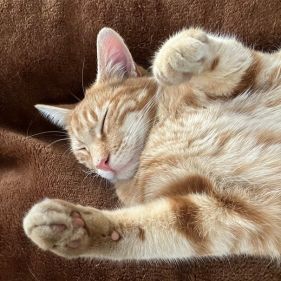
  <img src="https://cdn.freecodecamp.org/curriculum/cat-photo-app/relaxing-cat.jpg" alt="A cute orange cat lying on its back.">
  <p>본문</p>
</main>

<footer id="footer">Copyright Cat Photo App</footer>
13 다른 텍스트요소(p)내에 링크를 중첩할 수 있다.
<p>
  Here's a <a target="_blank" href="https://www.freecodecamp.org"> link to www.freecodecamp.org</a> for you to follow.
</p>
Here's a link to www.freecodecamp.org for you to follow.
link to www.freecodecamp.org은 앵커 텍스트라고 한다.링크 주소대신 나타나는 텍스트다.
cat photos View more cat photos,
14.죽은 링크.
cat photos.
15.이미지를 링크로.
이미지 태그를 a태그로 감싸는 것으로 이미지를 링크화 시킬 수 있다.
<a href="#"><img src="https://cdn.freecodecamp.org/curriculum/cat-photo-app/relaxing-cat.jpg" alt="Three kittens running towards the camera."></a>
답:```
```- 정렬되지 않은 목록 또는 글머리 기호 스타일 목록. ul
<ul>
  <li>milk</li>
  <li>cheese</li>
  <li>cheese</li>
</ul>
- 정렬된 리스트 ol
<ol>
  <li>Garfield</li>
  <li>Sylvester</li>
  <li>Sylvester</li>
</ol>
18.form만들기.
1 텍스트 인풋.
2 플레이스홀더
<input type="text" placeholder="cat photo URL".>
3 서버에 데이터를 보내는 form
form + action.
그럼 이렇게 묶을 수도 있다.
Indoor
제출 답은 :
Loving
Loving
Loving
- value 값 부여.
- 기본적으로 라디오와 체크박스가 체크되어 있도록 하기.
doctype선언
head와 body
코스 완료!