좋아요 필터링 기능 추가하기
- graphQL 파일에서 필터링 기능 넣기
// comments.graphql.
type Query {
  comments: [Comment]
  commentsByLikes(minLikes: Int!): [Comment]
  // minLikes 몇개를 받는지 : comment로 반환한다.
}

type Comment {
  id: ID!
  text: String!
  likes: Int
}
- resolvers.js 파일에서 resolver 생성
// comments.resolvers.js
const commentsModel = require("./comments.model");

module.exports = {
  Query: {
    comments: () => {
      return commentsModel.getAllComments();
    },
    commentsByLikes: (_, args) => {
      return commentsModel.getCommentsByLikes(args.minLikes);
    },
    // parent가 필요없으면 _를 넣어주자
    // passport done의 null 값과 같다
  },
};
- model 파일에서 함수 생성
function getCommentsByLikes(minLikes) {
  return comments.filter((comment) => {
    return comment.likes >= minLikes;
  });
}
// args.인자로 받는 것보다 많은것만 보여준다.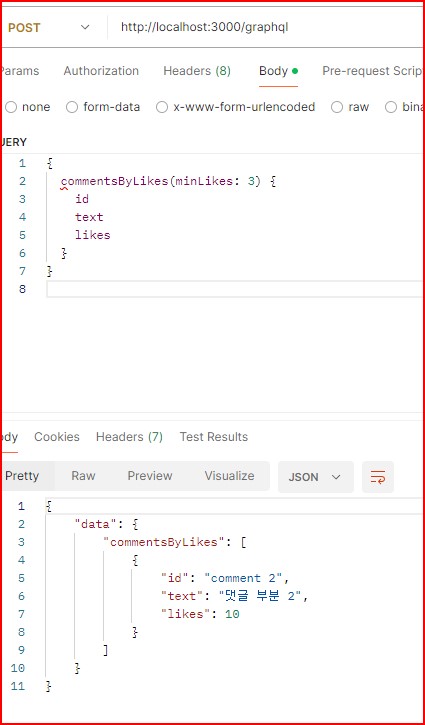
post.id 필터링 기능 추가하기
- graphQL 파일에 필터링 기능
type Query {
  posts: [Post]
  post(id: ID!): Post
}

type Post {
  id: ID!
  title: String!
  description: String!
  comments: [Comment]
}
- resolver 파일에 args 이용
const postsModel = require("./posts.model");

module.exports = {
  Query: {
    posts: () => {
      return postsModel.getAllPosts();
    },
    post: (_, args) => {
      return postsModel.getPost(args.id);
    },
  },
};
- model 파일에 함수 생성
const posts = [
  {
    id: "post1",
    title: "It is a first post",
    description: "설명 부분",
    comments: [
      {
        id: "comment 1",
        text: "댓글 부분",
        likes: 1,
      },
    ],
  },
  {
    id: "post2",
    title: "It is a second post",
    description: "설명 부분",
    comments: [],
  },
];

function getAllPosts() {
  return posts;
}

function getPost(id) {
  return posts.find((post) => {
    return post.id === id;
  });
}

module.exports = {
  getAllPosts,
  getPost,
};

개발 경험치 쌓는 곳