로그 미들웨어란?
-
클라이언트의 모든 요청 사항을 기록하여 서버의 상태를 모니터링하기 위한 미들웨어이다.
-
injectable class가 아니기 때문에 가져와서 사용해야 한다.
-
문제가 발생할 때 빠르게 진단할 수 있다. 또한, 로그 데이터는 사용자의 행동 분석하는 등 데이터 분석 작업에도 활용할 수 있다.
-
로그 기능을 지원하는 morgan, winston과 같은 라이브러리를 사용하거나 CloudWatch, Datadog과 같은 서비스를 이용할 수도 있다.
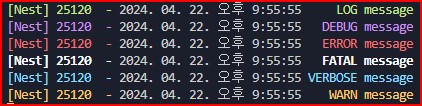
log 사용법
// 의존성 주입이 아니라 직접 명시
private readonly logger = new Logger(AppController.name);

@Get('log')
log(): void {
 this.logger.log('message')
 this.logger.debug('message')
 this.logger.error('message')
 this.logger.fatal('message')
 this.logger.verbose('message')
 this.logger.warn('message')
}

- 이런식으로 어느 위치에서 에러가 나온지 쉽게 알 수 있다.
Logging middleware
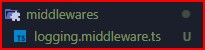
- 폴더 및 파일 생성
- middleware 작성
import { Logger, NestMiddleware } from '@nestjs/common';
import { NextFunction,Response,Request } from 'express';

export class LoggingMiddleware implements NestMiddleware{
    // 직접 명시
    private readonly logger = new Logger();

    // 미들웨어 실행
    use(req: Request, res: Response, next: NextFunction) {

        // 원본 url과 http method
        const { method, originalUrl } = req;;
        const startTime = Date.now();

        // api가 완료되었을떄 호출
        res.on('finish', () => {
            const { statusCode } = res;
            const responseTime = Date.now() - startTime;

            this.logger.log(`[${method}]${originalUrl}:${statusCode} - ${responseTime}`,)
        })

        next()
    }
}- appModule에서 명시
export class AppModule implements NestModule {
  configure(consumer: MiddlewareConsumer) {
    consumer.apply(LoggingMiddleware).forRoutes('*'); // 모든 경로에 미들웨어를 실행한다.
  }
}
winston 사용법
import winston from "winston";

const logger = winston.createLogger({
  level: "info", // 로그 레벨을 'info'로 설정합니다.
  format: winston.format.json(), // 로그 포맷을 JSON 형식으로 설정합니다.
  transports: [
    new winston.transports.Console(), // 로그를 콘솔에 출력합니다.
  ],
});

export default function (req, res, next) {
  // 클라이언트의 요청이 시작된 시간을 기록합니다.
  const start = new Date().getTime();

  // 응답이 완료되면 로그를 기록합니다.
  res.on("finish", () => {
    const duration = new Date().getTime() - start;
    logger.info(
      `Method: ${req.method}, URL: ${req.url}, Status: ${res.statusCode}, Duration: ${duration}ms`
    );
  });

  next();
}

개발 경험치 쌓는 곳