함수 선언 2
<!DOCTYPE html>
<html lang="en">
<head>
    <meta charset="UTF-8">
    <meta name="viewport" content="width=device-width, initial-scale=1.0">
    <title>Declaration</title>
</head>
<body>
    <script>
        //함수 이름이 같을 경우 마지막 함수 호출
        function 함수()  {
            document.write('함수 A<br>');
        }
        function 함수()  {
            document.write('함수 B<br>');
        }
        //함수 호출
        함수();

        document.write('----------------<br>');

        //함수 호출
        함수2();

        function 함수2()  {
            document.write('함수2<br>');
        }

        document.write('----------------<br>');

        //익명함수
        var 함수3 = function()  {
            document.write('함수C<br>');
        };

        var 함수3 = function()  {
            document.write('함수D<br>');
        }
        //함수 호출
        함수3();

        //변수 선언은 중복이 될 수 있고, 호출은 마지막 변수가 호출된다.

        document.write('----------------<br>');

        //함수 호이스팅이 아니라 변수 호이스팅으로 인식하여 오류가 발생함
        //함수 처럼 호출하면 오류 발생
        //함수4();

        var 함수4 = function() {
            document.write('함수4');
        };


    </script>
</body>
</html>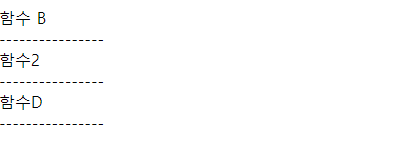
지역 변수 & 전역 변수
- 지역 변수(함수 레벨 스코프)
함수 안에서 var을 사용해서 선언한 변수, 함수 끝나면 소멸
- 함수가 종료되면 소멸되기 때문에 함수 밖에서는 호출이 불가능하다.
- 전역 변수
함수 밖에서 만들어진 모든 변수
함수 안에서 var 없이 만들어진 변수
함수가 끝나도 메모리에 남아 있음
- var을 명시하지 않고 전역 변수를 만들려면 선언과 함께 초기화해야 한다.
<!DOCTYPE html>
<html lang="en">
<head>
    <meta charset="UTF-8">
    <meta name="viewport" content="width=device-width, initial-scale=1.0">
    <title>지역 변수와 전역 변수</title>
</head>
<body>
    <script>
        function test1()  {
            var i = 10; // 지역 변수
            document.write(i + '<br>');
        }
        test1();

        //지역 변수는 함수가 종료되면 소멸되기 때문에 함수 바깥에서는 호출이 불가능하다.
        // document.write(i+'<br>');

        //전역 변수
        var j;
        function test2()    {
            j = 200;
            document.write(j + '<br>');
        }
        test2();

        function test3()    {
            document.write(j + '<br>');
        }
        test3();

        //전역 변수
        //var를 명시하지 않고 전역변수를 만들면 선언과 함께 초기화해야 함
        a = 10;
        function test4()    {
            document.write(a + '<br>');
        }
        test4();

        //전역변수
        //함수내에서 var를 명시하지 않고 변수를 선언하면 전역변수
        function test5() {
            m=300;
            document.write(m + '<br>');
        }
        test5();

        document.write(m + '<br>');
    </script>
</body>
</html>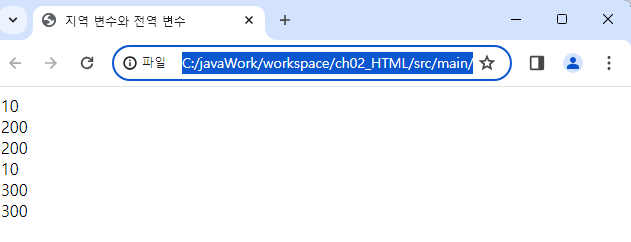
Let
블록 레벨의 스코프 : let (변수) , const(상수)
<!DOCTYPE html>
<html lang="en">

<head>
    <meta charset="UTF-8">
    <meta name="viewport" content="width=device-width, initial-scale=1.0">
    <title>let</title>
</head>

<body>
    <script>
        //let를 블록 레벨 지역 변수로 사용
        //for문 안에서 지역변수 선언
        for (let i = 1; i <= 3; i++) {
            document.write(i + '<br>');
        }
        document.write('--------------------<br>');
        // document.write(i);      //for문 블럭을 벗어나면 호출 불가

        for (var x = 1; x <= 3; x++) {
            document.write(x + '<br>');
        }
        document.write(x + ' <----- 전역적으로 인식<br>');

        function test1() {
            let i = 100;
            document.write(i + '<br>');
        }
        test1();

        // 함수 내에 정의되었기 때문에 함수를 벗어나서 호출 불가능하다.
        //document.write(i + '<br>');
        document.write('--------------------<br>');


        //let를 전역 변수로 사용
        let i = 10;
        function test2() {
            document.write( i + '<br>');
        }
        test2();
        document.write( i + '<---- 전역적으로 사용<br>');
        document.write('--------------------<br>');

        let a = '사과';
        //let로 변수 정의시 변수명 중복 불가
        //let a = '포도';
        document.write('a = ' + a +'<br>');
        document.write('--------------------<br>');

        //let를 명시하면 변수 호이스팅이 적용되지 않음
        //document.write(b);
        let b;
    </script>
</body>

</html>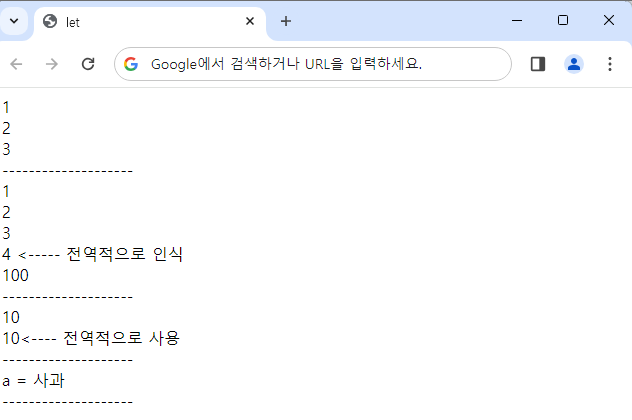
Const
<!DOCTYPE html>
<html lang="en">

<head>
    <meta charset="UTF-8">
    <meta name="viewport" content="width=device-width, initial-scale=1.0">
    <title>const</title>
</head>

<body>
    <script>
        const a = 10; //상수
        document.write(a + '<br>');
        document.write('---------------<br>');

        //
        // a = 20;
        // document.write(a + '<br>');

        function test() {
            const b = 20;
            document.write(b + '<br>');
        }
        test();
        //const는 블럭 레벨 스코프로 동작하기 때문에
        // 함수를 벗어나면 호출이 불가능하다.
        // document.write(b);
    </script>
</body>

</html>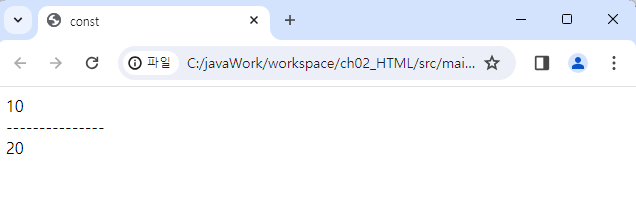
함수의 인자
JavaScript는 함수를 생성할 때 지정한 매개 변수보다 많거나 적은 매개 변수를 사용하는 것을 허용한다. 원래 함수에서 선언한 매개 변수보다 적게 사용하면 미지정 매개 변수에 undefined가 입력된다.
<!DOCTYPE html>
<html lang="en">
<head>
    <meta charset="UTF-8">
    <meta name="viewport" content="width=device-width, initial-scale=1.0">
    <title>함수의 인자</title>
</head>
<body>
    <script>
        function test(a,b){
            document.write('a = ' + a + '<br>');
            document.write('b = ' + b + '<br>');
        }
        test();
        document.write('--------------------<br>');
        test(10);
        document.write('--------------------<br>');
        test(10,20);
        document.write('--------------------<br>');
        test(10,20,30);
    </script>
</body>
</html>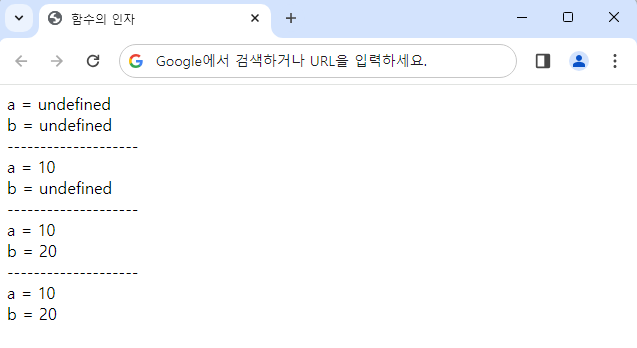
가변 인자
매개변수를 선언된 형태와 다르게 사용했을 때도 매겨변수를 모두 활용하는 함수 자바스크립트의 모든 함수는 내부에 자동으로 변수 arguments를 갖음 변수 arguments는 매개변수의 배열이 된다.
<!DOCTYPE html>
<html lang="en">
<head>
    <meta charset="UTF-8">
    <meta name="viewport" content="width=device-width, initial-scale=1.0">
    <title>가변 인자</title>
</head>
<body>
    <script>
        function test() {
            for (let i = 0; i < arguments.length; i++){
                document.write('arguments [' +i+'] : ' + arguments[i] + '<br>');
            }
        }
        test(10);
        document.write('------------------------<br>');
        test(10,20);
    </script>
</body>
</html>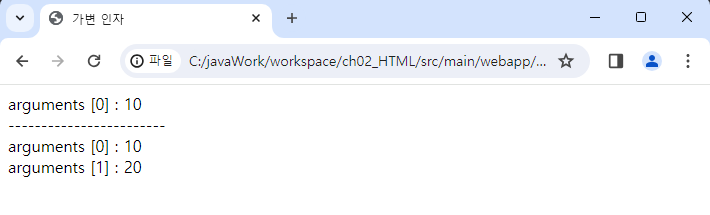
함수를 매개변수로 받는 함수
콜백 함수 : 함수의 매개변수를 통해 다른 함수의 내부로 전달되는 함수
함수를 호출하면서 다른 함수의 매개 변수로 함수를 전달한 것이 아니라 바로 함수를 실행하게 되면 한 번 실행 후에 오류가 발생하게 된다.
callFunctionTenTimes(justFunction());
이 코드는 오류를 발생 시키기 때문에
callFunctionTenTimes(justFunction);
이렇게 선언적 함수를 매개 변수에 전달시킨다.
<!DOCTYPE html>
<html lang="en">

<head>
    <meta charset="UTF-8">
    <meta name="viewport" content="width=device-width, initial-scale=1.0">
    <title>함수를 매개변수로 받는 함수</title>
</head>

<body>
    <script>
        function callFunctionTenTimes(otherFunction) {
            for (let i = 0; i < 10; i++) {
                otherFunction(); //매개변수로 전달된 함수를 실행
            }
        }
        //콜백 함수 정의 (선언적 함수)
        function justFunction(){
            document.write('Happy Day!! <br>');
        }

        //함수 호출
        //아래 경우는 함수를 호출하면서 다른 함수의 매개 변수로 함수를
        // 전달한 것이 아니라 바로 함수를 실행했기 때문에
        // 1번 실행 후 오류가 발생함
        // callFunctionTenTimes(justFunction());

        //함수 호출(선언적 함수를 매개 변수에 전달)
        callFunctionTenTimes(justFunction);

        document.write('--------------------<br>');

        //익명 함수
        callFunctionTenTimes(function () {
            document.write('Hello JavaScript!!<br>');
        });
    </script>
</body>
</html>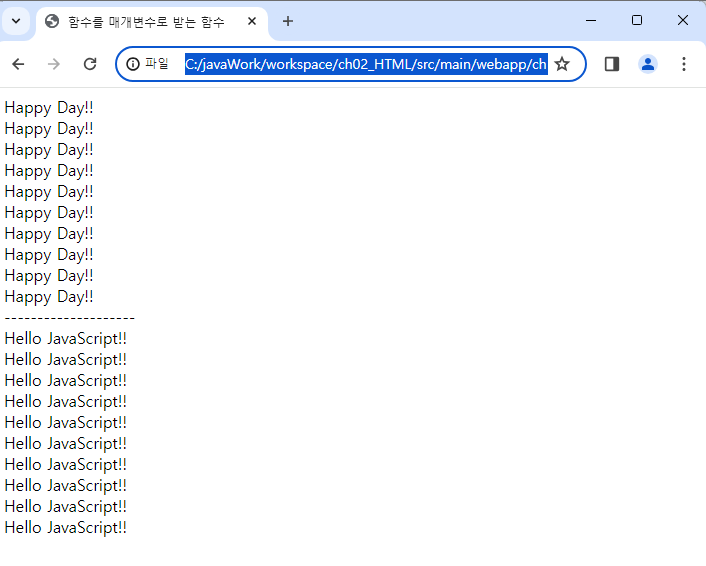
나머지 매개변수
매개변수를 정의할 때 정해지지 않은 매개변수들을 정의할 수 있게 한다.
arguments 객체와 유사하나 arguments 객체는 함수에 전달되는 모든 전달 인자를 포함하는 반면에, 나머지 매개 변수는 정해지지 않는 나머지를 의미한다.
<!DOCTYPE html>
<html lang="en">
<head>
    <meta charset="UTF-8">
    <meta name="viewport" content="width=device-width, initial-scale=1.0">
    <title>나머지 매개변수</title>
</head>
<body>
    <script>
        function test1(...args) {
            document.write('args : ' + args + '<br>');
        }
        test1(10,20,30);

        function test2(a,b,...others){
            document.write('a : ' + a + '<br>');
            document.write('b : ' + b + '<br>');
            document.write('others : ' + others + '<br>' );
        }
        test2(10,20,30,40,50);
        </script>
</body>
</html>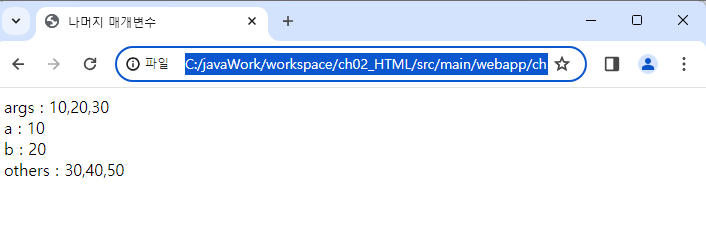
Return
if 조건문에서 break를 사용하면 특정 조건일 때 반복문을 빠져나간다.
return을 사용하면 함수를 호출한 곳으로 되돌아가고 결과적으로는 함수가 종료된다.
<!DOCTYPE html>
<html lang="en">

<head>
    <meta charset="UTF-8">
    <meta name="viewport" content="width=device-width, initial-scale=1.0">
    <title>return</title>
</head>

<body>
    <script>
        function returnTest() {
            document.write('문장 A<br>');

            for (let i = 1; i <= 10; i++) {
                //조건문
                if (i == 5) {
                    //특정 조건일 때 반복문을 빠져나감
                    //break;

                    //함수를 호출한 곳으로 되돌아감
                    //결과적으로 함수가 종료
                    return;
                }
                document.write(i + '<br>')
            }
            document.write('문장 B <br>');
//break를 사용하면 해당 문장 출력, return을 사용하면 해당 문장 미출력
        }

        //함수 호출
        returnTest();
        document.write('프로그램 끝');
    </script>
</body>

</html>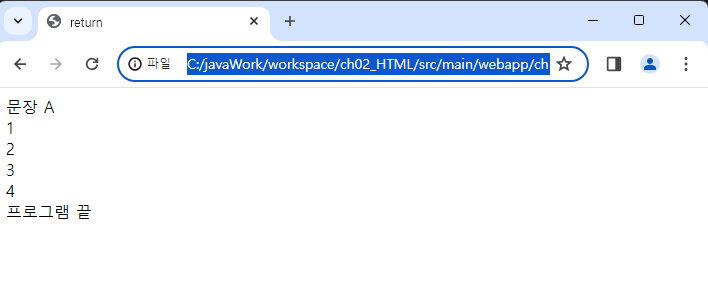
Arrow 함수
ES6에서 도입된 화살표 함수(arrow function)은 function 키워드 대신 화살표 (fat arrow => )를 사용하여 좀 더 간략한 방법으로 함수를 선언할 수 있다. 화살표 함수는 항상 익명 함수로 정의한다.
화살표 함수 코드 블럭을 지정하지 않고 한 문장으로 작성시 return문을 쓰지 않아도 화살표 오른쪽 표현식의 계산 결과값이 반환된다.
매개변수가 하나일 경우에는 인자를 정의할 때 괄호를 생략할 수 있다.
<!DOCTYPE html>
<html lang="en">
<head>
    <meta charset="UTF-8">
    <meta name="viewport" content="width=device-width, initial-scale=1.0">
    <title>Document</title>
</head>
<body>
    <script>
        //익명 함수로 정의
        let print = (x) => { // 화살표 함수 정의
            document.write(x);
        };
        print(10);
        document.write('<br>---------<br>');

        let print2 = (x) => { //화살표 함수 정의
            return x + 10;
        };
        //let number =  print2(10); // 변수를 굳이 명시할 필요는 없다
        document.write( print2(10) + '<br>----------<br>');

        let print3 = (x,y) => {
            return x * y;
        }
        document.write(print3(3,6) + '<br>----------<br>');

        //매개변수가 하나일 경우에는 인자를 정의할 때 괄호를 생략할 수 있다.
        let print4 = (x) => {
            return x * 10;
        };
        document.write(print4(5));
        document.write('<br>-----------<br>');

        //화살표 함수 코드 블럭을 지정하지 않고 한 문장으로 작성시 return문을 쓰지 않아도 화살표 오른쪽 표현식의 계산 결과값이 반환된다.
        let print5 = (x,y) =>  x * y;
        document.write(print5(2,3));
    </script>
</body>
</html>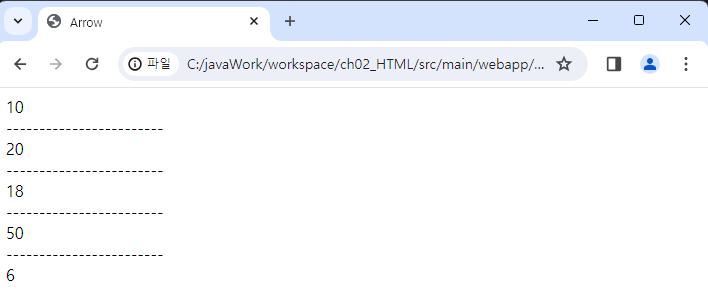
내부 함수
함수 안에 함수를 선언 한다.
<!DOCTYPE html>
<html lang="en">

<head>
    <meta charset="UTF-8">
    <meta name="viewport" content="width=device-width, initial-scale=1.0">
    <title>내부 함수</title>
</head>

<body>
    <script>
        function f() {
            function g() {
                document.write('g is called');
            }
            //내부 함수 호출
            g();
        }
        //함수 호출
        f();

    </script>
</body>
</html>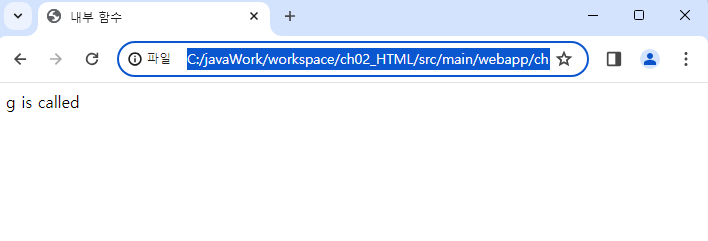
내부 함수 2
<!DOCTYPE html>
<html lang="en">
<head>
    <meta charset="UTF-8">
    <meta name="viewport" content="width=device-width, initial-scale=1.0">
    <title>내부 함수</title>
</head>
<body>
    <script>
        function f() {
            let n =123;
            //내부 함수
            function g(){
                document.write('n = ' + n + '<br>');
                document.write('g 함수 호출');
            }
            g();
        }
        f();
    </script>
</body>
</html>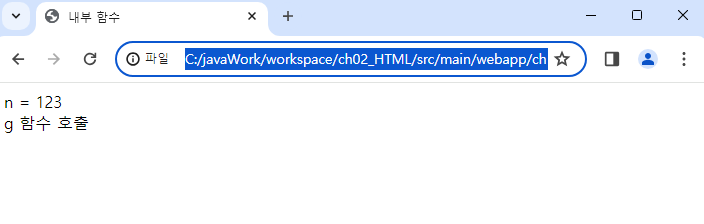
클로저
역변수가 남겨지고 지역변수를 사용할 수 있는 현상
f 함수가 종료되고 f 함수의 지역변수 n은 소멸해야 하지만 지역변수 n을 남겨둠으로써 내부 함수가 호출될 때 값이 정상적으로 출력될 수 있도록 처리해준다.
m이 g 함수를 포함하고 있기 때문에 m()을 출력하게 되면 원래는 지역변수 n이 소멸해야 하지만 소멸되지 않고 출력된다.
<!DOCTYPE html>
<html lang="en">
<head>
    <meta charset="UTF-8">
    <meta name="viewport" content="width=device-width, initial-scale=1.0">
    <title>내부 함수</title>
</head>
<body>
    <script>
        function f() {
            let n = 123;
            //내부 함수
            function g() {
                document.write('n = ' + n + '<br>')
                document.write('g함수 호출');
            }
            // 내부 함수 반환
            return g;
        }
        //함수 호출
        let m = f();
        document.write(m + '<br>');
        document.write('-------------<br>');
        //반환된 내부함수 호출
        //f함수가 종료되고 f함수의 지역변수  n은 소멸해야 하지만
        //지역변수  n을 남겨둠으로써 내부 함수가 호출될 때 값이 정상적으로 출력될 수 있도록 처리해줌
        // 이렇게 지역변수가 남겨지고 지역변수를 사용할 수 있는 현상을 클로저라고 부름
        m();


    </script>
</body>
</html> 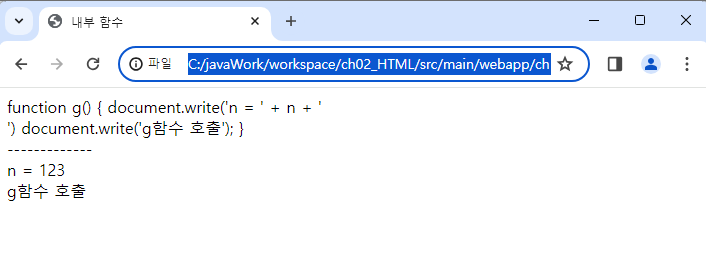
isFinite 함수
number가 무한한 값인지 확인
<!DOCTYPE html>
<html lang="en">
<head>
    <meta charset="UTF-8">
    <meta name="viewport" content="width=device-width, initial-scale=1.0">
    <title>isFinite</title>
</head>
<body>
    <script>
        let number1 = 10 / 0 ;
        document.write('number1 = ' + number1 + '<br>');

        let number2 = -10 / 0;
        document.write('number2 = ' + number2 + '<br>');

        //isFinite 함수를 이용해서 0으로 나누었는지 판단
        if( isFinite(number1)){ //0이 아닌 수로 나눈 경우
            document.write('0이 아닌 수로 나눔');
        }else{//0으로 나눈 경우
            document.write('0으로 나눔');
        }
    </script>
</body>
</html>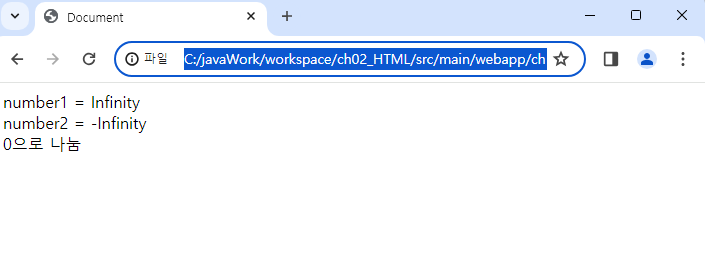
isNaN 함수
매개변수가 숫자인지 아닌지 확인하는 함수
<!DOCTYPE html>
<html lang="en">
<head>
    <meta charset="UTF-8">
    <meta name="viewport" content="width=device-width, initial-scale=1.0">
    <title>isNaN 함수</title>
</head>
<body>
    <script>
        let number1= 10 / 'A'; //NaN(Not a Number)
        document.write('number1 = ' + number1 + '<br>');

        //항상 false로 반환하기 때문에 isNaN함수를 사용해야 함
        if(number1 == NaN){
            document.write('숫자가 아님<br>');
        } else {
            document.write('숫자임<br>');
        }
        document.write('-------------<br>');

        //전달되는 인자의 값이 숫자인지 아닌지 판단
        if(isNaN(number1)){
            document.write('숫자가 아님<br>');
        } else{
            document.write('숫자임<br>');
        }

    </script>
</body>
</html>