instanceof 키워드
- 생성자 함수를 통해 만들어진 객체가 instance
- 해당 객체가 어떠한 생성자 함수를 통해 생성됐는지 확인할 때 사용
<!DOCTYPE html>
<html lang="en">
<head>
    <meta charset="UTF-8">
    <meta name="viewport" content="width=device-width, initial-scale=1.0">
    <title>instanceof 키워드</title>
</head>
<body>
    <script>
        //생성자 함수 정의
        function Student(name){
            this.name  = name;
        }
        //객체 생성
        let student = new Student('홍길동');

        //객체가 속한 클래스와 상위 클래스 체크
        document.write(student instanceof Student);
        document.write('<br>')
        document.write(student instanceof Object);
        document.write('<br>')
        document.write (student instanceof Number);
        document.write('<br>')
    </script>
</body>
</html>
클라이언트 객체
| 객체 | 특징 |
|---|---|
| window | 최상위 객체로 자바스크립트에서 사용되는 모든 객체를 처리 |
| navigator | 웹 브라우저에 관련된 정보를 제공 |
| link | 하이퍼링크와 관련된 작업 처리 |
| anchor | 특정 위치로의 이동 객체 |
| image | 문서 내의 그림에 관련된 처리 |
| location | 현재 문서의 URL과 관련된 정보를 처리 |
| history | 방문기록에 관련된 처리 |
| document | 문서에 대한 정보를 처리 |
| form | 폼에 있는 양식 객체를 처리 |

Window 메서드
window 메서드
- window.alert() : 경고창
- window.prompt() : 입력창
- window.confirm(): 선택창
<!DOCTYPE html>
<html lang="en">
<head>
    <meta charset="UTF-8">
    <meta name="viewport" content="width=device-width, initial-scale=1.0">
    <title>alert, prompt, confirm</title>
</head>
<body>
    <script>
       window.alert('경고창');  //= alert('경고창');

        let season = window.prompt('좋아하는 계절은?',''); //= prompt('좋아하는 계절은?','');
        document.write('좋아하는 계절은 ' + season +'이다.<br>');

        let choice = window.confirm('야근을 하겠습니까?');  //=confirm('야근을 하겠습니까?');
        //확인 true , 취소 false 반환
        if (choice){
            document.write('야근 확정!');
        }
        else{
            document.write('야근 취소');
        }
    </script>
</body>
</html>- window.open(url, 새 창 이름, option) : 창 열기
- window.close() : 창 닫기
| window.Open의 Option | 설명 |
|---|---|
| width | 새 윈도우의 넓이 |
| height | 새 윈도우의 높이 |
| location | 주소 입력창 유무 |
| menubar | 메뉴의 유무 |
| resizable | 화면 크기 조절 가능 여부 |
| status | 상태 표시줄의 유무 |
| toolbar | 툴바 유무 |
| scrollbars | 스크롤바 유무 |
| left | 창의 가로축 위치 지정 |
| top | 창의 세로축 위치 지정 |
<!DOCTYPE html>
<html lang="en">
<head>
    <meta charset="UTF-8">
    <meta name="viewport" content="width=device-width, initial-scale=1.0">
    <title>open, close</title>
</head>
<body>
    <script>
        let win;
        function winOpen() {
            //새 창 만들기
            win = window.open('https://www.naver.com','child',
            'toolbar=no, location=no, status=no, menubar = no, resizale=no, scrollbars=no, width=400, height=300');
        }
        function winClose(){
            //새로 열린 창 닫기
            win.close();
        }
    </script>
    <input type="button" value="새 창" onclick="winOpen();">
    <input type="button" value="창 닫기" onclick="winClose();">
</body>
</html>- setTimeout(function,millisecond) :일정시간 후에 함수를 한 번 실행
- setInterval(function,millisecond) : 일정 시간마다 함수를 반복해서 실행
<!DOCTYPE html>
<html lang="en">
<head>
    <meta charset="UTF-8">
    <meta name="viewport" content="width=device-width, initial-scale=1.0">
    <title>window 객체의 타이머 메소드</title>
</head>
<body>
    <script>
        //윈도우가 로드될 때
        window.onload = function () {
            alert('경고창을 닫고 3초 후 이 페이지는 종료됩니다.');
            //3초 후에 함수를 실행
            window.setTimeout(function(){
                window.close(); //현재 창을 닫음
            }, 3000);
        };
    </script>
</body>
</html>
Location
| 속성 | 설명 |
|---|---|
| host | 호스트명과 포트 번호 정보를 표시(URL에 포트가 표시되어 있을 경우) (www.naver.com) or (localhost:8080) |
| hostname | 호스트명을 표시 (www.naver.com) |
| href | 전체 URL을 표시 (http://www.naver.com/index.html) |
| pathname | 웹 문서의 경로를 표시 (/index.html) |
| port | 포트 번호를 표시 (8080) |
| protocol | 프로토콜명을 표시 (http:) |
| search | 퀴리 파라미터 (?q=bar) |
| hash | 해시코큰 (#baz) |
<!DOCTYPE html>
<html lang="en">
<head>
    <meta charset="UTF-8">
    <meta name="viewport" content="width=device-width, initial-scale=1.0">
    <title>Location</title>
</head>
<body>
    <script>
        document.write('location.href : ' + location.href + '<br>');
        document.write('location.protocol : ' + location.protocol + '<br>');
        document.write('location.host : ' + location.host + '<br>');
        document.write('location.hostname : ' + location.hostname + '<br>');
        document.write('location.port : ' + location.port + '<br>');
        document.write('location.pathname : ' + location.pathname + '<br>');
    </script>
</body>
</html>| 메서드 | 설명 |
|---|---|
| assign() | 현재 표시 중인 페이지에서 다른 페이지로 이동 (href 프로퍼티에 값을 설정하는 것과 같은 동작) |
| replace(“URL”) | 현재 문서를 지정한 URL로 대체 (브라우저 이력이 남지 않기 때문에 ‘뒤로 가기’버튼으로 원래 페이지로 돌아가는 것 불가능) |
| reload() | 문서 새로고침 location.reload(true); //브라우저 캐시를 무시하고 리로드 location.reload(false); //브라우저 캐시를 이용해 리로드 location.reload(); //location.reload(false);와 같음 |
<!DOCTYPE html>
<html lang="en">
<head>
    <meta charset="UTF-8">
    <meta name="viewport" content="width=device-width, initial-scale=1.0">
    <title>Document</title>
</head>
<body>
    <input type="button" value="이동(href)" onclick="location.href='s01_window.html'" >
    <input type="button" value="이동(assign)"onclick="location.assign('s02_window.html')">
    <input type="button" value="이동(replace)"onclick="location.replace('s02_window.html')">
    <!-- 현재 문서를 지정한 URL로 대체 (브라우저 이력이 남지 않기 때문에 ‘뒤로 가기’버튼으로 원래 페이지로 돌아가는 것 불가능) -->
    <input type="button" value="새로고침"onclick="location.reload()">

</body>
</html>
History
| 메서드 | 설명 |
|---|---|
| back() | 이전 페이지로 이동 |
| forward() | 다음 페이지로 이동 |
| go(n) | n=양수 : 히스토리 목록에서 n만큼 다음 페이지로 이동 n=음수 : 히스토리 목록에서 n만큼 이전 페이지로 이동 |
<!DOCTYPE html>
<html lang="en">
<head>
    <meta charset="UTF-8">
    <meta name="viewport" content="width=device-width, initial-scale=1.0">
    <title>History</title>
</head>
<body>
    <input type="button" value="이전(back)" onclick="history.back()">
    <input type="button" value="이전(go(-1))" onclick="history.go(-1)">
    <input type="button" value="다음(forward)" onclick="history.forward()">
    <input type="button" value="다음(go(1))" onclick="history.go(1)">
</body>
</html>
내장 객체
| 객체 | 특징 |
|---|---|
| Array | 여러 Data를 하나의 이름으로 저장하고 다루기 위해 사용하는 객체 |
| String | |
| Date | |
| Event | 로컬컴퓨터에서 발생하는 이벤트에 관한 속성 정보를 알려는 객체 |
| Math | |
| Function | 함수를 만들 때 사용하는 객체 |
| Screen | Local컴퓨터의 화면의 해당도나 색상을 알기위한 객체 |
| Number | |
| Boolean | bool형식의 값을 가지는 객체를 만들어주는 객체 |
Array
- 생성자 함수
| 생성자 함수 | 설명 |
|---|---|
| Array() | 빈 배열을 만듬 |
| Array(number) | 매개 변수만큼의 크기를 가지는 배열을 만듬 |
| Array(mixed,..,mixed) | 매개 변수를 배열로 만듬 |
- 속성
| 속성 | 설명 |
|---|---|
| length | 배열 요소의 개수를 알아냄 |
- 메서드
| 메서드 | 설명 |
|---|---|
| concat() | 매개 변수로 입력한 배열의 요소를 모두 합쳐 배열을 만들어 반환 |
| join() | 배열 안의 모든 요소를 문자열로 만들어 반환 |
| pop() | 배열의 마지막 요소를 제거하고 반환 |
| push() | 배열의 마지막 부분에 새로운 요소를 추가 |
| reverse() | 배열의 요소 순서를 뒤집음 |
| slice() | 배열 요소의 지정한 부분을 반환 |
| sort() | 배열의 요소를 정렬하고 반환 |
| splice() | 배열 요소의 지정한 부분을 삭제하고 삭제한 요소를 반환 |
<!DOCTYPE html>
<html lang="en">
<head>
    <meta charset="UTF-8">
    <meta name="viewport" content="width=device-width, initial-scale=1.0">
    <title>Array</title>
</head>
<body>
    <script>

        //배열 생성
        const array1 = new Array();
        //배열 요소의 목록
        document.write(array1+'<br>');
        //배열 길이
        document.write(array1.length + '<br>');
        document.write('-----------------<br>');

        //배열 생성
        const array2 = new Array(10); //배열의 길이를 10으로 지정
        //배열 요소의 목록
        document.write(array2 + '<br>');
        //배열의 길이
        document.write(array2.length + '<br>');
        document.write('-----------------<br>');

        //배열 생성 (초기값 지정)
        const array3 = new Array(50,273,103,57,32);
        //배열 요소의 목록
        document.write(array3 + '<br>');
        //배열의 길이
        document.write(array3.length);
    </script>
</body>
</html>
String
- 속성
| 속성 | 설명 |
|---|---|
| length | 문자열의 길이 |
- 메서드
| 메서드 | 설명 |
|---|---|
| charAt(position) | 문자열에서 position에 위치한 문자를 반환 인덱스 번호는 0부터 시작 |
| charCodeAt(position) | 문자열에서 position에 위치한 문자의 유니코드 번호를 반환 인덱스 번호는 0부터 시작 |
| concat(string,...,string) | 매개 변수로 입력한 문자열을 연결해서 리턴 |
| indexOf(‘문자’,n) | 문자열에서 해당 문자의 위치를 왼쪽 n번째부터 찾아서 찾은 위치를 반환 n이 생략되면 왼쪽에서부터 찾고 없으면 -1dmf qksghks 인덱스 번호는 0부터 시작 |
| lastIndexOf(‘문자’,n) | 문자열에서 해당 문자의 위치를 오른쪽 n번째부터 찾아서 찾은 위치를 반환 n이 생략되면 오른쪽에서부터 찾고 없으면 -1dmf qksghks 인덱스 번호는 0부터 시작 |
| localeCompare(that) | 로케일에 의한 문자열 비교. 비교 결과에 따라 양수, 0, 음수인 정수를 반환 |
| match(regExp) | 문자열 내에 regExp가 있는지 확인 |
| replace(regExp,replacement) | regExp를 replacement로 바꾼 뒤 반환 |
| search(regExp) | regExp와 일치하는 문자열의 위치를 반환 |
| slice(start,end) | 특정 위치의 문자열을 추출해 반환 |
| split(‘구분자’) | 구분자로 문자열을 분리 |
| substring(n,m) | 문자열의 n번째 문자부터 m번째 문자까지를 반환 |
| substr(n,m) | 문자열의 n번째 문자부터 m개의 문자를 반환 |
| substring(start,end) | start부터 end까지의 문자열을 새로운 문자열 값으로 반환. 동작 방식은 slice와 같지만 인자로 음수를 지정할 수 없음 |
| toLocaleLowerCase() | 문자열의 각 문자를 로캐일을 고려해 소문자로 변환 |
| toLocaleUpperCase() | 문자열의 각 문자를 로캐일을 고려해 대문자로 변환 |
| toLowerCase() | 모두 소문자로 변환 |
| toString() | String 인스턴스에서 문자열 값으로 변환 |
| toUpperCase() | 모두 대문자로 변환 |
| trim() | 문자열 전후의 공백을 제거 |
| valueOf() | String 인스턴스에서 문자열 값으로 변환 |
<!DOCTYPE html>
<html lang="en">
<head>
   <meta charset="UTF-8">
   <meta name="viewport" content="width=device-width, initial-scale=1.0">
   <title>String</title>
</head>
<body>
   <script>
       let characters = prompt('사용할 비밀번호를 입력하세요', '6글자 이상');

       //length : 문자열의 길이
       if(characters.length < 6){
           document.write('6글자 이상으로 입력해주세요');
       } else{
           document.write('비밀번호 설정이 완료되었습니다.')
       }
   </script>
</body>
</html>
toUpperCase()
<!DOCTYPE html>
<html lang="en">
<head>
    <meta charset="UTF-8">
    <meta name="viewport" content="width=device-width, initial-scale=1.0">
    <title>영문자 대문자로 변경하기</title>
</head>
<body>
    <script>
        function trans() {
            let txt = document.form1.id.value;
            // document -> 전체 html 문서
            // form -> 작성한 form  태그
            // id -> input 태그
            // value -> 입력한 값
            txt = txt.toUpperCase(); //대문자 변환 후 반환
            //대문자로  변환된 데이터를 input 태그에 표시
            document.form1.id.value = txt;
        }
    </script>

    <form name="form1">
        ID를 소문자로 입력하세요. 대문자로 변환됩니다.<br>
        ID : <input type="text" name="id">
        <input type="button" value="입력" onclick="trans()">
    </form>

</body>
</html>
substr()
<!DOCTYPE html>
<html lang="en">
<head>
    <meta charset="UTF-8">
    <meta name="viewport" content="width=device-width, initial-scale=1.0">
    <title>이메일 체크</title>
</head>
<body>
    <script>
        function check() {
            //입력한 이메일 값 읽기
            let email = document.form1.email.value;
            let n = email.indexOf('@');
            alert(n);
            if(n > 0){                        // 시작 인덱스, 추출할 문자 개수
                document.form1.id.value = email.substr(0,n);
            }else{
                document.form1.email.value = ''; //값 초기화
                alert('이메일 형식에 부합하지 않습니다. 다시 입력해주세요.');
            }
        }
    </script>

    <form name="form1">
        ID : <input type="text" name="id" placeholder="아이디는 이메일에서 추출" readonly="readonly"><br><br>
        Email : <input type="text" name="email"><br><br>
        <input type="button" value="입력" onclick="check()">
    </form>

</body>
</html>
<!DOCTYPE html>
<html lang="en">
<head>
<meta charset="UTF-8">
<meta name="viewport" content="width=device-width, initial-scale=1.0">
<title>String의 메서드 사용</title>
</head>
<body>
<script>
let msg = '세상의 끝에서 세상을 노래하다';
// length = 16
document.write(msg.length+'<br>'); //문자열의 길이
document.write(msg.charAt(8) + '<br>') //해당 인덱스의 문자 반환
document.write(msg.indexOf('상') + '<br>') // 해당 문자의 인덱스 반환
document.write(msg.indexOf('노래') + '<br>')
document.write(msg.lastIndexOf('상') + '<br>')
document.write('-------------------------<br>');
//문자열에서 부분 문자열 추출
document.write(msg.substring(5) + '<br>'); // 지정한 인덱스부터 끝 인덱스까지 추출
document.write(msg.substr(5) + '<br>'); // 지정한 인덱스부터 끝 인덱스까지 추출
document.write(msg.slice(5) + '<br>');
document.write('-------------------------<br>');
//시작 인덱스부터 끝 인덱스 전까지
document.write(msg.substring(1,5) + '<br>');
//시작 인덱스, 추출할 문자 개수
document.write(msg.substr(5,2) + '<br>');
document.write(msg.slice(1,5) + '<br>');
document.write('-------------------------<br>');
let msg2 = 'Hello WORLD';
document.write(msg2.toUpperCase() + '<br>'); // 대문자
document.write(msg2.toLowerCase() + '<br>'); // 소문자
document.write('-------------------------<br>');
let msg3 = '하하';
// 기존 문자열과 인자로 전달된 문자열을 연결해서 새로운 문자열을 반환
document.write(msg.concat(msg3) + '<br>');
document.write('-------------------------<br>');
let msg4 = '2024-04-08';
let array = msg4.split('-');
//배열 요소의 목록
document.write(array);
</script>
</body>
</html>Date
| 메서드 | 설명 |
|---|---|
| getFullYear() | 연도 정보를 반환 |
| getMonth() | 월 정보를 반환(0~11) |
| getDate() | 일 정보를 반환(1~31) |
| getDay() | 요일 정보를 숫자로 반환(일요일 0 ~ 토요일 6) |
| getHours() | 시간 정보를 반환 |
| getMinutes() | 분 정보를 반환 |
| getSeconds() | 초 정보를 반환 |
| getTime() | 1970년 1월 1일 0시부터 지정한 시간까지를 1/1000초로 반환 |
<!DOCTYPE html>
<html lang="en">
<head>
    <meta charset="UTF-8">
    <meta name="viewport" content="width=device-width, initial-scale=1.0">
    <title>Date</title>
</head>
<body>
    <script>
        const now = new Date();

        document.write('now의 값 : ' + now + '<br>');
        document.write('now.toString() : ' + now.toString() + '<br>');

        document.write('오늘 : ' + now.toLocaleString() + '<br>');
        document.write('오늘의 날짜 : ' + now.toLocaleDateString() + '<br>');
        document.write('현재 시각 : ' + now.toLocaleTimeString() + '<br>');
        document.write('연도 : ' + now.getFullYear() + '<br>');
        //0부터 11로 표현하기 때문에 +1
        document.write('달 : ' + (now.getMonth() + 1) + '<br>');
        document.write('일 : ' + now.getDate()  + '<br>');
        //요일 0(일)~6(토)
        document.write('요일 : ' + now.getDay()  + '<br>');

        // 0~23 : 시
        document.write('시 : ' + now.getHours()  + '<br>');
        document.write('분 : ' + now.getMinutes() + '<br>');
        document.write('초 : ' + now.getSeconds() + '<br>');
        document.write('초 : ' + now.getMilliseconds() + '<br>');
</script>

</body>
</html>
시계 만들기
<!DOCTYPE html>
<html lang="en">
<head>
    <meta charset="UTF-8">
    <meta name="viewport" content="width=device-width, initial-scale=1.0">
    <title>Clock</title>
    <script>

        //윈도우가 로드되면 대입한 함수가 실행
        window.onload = function() {
            //일정 시간마다 매개변수로 전달된 함수를 반복해서 실행
            setInterval(function() {
                const time = new Date();
                let hours = time.getHours();
                let minutes = time.getMinutes();
                let seconds = time.getSeconds();
                let clock = '';

                clock += (hours < 10 ? '0' : '') + hours;
                clock += (minutes < 10 ? ': 0' : ':')+ minutes;
                clock += (seconds < 10 ? ': 0' : ':')+ seconds;

                //id가 display인 태그에 접근해서 시,분,초를 표시
                document.getElementById('display').innerHTML = clock;
            } , 1000);
        }
    </script>
</head>
<body>
    <span id ="display">

    </span>
</body>
</html>
Math
| 메서드 | 설명 |
|---|---|
| sin(x) | sine 함수 |
| cos(x) | cosine 함수 |
| tan(x) | tangent 함수 |
| asin(x) | arc sine 함수 |
| acos(x) | arc cosine 함수 |
| atan(x) | arc tangent 함수 |
| abs(x) | x의 절대값 |
| exp(x) | E에 대한 지수 함수 |
| log(x) | x 로그값 |
| pow(x,y) | 지수 함수, x의 y 제곱 |
| sqrt(x) | 제곱근 함수 x의 루트값 |
| random() | 난수 발생 함수 |
| round(x) | x값에 대한 반올림 함수 |
| floor(x) | x의 소수점 이하 값을 절삭하는 함수 |
| ceil(x) | x의 소수점 이하 값을 무조건 반올림하는 함수 |
| max(x,y) | x와 y 중 큰 값을 반환 |
| min(x,y) | x와 y 중 작은 값을 반환 |
<!DOCTYPE html>
<html lang="en">
<head>
    <meta charset="UTF-8">
    <meta name="viewport" content="width=device-width, initial-scale=1.0">
    <title>Math</title>
</head>
<body>
    <script>
        document.write('Math.ceil(5.3) : ' + Math.ceil(5.3) + '<br>'); //올림 처리
        document.write('Math.floor(5.9) : ' + Math.floor(5.9) + '<br>'); //절삭 처리
        document.write('Math.round(5.6) : ' + Math.round(5.6) + '<br>'); //반올림 처리
        document.write('----------------------<br>');

        document.write('Math.max(52,32,103,57,273) : ' + Math.max(52,32,103,57,273) + '<br>');
        document.write('Math.min(52,32,103,57,273) : ' + Math.min(52,32,103,57,273) + '<br>');
        document.write('----------------------<br>');

        document.write('Math.abs(-5) : ' + Math.abs(-5) + '<br>');
        //0이상 1미만의 실수값 반환
        document.write('Math.random() : ' +Math.random());

    </script>
</body>
</html>
Number
<!DOCTYPE html>
<html lang="en">
<head>
    <meta charset="UTF-8">
    <meta name="viewport" content="width=device-width, initial-scale=1.0">
    <title>toFixed(), toLocaleString()</title>
</head>
<body>
    <script>
        document.write('반올림 (자리수 지정)<br>');

        let newNum = 12254.437;
        document.write('소수점 3째자리에서 반올림 : ' + newNum.toFixed(2) + '<br>');

        //디폴트로 소수점 반올림 3자리
        document.write('숫자 세자리 콤마 지정하기 <br>');
        let number = 1234567.493878204;
        document.write(number.toLocaleString() + '<br>');

        //지정된 지역에서 사용하는 숫자의 표현방식으로 문자열 반환
        document.write(number.toLocaleString(undefined,{maximumFractionDigits:5}));
    </script>
</body>
</html>
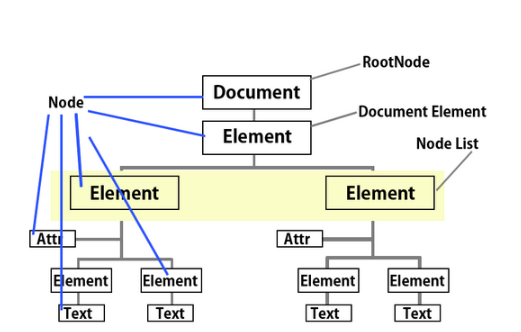
문서객체모델(DOM - Document Object Model)
- 넓은 의미로 웹 브라우저가 HTML 페이지를 인식하는 방식
- 좁은 의미로는 document 객체와 관련된 객체 집합
- 사용시 HTML 페이지에 태그를 추가, 수정, 제거할 수 있음
- ‘태그’ - HTML 페이지에 존재하는 html이나 body 태그
- 문서 객체 - 태그를 자바스크립트에서 이용할 수 있는 객체로 만든 것
HTML 태그를 자바스크립트로 가져오는 방법
| 메서드 | 설명 |
|---|---|
| getElementById(id) | 태그의 id 속성이 id와 일치하는 문서 객체를 가져옴 |
| getElementsByName(name) | 태그의 name속성이 name과 일치하는 문서 객체를 배열로 가져옴 |
| getElementsByTagName(tagName) | tagName과 일치하는 문서 객체를 배열로 가져옴 |
태그명을 통해서 문서 객체 탐색
<!DOCTYPE html>
<html>
<head>
<meta charset="UTF-8">
<title>태그명을 통해서 문서 객체 탐색</title>
<script type="text/javascript">
    //윈도우가 로드될 때 onload에 대입된 함수가 실행
	window.onload=function(){
    	//태그명을 통해서 태그를 탐색해서 문서 객체로 반환
    	//복수의 태그가 존재할 수 있기 때문에 배열로 반환
    	const header1 = document.getElementsByTagName('h1');
    	header1[0].innerHTML = '달빛이 찬란한 호수';
    	header1[1].innerHTML = '흰 눈이 눈 부신 들판';

    	//반복문 사용하기
    	const header3 = document.getElementsByTagName('h3');

    	for(let i=0;i<header3.length;i++){
    		if(i%2==1){//홀수
    			header3[i].innerHTML = '우주';
    		}else{//짝수
    			header3[i].innerHTML = '지구';
    		}
    	}
    };
</script>
</head>
<body>
	<h1>하늘</h1>
	<h1>하늘</h1>

	<hr size="1" width="90%">

	<h3>구름</h3>
	<h3>구름</h3>
	<h3>구름</h3>
</body>
</html>
id를 이용한 문서 객체 탐색
<!DOCTYPE html>
<html>
<head>
<meta charset="UTF-8">
<title>id를 이용한 문서 객체 탐색</title>
<script type="text/javascript">
	//윈도우가 로드될 때 onload에 대입된 function를 실행
	window.onload=function(){
		const header1 = document.getElementById('header_1');
		const header2 = document.getElementById('header_2');

		//태그의 내용 변경
		header1.innerHTML = '하하';
		header2.innerHTML = '호호';
	};
</script>
</head>
<body>
	<h1 id="header_1">Header</h1>
	<h1 id="header_2">Header</h1>
</body>
</html>
태그명과 id를 사용해서 문서 객체 탐색
<!DOCTYPE html>
<html>
<head>
<meta charset="UTF-8">
<title>태그명과 id를 사용해서 문서 객체 탐색</title>
<script type="text/javascript">
	//윈도우가 로드될 때 onload에 대입된 함수가 실행
	window.onload=function(){
		const allSpans = document.getElementsByTagName('span');

		let output = '[모든 span 태그의 text 출력]\n';
		for(let i=0;i<allSpans.length;i++){
			output += allSpans[i].innerHTML + '\n';
		}
		alert(output);

		//id가 foo인 p 태그 반환
		const foo = document.getElementById('foo');
		//id가 foo인 p 태그의 자식 태그 중 span 태그 반환
		const fooSpans = foo.getElementsByTagName('span');

		let output2 = '[id가 foo인 p 태그 하위 태그 중 모든 span 태그의 text 출력]\n';
		for(let i=0;i<fooSpans.length;i++){
			output2 += fooSpans[i].innerHTML + '\n';
		}
		alert(output2);
	};
</script>
</head>
<body>
	<p id="foo">
		<span>a</span>
		<span>b</span>
		<span>c</span>
	</p>
	<p id="bar">
		<span>x</span>
	</p>
</body>
</html>
name 속성을 이용한 문서 객체 탐색
<!DOCTYPE html>
<html>
<head>
<meta charset="UTF-8">
<title>name 속성을 이용한 문서 객체 탐색</title>
<script type="text/javascript">
	window.onload=function(){
		//name 속성의 값을 통해서 태그 객체들을 배열에 담아 반환
		const prev = document.getElementsByName('prev');
		prev[0].innerHTML  = '이전';

		const next = document.getElementsByName('next');
		next[0].innerHTML = '다음';

		const country = document.getElementsByName('country');
		country[0].checked = true;

		const comment = document.getElementsByName('comment');
		comment[0].value = '간단한 설명 입력';

	};
</script>
</head>
<body>
	<button name="prev">prev</button>
	<br>
	<button name="next">next</button>
	<br>
	<input type="checkbox" name="country" value="한국">한국
	<input type="checkbox" name="country" value="미국">미국
	<input type="checkbox" name="country" value="영국">영국
	<br>
	<input type="text" name="comment">
</body>
</html>
Lucky Things🍀