
QueryDSL 구현 중 트러블 슈팅
🤔 문제 상황
: QueryDSL을 사용하여 검색 기능 API를 구현하던 중,
제목 기준 검색을 했는데 결과가 중복으로 나오는 문제가 발생하였다.
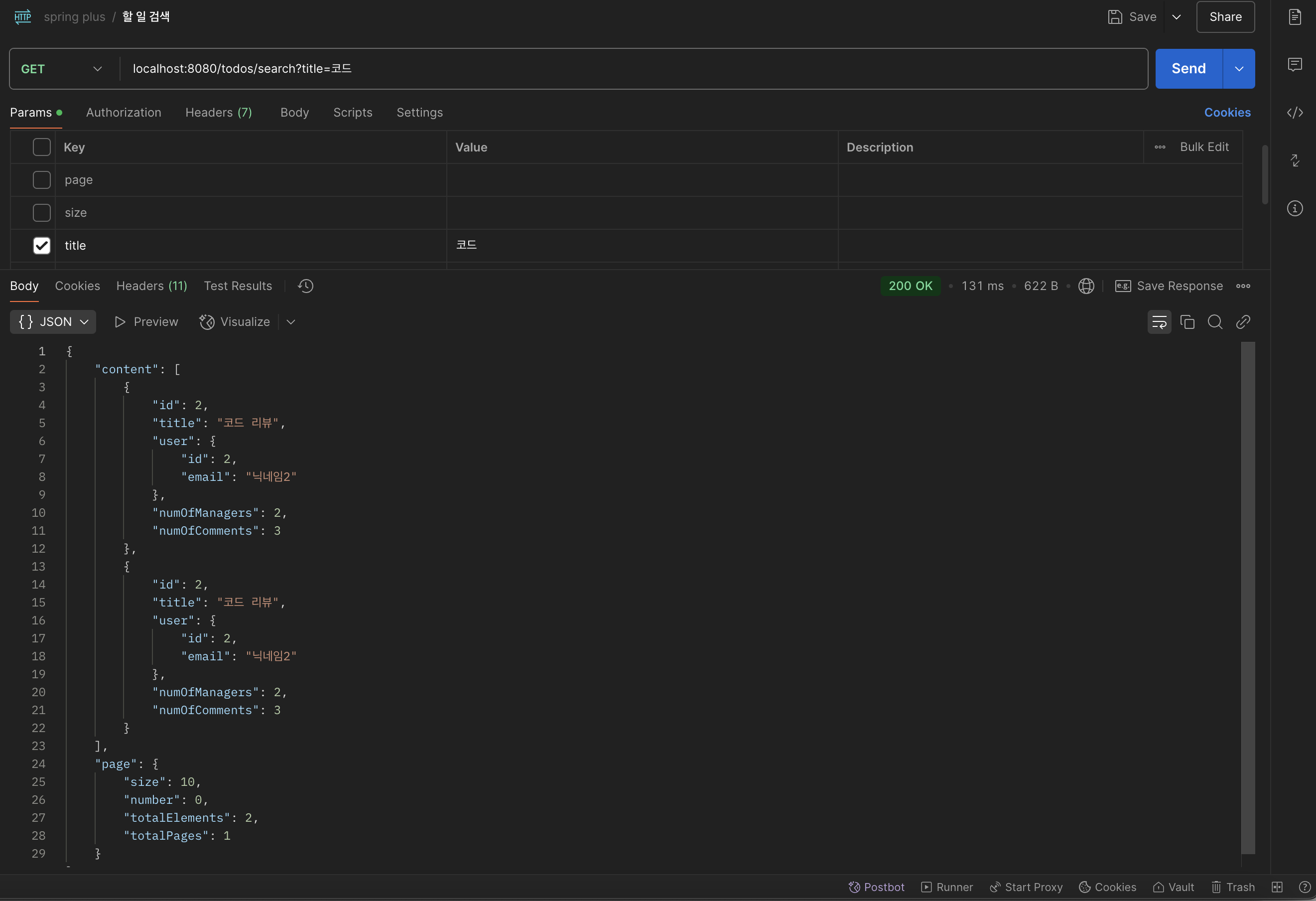
그래서 아래 코드와 같이 중복 방지를 위한 distinct()를 추가해주었더니
        List<TodoSearchResponse> result = jpaQueryFactory
                .select(Projections.constructor(
                        TodoSearchResponse.class,
                        todo.id,
                        todo.title,
                        Projections.constructor(UserResponse.class, todo.user.id, todo.user.nickname),
                        todo.numOfManagers,
                        todo.numOfComments
                ))
                .from(todo)
                .leftJoin(todo.managers, manager)
                .leftJoin(manager.user, user)
                .where(containsTitle(title),
                        containsNickname(nickname),
                        betweenDate(startDate, endDate)
                )
                .groupBy(todo.id, user.id, user.nickname)
                .distinct()
                .orderBy(todo.createdAt.desc()) // 생성일 기준 내림차순
                .offset(pageable.getOffset()) // 페이징
                .limit(pageable.getPageSize())
                .fetch();
}2025-03-14T11:38:30.092+09:00 WARN 26390 --- [expert] [nio-8080-exec-5] o.h.engine.jdbc.spi.SqlExceptionHelper : SQL Error: 3065, SQLState: HY000 2025-03-14T11:38:30.092+09:00 ERROR 26390 --- [expert] [nio-8080-exec-5] o.h.engine.jdbc.spi.SqlExceptionHelper : Expression #1 of ORDER BY clause is not in SELECT list, references column 'expert.t1_0.created_at' which is not in SELECT list; this is incompatible with DISTINCT 2025-03-14T11:38:30.097+09:00 ERROR 26390 --- [expert] [nio-8080-exec-5] o.a.c.c.C.[.[.[/].[dispatcherServlet] : Servlet.service() for servlet [dispatcherServlet] in context with path [] threw exception [Request processing failed: org.springframework.orm.jpa.JpaSystemException: JDBC exception executing SQL [/* select distinct todo.id, todo.title, todo.user.id, todo.user.nickname, todo.numOfManagers, todo.numOfComments from Todo todo left join todo.managers as manager left join manager.user as user where lower(todo.title) like ?1 escape '!' group by todo.id, user.id, user.nickname order by todo.createdAt desc */ select distinct t1_0.id,t1_0.title,t1_0.user_id,u2_0.nickname,t1_0.num_of_managers,t1_0.num_of_comments from todos t1_0 left join managers m1_0 on t1_0.id=m1_0.todo_id left join users u1_0 on u1_0.id=m1_0.user_id join users u2_0 on u2_0.id=t1_0.user_id where lower(t1_0.title) like ? escape '!' group by t1_0.id,u1_0.id,u1_0.nickname order by t1_0.created_at desc limit ?,?] [Expression #1 of ORDER BY clause is not in SELECT list, references column 'expert.t1_0.created_at' which is not in SELECT list; this is incompatible with DISTINCT] [n/a]] with root cause java.sql.SQLException: Expression #1 of ORDER BY clause is not in SELECT list, references column 'expert.t1_0.created_at' which is not in SELECT list; this is incompatible with DISTINCT at com.mysql.cj.jdbc.exceptions.SQLError.createSQLException(SQLError.java:130) ~[mysql-connector-j-8.3.0.jar:8.3.0]
오히려 이런 오류가 발생하였다.
찾아보니‼️ distinct()랑 orderBy를 같이 사용했을 때의 문제였다.
해결방법
🌀 distinct 랑 orderby를 함께 사용할 때, select문에서 사용한 컬럼만 orderby에 추가할 수 있다.
Distinct : 단순 그룹핑 작업 (중복 제거)
Group by : 그룹핑 작업 + 정렬 작업 수행
💫 내가 보기엔 쿼리문이 한 번에 돌아가는 것처럼 보이지만!!!
- 내부적으로는 먼저 사용되는 쿼리가 있다는 점
- 순서를 고려하여 쿼리문을 작성해야한다는 점
을 느끼게 되었다.
🪄 고민했던 사항
1️⃣ 쿼리문에 사용되는 user에서 managerUser와 todoUser를 구분해야했다는 점이었다.
- todoUser: Todo를 작성한 User
- managerUser: Manager를 통해 연결된 User ➡️ 검색 대상
containsNickname()이 managerUser를 기준으로 닉네임을 검색하도록 수정하였다.
기존에는 user.nickname.contains(nickname)이라서 manager.user와 todo.user 중 어떤 걸 참조하는지 명확하지 않았음
containsNickname(managerUser, nickname)처럼 특정 QUser 객체를 넘겨서 담당자의 닉네임을 정확하게 검색하도록 변경
2️⃣ 검색어 방식 (contains() vs like())
기본적으로 contains()는 like '%검색어%'와 동일하다.
escape 문자 처리 필요하면 .like("%" + nickname + "%")로 직접 구현 가능하다.
소문자 변환 검색도 고려해보면 좋을 것 같다.
aws 트러블슈팅
ubuntu@ip-172-31-39-176:~/spring-plus$ gradle -v

------------------------------------------------------------
Gradle 4.4.1
------------------------------------------------------------

Build time:   2012-12-21 00:00:00 UTC
Revision:     none

Groovy:       2.4.21
Ant:          Apache Ant(TM) version 1.10.12 compiled on January 17 1970
JVM:          17.0.14 (Ubuntu 17.0.14+7-Ubuntu-122.04.1)
OS:           Linux 6.8.0-1021-aws amd64

ubuntu@ip-172-31-39-176:~/spring-plus$ gradle wrapper
Starting a Gradle Daemon (subsequent builds will be faster)

FAILURE: Build failed with an exception.

* What went wrong:
Could not create service of type ScriptPluginFactory using BuildScopeServices.createScriptPluginFactory().
> Could not create service of type PluginResolutionStrategyInternal using BuildScopeServices.createPluginResolutionStrategy().

* Try:
Run with --stacktrace option to get the stack trace. Run with --info or --debug option to get more log output. Run with --scan to get full insights.

* Get more help at https://help.gradle.org

BUILD FAILED in 3s
ubuntu@ip-172-31-39-176:~/spring-plus$ rm -rf ~/.gradle/caches
ubuntu@ip-172-31-39-176:~/spring-plus$ rm -rf ~/.gradle/wrapper
ubuntu@ip-172-31-39-176:~/spring-plus$ gradle wrapper

FAILURE: Build failed with an exception.

* What went wrong:
Could not create service of type ScriptPluginFactory using BuildScopeServices.createScriptPluginFactory().
> Could not create service of type PluginResolutionStrategyInternal using BuildScopeServices.createPluginResolutionStrategy().

* Try:
Run with --stacktrace option to get the stack trace. Run with --info or --debug option to get more log output. Run with --scan to get full insights.

* Get more help at https://help.gradle.org

BUILD FAILED in 0s
ubuntu@ip-172-31-39-176:~/spring-plus$ ㅣㄴ
ㅣㄴ: command not found
ubuntu@ip-172-31-39-176:~/spring-plus$ ls
README.md  build.gradle  gradle  gradlew  gradlew.bat  settings.gradle  src
ubuntu@ip-172-31-39-176:~/spring-plus$ cd gradle
ubuntu@ip-172-31-39-176:~/spring-plus/gradle$ ls
wrapper
ubuntu@ip-172-31-39-176:~/spring-plus/gradle$ cd wrapper
ubuntu@ip-172-31-39-176:~/spring-plus/gradle/wrapper$ ls
gradle-wrapper.jar
ubuntu@ip-172-31-39-176:~/spring-plus/gradle/wrapper$ nano ~/spring-plus/gradle/wrapper/gradle-wrapper.properties
ubuntu@ip-172-31-39-176:~/spring-plus/gradle/wrapper$ ls
gradle-wrapper.jar  gradle-wrapper.properties
ubuntu@ip-172-31-39-176:~/spring-plus/gradle/wrapper$ cd ..
ubuntu@ip-172-31-39-176:~/spring-plus/gradle$ cd ..
ubuntu@ip-172-31-39-176:~/spring-plus$ ./gradlew clean build
Downloading https://services.gradle.org/distributions/gradle-8.5-bin.zip
............10%.............20%............30%.............40%.............50%............60%.............70%.............80%............90%.............100%

Welcome to Gradle 8.5!
🤔 문제 상황
: AWS ec2를 통해 인스턴스를 생성하고 접속하여 나의 spring boot 프로젝트를 git clone을 통해 인스턴스 서버로 실행하려고 했던 상황이었다.
AWS로 서버를 실행하기 위해서는 /.gradlew clean build 를 통해 .jar 파일을 생성해야한다.
하지만 .properties가 모두 gitignore에 들어가있었어서 생긴 문제였다.
없으면 빌드가 안되니까!!! ➡️ 그냥 수동으로 만들어줌ㅋㅋ
이후, 분명 build 잘 되어서 인스터스 서버로 접속했는데 서버가 먹통이 되었다...
알고보니
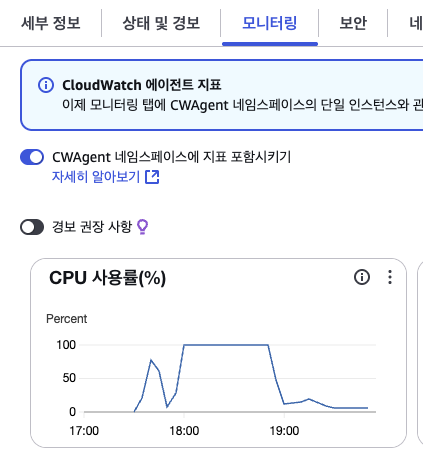
인스턴스 서버가 터졌던것 ^^..
그것도 모르고 ㅠ 삽질했었다... 뭔가 이상하다 싶을 때에는 모니터링 기능을 통해 CPU 사용률을 확인해보자!
➡️ 그래서 git clone을 하지 말고
그냥 로컬 터미널에서 진행하기로함
이 블로그 보고 어찌저찌 하는데? 여전히 접속은안되는..
데이터베이스 연결 문제인듯 하기도 하다