[Android/Kotlin] DiffUtil을 이해하고 NotifyDataSetChanged() 를 대체해보자
RecyclerView에 새로운 데이터를 업데이트 하는 제일 쉬운 방법은 notifyDataSetChanged() 라고 생각한다. 하지만 notifyDataSetChanged에는 다음과 같은 문제가 존재한다.
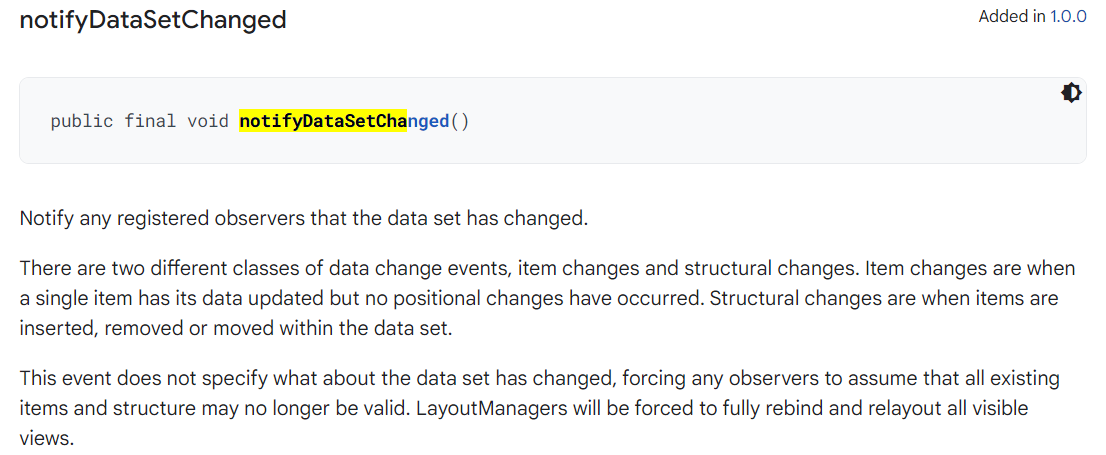
"이 이벤트는 데이터 세트의 변경 사항을 지정하지 않으므로 관찰자는 모든 기존 항목과 구조가 더 이상 유효하지 않을 수 있다고 가정하게 됩니다. LayoutManager는 표시되는 모든 뷰를 완전히 다시 바인딩하고 다시 배치해야 합니다."
어댑터를 작성하는 경우 가능하면 보다 구체적인 변경 이벤트를 사용하는 것이 항상 더 효율적입니다. notifyDataSetChanged()를 최후의 수단으로 의지하십시오 .
위 글의 내용처럼 이 notifyDataSetChanged()는 RecyclerView에 하나의 항목을 추가하는 작업을 수행해도 모든 뷰를 다시 바인딩하고 배치하는 낭비를 초래한다. -> 어떤 경우에는 RecyclerView의 장점을 전혀 이용하지 못한다.
따라서 삽입, 삭제 등 각 이벤트에 따라 함수를 제공하고있다.
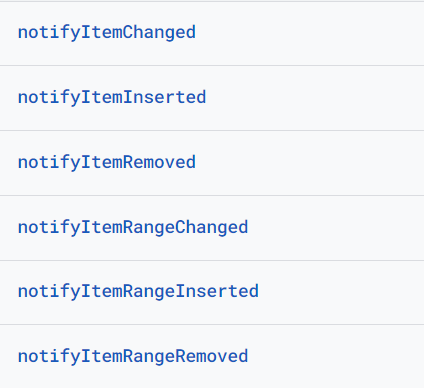
하지만 각 상황에 맞게 위 함수를을 사용하는 일은 무척 번거롭기 때문에, DiffUtil은 이러한 불편한 점을 해소하기 위해 개발되었다.
DiffUtil
DiffUtil을 간단하게 설명하면 이전 List와 현재 List 간의 상태 차이를 계산하여 최소한의 데이터에 대해 갱신하도록 하는 클래스이다.
AsyncListDiffer
AsyncListDiffer는 DiffUtil을 편하게 쓰기 위해서 만들어진 클래스로 많은 목록들을 UI 스레드에서 계산하면 성능에 문제가 발생할 수 있기 때문에, AsyncListDiffer는 백그라운드 스레드에서 두 리스트의 차이를 계산하고, RecyclerView.Adapter에 수정할 리스트에 대한 정보를 전달하는 역할을 수행한다.
AsyncListDiffer Class의 내부 코드를 조금 살펴보자.
 public void submitList(@Nullable final List<T> newList,
            @Nullable final Runnable commitCallback) {
        // incrementing generation means any currently-running diffs are discarded when they finish
        final int runGeneration = ++mMaxScheduledGeneration;

        if (newList == mList) {
            // nothing to do (Note - still had to inc generation, since may have ongoing work)
            if (commitCallback != null) {
                commitCallback.run();
            }
            return;
        }

        final List<T> previousList = mReadOnlyList;

        // fast simple remove all
        if (newList == null) {
            //noinspection ConstantConditions
            int countRemoved = mList.size();
            mList = null;
            mReadOnlyList = Collections.emptyList();
            // notify last, after list is updated
            mUpdateCallback.onRemoved(0, countRemoved);
            onCurrentListChanged(previousList, commitCallback);
            return;
        }

        // fast simple first insert
        if (mList == null) {
            mList = newList;
            mReadOnlyList = Collections.unmodifiableList(newList);
            // notify last, after list is updated
            mUpdateCallback.onInserted(0, newList.size());
            onCurrentListChanged(previousList, commitCallback);
            return;
        }

        final List<T> oldList = mList;
        mConfig.getBackgroundThreadExecutor().execute(new Runnable() {
            @Override
            public void run() {
                final DiffUtil.DiffResult result = DiffUtil.calculateDiff(new DiffUtil.Callback() {
                    @Override
                    public int getOldListSize() {
                        return oldList.size();
                    }

                    @Override
                    public int getNewListSize() {
                        return newList.size();
                    }

                    @Override
                    public boolean areItemsTheSame(int oldItemPosition, int newItemPosition) {
                        T oldItem = oldList.get(oldItemPosition);
                        T newItem = newList.get(newItemPosition);
                        if (oldItem != null && newItem != null) {
                            return mConfig.getDiffCallback().areItemsTheSame(oldItem, newItem);
                        }
                        // If both items are null we consider them the same.
                        return oldItem == null && newItem == null;
                    }

                    @Override
                    public boolean areContentsTheSame(int oldItemPosition, int newItemPosition) {
                        T oldItem = oldList.get(oldItemPosition);
                        T newItem = newList.get(newItemPosition);
                        if (oldItem != null && newItem != null) {
                            return mConfig.getDiffCallback().areContentsTheSame(oldItem, newItem);
                        }
                        if (oldItem == null && newItem == null) {
                            return true;
                        }
                        // There is an implementation bug if we reach this point. Per the docs, this
                        // method should only be invoked when areItemsTheSame returns true. That
                        // only occurs when both items are non-null or both are null and both of
                        // those cases are handled above.
                        throw new AssertionError();
                    }

                    @Nullable
                    @Override
                    public Object getChangePayload(int oldItemPosition, int newItemPosition) {
                        T oldItem = oldList.get(oldItemPosition);
                        T newItem = newList.get(newItemPosition);
                        if (oldItem != null && newItem != null) {
                            return mConfig.getDiffCallback().getChangePayload(oldItem, newItem);
                        }
                        // There is an implementation bug if we reach this point. Per the docs, this
                        // method should only be invoked when areItemsTheSame returns true AND
                        // areContentsTheSame returns false. That only occurs when both items are
                        // non-null which is the only case handled above.
                        throw new AssertionError();
                    }
                });

                mMainThreadExecutor.execute(new Runnable() {
                    @Override
                    public void run() {
                        if (mMaxScheduledGeneration == runGeneration) {
                            latchList(newList, result, commitCallback);
                        }
                    }
                });
            }
        });
    }
submitList() 함수를 보면 이전 리스트가 존재하면서 이전 리스트와 동일하지 않은(객체의 주소) 새로운 리스트가 들어왔을 때 백그라운드 스레드에서 두 리스트 간의 차이를 계산하고, 메인 스레드에서 차이를 계산한 결과를 latchList()를 통해 새로운 리스트를 업데이트 하도록 구현되어 있다.
void latchList(
            @NonNull List<T> newList,
            @NonNull DiffUtil.DiffResult diffResult,
            @Nullable Runnable commitCallback) {
        final List<T> previousList = mReadOnlyList;
        mList = newList;
        // notify last, after list is updated
        mReadOnlyList = Collections.unmodifiableList(newList);
        diffResult.dispatchUpdatesTo(mUpdateCallback);
        onCurrentListChanged(previousList, commitCallback);
    }
latchList 내부에 dispatchUpdatesTo 함수를 통해 DiffResult 결과에 따라 onMoved(), onRemoved(), onChanged()등 함수를 실행시킨다.
이제 이 AsyncListDiffer을 사용해보자.
class PracticeAdapter : RecyclerView.Adapter<PracticeAdapter.ViewHolder>() {

    private val differ = AsyncListDiffer(this, object: DiffUtil.ItemCallback<Data>() {
        override fun areItemsTheSame(oldItem: Data, newItem: Data): Boolean {
            return oldItem.id == newItem.id
        }

        override fun areContentsTheSame(oldItem: Data, newItem: Data): Boolean {
            return oldItem == newItem
        }
    })

    override fun onCreateViewHolder(parent: ViewGroup, viewType: Int): ViewHolder {

    }

    override fun getItemCount(): Int = differ.currentList.size

    override fun onBindViewHolder(holder: ViewHolder, position: Int) {

    }

	private fun getItem(position: Int) = differ.currentList[position]

   	fun setList(items: List<Data>) {
    	differ.submitList(itmes)
    }

    inner class ViewHolder : RecyclerView.ViewHolder() {

    }
}
AsyncListDiffer는 생성할 때 RecyclerView.Adapter, DiffUtil.ItemCallBack를 넘겨줘야 하는데, DiffUtil.ItemCallBack은 반드시 두 가지 함수를 오버라이드 해야한다.
areItemsTheSame() 메서드는 항목의 고유 식별자를 비교하고, areContentsTheSame() 메서드는 항목의 내용이 동일한지 비교한다. (위 예제처럼 익명 함수 대신 class로 정의해서 사용해도 된다.)
Adapter 내부에서 AsyncListDiffer를 선언 후 AsyncListDiffer내부에 있는 함수를 이용하여 함수를 오버라이드 하거나 생성하고, RecyclerView를 갱신하면 된다.
ListAdapter
위 AsyncListDiffer를 선언하고 해당 변수를 이용하여 List의 아이템을 꺼내고 RecyclerView를 갱신하는 방법이 반복되자, ListAdapter라는 우리에게 정말 편한 추상클래스를 제공하였다.
ListAdapter 내부 코드를 간단히 보자.
public abstract class ListAdapter<T, VH extends RecyclerView.ViewHolder>
        extends RecyclerView.Adapter<VH> {
    final AsyncListDiffer<T> mDiffer;
    private final AsyncListDiffer.ListListener<T> mListener =
            new AsyncListDiffer.ListListener<T>() {
        @Override
        public void onCurrentListChanged(
                @NonNull List<T> previousList, @NonNull List<T> currentList) {
            ListAdapter.this.onCurrentListChanged(previousList, currentList);
        }
    };

  public void submitList(@Nullable List<T> list) {
          mDiffer.submitList(list);
      }

    public void submitList(@Nullable List<T> list, @Nullable final Runnable commitCallback) {
        mDiffer.submitList(list, commitCallback);
    }

    protected T getItem(int position) {
        return mDiffer.getCurrentList().get(position);
    }

    @Override
    public int getItemCount() {
        return mDiffer.getCurrentList().size();
    }

    @NonNull
    public List<T> getCurrentList() {
        return mDiffer.getCurrentList();
    }

    /**
     * Called when the current List is updated.
     * <p>
     * If a <code>null</code> List is passed to {@link #submitList(List)}, or no List has been
     * submitted, the current List is represented as an empty List.
     *
     * @param previousList List that was displayed previously.
     * @param currentList new List being displayed, will be empty if {@code null} was passed to
     *          {@link #submitList(List)}.
     *
     * @see #getCurrentList()
     */
    public void onCurrentListChanged(@NonNull List<T> previousList, @NonNull List<T> currentList) {
    }
ListAdapter 내부에 mDiffer 변수로 AsyncListDiffer를 가지고 있어 우리가 위에서 일일이 구현했던 함수를 미리 선언해놨다.
이제 ListAdapter 사용법을 보자.
class PracticeAdapter : ListAdapter<Data, PracticeAdapter.ViewHolder>(object: DiffUtil.ItemCallback<Data>() {
    override fun areItemsTheSame(oldItem: Data, newItem: Data): Boolean {
            return oldItem.id == newItem.id
        }

        override fun areContentsTheSame(oldItem: Data, newItem: Data): Boolean {
            return oldItem == newItem
        }
    })

    override fun onCreateViewHolder(parent: ViewGroup, viewType: Int): ViewHolder {

    }

    override fun onBindViewHolder(holder: ViewHolder, position: Int) {

    }

    inner class ViewHolder : RecyclerView.ViewHolder() {

    }
}
AsyncListDiffer를 사용했을때는 직접 함수를 만들었지만, ListAdapter 내부에 우리가 주로 사용하는 함수들을 미리 생성했기 때문에 코드가 훨씬 간결해진다.
참고 자료:
https://developer.android.com/reference/androidx/recyclerview/widget/RecyclerView.Adapter#notifyDataSetChanged()
https://developer.android.com/reference/androidx/recyclerview/widget/DiffUtil
https://developer.android.com/reference/androidx/recyclerview/widget/AsyncListDiffer
https://dev.gmarket.com/79
