Hardware-based Root-of-Trust
Boot Guard
The Boot Guard verification method compares the BIOS image against the Dell original equipment manufacturer generated hash that is stored on the servers.
- Boot Guard is enabled at the factory and cannot be disabled
- A BIOS attack is typically hard to detect because the BIOS runs before the operating system and other security software loads.
Secure Boot
Secure Boot is a security standard that the industry develops to help ensure that a device boot uses software that the Original Equipment Manufacturer trusts.
Boot Guard는 “BIOS가 진짜인지부터 확인하고 나서 부팅을 허락하는 하드웨어 보안 장치”다.
전원 ON → CPU 초기화 → 🔐 Intel Boot Guard (여기!) → BIOS 실행 → Secure Boot 검사(여기!) → OS 로딩
TPM 2.0
TPM is a hardware security device that provides cryptographic keys and only the TPM can encrypt or decrypt them.
→ 암호 키를 안전하게 저장·처리하는 하드웨어 보안 칩
Trusted Platform Module or TPM plays a significant role in Secure Boot.
-
TPM이 설치되고 활성화되면 시스템 보드에 암호학적으로 종속(바인딩) 되며, 다른 메인보드로 이전할 수 없음
-
시스템 보드에 장애가 발생할 경우, 메인보드와 TPM은 반드시 함께 교체
-
13G, 14G, 15G, 16G 서버:
TPM은 일반적으로 시스템 보드에 장착되는 플러그인 모듈이지만, 활성화된 이후에는 이전이 불가능합니다. -
17G 서버:
TPM은 DC-SCM(Data Center Secure Control Module) 에 통합되어 있으며, 역시 이전할 수 없습니다.
Lockdown Mode
System Lockdown Mode provides a mechanism to protect a configuration from any unintentional or accidental changes after the system is provisioned to a specific level.
- The system lockdown mode is applicable to both the system configuration and firmware updates.
- System lockdown mode is only available on an Enterprise or Datacenter licensed iDRAC.
BIOS vs UEFI
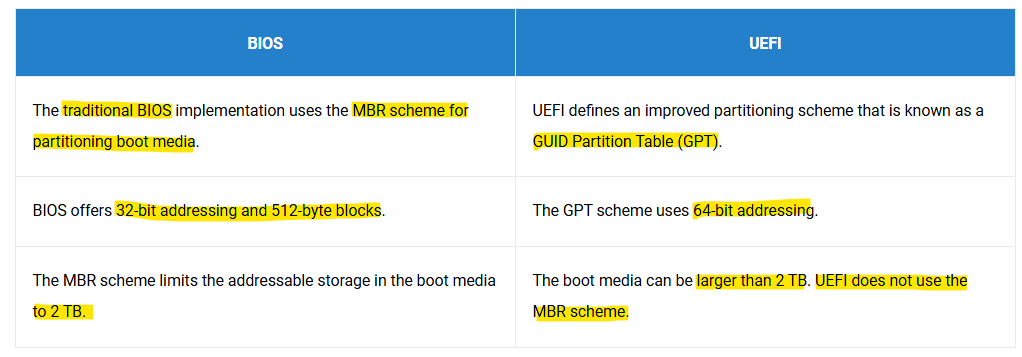
Tip: The Boot Manager is a UEFI utility accessed by pressing F11 during startup to select a boot device or access system utilities without altering the permanent boot order.
It provides options to launch a one-time boot menu, enter System Setup (BIOS), access the Dell Lifecycle Controller, or view system utilities.
CMOS (Complimentary Metal Oxide Semiconductor)
All the PowerEdge server system boards have a CMOS.
The BIOS code starts and reads all the contents of CMOS to understand the system configuration.
A CMOS battery provides constant power to the chip to avoid losing data when the server is shut down.
Secure Component Verification (SCV)
SCV assures the components in the PowerEdge server match what was manufactured and shipped.
SCV uses a factory-signed certificate that contains the unique component IDs used to validate components. This certificate is signed in the Dell factory and is stored in the server.
Authentication VS Authorization
Authentication is proving "I am who I say I am."
Authorization is "I can access only the data that I am permitted to access."
iDRAC User Accounts - Role-Based Access
Administrators can configure up to 16 local iDRAC9
and 32 local iDRAC10 users.
RTO VS RPO
RTO(Recovery Time Objective) 는 데이터를 얼마나 빨리 복구할 수 있는지에 대한 것이고,
RPO(Recovery Point Objective) 는 얼마만큼의 데이터 손실을 감수할 수 있는지에 대한 것입니다.
RTO는 스토리지 솔루션이 장애로부터 복구되어 애플리케이션 요청을 다시 처리하기 시작할 때까지 허용되는 시간을 의미합니다.
RPO는 스토리지 시스템에 장애가 발생한 시점과, 해당 시스템이 데이터를 복구할 수 있는 과거 시점 사이의 시간 간격을 의미합니다.