css
*전체 선택자
타입선택자
class선택자 -여러번 사용가능 .사용 <span class="">
id선택자-한번만 사용 #사용
그룹선택자 쉼표로 나열
css 우선순위
!important
inline 스타일
id스타일
class스타일
type스타일
font-family 폰트 두개 지정하는 이유는 앞에 폰트 사용할 수 없을 때 뒤에 적용
font-size 16px=1em
font-style 이탤릭체
font-weight
color
color
  1.hsl 색상 채도 불투명도
  2.영문법
  3.rgb/rgba
  투명도 0~1에 가까울 수록 투명해짐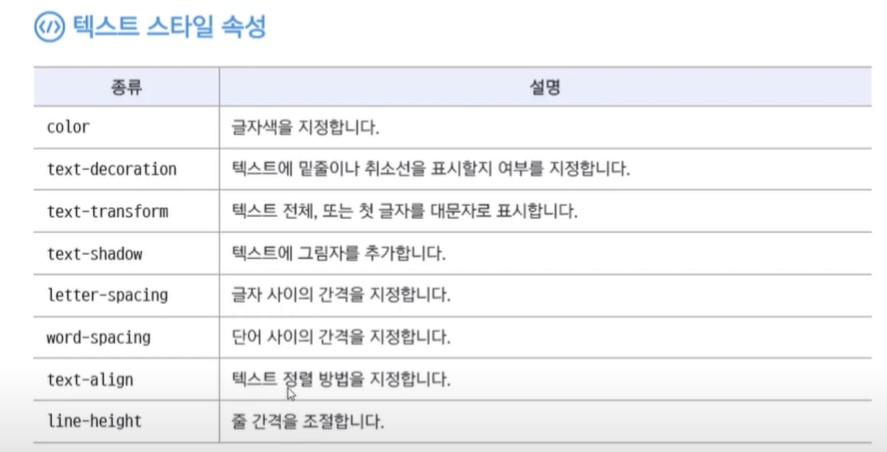
line-height는 텍스트를 세로 정렬할 때도 사용
line-height 1.5~2가 적당
특정 열에 스타일 적용하기
  <colgroup>
  <col style="background-color:#eee;"> 첫번째 열 스타일 지정
  <col> 스타일 없어도 <col> 명시
  <col style="width:150px">
  <col style="width:150px">
</colgroup>
<!DOCTYPE html>| 구분 | 성인 | 독서자 |
|---|---|---|
| 종이책 | 6.1권 | 11.8권 |
| 전자책 | 1.2권 | 7.1권 |
| 오디오북 | 0.2권 | 5.5권 |
      <form>
        <fieldset>
          <legend>사용자 정보</legend>
          <ul>
            <li>
              <label for="uid">아이디</label>
              <input type="text" id="uid">
            </li>
            <li>
              <label for="email">이메일</label>
              <input type="email" id="email">
            </li>
            <li>
              <label for="pwd1">비밀번호</label>
              <input type="password" id="pwd1">
            </li>
            <li>
              <label for="pwd2">비밀번호 확인</label>
              <input type="password" id="pwd2">
            </li>
          </ul>
        </fieldset>

        <fieldset>
          <legend>이벤트와 새로운 소식</legend>
          <input type="radio" name="mailing" id="mailing_y">
          <label for="mailing_y">메일수신</label>
          <input type="radio" name="mailing" id="mailing_n">
          <label for="mailing_n">메일수신 안함</label>
        </fieldset>
        <div id="buttons">
          <input type="submit" value="가입하기">
          <input type="reset" value="최소">
        </div>

        <ul>
          <li>
              <label><input type="checkbox" value="s_3">선물용 3kg</label>
              <input type="number" min="0" max="3" value="1">개 (최대5개)<!---value로 초깃값 -->
          </li>
          <li>
            <label><input type="checkbox" value="s_5">선물용 5kg</label>
            <input type="range" min="0" max="3">개 (최대 3개)
        </ul>
      </form>
      <form>
        <fieldset>
          <legend>날짜 지정하기</legend>
          <input type="date" in="2020-02-01" max="2020-02-15" step="2" value="2020-02-15">
          <input type="month">
          <input type="week">
        </fieldset>
        <fieldset>
          <legend>시간 지정하기</legend>
          <input type="time">
          <input type="datetime-local">
        </fieldset>
      </form>

      <form>
        <fieldset>
          <legend>이미지 버튼</legend>
          <label>아이디: <input type="text" id="user_id" size="10"></label>
          <label>비밀번호: <input type="password" id="user_pw" size="10"></label>
          <input type="image" src="images/login.png" alt="로그인">
        </fieldset>
      </form>


        <!--button type="submit/reset/button">내용</button> = <input type="submit/reset/ button">--->
      <form>
        <fieldset>
          <legend>type="button"</legend> <!--type="button"은 submit이나 reset기능이 없고 오직 버튼형태 주로 버튼 클릭해서 자바스크립트 실핼할 때 사용한다.-->
           <input type="button" value="공지 창 열기" onclick="window.open('notice.html')"> <!--자바스크립트 window.open-->
        </fieldset>
      </form>
      <form>
        <fieldset>
          <legend>파일첨부하는 tpye="file"</legend>
          <input type="file">
        </fieldset>
      </form>
      <form>
        <fieldset>
          <legend>히든필드</legend>
          <input type="hidden" value="사이트를 통한 직접 로그인">
          <label>아이디: <input type="text" id="user_id" size="10"></label>
          <label>비밀번호: <input type="password" id="user_pw" size="10"></label>
          <input type="submit" value="로그인">
        </fieldset>
      </form>
      <form>
        <fieldset>
          <legend>autofocus/placeholder/readonly/required</legend>
          <label for="user-name">이름 :</label>
          <input type="text" id="user-name" autofocus>

          <label for="phone">연락처 : </label>
          <input type="tel" id="phone" placeholder="하이픈 빼고 입력해 주세요."><br>

          <label for="addr">배송 주소 : </label>
          <input type="text" id="addr" value="대한민국" readonly>

          <label for="email">이메일 : </label>
          <input type="email" id="email" required>
          <input type="submit" value="주문하기">
          <input type="reset" value="취소하기">
        </fieldset>
      </form>