
- const와 let
const(constant) : 값이 절대 바뀔 수 없다.
let : 새로운 것을 생성할 때 사용한다.(업데이트 하고 싶을때 업데이트 가능)
const isMinzyFat=true;
isMinzyFat=false;
console.log(isMinzyFay);
const는 값이 바뀌지 않는데 사용자가 바꾸어서 오류가 발생

let isMinzyFat=true;
isMinzyFat=false;
console.log(isMinzyFat);
let의 경우 사용자가 값을 바꾸어도 오류가 발생되지 않고 바뀌어진 값으로 출력됨
Always use Const, Sometimes use let, Never use var!!🔔
- null과 undefined
null : 변수 안에 어떤 것이 없다는 것을 확실히 하기 위해 사용(자연적 발생X)
말 그대로 비어있음
undefined : 변수가 메모리에 있어서 컴퓨터가 변수 있지하지만, 값이 없음
const a = null;✨null=literally means nothing. But nothing is something✨
let hello;
console.log(hello);
-
array
① array 형식const toBuy=['potato', 'tomato', 'pizza']; //배열(array)형식이다. console.log(toBuy);
② 선언한 array 업데이트 (함수사용)
const toBuy=['potato', 'tomato', 'pizza'];
toBuy.push('apple'); //push함수 사용해서 추가
console.log(toBuy);
②-1 선언한 array 업데이트 (직접 바꿔주기)
const toBuy=['potato','tomato','pizza'];
toBuy[2]="water";
console.log(toBuy);
③ array에서 원하는 부분만 출력
const toBuy=['potato','tomato','pizza'];
console.log(toBuy[2]); 
- Object 와 property 생성
① object 형식
const player={
	name : "Minzy",
    age : 99,
    height : 190,
};
console.log(player);
② object 안의 property업데이트하기
const player={
	name : "Minzy",
  age : 99,
  height : 190,
};
console.log(player); //일반적인 object 생성 형식
player.name = "Minzy Jeong";
console.log(player); //업데이트된 이름으로 출력됨 
③ object 안의 property 추가하기
 const player={
		name : "Minzy",
  	age : 99,
  	height : 190,
};
player.sexy="soon";
console.log(player); 
- function
① function 형식
function plus(){
	console.log(2+2);
}
plus(); //function plus를 누르는 키라고 생각하자!
② function 밖에서 data 받기
function 안에 data 넣는 것보다 function 밖에 data 넣는게 더 나음
function plus(a,b){
	console.log(a+b);
}
plus(2,2);
plus(4,1.1111);
- Make an add calculator function
const calculator={
	add : function(a,b){
    		console.log(a+b);
          },
};
calculator.add(5,1);
[Code Challenge Alone] Make a calculator function!!
(기능 : ➕, ➖, ➗, 제곱)
const calculator = {
    add : function(a,b){
        console.log(a+b);
    },
    minus : function(a,b){
        console.log(a-b);
    },
    divide : function(a,b){
        console.log(a/b);
    },
    square : function(a,b){
        console.log(a**b);
    },
};
calculator.add(5,1);
calculator.minus(5,1);
calculator.divide(5,1);
calculator.square(5,1);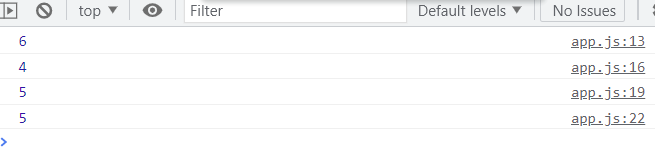

프론트엔드 취미 공부생