CALCULATE
1. 측정값 작성 예시
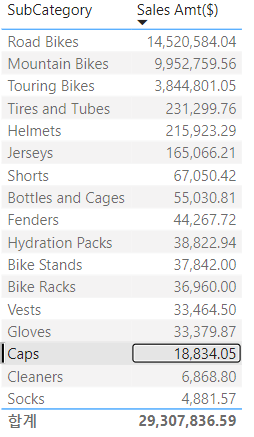
위의 결과값에서 SubCategory가 "Caps"의 총매출액을 구하고자 함
CALCULATE = (측정값, 필터조건)
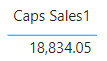
Caps값만 확인할 수 있도록 필터조건을 걸어 계산식 생성
Caps Sales1 = CALCULATE([Sales Amt($)],Products[SubCategory]="Caps" )
2. 다중조건 필터 적용 (AND/OR)
예시) 자전거 카테고리에서 색상이 "Blue" 제품의 매출액을 구하기
- && = AND
- || = OR
Blue Bikes Sales = CALCULATE([Sales Amt($)], Products[Color] = "Blue" && Products[Category] = "Bikes")
Blue Bikes Sales = CALCULATE([Sales Amt($)], Products[Color] = "Blue" || Products[Category] = "Bikes")
3. 서로 다른 테이블을 필터로 적용
예시) 캐나다에서 판매된 양말의 매출액을 구하기
테이블이 다를 경우 다중조건 부호를 사용하지 않고 ","를 사용해서 필터조건을 적용
Canada Socks = CALCULATE([Sales Amt($)], Customers[Region] = "Canada", Products[SubCategory] = "Socks")
4. 부등호 필터조건 적용
예시) 가격이 3000달러 이상인 제품의 매출액을 구하기
- 초과 (>)
- 이상 (>=)
- 이하 (<=)
- 미만 (<)
Price over 3000 = CALCULATE([Sales Amt($)], Sales[Price] >= 3000)
본 포스트는 어니언 비아이(ONION BI) 강의를 참고하였습니다.

데이터 공부 기록 공간입니다.