
너무나도 오랜만에 블로그에 글을 적는다..
프로젝트 기간동안 개인 사정으로 일본에 가있어야 했는데 굉장히 바쁜 나날을 보냈던 것 같다.
프로젝트를 시작하면서 거쳐온 과정을 설명하는건 다음 기회에 하기로 하고,
내가 맡았던 컴포넌트를 정리 해보기로 했다.
폴더구조
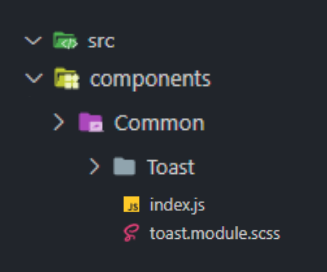
이런식으로 컴포넌트 폴더를 따로 만든 후 export 해서 여러 페이지에서 재사용 가능하도록 만들었다
밑에 코드를 보면 알겠지만 constant 라는 파일을 따로 만들어서 토스트 안에 들어가는 문구를 관리하게 쉽게 만들었다
라이브러리
애니메이션 구현을 위해 CSSTransition을 사용했다
그런데 CSSTransisiton 을 사용하다 보니,
Warning: findDOMNode is deprecated in StrictMode. findDOMNode was passed an instance of Transition which is inside StrictMode. Instead, add a ref directly to the element you want to reference. Learn more about using refs safely here
이라는 에러가 떴다.
<React.StrictMode>
    <App />
</React.StrictMode>
StrictMode를 삭제하면 해결이 난다고 나와있었지만, 나는 권장사항에 맞게 useRef 를 넣어주기로 했다.
아래의 코드를 참고하면 알 수 있을것이다.
결과물
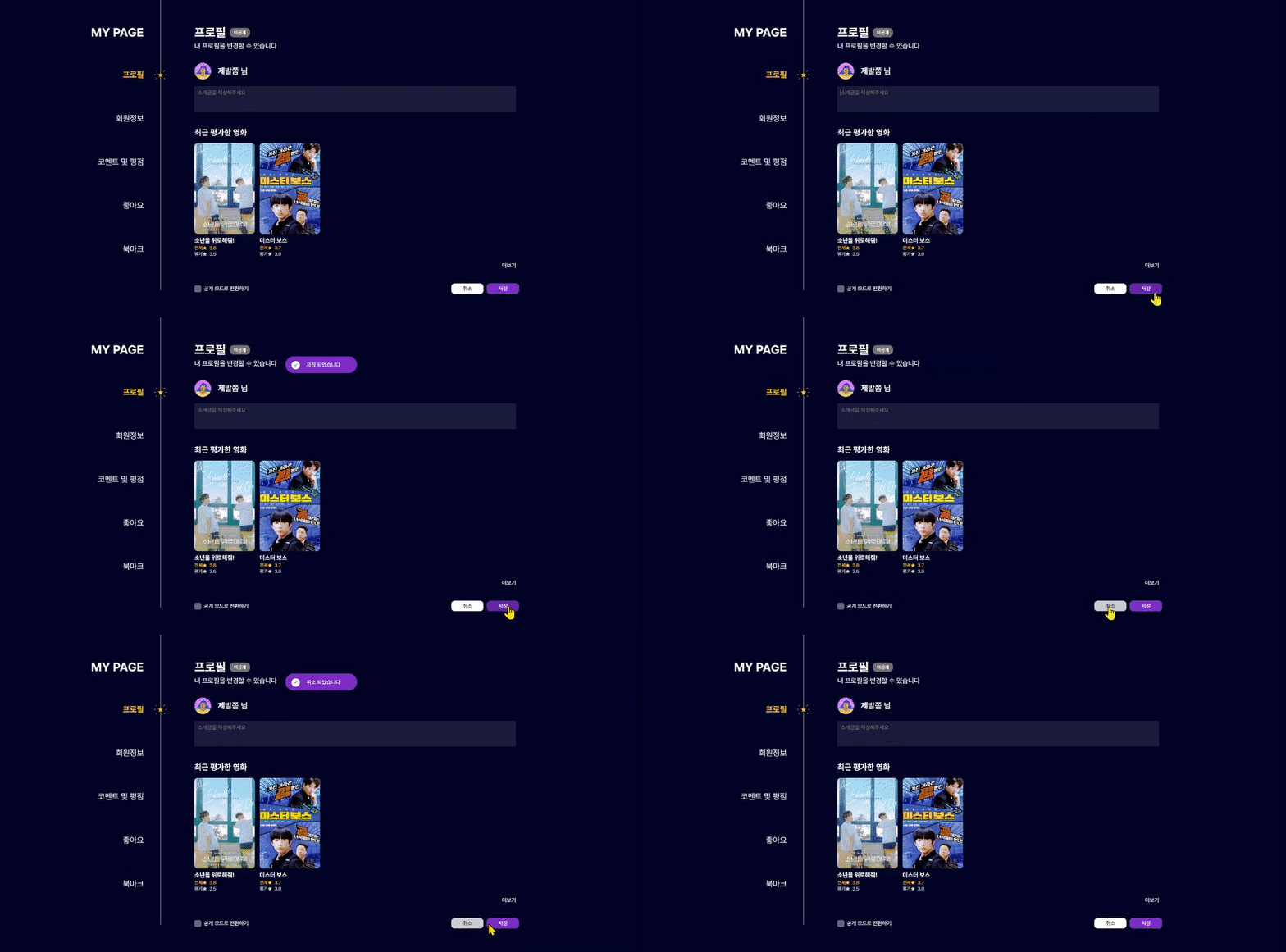
위치가 애매한건 내 모니터 크기 때문에..ㅎ
컴포넌트 코드
📂 Toast > index.js
import React from "react";
import { CSSTransition } from "react-transition-group";
import cx from "classnames";
import styles from "./toast.module.scss";
import { IconGreenCheck } from "../../../assets/icon";
import { IconClose } from "../../../assets/icon";

const transitionStyle = {
  entering : {
    opacity : 1,
    //위치 조정
    transform: "translate(-50%, 140%)",
    //애니메이션 조정
    transition: "opacity 500ms ease-in-out"
  },

  exiting : {
    opacity : 0,
    //위치 조정
    transform: "translate(-50%, 140%)",
    //애니메이션 조정
    transition: "opacity 500ms ease-in-out"
  },

  exited: {
    opacity : 0,
    transform: 'translate(-50%, 140%)',
    transition: "opacity 500ms ease-in-out"
}
}

const Toast = ({ className, type, children, func, float, ...props }) => {

  // 권장사항에 따라 useRef를 사용했다
  const nodeRef = React.useRef(null)
  return (
    <CSSTransition nodeRef={nodeRef} in={float} timeout={3000} unmountOnExit>
      {(state) => (
        <section
          ref={nodeRef}
          style={{ ...transitionStyle[state] }}
          className={cx(styles.toast, className, styles[type])}
        >
          <figure className={cx(styles.circle)}>
            <IconGreenCheck />
          </figure>
          {children}
        </section>
      )}
    </CSSTransition>
  );
};

export default Toast;
📂 Toast > toast.module.scss
@use "../../../styles/constants" as c;
@use "../../../styles/mixins" as m;

.toast {
  @include m.flex();
  position: fixed;
  top: 5%;
  left: 50%;
  bottom: 140px;
  height: 50px;
  padding: 12px 50px 10px 12px;
  border-radius: 50px;
  z-index: 9999;
  transform: translate(-50%, -50%);
  background-color: c.$C_PURPLE;
  font-size: 16px;
  color: c.$C_WHITE;

  &.secondaryToast {
    background-color: c.$C_WHITE_40;
  }

  &.dangerToast {
    background-color: c.$C_PINK;
  }

  &.darkToast {
    background-color: c.$C_DARKINDIGO;
  }

}

.circle {
  @include m.flex();
  width: 25px;
  height: 25px;
  padding: 6px;
  margin: 0px 20px 0px 6px;
  background-color: c.$C_WHITE;
  border-radius: 100%;
}
📂 src > styles > constants / mixins
변수를 활용해서 color 를 지정해 두었는데,
c.$C_뫄뫄로 지정된 것들이 다 그런식으로 지정한 것들이다자주 쓰이는 스타일을 mixin을 활용하여 사용했다
- 예로 자주 쓰이는 flex, justify-content, align-items, flex-direction 의 기본값을 저장해서 활용했다
- 값을 바꾸고 싶다면
@include m.flex(center, center, column);이런식으로 활용하면 된다@mixin flex($justifyContent: center, $alignItems: center, $flexDirection: row) { display: flex; justify-content: $justifyContent; align-items: $alignItems; flex-direction: $flexDirection; }
페이지에 컴포넌트 적용 해보기
이 페이지는 아직 리팩토링 중이라 페이지 전체 코드는 약간 부끄러우니.. 토스트 구현 부만 코드 작성했다
📂 Page > 작업 페이지 폴더 > constants.js
export const msgList = {
  save : "저장 되었습니다",
  cancel : "취소 되었습니다",
  delete : "탈퇴 되었습니다",
  fail : "실패 했습니다",
  errText : "잘못된 양식 입니다"
}
📂 Page > 작업 페이지 폴더 > index.js
import React, { useEffect, useState } from "react";
import cx from "classnames";
import { Button, CheckBox, Toast } from "../../../components";
import { msgList } from "../constants";
import { ImageProfile2 } from "../../../assets/images/profileImages";
import styles from "./profile.module.scss";

const Profile = () => {
  const [floatToast, setFloatToast] = useState(false);
  const [toastMsg, setToastMsg] = useState("");

  const onSubmit = async (e) => {
    e.preventDefault();
    try {
      const responsePatch = await updateMe(introData);
      if (responsePatch.status === 204) {
        onGetMe();
        toast("save");
      }
    } catch (err) {
      const errData = err.response.data;
      alert(errData.message);
      toast("fail");
    }
  };

  const toast = (msg) => {
    if (!floatToast) {
      setFloatToast(true);
      setToastMsg(msgList[msg]);
    }
  };

  useEffect(() => {
    if (floatToast) {
      setTimeout(() => {
        setFloatToast(false);
      }, 2000);
    }
  }, [floatToast]);

  return (
    <main className={styles.wrapper}>
      <header className={styles.header}>
        <div className={styles.titleWrapper}>
          <h1 className={styles.title}>프로필</h1>
        </div>
        <h3 className={styles.subTitle}>내 프로필을 변경할 수 있습니다</h3>
      </header>

      <section>
        <div className={styles.myInfo}>
          <img
            className={styles.profileImg}
            src={user?.profileImage ?? ImageProfile2}
            onClick={onClickImage}
          />
          <h4>{user?.nickname} 님</h4>
        </div>

        <div className={styles.introWrapper}>
          <textarea
            className={styles.introText}
            value={form?.description}
            placeholder={"소개글을 작성해주세요"}
            onChange={onChange}
          />
        </div>
          <Button
            color="secondary"
            children="취소"
            // 그저 컴포넌트 연습용이라면 간단하게 이렇게 써도 되고
            onClick={() => toast("cancel")}
          />
          <Toast type="dangerToast" children={toastMsg} float={floatToast} />
          <Button
            color="primary"
            children="저장"
            // 플젝을 한다면 이렇게 쓰면 된다 (위의 코드 참고)
            onClick={(e) => {
              onSubmit(e);
            }}
          />
          <Toast children={toastMsg} float={floatToast} />
        </div>
      </section>

    </main>
  );
};

export default Profile;
엉금엉금
![다음 포스트[Error] InvalidCharacterError: Failed to execute 'createElement' on 'Document': The tag name provided ('/static/media/~~.svg ') is not a valid name.](/@miyya/Error-InvalidCharacterError-Failed-to-execute-createElement-on-Document-The-tag-name-provided-staticmedia.svg-is-not-a-valid-name)