1-2를 돌아보면,
1주차가 너무 힘들었던지.
‘2주차의 과제는 좀 할만한데’ 라는 생각이 들 정도였다.
그 때 AI가 다해주긴 했지만, 어쨌든 생각보다 빨리 끝났다.
1주차에 비하면 천국인데?? 싶었더랬찌
두번째도 생각보다 쉽지 않았다.
- 게다가 이번에는 TS도 추가해주었다. 타입이 추론되니까 어떤 매개변수가 오게 되는지 좀 더 명확해져서 TS를 왜 추가해야 하는지 JS 때 빼져리게 느낀 것 같다. 없으면 어떤 타입이 오는 지 알기가 너무 힘드로~
- 처음 작업할 때는 1주차처럼 되지 않기 위해서 마음이 급해져서 마구잡이로 좀 사람들의 코드를 훔치러 다닌 감이 없지 않아 있다. 괴도 키드처럼
- 게다가 대부분을 AI에게 많이 의존하였다. 이번에도 좀 있었지만, 첫번째 처럼은 아니었다. 그래서 마지막에 테스트 코드 e2e가 팡팡 터지는데 문제가 무엇인지 알기가 힘들었다.
결국 찾은 문제의 원인
- 바로
boolean처리를 게을리 하였다. 괜찮을지 알고 냅뒀는데 알고 보니, 이게 원인이었다. 꽤 오랫동안 디버깅이며 뭐며 했는데 알기가 힘들었는데 다행히도 이전 코드랑 비교를 해봤을 때. 달라진 부분은 이것밖에 었었다.- 역시 사람은 미루면 안된다 미루니까 이렇게 되는 것...
다시 한 번 반성하게 된다!! 미 루 지 말 자!!!!!!!!
이번에는 개선점보다 실제 React에서 Virtaul Dom을 사용해서 HTML 렌더링되는 과정을 풀어보자.
- 리액트에서 어떻게 컴포넌트와 태그가 렌더링되는지 알면 알수록 재밌다.
- 실제로 구현해보면 생각보다 많은 필터링을 거치고, react가 하나부터 열까지 다 해주기 때문에 우리가 컴포넌트와 태그를 작성하면 화면에서 확인할 수 있다는 사실을 눈으로 보고 코드로 작성하면서 익힐 수 있는 시간이기도 하다. 이벤트 기능 구현까지도 말이다.
초기 렌더링의 흐름을 보자
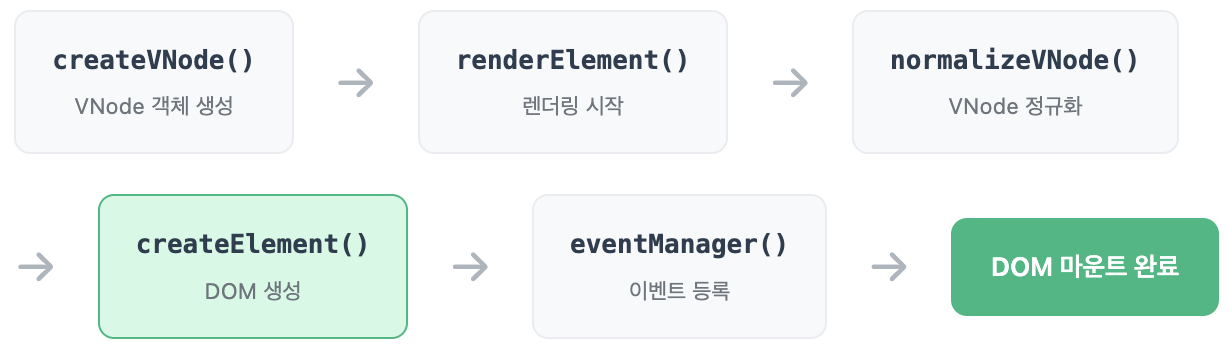
렌더링을 위한 객체 생성: createVNode 함수
export function createVNode(
  type: string | Function,
  props: Record<string, any> | null,
  ...children: VNodeChild[]
): VNode {
  return {
    type,
    props,
    children: children
      .flat(2)
      .filter((child) => child !== null && child !== undefined && child !== true && child !== false) as VNodeChild[],
  };
}
- 리액트는 기본적으로 얕은 비교를 하기 때문에
flat메소드로 배열을 평평하게 만들어 준다.- 엘리먼트에 사용되지 않는
null, boolean, undefined는 제거 해준다.- 이렇게 만들어진 객체를
renderElement함수에 매개변수로 전달해준다.
렌더링의 시작: renderElement 함수
export function renderElement(vNode: VNodeChild, container: HTMLElement) {
  const node = normalizeVNode(vNode);

  if (!container.firstChild) {
    const elements = createElement(node);
    container.append(elements);
  } else {
    updateElement(container, node, container["_vNode"]);
  }

  container["_vNode"] = node;

  return setupEventListeners(container);
}
- 먼저,
renderElement에서 먼저 들어오는 컴포넌트 혹은 HTML 태그와 부모 컨테이너를 확인한다.- 이 컨테이너가 처음 렌더링하는 것인지 이미 존재하는 컨테이너인지 확인하여, 컨테이너에 태그를 추가할지
updateElement함수로 돌려서 업데이트시킨다.- 마지막에 이벤트 함수를
addEventListner에 추가 혹은 제거하여 컨테이너를 반환한다.
vNode의 정규화: normalizeVNode 함수
export function normalizeVNode(vNode: VNodeChild) {
  if (typeof vNode === "boolean" || typeof vNode === "undefined" || vNode === null) {
    return "";
  }

  if (typeof vNode === "number" || typeof vNode === "string") {
    return `${vNode}`;
  }

  const node = vNode as VNode;

  if (typeof node?.type === "function") {
    return normalizeVNode(node.type({ ...node.props, children: node.children }));
  }

  if ((node?.children ?? []).length > 0) {
    return { ...vNode, children: node.children.map((child) => normalizeVNode(child)).filter(Boolean) };
  }

  return vNode;
}
- boolean, undefined, null은 화면 렌더링하는데 필요하지 않음으로 빈 문자열로 리턴
- 어짜피 숫자는 화면에 보일 때는 무조건 문자열이기 때문에 문자열과 같이 문자열로 리턴
- 매개변수가 위의 사항에 해당하지 않고, 타입이 function인 경우에는 아직 컴포넌트라는 얘기이기 때문에 현재 해당 함수를 재귀시킨다.
- 또한 매개변수에게 children이 있는 경우, 컴포넌트가 아직 있을 수 있고, 해당 값을 처리하기 위해 또한 현재 해당 함수를 재귀시킨다.
CreateElement 함수
export function createElement(vNode: VNodeChild) {
  if (typeof vNode === "boolean" || vNode === undefined || vNode === null) {
    return createTextNode("");
  }

  const node = vNode as VNode;

  if (Array.isArray(vNode)) {
    const fragment = document.createDocumentFragment();
    vNode.forEach((item) => {
      fragment.appendChild(createElement(item));
    });

    return fragment;
  }

  if (typeof node.type === "string") {
    const tag = updateAttributes(createTag(node.type), node.props);

    node.children.forEach((item) => {
      tag.appendChild(createElement(item));
    });

    return tag;
  }

  if (typeof node?.type === "function") {
    throw Error();
  }

  return createTextNode(`${vNode}`);
}
- 실제로 이 부분은 화면을 렌더링하기 위해서 태그를 만들어 내는 부분이다.
- 부모에게 텍스트를 appendchild를 시키기 위해서는 text node만 가능하기 때문에, 기본 자료형같은 경우에는 빈문자열 또는 문자열로
document.createTextNode하여 텍스트 노드를 만들어 내어 appendchild 되기 전에 상태로 만들어 준다.- 다만 배열인 경우에는,
document.createDocumentFragment로 빈 노드 객체를 생성시켜서 배열을 돌려서 빈 노드 객체에 appendchild한다. 다만, 여기서도 구조가 복잡한 경우, 재귀화시켜서 모두 빠짐없이 Element를 만들 수 있도록 해준다.- 타입이 문자열인 경우에는, 더 이상 컴포넌트가 아니라는 소리이기 때문에, 일단 컨테이너에게
updateAttributes로 태그에 해당하는 className이나 disabled..또 이벤트 함수를 addEvent로 적용해준다.
엘리먼트에 이벤트 함수를 추가: setupEventListeners
export function setupEventListeners(root: HTMLElement) {
  rootContainer = root;

  for (const eventType of eventTypes) {
    const existingListener = listenerMap.get(eventType);

    rootContainer.removeEventListener(eventType, existingListener); // 같은 함수!
    listenerMap.set(eventType, newListener);
    rootContainer.addEventListener(eventType, newListener);
  }
}

export function addEvent(element: HTMLElement, eventType: string, handler: Function) {
  //...생략
}

export function removeEvent(element: HTMLElement, eventType: string, handler: Function) {
  //...생략
}
- CreateElement 함수에서
updateAttributes를 통해 이전에addEvent를 해주었다.addEvent함수는setupEventListeners에서 실제로 실행하기 위해 추가해야하는 이벤트의 타입과 함수를 저장하는 역할을 한다.removeEvent는updateElement에서 이벤트 함수를 삭제해야 할 경우, 기존에 저장되어 있는 상수에서 삭제해야 하는 이벤트 함수와 더 나아가서는 이벤트 타입까지 삭제한다.renderElement함수에서 값을 리턴하기 전에 먼저,setupEventListeners를 실행해준다. 왜냐면 여기서 필요한 이벤트 함수를 붙여주기 때문이다. 물론 혹시나 기존의 이벤트 함수 때문에 영향을 받을 수 있기 때문에 그 전에 영향을 받지 않도록 이벤트를 모두 삭제 한 후에 다시 붙여준다.
업데이트 렌더링이 초기 렌더링과 다른 건...
딱 하나! updateElement 함수이다.
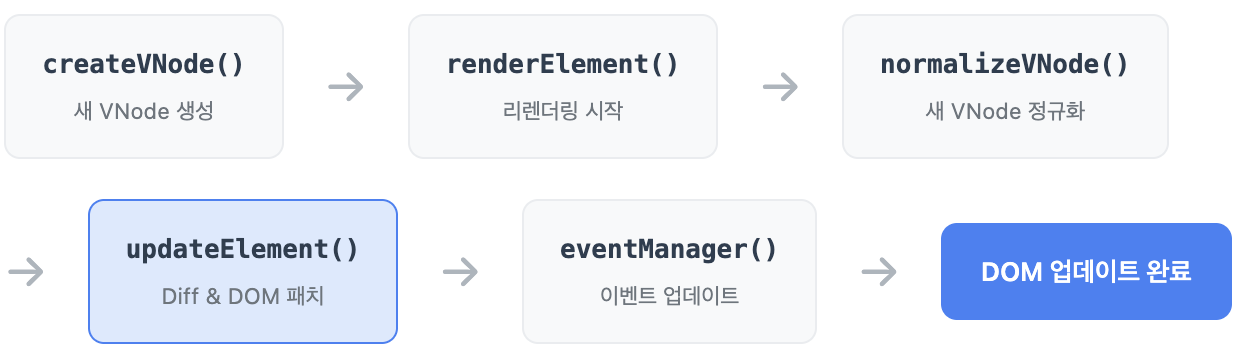
다른 부분을 비교하여 업데이트: updateElement 함수
export function updateElement(parentElement: HTMLElement, newNode: VNodeChild, oldNode: VNodeChild, index = 0) {
  const rNewNode = newNode as VNode;
  const rOldNode = oldNode as VNode;

  if (!oldNode && newNode) {
    // 새 요소 추가!
    parentElement.appendChild(createElement(rNewNode));
  } else if (oldNode && !newNode) {
    // 자식 제거할 때 children 범위가 앞당겨질 경우, index가 벗어나지 않도록 조정
    const oldIndex = parentElement.childNodes.length <= index ? parentElement.childNodes.length - 1 : index;
    const oldElement = parentElement.childNodes?.[oldIndex];

    if (oldElement) {
      // 요소 제거!
      parentElement.removeChild(oldElement);
    }
  } else if (rNewNode?.type !== rOldNode?.type) {
    const node = createElement(rNewNode);

    // 완전 교체!
    parentElement.replaceChild(node, parentElement.childNodes[index]);
  } else if (typeof newNode === "string") {
    if (newNode !== oldNode) {
      parentElement.childNodes[index].textContent = newNode;
    }
  } else {
    const element = parentElement.childNodes[index];
    // 속성 업데이트
    const target = updateAttributes(element as HTMLElement, rNewNode.props, rOldNode.props);

    // 자식들 재귀 업데이트!
    const maxLength = Math.max((rNewNode.children || []).length, (rOldNode.children || []).length);
    for (let i = 0; i < maxLength; i++) {
      updateElement(target, rNewNode.children[i] ?? null, rOldNode.children[i], i);
    }
  }

  return parentElement;
}
- 업데이트할 때, 기존의 element와 새로운 element를 비교하여
- 기존의 element가 없는데 새로운 element가 추가된거면 createElement 함수로 새로운 elemetn를 생성하여 컨테이너에 appnendchild시켜주고,
- new element가 없는 경우에는 기존의 element를 삭제하며,
- 기존의 type과 새로운 type이 다른 경우 element를 변경하며,
- 새로 들어오는 vNode가 다만, element가 아니라 문자열인 경우에는 textContent를 이용하여 문자열을 추가해주며,
- 그 외 같은 경우에는 updateAttributes 함수로 필요한 부분이나 필요없는 부분을 삭제 또는 추가하여 업데이트하고, 만약에 자식들이 있는 경우에는 재귀화를 시켜서 현재 컨테이너를 리턴한다.
마무리를 하며,
- 1-1 과제에서는 주로 개선한 점을 찾았는데, 이번 과제는 개선하는 것 보다는 어떠 흐름인지 과정인지를 아는 게 더. 중요하다고 생각해서 이번에는 rendering되는 흐름을 위주로 해서 포스팅하여 마무리지었다.
- 항상 하는 생각이지만, A를 넣어서 B가 딱 하고 그냥 나오는 결과를 아는 건 생각보다 재미없다. A가 어떤 과정을 거쳐서 필터링 되고 깍아져서 B로 나왔는지 알았을 때 비로소 B의 결과물이 빛난다고 생각한다. 물론 재미의 면도 똑같고. 이거랑 똑같은 결이 아마도 1-3의 과제와 비슷할 것 같다.

이전 블로그: https://c11.kr/dyb0